Travel and logistics rely on highly fragmented API environments. Booking a single corporate trip forces coordinators to jump between flight aggregators, hotel platforms, ground transport apps, and expense software. Similarly, tracking a single physical shipment involves checking warehouse availability, multiple shipping carriers, customs clearance logs, and last-mile couriers.
Data from Phocuswright indicates that travel managers navigate an average of 6.4 platforms to book and track a single trip. In logistics, IBM reports that tracking cross-border cargo requires checking 4.2 different carrier websites.
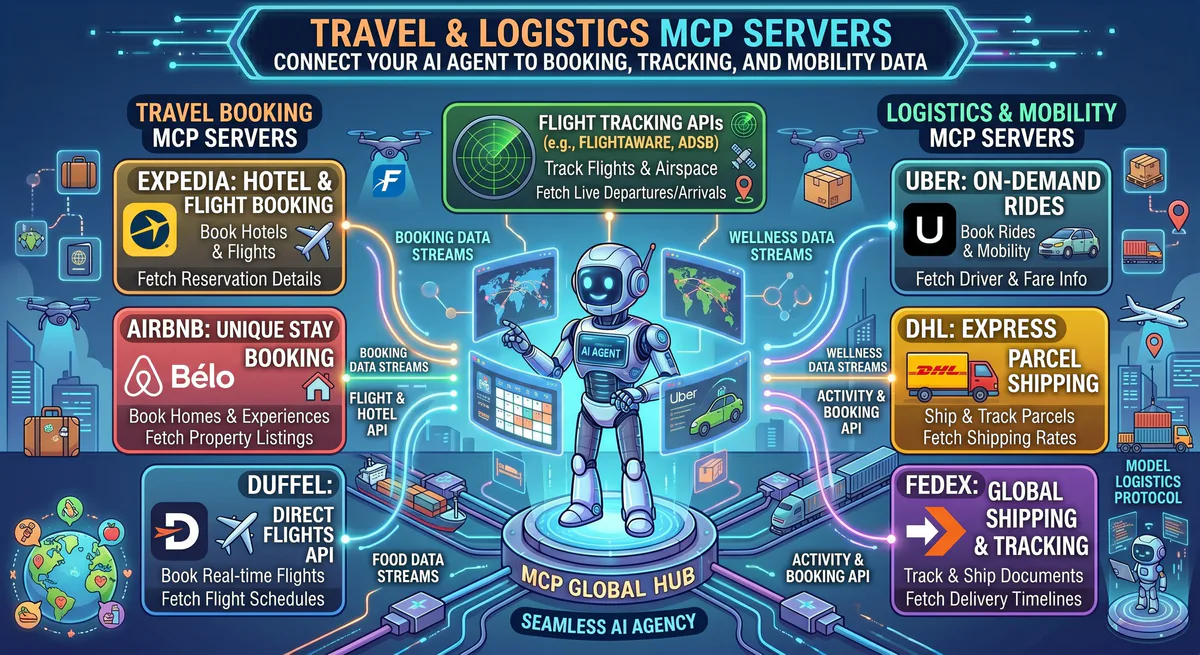
Connecting these systems via the Model Context Protocol (MCP) replaces this manual lookup process. Instead of logging into multiple portals, an AI agent runs queries across Expedia, Duffel, DHL, and FedEx APIs directly.
Here is a breakdown of the core travel and logistics servers hosted in our App Catalog.
What is the Value of Using MCP for Travel and Logistics Data?
Connecting travel and logistics APIs to agents via MCP stops manual copy-pasting between flight trackers and cargo dashboards. Instead of checking six different platforms, a single JSON-RPC client polls Duffel, Expedia, and carrier endpoints concurrently, correlating flight arrivals with warehouse staffing schedules in real-time.
These are the primary travel and shipping tools available:
| Platform | MCP Server | Primary Use Case |
|---|---|---|
| Expedia | Expedia Hotels MCP | Hotel search, pricing, availability |
| Expedia Car Rental | Expedia Car Rental MCP | Vehicle rental, comparison |
| Expedia VRBO | Expedia VRBO MCP | Vacation rental properties |
| Airbnb | Airbnb MCP | Short-term rentals, experiences |
| Duffel Flights | Duffel Flights MCP | Multi-airline flight search, booking |
| FlightAware | FlightAware MCP | Real-time flight tracking, delays, gate info |
| AeroAPI | AeroAPI (FlightAware) MCP | Flight data API, historical routes |
| DHL | DHL MCP | International shipment tracking, customs |
| FedEx | FedEx MCP | Domestic/international tracking, rates |
| Uber | Uber MCP | Ride estimates, trip history |
| Transport for London | Transport for London MCP | TfL routes, disruptions, real-time arrivals |
| DOT Transportation | DOT Transportation MCP | US transportation safety data |
| Booking Manager | Booking Manager MCP | Charter/boat booking management |
How Do AI Travel Agents Execute Multi-Platform Booking Workflows?
AI agents orchestrate travel by parsing user parameters, querying flight databases like Duffel, filtering accommodation locations near transit hubs via Expedia, and calculating rideshare fees. By chaining these distinct tool outputs, the agent returns a structured itinerary with actual costs instead of generic suggestions.
Practical Walkthrough: Coordinating Flights and Lodging
When a user asks:
“Plan a 4-day business trip from London to Tokyo. Departing Tuesday April 22, returning Friday April 25. I need flights (business class preferred), a hotel near Tokyo Big Sight convention center (budget: $250/night max), and an Uber estimate from Haneda to the hotel.”
The agent calls duffel-flights-mcp to pull flight options and prices:
| Option | Route | Departure | Arrival | Class | Price |
|---|---|---|---|---|---|
| JAL | LHR ? HND (direct) | 10:25 ? 06:50+1 | 11h 25m | Business | $3,240 |
| ANA | LHR ? NRT (direct) | 19:00 ? 14:25+1 | 11h 25m | Business | $3,180 |
| BA | LHR ? HND (direct) | 09:30 ? 05:55+1 | 11h 25m | Business | $4,420 |
Next, the agent queries expedia-hotels-mcp and airbnb-mcp using geographic coordinates close to the convention center:
| Accommodation | Distance | Rating | Price/night | Source |
|---|---|---|---|---|
| Hotel Sunroute Ariake | 0.4 km | 4.2? | $185 | Expedia |
| Washington Hotel Ariake | 0.6 km | 4.0? | $162 | Expedia |
| Airbnb: Modern Ariake 1BR | 0.3 km | 4.8? | $128 | Airbnb |
| Hilton Tokyo Odaiba | 2.1 km | 4.5? | $245 | Expedia |
Finally, the agent queries uber-mcp for transit cost from Haneda Airport to Hotel Sunroute Ariake, returning an estimate of —4,200-5,800 ($28-39). The entire response is structured and delivered in under ten seconds.
How Does Multi-Carrier Shipment Tracking Streamline Supply Chains?
Multi-carrier tracking binds shipment status updates from DHL and FedEx directly into database operations. If an international customs hold occurs, the agent flags the cargo immediately, determines which documents are missing, and alerts the logistics team through Slack, preventing delayed warehouse check-ins.
Practical Walkthrough: Multi-Carrier Shipping Status
When asked to check active shipments across carriers, the agent connects directly to the shipping APIs:
DHL Active Shipments:
- Tracking #: DHL-7842918 | Status: In transit (Hong Kong hub) | ETA: Apr 16 | On time
- Tracking #: DHL-7843022 | Status: Customs hold (NYC) | ETA: Delayed | Action required (commercial invoice)

FedEx Active Shipments:
- Tracking #: FX-9912847 | Status: Weather delay (Memphis hub) | ETA: Delayed | Expected clearance: tonight
- Tracking #: FX-9912901 | Status: In transit (Anchorage) | ETA: Apr 17 | On time
The agent alerts the coordinator that DHL-7843022 requires a commercial invoice and certificate of origin, allowing the team to address the hold before it impacts delivery SLAs.
Why is Real-Time Flight Tracking Critical for Corporate Travel Safety?
Real-time flight tracking keeps executive schedules updated by capturing actual departure times, delays, and gate changes directly from FlightAware. Tracking these metrics dynamically allows ground transportation options to recalculate pickup times automatically, preventing coordinators from manually monitoring flight boards.
Practical Walkthrough: Flight Progress Monitoring
For live flight monitoring:
- The agent queries
flightaware-mcpfor JAL flight 41. - The flight tracker returns current coordinates, speed, altitude, and ETA at Haneda Airport.
- The agent cross-references the gate assignment (Terminal 3, Gate 87) and checks local weather conditions to confirm if delay risks exist.
- It then adjusts the ground transport pickup estimate to match the new ETA automatically.
What Security Protections Secure Sensitive Logistics and Travel Payload Data?
Securing travel and logistics data requires routing all outbound API requests through sandboxed environments. This architecture blocks prompt injection attempts, filters passenger passport numbers using egress DLP patterns, and stores provider credentials in encrypted vaults rather than leaving them exposed in plaintext.
To prevent data leaks, do not run local unmonitored integration scripts that expose credentials.
Local unmonitored setup (credentials exposed in plain text files):
{
  "mcpServers": {
    "dhl": {
      "command": "npx",
      "args": ["-y", "dhl-mcp-server"],
      "env": {
        "DHL_API_KEY": "dhl_key_12345...",
        "DHL_ACCOUNT_NUMBER": "acct_67890"
      }
    }
  }
}
Vinkius Gateway setup (credentials vaulted, requests monitored, DLP active):
{
  "mcpServers": {
    "dhl": {
      "url": "https://gateway.vinkius.com/session-ghi789/dhl"
    }
  }
}
Additionally, the gateway implements:
- Outbound DLP to automatically scrub passport numbers, credit card tokens, and email addresses.
- Access controls to ensure the model cannot run mutation commands (
DESTRUCTIVEorMODIFY) without approval. - An emergency kill switch that lets administrators deactivate tool access immediately if an API key is compromised.
FAQs: Choosing the Best MCP Server Platform for Your Team
Integrating travel systems via MCP requires structured API clients, sandboxed V8 runtimes, and immutable audit logs. Implementing these tools prevents data exfiltration, redacts passenger details, and allows administrators to immediately disconnect compromised servers using centralized connection kill switches.
Why do tool integrators need cryptographic audits?
Without cryptographic signatures and hash-chaining, standard database logs can be mutated, leaving security teams unable to prove that a specific agent was responsible for an unauthorized API call.
How does Vinkius isolate third-party MCP code?
Vinkius routes execution through ephemeral V8 isolates. The code is isolated from local system processes and the host filesystem, preventing path-traversal attacks and malicious resource hijacking.
What is the difference between an inference gateway and an execution gateway?
An inference gateway handles prompts, token limits, and LLM availability on the inbound path. An execution gateway handles stateful JSON-RPC commands, data loss prevention, sandboxing, and access controls on the outbound path.
How does Vinkius handle agentic budget overruns?
Vinkius utilizes a sliding-window financial circuit breaker linked to client accounts. If an agent swarm runs into an execution loop and exceeds a set budget, the circuit trips and requires manual administrative reset.
Can Vinkius convert OpenAPI specs into MCP servers?
Yes. Vinkius provides an automated OpenAPI import utility that translates standard Swagger and OpenAPI JSON manifests into functional, sandboxed MCP servers instantly.
Combined Workflow Matrix
| Workflow | Tools Combined | Query Example |
|---|---|---|
| End-to-end trip planning | Duffel + Expedia + Airbnb + Uber | ”Plan travel: flights, lodging, and ground transport” |
| Live tracking and pickup | FlightAware + Uber | ”Monitor flight progress and request pickup car” |
| Logistics status updates | DHL + FedEx + Slack | ”List shipment statuses and post updates to channel” |
| Expense compilation | Duffel + Expedia + Google Sheets | ”Export all flight and hotel costs to spreadsheet” |
| Supply chain connection | DHL + FedEx + Shopify | ”Link shipping status tracking to customer accounts” |
Best Travel and Logistics MCP Servers: Expedia, Airbnb and FlightAware Setup Steps
- Select your tools in our App Catalog.
- Connect to the endpoints:
- Copy the secure URLs into Claude, Cursor, or ChatGPT to start querying.
Related Guides
- Fleet Intelligence Recipe ? — Tesla, Google Maps, Weather, and Slack
- E-Commerce MCP Servers ? — Shopify and WooCommerce integrations
- Real Estate MCP Servers ? — Idealista and Zillow property query setups
- The Complete MCP Server Directory ? — Database of 2,500+ tools
Start Building Your Logistics Agent
Delegate travel schedules and shipment monitoring to autonomous tools. The integrations above establish the foundational connection layer.
Need custom travel or logistics integrations? Contact support@vinkius.com.
Analyze with AI
Send this article directly to your preferred AI to analyze concepts, extract actionable insights, or seamlessly integrate into your own projects.
Connect AI agents to your entire stack.
Browse ready-to-use MCP servers. Paste one URL to connect live databases, APIs, and business tools instantly.