Remote MCP server hosting means running MCP servers on cloud infrastructure instead of locally on a developer’s machine — so AI agents can access tools over the network through HTTP+SSE transport, with centralized credential management, persistent availability, and shared access across teams. In 2026, the shift from local to remote MCP is accelerating because local deployments cannot scale beyond a single user, cannot be governed centrally, and expose credentials on every machine that runs them.
This guide compares the three deployment models — local, self-hosted cloud, and managed platform — across every dimension that matters for production teams.
What Are the Three Main MCP Server Deployment Models?
The three main deployment models for Model Context Protocol servers are local stdio execution, self-hosted cloud hosting, and managed gateway platforms. Choosing between them determines whether your tools run as isolated computer processes, custom container services on private networks, or fully governed cloud endpoints.
Model 1: Local MCP Servers
The default starting point. You clone a repository, run npm install or pip install, and start the MCP server as a local process. Your AI client (Claude Desktop, Cursor) communicates with it over stdio — standard input/output, piped directly between processes.
AI Client ? stdio pipe ? MCP Server Process (local machine)The AI host starts the server process directly. Communication happens through stdin/stdout. No network is involved.
Who uses it: Individual developers prototyping, running personal automation, or testing integrations before production deployment.
Model 2: Self-Hosted Cloud
You deploy MCP servers on your own cloud infrastructure — AWS, GCP, Azure, or a VPS. The servers run as containers (Docker/Kubernetes), serverless functions, or persistent processes. Communication switches from stdio to HTTP+SSE (Server-Sent Events) transport.
AI Client ? HTTPS ? Load Balancer ? MCP Server Container (your cloud)You manage the infrastructure: compute, networking, TLS certificates, secrets management, monitoring, scaling, and updates.
Who uses it: Engineering teams that need shared MCP access, have specific compliance requirements, or want full infrastructure control.
Model 3: Managed Platform
A third-party platform hosts, maintains, secures, and governs MCP servers for you. You subscribe to servers through a marketplace, receive a connection URL, and paste it into your AI client. The platform handles infrastructure, credentials, DLP, audit logging, and updates.
AI Client ? HTTPS ? Managed Gateway ? MCP Server (platform infrastructure)You manage nothing. You subscribe, connect, and use.
Who uses it: Teams that want production-grade MCP access without the operational overhead of running infrastructure.
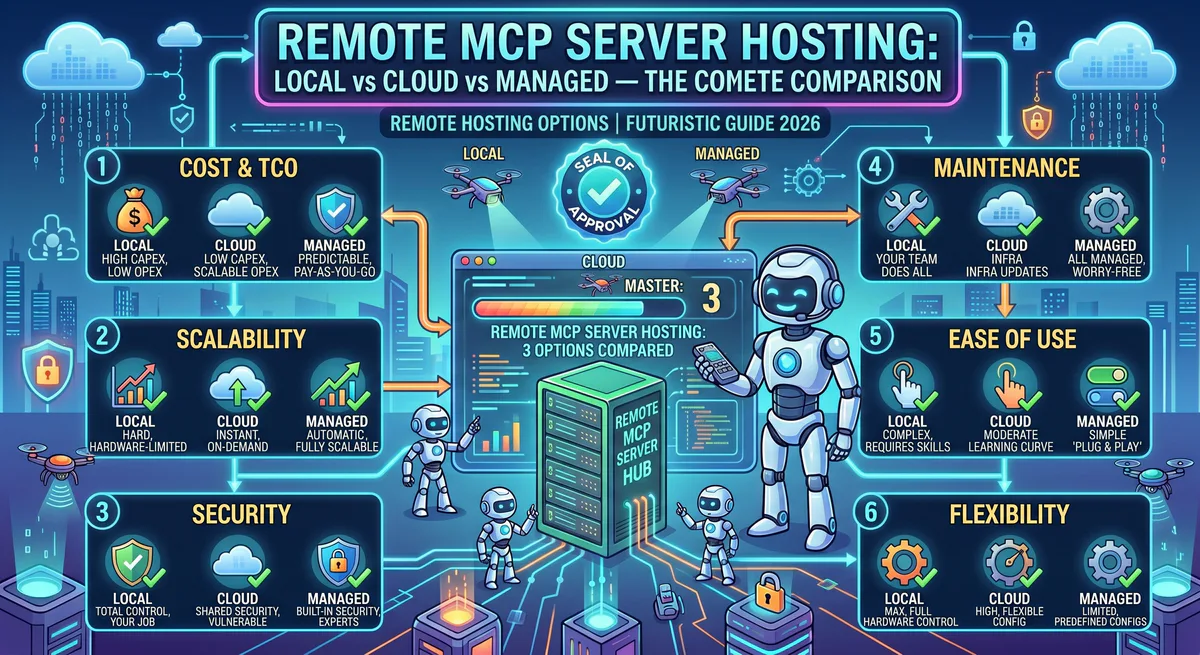
How Do MCP Hosting Options Compare Across Core Features?
Comparing hosting options reveals distinct trade-offs in setup speed, multi-user accessibility, credential protection, and auditing. While local setups are free and fast to start, they lack security controls. Cloud self-hosting provides complete infrastructure ownership, whereas managed platforms eliminate setup overhead and automate security policies.
Here is how the three deployment methods compare at a glance:
| Dimension | Local | Self-Hosted Cloud | Managed Platform |
|---|---|---|---|
| Setup time | Minutes | Hours to days | Minutes |
| Transport | stdio | HTTP + SSE | HTTP + SSE |
| Multi-user access | ? Single user only | ? Shared across team | ? Shared across org |
| Persistent availability | ? Dies when laptop closes | ? Always on | ? Always on, SLA-backed |
| Credential management | ?? Plain text in config files | ?? Your secrets manager | ?? Built-in encrypted vault |
| Security governance | ? None | ?? Whatever you build | ?? Gateway with DLP, RBAC, audit |
| Audit trail | ? None | ?? Whatever you configure | ?? Hash-chained, immutable |
| DLP | ? None | ?? BYO solution | ?? Built-in PII/secret redaction |
| Scalability | ? One machine | ? Horizontal (your infra) | ? Automatic |
| Update management | Manual git pull | Manual redeploy | Automatic, version-managed |
| Cost model | Free (your compute) | Variable (cloud bills) | Subscription (predictable) |
| Infrastructure expertise | None required | DevOps/SRE required | None required |
| Compliance readiness | ? None | ?? Depends on implementation | ?? SOC 2 compatible out of box |
| Kill switch | Kill process manually | SSM / kubectl | One-click in dashboard |
| Best for | Prototyping | Regulated industries with custom needs | Production teams wanting speed |
How Does Security Differ Between Local and Remote MCP Hosting?
Security differs between local and remote hosting by shifting how credentials and permissions are managed. Local hosting stores raw API keys in plaintext files and gives agents full user access to local filesystems, while remote cloud networks separate keys into vaults and enforce token boundaries.
Security is the dimension where the three models diverge most dramatically.
Local: The Illusion of Safety
Many teams assume local is safer because “the data never leaves my machine.” This is dangerously misleading.
// Example: Local claude_desktop_config.json containing plaintext passwords
{
  "mcpServers": {
    "postgres": {
      "command": "docker",
      "args": [
        "run",
        "-i",
        "--rm",
        "-e",
        "PGPASSWORD=secretpassword",
        "mcp/postgres"
      ]
    }
  }
}- API keys sit in config files in plain text: Any application on your machine — including the AI agent — can read them.
- Permissions are inherited: The MCP server process runs with your user permissions. It can read any file, access any network resource, and execute any command you can.
- Prompt injection risk: If the AI agent is compromised through prompt injection, the attacker inherits your entire local environment.
- No visibility: There is zero audit trail. If your agent processes a transaction, deletes a repository, or exfiltrates data, there is no log of what happened.
Self-Hosted: Secure If You Build It
Self-hosted cloud shifts credential management to your infrastructure, which is an improvement — but only if you actually implement proper security.
To secure this setup, you must implement:
- Secrets management (HashiCorp Vault, AWS Secrets Manager, or equivalent)
- Network segmentation between MCP servers and the rest of your infrastructure
- TLS termination with certificate rotation
- Access control and authentication for inbound MCP connections
- Logging infrastructure for audit trails
- DLP scanning for outbound payloads
- Monitoring and alerting for anomalous behavior
This is a significant engineering investment. Most self-hosted deployments we see in the wild implement only a fraction of these.
Managed: Security as Infrastructure
A managed platform provides security as a built-in layer, not an afterthought.
// Example: Managed remote connection schema in claude_desktop_config.json
{
  "mcpServers": {
    "postgres": {
      "url": "https://mcp.vinkius.com/token-xyz123/postgres"
    }
  }
}- Credential vault: Your API keys and OAuth tokens never touch the AI agent’s environment.
- Semantic intent classification: Destructive tool calls are identified and blocked before execution.
- DLP engine: PII, secrets, and financial data are redacted from tool responses before they reach the model.
- Hash-chained audit trail: Every tool call is logged with cryptographic integrity guarantees.
- RBAC: Per-user, per-team, per-role access policies on individual tools.
- Emergency kill switch: Revoke all access organization-wide in one click.
How Should Teams Calculate the Total Cost of MCP Hosting?
Teams must calculate the total cost of MCP hosting by balancing cloud infrastructure bills against hidden engineering salaries. While local compute is free and cloud resources cost under one thousand dollars monthly, the engineering time spent building custom pipelines and monitoring failures often exceeds marketplace subscription rates.
Let’s look at the financial math behind each option.
Local: Free (Until It Isn’t)
Local hosting has zero infrastructure cost. But the hidden costs are real:
- Developer time spent installing, configuring, and troubleshooting MCP servers.
- Productivity loss when servers break after updates.
- Credential management overhead — manually rotating keys across developer machines.
- Security incident costs when credentials are exposed.
- No shared access — every team member maintains their own server instances.
Self-Hosted: Predictable Infrastructure, Unpredictable Engineering
Cloud infrastructure costs are straightforward to estimate. Engineering costs are not.
Infrastructure estimate (typical team of 10, running 15 MCP servers)
Component Monthly Cost (estimate) Compute (ECS/EKS/Cloud Run) $200—$800 Load balancer $20—$50 Secrets manager $10—$30 Logging/monitoring $50—$200 TLS certificates $0 (Let’s Encrypt) to $50 Total infrastructure $280—$1,130/mo
The engineering hours required for initial setup, security hardening, and ongoing maintenance typically cost several thousand dollars per month. SRE resources spent on custom tool-calling infrastructure are hours taken away from your core product.
Managed: Subscription Model
Managed platforms charge per seat, per server subscription, or by usage. The cost is predictable and includes all infrastructure, security, updates, and governance.
The trade-off:
- You pay more per-server than self-hosted infrastructure costs.
- You pay zero engineering time for infrastructure management.
- You get security, compliance, and governance included.
- Break-even typically occurs when the equivalent of 0.5 FTE of DevOps time is being spent on MCP infrastructure.
How Do Teams Manage Operational Complexity Across Hosting Models?
Teams manage operational complexity by deciding who handles software updates, scaling policies, and recovery scripts. Local deployments require manual updates on every machine, self-hosted configurations demand custom continuous deployment workflows, and managed gateway platforms handle software lifecycles automatically without requiring active developer maintenance.
Let’s break down the operational differences in daily maintenance.
Managing Updates
MCP servers are actively developed. The protocol itself is evolving. Server implementations change, add tools, and fix bugs regularly.
- Local: Run
git pulland restart. Hope nothing breaks. Repeat on every developer’s machine individually. - Self-hosted: Update container images, run integration tests, deploy to staging, verify, deploy to production. Coordinate across all server instances. Maintain rollback procedures.
- Managed: The platform handles updates. You get notifications about new versions and breaking changes. Rollback is one click.
Managing Scale
- Local: Cannot scale. One user, one machine. If you need two team members accessing the same MCP server, you need two installations, two credential sets, two maintenance workflows.
- Self-hosted: Horizontal scaling through Kubernetes or container orchestration. You manage auto-scaling policies, health checks, and load distribution. Each additional user multiplies the credential management and access control complexity.
- Managed: Scaling is automatic and transparent. Adding a new team member is adding a seat. Adding a new MCP server is subscribing to it.
Handling Failures
- Local: If the server process crashes, the AI agent loses tool access. No automatic restart. No health monitoring. No alerts. You notice when your agent stops working.
- Self-hosted: Health checks, automatic container restarts, and monitoring — if you’ve set them up. The quality of failure handling is exactly as good as your DevOps investment.
- Managed: Health monitoring, automatic recovery, and SLA-backed uptime. If a server fails, the platform restarts it. If it can’t be recovered, you get notified. You don’t page your SRE team at 3 AM because an MCP server OOM’d.
How Do You Migrate MCP Servers from Local to Production?
Migrating MCP servers to production requires inventorying local configurations, centralizing API credentials in secure vaults, choosing a deployment model, and moving read-only integrations first. Following this sequence prevents service disruptions, secures developer endpoints, and allows administrators to enforce tool-level access control before exposing write access.
If you are currently running MCP servers locally and want to move to production, follow this sequence:
- Inventory: List every MCP server running on every developer’s machine. Document which credentials each server uses and where those credentials are stored.
- Centralize Credentials: Move all credentials to a centralized vault. This is the single most impactful security improvement you can make, regardless of which hosting model you choose.
- Choose Your Model: Use our decision framework:
- Under 5 developers, under 5 MCP servers: Managed platform (fastest, cheapest per unit of value).
- 5-50 developers, compliance requirements, dedicated DevOps: Self-hosted or managed.
- 50+ developers, enterprise compliance, custom integrations: Self-hosted with managed gateway, or fully managed enterprise.
- Regulated industries (healthcare, finance, government): Self-hosted with your compliance stack, or managed platform with compliance certifications.
- Migrate Incrementally: Don’t migrate all servers at once. Start with the highest-value, lowest-risk servers (e.g., read-only integrations like Datadog MCP or Sentry MCP). Validate the workflow with your team. Then migrate write-capable servers with appropriate governance.
- Implement Governance: Once servers are running remotely, implement RBAC policies, audit logging for all tool calls, DLP rules for sensitive data, and kill switch procedures for emergencies.
Explore our managed platform with 2,500+ governed MCP servers ?
Related Guides
- Finance MCP Servers — QuickBooks, Xero for property accounting
- CRM & Sales MCP Servers — General CRM tools
- Communication MCP Servers — Slack, Zoom for team coordination
- The Complete MCP Server Directory — 2,500+ apps
FAQs: Choosing and Deploying Remote MCP Hosting Platforms
Addressing latency concerns, configuration steps, and protocol transports helps developers choose the right remote server platform. Hardening connections at the gateway layer ensures that agentic integrations access internal databases and third-party APIs reliably without exposing secrets or introducing significant operational overhead.
Can I mix local and remote MCP servers?
Yes. Most AI clients (Claude Desktop, Cursor, VS Code) support both stdio and HTTP transports simultaneously. You can run a local filesystem MCP server for quick access to your project files while connecting to a remote GitHub MCP server for repository management. The client manages both connections independently.
What latency does remote hosting add?
For HTTP+SSE transport, typical round-trip latency is 20-100ms for the MCP protocol overhead, plus whatever time the underlying API call takes. Since most MCP tool calls involve external API requests (which already add 100-500ms), the protocol overhead is negligible.
Do I need to change my MCP server code to run it remotely?
If your server only supports stdio transport, you’ll need to add HTTP+SSE support. Most modern MCP SDKs (Python mcp library, TypeScript @modelcontextprotocol/sdk) support both transports with minimal configuration changes. If you use a managed platform, the platform handles transport configuration.
How does remote hosting affect data compliance and audit logs?
Remote hosting enables centralized compliance by routing all agent actions through a load balancer or gateway proxy. This allows security teams to inspect payloads, redact sensitive data (DLP), log every tool call to a secure database, and revoke tokens instantly if an agent behaves anomalously.
Can I self-host and also use a managed gateway?
Yes. Some organizations deploy MCP servers on their own infrastructure but route all traffic through a managed gateway that provides authentication, DLP, audit logging, and governance. This gives you full control over data residency while offloading security and compliance to the gateway.
Analyze with AI
Send this article directly to your preferred AI to analyze concepts, extract actionable insights, or seamlessly integrate into your own projects.
Connect AI agents to your entire stack.
Browse ready-to-use MCP servers. Paste one URL to connect live databases, APIs, and business tools instantly.