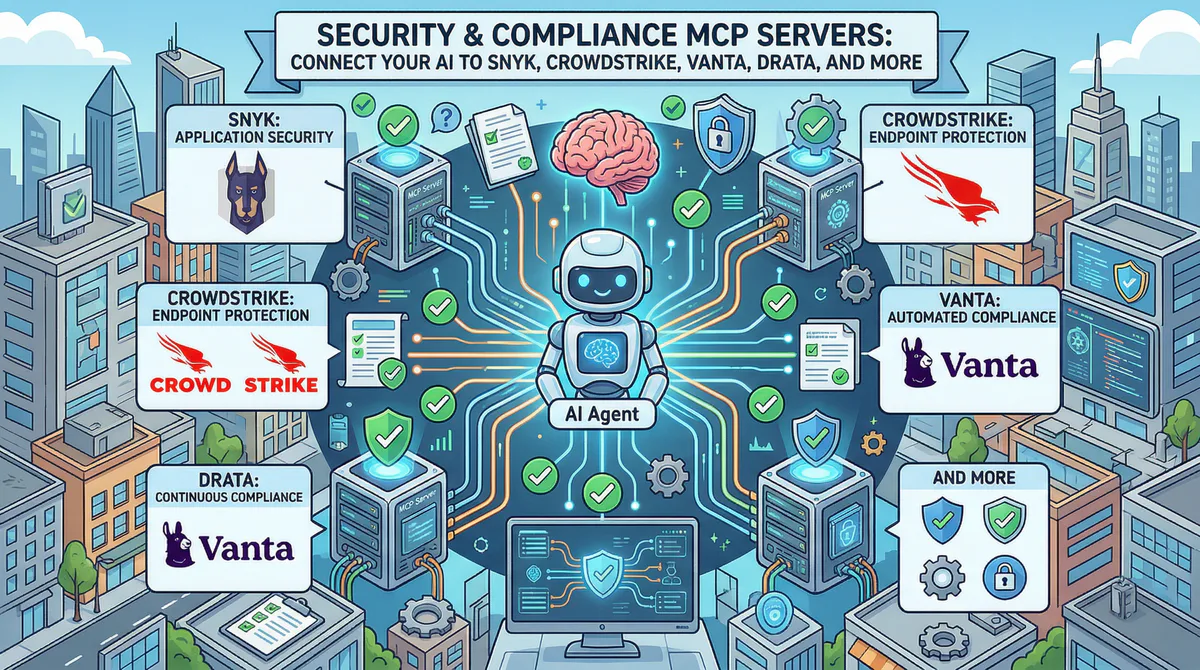
Your security team uses an average of 76 different tools, according to industry surveys. That’s 76 dashboards, 76 alert streams, 76 sources of truth — and your security lead is supposed to synthesize all of them into a coherent risk posture. Let’s be real: the result is predictable alert fatigue, missed vulnerabilities, and the constant fear that a critical finding is buried in a dashboard nobody checked today.
Model Context Protocol (MCP) servers solve this by letting your AI query every security tool through a single, secure channel. Each server creates a governed bridge between your AI assistant and a specific security platform. The AI agent can then correlate data across tools — something no single dashboard can do:
“Are there any critical Snyk findings in production repos that overlap with endpoints that have active CrowdStrike alerts?”
That cross-platform correlation — which would take a security analyst hours of manual investigation — becomes a 10-second prompt. In this guide, we evaluate every security and compliance MCP server in our catalog, the real-world incident response and audit workflows each one enables, and why connecting security tools through our managed gateway is a necessity for corporate data protection.
Why Do AI Security Tools Require a Secure Gateway Connection?
AI security tools require a secure gateway connection to prevent exposing raw vulnerability reports, plaintext credentials, and internal network maps to large language models. A gateway redacts sensitive telemetry, enforces role-based access policies, and cryptographically logs queries to protect infrastructure data from prompt injections.
There is an inherent paradox in connecting security tools to AI: the tools that protect your infrastructure contain the most sensitive information about your vulnerabilities. Scan results, CVSS scores, internal hostnames, IP addresses, firewall rules, and compliance gaps — all data that would be gold for an attacker.
Here is the thing: connecting security tools through our gateway provides protection layers you cannot get by running raw MCP servers locally.
- Internal hostnames and IP addresses are redacted via your DLP rules — the AI sees “Server A has a critical finding” instead of
prod-db-001.internal.company.com. - CVE details are summarized without exposing specific version numbers.
- All security queries are cryptographically logged — you know exactly what was asked and what was returned.
- Zero data retention — security data passes through the proxy gateway and is never stored on disk.
- Per-token access control — each team member connects with individual credentials, ensuring access patterns are auditable.
Compare how a local configuration exposes raw API tokens compared to a secure gateway URL.
Local configuration (unsafe plaintext file):
{
  "mcpServers": {
    "snyk": {
      "command": "npx",
      "args": [
        "-y",
        "@snyk/mcp-server"
      ],
      "env": {
        "SNYK_TOKEN": "12345678-abcd-ef01-2345-6789abcdef01"
      }
    }
  }
}
Remote configuration (secure gateway url):
{
  "mcpServers": {
    "snyk": {
      "url": "https://mcp.vinkius.com/token-abc123xyz/snyk"
    }
  }
}
How Do Application Security MCP Servers Protect Source Code?
Application security MCP servers protect source code by connecting AI agents to tools like Snyk, Semgrep, and SonarQube for real-time code scanning. This setup allows developers to run automated dependency audits, verify license compliance, identify hardcoded secrets, and generate code patches directly inside the local IDE.
Connecting AppSec tools to AI agents translates static reports into actionable engineering tasks.
Snyk MCP
Snyk finds and fixes vulnerabilities in code, open-source dependencies, containers, and infrastructure-as-code. It integrates directly into development workflows — git repositories, CI/CD pipelines, and IDE extensions.
What your AI can do once connected:
- Query vulnerability scanning results — check critical, high, medium, and low severity findings by project, language, or package.
- Identify open-source dependency risks — see which third-party packages have known exploits and find the safe versions.
- Generate fix recommendations — get automated remediation suggestions including upgrade paths and patches.
- Verify license compliance — identify dependencies with risky or incompatible licenses.
- Audit container security — pull findings from Docker image scans with base image upgrade recommendations.
Real-world workflows this enables:
- Pre-release security gate: Before every release, your security champion asks: “Are there any critical or high-severity vulnerabilities in our production repositories?” The AI queries Snyk and alerts the engineer: “2 critical findings. 1) CVE-2026-XXXX in express (v4.18.2 ? upgrade to v4.19.0). 2) Hardcoded AWS key detected in config/staging.ts.”
- Dependency risk assessment: Before adopting a new library, a developer asks: “What’s the security profile of the
@auth/corepackage?” The AI checks Snyk’s database: “3 known vulnerabilities (all patched in latest version). Last security issue: 4 months ago. Actively maintained (47 contributors, weekly releases).” - Technical debt visibility: Your security lead presents to the board: “What’s our vulnerability fix rate trend over the last 6 months?” The AI pulls Snyk metrics: “Mean time to remediate critical: 4.2 days (down from 7.1 days — a 41% improvement). Fix rate: 89% of findings resolved within SLA.”
Example prompts:
- “Are there any critical vulnerabilities in our production projects?”
- “Which open-source dependencies have known exploits with available patches?”
- “Show me our vulnerability fix rate trend for the last 6 months.”
- “What’s the container security status for our latest Docker images?”
Connect: Snyk MCP in our App Catalog ?
Semgrep / SonarQube / Veracode / Checkmarx
- Semgrep MCP: Custom rules, SAST results, and security pattern violations. Connect ?
- SonarQube/SonarCloud MCP: Code quality gates, security hotspots, tech debt tracking, and coverage. Connect ?
- Veracode MCP: Enterprise SAST/DAST results, policy compliance, and flaw tracking. Connect ?
- Checkmarx MCP: SAST/DAST/SCA scan results and compliance reporting. Connect ?
How Do EDR and Cloud Security MCP Servers Monitor Threat Vectors?
EDR and cloud security MCP servers monitor threat vectors by feeding real-time endpoint telemetry from platforms like CrowdStrike Falcon and Prisma Cloud into AI agents. This enables security teams to automate threat briefings, reconstruct step-by-step incident timelines on compromised systems, and quickly contain malicious host processes.
Connecting endpoint tools moves response times from hours to seconds.
CrowdStrike Falcon MCP
CrowdStrike Falcon provides real-time threat detection, incident response, and threat intelligence across all endpoints — laptops, servers, cloud workloads, and mobile devices.
What your AI can do once connected:
- Track active threat detections — pull severity, affected hosts, detection type, and MITRE ATT&CK tactics.
- Reconstruct incident timelines — get a step-by-step audit of what happened on a compromised endpoint.
- Check endpoint health — monitor sensor status, offline devices, and last check-in times.
- Inject threat intelligence — gather context about the threat actors and techniques behind detections.
- Verify containment status — confirm whether affected endpoints have been isolated.
Real-world workflows this enables:
- Morning security briefing: Your SOC analyst starts every day by checking CrowdStrike. Now they ask: “Any new high-severity detections since yesterday? If so, are the affected endpoints contained?” The AI responds: “1 new detection. PowerShell execution pattern on LAPTOP-MK82 (user: dev-engineer-4), matched MITRE T1059.001. Endpoint auto-contained at 3:14 AM.”
- Incident investigation acceleration: During an active investigation, your analyst asks: “Show me the process execution and network connection timeline for the detection on LAPTOP-MK82 in the 30 minutes before and after.” The AI reconstructs the timeline: “2:58 AM — Outlook spawned PowerShell. 3:01 AM — PowerShell downloaded base64 script from pastebin. 3:14 AM — Falcon blocked execution and contained endpoint.”
Example prompts:
- “Are there any high-severity detections in the last 24 hours?”
- “Which endpoints have offline sensors?”
- “Show me the incident timeline for the detection on server-prod-03.”
- “How many new detections this week vs. last week?”
Connect: CrowdStrike Falcon MCP in our App Catalog ?
Prisma Cloud / Trend Micro
- Prisma Cloud MCP: Cloud misconfiguration detection across AWS/Azure/GCP, compliance violations, and workload protection. Connect ?
- Trend Micro MCP: Threat detection, workload security, and email security. Connect ?
How Do Attack Surface MCP Servers Identify Exposed Endpoints?
Attack surface MCP servers identify exposed endpoints by querying internet-wide intelligence platforms like Shodan and Tenable to find open ports and unauthenticated services. This data enables AI agents to continuously monitor public IP ranges, alert teams to database exposures, and correlate open ports with known vulnerabilities.
External monitoring is critical because public exposures are the first target for automated scanning networks.
Shodan MCP
Shodan indexes open ports, services, banners, and known vulnerabilities across the entire internet.
What your AI can do once connected:
- Monitor attack surface — list exposed services, open ports, and unexpected public-facing infrastructure.
- Correlate vulnerabilities — check which of your public IPs run services with known CVEs.
- Detect changes — alert on new services that appeared on your IP range since the last scan.
Real-world workflow: Your penetration tester asks before a review: “Scan our public IP range for any unexpected open ports or services that shouldn’t be exposed.” The AI queries Shodan: “Found 14 services. Expected: 10. Unexpected: 4. Port 3306 (MySQL) on 203.0.113.47 is database directly internet-facing. Port 9200 (Elasticsearch) on 203.0.113.52 has no authentication detected.” Finding these gaps prevents immediate breaches.
Connect: Shodan MCP — Tenable MCP — Rapid7 InsightVM MCP
How Do Compliance MCP Servers Automate Continuous Audit Evidence?
Compliance MCP servers automate continuous audit evidence by connecting AI systems to automated frameworks like Vanta and Drata. This integration allows compliance managers to inspect failing security tests, trace disk encryption status across employee devices, track background checks, and generate real-time readiness scores for SOC 2 audits.
Continuous compliance replaces the frantic rush of manual audit preparation.
Vanta MCP
Vanta monitors security controls and flags compliance gaps across frameworks like SOC 2, ISO 27001, HIPAA, GDPR, and PCI-DSS.
What your AI can do once connected:
- Monitor compliance status — view passing and failing tests across active frameworks.
- Collect evidence — track the status of automated and manual evidence items.
- Evaluate vendor risk — pull third-party risk assessment scores and review status.
- Track employee compliance — verify security training completion, device encryption status, and MFA enrollment.
Real-world workflow: Two weeks before your SOC 2 audit, your compliance manager asks: “What’s our current status? Any failing tests or overdue evidence?” The AI checks Vanta: “142 of 148 tests passing. 6 failing: 3 laptops lack disk encryption (employees: Alex M., Sarah K., James L.). Background check evidence is missing for 2 new hires. Vendor risk assessment for Cloudflare is overdue.”
Connect: Vanta MCP — Drata MCP — OneTrust MCP
How Do Security Teams Coordinate Workflows Across Multiple MCP Servers?
Security teams coordinate workflows across multiple MCP servers by routing structured queries to different security databases sequentially through the AI client. This unified channel enables agents to verify code vulnerabilities with Snyk, check runtime threats in CrowdStrike, and validate external port exposure with Shodan in a single prompt.
The short version: linking security tools allows your AI agent to construct cross-tool context on demand.
Here is how information flows during a security incident check:
| Target Query | Primary MCP Server | telemetry retrieved |
|---|---|---|
| ”Any critical vulns in our code?” | Snyk MCP | Open-source vulnerabilities and dependency paths |
| ”Any threats on our endpoints?” | CrowdStrike MCP | Active EDR detections and compromised host details |
| ”Is anything exposed externally?” | Shodan MCP | Active ports and unauthenticated services on public IPs |
| ”Are we audit-ready?” | Vanta/Drata MCP | Continuous compliance test results and missing logs |
| ”Any cloud misconfigurations?” | Prisma Cloud MCP | Cloud environment policies and storage bucket access |
— and this matters — because it changes security analysis from a coordination problem into a direct question.
How Do You Connect Security MCP Servers to Your AI Client?
You connect security MCP servers to your AI client by subscribing to governed endpoints in our catalog, copying the remote connection URL, and adding it to your local configuration. This setup routes tool execution requests through a secure gateway, providing multi-user authentication and audit trails within minutes.
To configure remote security servers, you only need to update your client’s configuration file.
- Navigate to the Vinkius App Catalog.
- Select the security server you want to connect (e.g., Snyk).
- Authenticate and retrieve your unique connection token.
- Add the URL directly to your
claude_desktop_config.jsonor Cursor settings. - Restart your client. The AI can now run scans and queries securely.
Related Security and Compliance Guides
- Developer & Data MCP Servers — Codacy, Sentry, and Datadog
- HR MCP Servers — Employee compliance records
- Finance MCP Servers — SOX compliance configurations
- The Complete MCP Server Directory — 2,500+ apps
FAQs: Securing and Deploying Compliance MCP Servers
Addressing concerns about data storage, network latency, custom API integrations, and token permissions ensures that organizations deploy compliance tools safely. Centralizing transport layers at a secure gateway allows security teams to query telemetry databases without introducing compliance risks or exposing plaintext administrative credentials.
Can security MCP servers be run completely within a private network?
Yes. If you deploy MCP servers in a self-hosted cloud configuration, you can restrict inbound access to specific IP ranges or run them behind a VPN. However, routing connection requests through a managed gateway provides automated data loss prevention (DLP) filters and audit logging.
How does the gateway prevent AI agents from executing destructive commands?
The gateway inspects incoming tool requests and applies semantic intent classification. If an AI agent attempts to run a write-capable tool that exceeds its authorized role — or tries to execute a command flagged as high risk — the gateway blocks the request and triggers an alert.
Does connecting security tools to an AI agent violate SOC 2 policies?
Not if you govern the access layer. Running local stdio servers stores API keys in plaintext files and lacks audit logs, which violates SOC 2 principles. Using a managed gateway with encrypted token management, single sign-on, and immutable logging ensures full SOC 2 compatibility.
What latency does a security gateway add to real-time incident response?
Typical round-trip latency added by the gateway is 20-100ms. Since EDR and scanner APIs themselves take 100-500ms to fetch telemetry, this minor network overhead has no noticeable impact on your incident response triage times.
Can I configure custom DLP rules for vulnerability reports?
Yes. The gateway allows administrators to set regex filters and semantic redaction rules. This ensures that internal server names, IP addresses, database connection strings, and specific software versions are replaced with generic tokens before the data reaches the AI host.
Analyze with AI
Send this article directly to your preferred AI to analyze concepts, extract actionable insights, or seamlessly integrate into your own projects.
Connect AI agents to your entire stack.
Browse ready-to-use MCP servers. Paste one URL to connect live databases, APIs, and business tools instantly.