
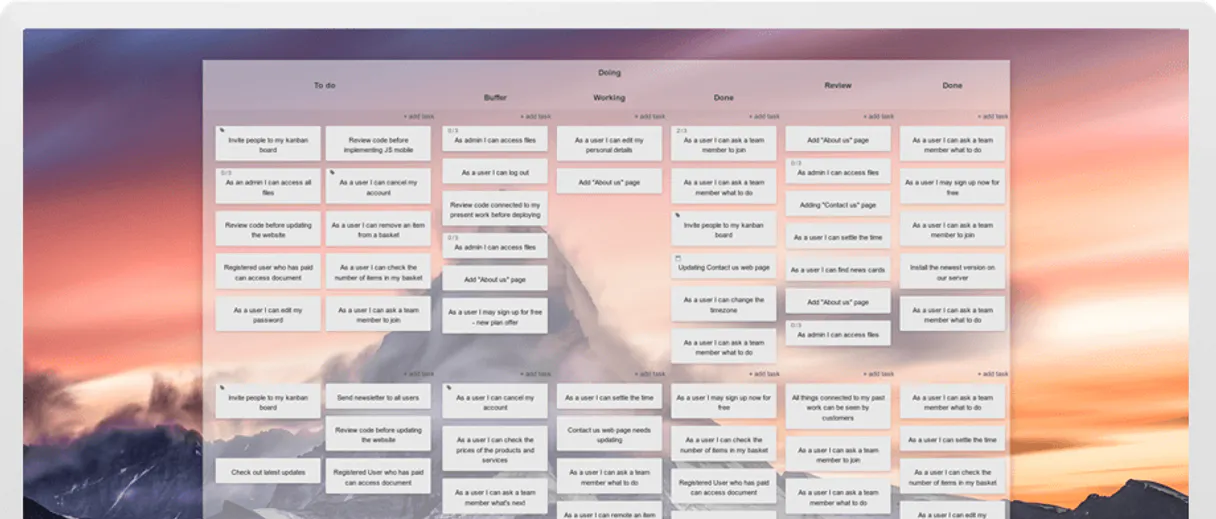
KanbanTool MCP. Monitor workflow flow and spot bottlenecks instantly.
 Gemini
 Works with every AI agent you already use
…and any MCP-compatible client









Just plug in your AI agents and start using Vinkius.
KanbanTool connects your workflow board directly into any AI agent. Stop managing tasks by clicking through dashboards and start talking about your project flow.
This MCP lets you list boards, track every task's status from 'To Do' to 'Done,' identify bottlenecks using WIP limits, and even assign cards to team members—all in natural conversation.
What your AI agents can do
Archive task card
Marks a specific task card as completed or removed from the active board view.
Create task card
Adds a brand-new, empty task card to any specified Kanban board.
Get board details
Retrieves the full metadata and current list of tasks for a specific Kanban board.
Retrieve a list of all available Kanban boards and their overall metadata.
Create, update the status of, or archive specific task cards on any board.
Identify tasks assigned to a user and view their current workload distribution across different stages.
View the complete activity log or changelog for any specific task card.
Ask AI about this MCP
Supported MCP Clients
OAuth 2.0 Compatible Gemini Waiting for input…
KanbanTool with 10 Tools
Use these tools to orchestrate everything from listing available boards to updating individual task statuses via your AI client.
Make your AI actually useful.
Add this MCP to Claude, Cursor, or Windsurf and your AI stops guessing. It gets real tools to look things up, take action, and handle the stuff you keep doing by hand.
Start using KanbanTool on Vinkius019dd10farchive task card
Marks a specific task card as completed or removed from the active board view.
019dd10fcreate task card
Adds a brand-new, empty task card to any specified Kanban board.
019dd10fget board details
Retrieves the full metadata and current list of tasks for a specific Kanban board.
019dd10fget user profile
Retrieves the current user's basic profile information (e.g., name and email).
019dd10fget task details
Fetches all deep details about one single task card, like its description or priority level.
019dd10flist task activities
Displays the entire chronological history and changelog for a selected task card.
019dd10flist boards
Gets an index of every Kanban board accessible under your account.
019dd10flist shared links
Shows a list of board links that have been shared with other users or groups.
019dd10flist board tasks
Lists all task cards currently associated with a board, grouped by column.
019dd10fupdate task details
Modifies specific data points on an existing task, such as changing its title or due date.
Choose How to Get Started
Build a custom MCP for your own tools, or connect a ready-made integration from our catalog.
Build Your Own
Turn any API into an MCP. Import a spec, define Agent Skills, or deploy with MCPFusion.
- Import from OpenAPI, Swagger, or YAML specs
- Create Agent Skills with progressive disclosure
- Deploy to edge with MCPFusion framework
- Built in DLP, auth, and compliance on every call
- Real time usage dashboard and cost metering
- Publish to catalog or keep private
Make Your AI Do More
Start with KanbanTool, then connect any of our 5,000+ other servers whenever your AI needs more. One click, no limits.
- Use this MCP plus 5,000+ others, all in one place
- Add new capabilities to your AI anytime you want
- Every connection is secured and compliant automatically
- Track usage and costs across all your servers
- Works with Claude, ChatGPT, Cursor, and more
- New servers added to the catalog every week
Independent Platform Disclaimer: Vinkius is an independent platform and is not affiliated with, endorsed by, sponsored by, verified by, or otherwise authorized by KanbanTool. All third-party trademarks, logos, and brand names are the property of their respective owners. Their use on this website is strictly for informational purposes to identify service compatibility and interoperability.
VINKIUS INFRASTRUCTURE
Cloud Hosted
Managed infra
V8 Isolated
Sandboxed per request
Zero-Trust Proxy
No stored credentials
DLP Enforced
Policy on every call
GDPR Compliant
EU data residency
Token Compression
~60% cost reduction
Works with Claude, ChatGPT, Cursor, and more
The Model Context Protocol standardizes how applications expose capabilities to LLMs. Instead of operating in isolation, your AI gains direct access to external platforms, live data, and real-world actions through secure, standardized connections.
This server provides 10 capabilities that interface natively with Claude, ChatGPT, Cursor, and any MCP client. No middleware. No custom integration required.
The Manual Work of Tracking Project Flow
Right now, tracking progress means jumping between the main board view, checking individual task cards to see who owns them, and then cross-referencing separate capacity reports. You're copying status updates from column A into a spreadsheet and pasting assignee names into an email draft.
With this MCP, you just tell your agent: 'Which boards are bottlenecked?' Your AI client handles the multi-step logic—it checks board metadata, counts tasks per column, flags overages, and gives you a clear answer. It's immediate status reports without lifting a finger.
Using KanbanTool for Task Management
Manual work involves logging into the system to create a card, filling out all fields, and then remembering to update the due date later. You're juggling multiple UI interactions just to keep one task current.
Now, you simply ask your agent: 'Create a high-priority card called X for Sarah.' The MCP handles creating the task using 'create_task_card,' setting the priority via 'update_task_details,' and assigning it all in one go. It’s direct action.
What you can do with this MCP connector
You manage complex projects on Kanban boards. But tracking the actual work is messy; sometimes you need to know which card is stuck at review, or who has capacity for a new feature. This MCP lets your AI agent read that board and understand its structure. You can ask it to list all active boards, check how many tasks are in 'In Progress,' and even monitor if a column is exceeding its Work-in-Progress limit.
Need to update something? Your agent handles the API calls to create new cards or move existing ones across stages. If you use this connector through Vinkius, your AI client gets access to the full catalog of tools, keeping everything in one place.
019dd110-0b93-7194-80a9-3685684f7a76 
How KanbanTool MCP Works
- 1 Subscribe to this MCP and provide your KanbanTool subdomain and API Token.
- 2 Connect your preferred AI agent (like Claude or Cursor) within the Vinkius catalog using these credentials.
- 3 Directly prompt your agent with a request, such as 'List all boards and tell me which one is over its WIP limit.' The agent handles the rest.
The bottom line is: you talk to your AI client, and it talks to KanbanTool for you.
Who Is KanbanTool MCP For?
This MCP targets operational roles who manage complex project pipelines but hate repetitive dashboard checks. If you're constantly asking 'What's stuck?' or 'Who should handle this next?', this is for you.
Checks if the team has enough capacity in a given sprint and needs to reallocate cards between different boards.
Monitors the Work-in-Progress (WIP) limits across multiple columns to ensure the development team doesn't get bottlenecked.
Organizes cross-functional work, making sure that tasks move correctly from initial intake through QA and final deployment stages.
What Changes When You Connect
- Stop guessing about progress. You can use 'list_board_tasks' to get a real-time count of every card in every stage, allowing you to see where the team is bottlenecked right now.
- Improve task clarity by using 'get_task_details'. Instead of opening the board and clicking through cards, your agent pulls all the necessary context for one task immediately.
- Keep track of who's doing what. You can ask your agent to check workload distribution, making sure no single team member is assigned too many high-priority items.
- Maintain a perfect record. Need to know why a card was moved? Use 'list_task_activities' to view the complete history and changelog of that specific task.
- Keep things clean. When a project phase ends, use 'archive_task_card' so the board stays focused on only the tasks needing attention.
Real-World Use Cases
The Sprint Review Check-in
A PM needs to report status. They ask their agent to use 'list_board_tasks' and check the WIP limits on the main sprint board. The agent responds: 'Done is at 9/10 cards; In Progress is at 6/5, over limit by one. We need to move a card.' This prevents scope creep.
Onboarding a New Team Member
An Ops Lead needs to see the overall structure of work. They ask their agent to 'list_boards' first, then select the correct board using 'get_board_details' to give the new hire an immediate overview.
Investigating a Delay
A developer notices a card hasn't moved in days. They ask their agent to run 'list_task_activities' on that specific task, immediately revealing who last touched it and why the work stalled.
Reassigning Priority Work
A manager needs to shift an item from 'To Do.' They ask their agent to use 'update_task_details' on a specific card, changing its priority and assigning it to the correct team member without manual clicks.
The Tradeoffs
Treating boards like simple lists
The user just asks: 'Show me all tasks.' This results in a massive, unorganized dump of card titles with no context or grouping.
→ Instead, use the agent to run 'list_board_tasks' and ask it to group the results by column. Then follow up by using 'get_board_details' if you need specific metadata like WIP limits.
Changing tasks without tracking
A user manually changes a task's status, but forgets to log why or who approved the change. The audit trail is incomplete.
→ After making any critical update using 'update_task_details', immediately ask your agent to run 'list_task_activities'. This forces a review of the changelog and ensures proper documentation.
Assuming board structure never changes
The user assumes that every time they connect, the boards will be exactly as they were last week, missing new project streams or retired ones.
→ Always start by running 'list_boards' to get a current index of all available workspaces. This ensures your agent knows about new or hidden projects.
When It Fits, When It Doesn't
Use this MCP if your primary need is understanding the flow and status of work items across predefined stages. It excels at monitoring bottlenecks (WIP limits) and tracking task progression, using tools like 'list_board_tasks' and 'get_task_details'. Don't use it if you are trying to build a custom reporting dashboard or calculate complex velocity metrics that require external data sources; those need specialized BI tools. If your goal is simply to read text from a general database record, then a generic database connector will be better than this Kanban-specific tool.
Common Questions About KanbanTool MCP
How do I list boards with KanbanTool MCP? +
You use the 'list_boards' tool. This simple call gives you a complete index of every single board available under your account, so you know exactly where to start looking.
Does KanbanTool MCP help track task history? +
Yes, it does. The 'list_task_activities' tool lets you view the entire changelog for any card, showing every update and who made it over time.
Can I move cards using KanbanTool MCP? +
You can modify tasks using 'update_task_details'. Your agent handles moving a card from one column to another stage across the board.
What is the difference between list_board_tasks and get_board_details? +
list_board_tasks gives you a focused, grouped count of tasks by column. 'get_board_details' retrieves all the raw metadata for the board itself, which can include things like overall limits or custom field definitions.
How do I check if a user is already assigned to a task? +
You use 'get_task_details'. This tool pulls all current information about the card, including who it's currently assigned to and its priority level.
What information does the `get_user_profile` command provide about team members? +
It returns detailed user metadata. This includes names, roles, and current status. Your agent can use this data to verify permissions before updating task assignments.
When I use the `create_task_card` tool, what fields must I include for proper tracking? +
You need to provide a title, board ID, and at least one column. You can also specify priority levels or assignees during card creation.
What is the process when I run the `archive_task_card` command? +
The task remains linked to the board but moves out of active views. Archiving keeps records available for auditing without cluttering the primary workflow columns.
Can I create and move cards across board columns? +
Yes. Create new cards in any column, move them across workflow stages, update details, and archive completed cards. Track card history and activity.
Does KanbanTool require a subdomain? +
Yes. Each KanbanTool account has a unique subdomain (e.g., your-team). Provide the subdomain and API Token. Bearer token against https://{subdomain}.kanbantool.com/api/v3.
Can I monitor WIP limits and identify bottlenecks? +
Yes. Track how many cards are in each column relative to WIP limits. Identify bottleneck columns where work is accumulating beyond limits.
Use it with your favorite AI tools
Connect this server to Cursor, Claude, VS Code, and more.