
EmailListVerify MCP. Run bulk list cleaning and check email health via chat.
 Gemini
 Works with every AI agent you already use
…and any MCP-compatible client









Just plug in your AI agents and start using Vinkius.
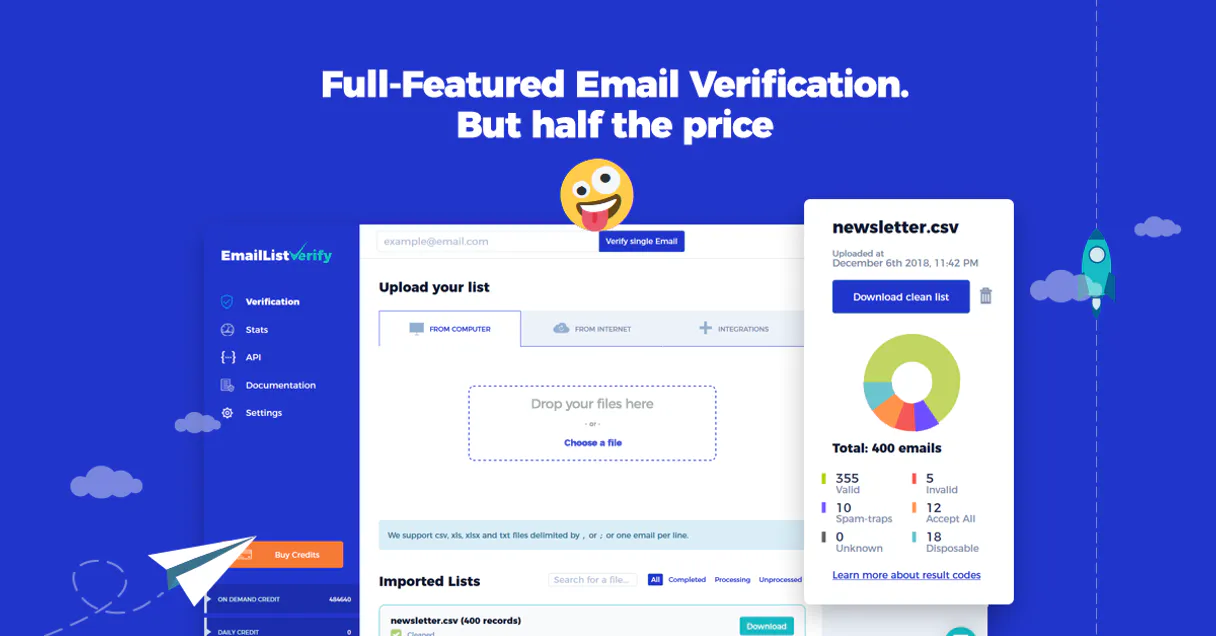
EmailListVerify connects your AI agent to a bulk email verification platform. It lets you check individual email addresses for deliverability, run large-scale list cleaning jobs, and monitor the status and credit usage for all your verification tasks via natural language conversation.
What your AI agents can do
Get emaillistverify metadata
Retrieves general settings and metadata for your EmailListVerify account.
Get remaining credits
Gets the current number of remaining verification credits in your account.
Get verification job status
Provides the status and summary results for a specific, named bulk verification job.
The agent verifies one email address for deliverability, checking MX records and SMTP status.
The agent lists and retrieves the current status and results for any uploaded batch verification file.
The agent retrieves real-time information on remaining verification credits and account quotas.
The agent provides high-level summaries of verification activity, including success rates and common invalid email patterns.
The agent retrieves a complete list of all email verification jobs run in the account.
Ask AI about this MCP
Supported MCP Clients
Gemini Waiting for input…
EmailListVerify MCP Server: 9 Tools for Email Hygiene
These tools let your agent check single emails, track job status, and manage credits for bulk email list verification.
019d758fget emaillistverify metadata
Retrieves general settings and metadata for your EmailListVerify account.
019d758fget remaining credits
Gets the current number of remaining verification credits in your account.
019d758fget verification job status
Provides the status and summary results for a specific, named bulk verification job.
019d758flist in progress verification jobs
Lists all bulk verification jobs that are currently running in the processing queue.
019d758flist latest verification jobs
Identifies the most recently uploaded email verification files.
019d758flist successfully processed files
Lists all bulk verification jobs that have finished processing successfully.
019d758flist verification jobs
Lists every bulk email verification job file/job associated with your account.
019d758fquick verification health audit
Gathers a high-level summary of verification activity, showing overall success rates and common failure patterns.
019d758fverify single email
Verifies the deliverability status of one single email address.
Choose How to Get Started
Build a custom MCP for your own tools, or connect a ready-made integration from our catalog.
Build Your Own
Turn any API into an MCP. Import a spec, define Agent Skills, or deploy with MCPFusion.
- Import from OpenAPI, Swagger, or YAML specs
- Create Agent Skills with progressive disclosure
- Deploy to edge with MCPFusion framework
- Built in DLP, auth, and compliance on every call
- Real time usage dashboard and cost metering
- Publish to catalog or keep private
Make Your AI Do More
Start with EmailListVerify, then connect any of our 4,700+ other servers whenever your AI needs more. One click, no limits.
- Use this MCP plus 4,700+ others, all in one place
- Add new capabilities to your AI anytime you want
- Every connection is secured and compliant automatically
- Track usage and costs across all your servers
- Works with Claude, ChatGPT, Cursor, and more
- New servers added to the catalog every week
What you can do with this MCP connector
EmailListVerify plugs your AI agent right into a bulk email verification platform. You use it to check single emails for deliverability, run huge list-cleaning jobs, and track the status and credits for every verification task, all just by talking to it.
Your agent verifies a single email address by checking MX records and the SMTP status. You can tell it to list all jobs currently running or get the status and summary results for a specific bulk job. To see what you uploaded recently, you can ask it to list the latest verification jobs, or check the files that finished processing successfully.
You can also get a complete list of every bulk verification job ever run on the account, or check the general metadata for the EmailListVerify account settings. For a quick overview, the agent compiles a high-level summary of all verification activity, showing overall success rates and common failure patterns. You can check the current remaining verification credits and account quotas.
You'll also be able to get the current number of remaining credits.
How EmailListVerify MCP Works
- 1 Connect the EmailListVerify integration to your agent and authorize it using your API Key.
- 2 Ask your agent to perform an action, like 'Show me the status of my last job' or 'How many credits are left?'
- 3 The agent executes the relevant tool call and reports the specific data (e.g., 'Job XYZ is 80% complete,' or 'You have 12,450 credits left') to you.
The bottom line is your agent talks to the API, and you get actionable data back in natural conversation.
Who Is EmailListVerify MCP For?
Email marketers need this when they're tired of sending campaigns to dead addresses. CRM managers use it to clean up data fields during entry, stopping bad data before it enters the database. Operations teams rely on it to monitor credit burn and ensure large-scale list jobs finish on time.
Checks the deliverability of a list before a send. Uses the agent to verify individual addresses or run bulk jobs to clean up the entire mailing list.
Needs to audit email data quality across multiple sources. Uses the agent to get high-level summaries of verification activity and success rates.
Verifies email addresses during data entry or migration. Uses the agent to check quality and identify invalid records before they contaminate the main database.
What Changes When You Connect
- Check deliverability on demand. Use
verify_single_emailto instantly validate any email address, resolving MX records and checking for disposable domains. You stop sending emails to dead accounts immediately. - Stop guessing about job status.
list_in_progress_verification_jobsshows you exactly what's running right now, preventing you from having to manually poll job dashboards. - Know your budget before you start. Call
get_remaining_creditsto see your current credit balance and organizational quota. You'll never run out of verification capacity mid-campaign. - Get a full history view.
list_verification_jobsgives you a complete log of every file you've uploaded. This helps you track trends and debug why a specific list failed. - Audit results instantly. Use
quick_verification_health_auditto get a single summary of success rates and invalid email patterns, saving you from reading dozens of job reports. - Keep track of finished work.
list_successfully_processed_fileslets you filter job results to only see the files that finished successfully, keeping your cleanup workflow clean.
Real-World Use Cases
Pre-send List Scrubbing
A marketer has a list of 50,000 contacts. Instead of downloading the file and checking status in a dashboard, they ask their agent to run a bulk job. The agent uses list_latest_verification_jobs to confirm the file uploaded and then uses get_verification_job_status to report the progress and final results summary.
Data Entry Quality Check
A CRM administrator is manually adding new leads. They ask their agent to check a suspect email. The agent uses verify_single_email and reports not only 'Valid' but also details about MX records and whether it's disposable, letting the admin fix the data right away.
Operational Status Check
An operations team member needs to know if the entire verification system is healthy. They ask the agent to run quick_verification_health_audit. The agent returns an immediate, high-level report on overall success rates and usage, eliminating the need to check three different job listing endpoints.
Auditing Account Limits
A manager is worried about budget overruns. They ask the agent to check the account limits. The agent uses get_remaining_credits to provide the current count and advises if any recently completed jobs used a large amount of credits.
The Tradeoffs
Checking Job Status Manually
Logging into the verification dashboard and manually clicking through 'In Progress', 'Failed', and 'Completed' tabs to piece together the status of the last 10 jobs.
→
Use list_verification_jobs to see every file run. Then, use get_verification_job_status for the specific job ID you care about. Better yet, use list_in_progress_verification_jobs for a real-time view.
Ignoring Credit Limits
Starting a huge bulk verification job without checking the remaining credits, leading to the job stopping mid-run and leaving the list incomplete.
→
Always check get_remaining_credits first. This tool tells you your quota before you commit to a large, expensive job.
Relying on single endpoints
Only checking list_latest_verification_jobs and missing the actual results summary, leaving you with a file name but no idea if the job succeeded.
→
After identifying a job using list_latest_verification_jobs, always use get_verification_job_status to retrieve the detailed summary and status.
When It Fits, When It Doesn't
Use this if your primary need is data hygiene and deliverability tracking. You need to know if an email address is good before it goes out, or if a large list needs cleaning up. Use it to track credits and job status because you want visibility into the process.
Don't use it if you just need to check a single email address and don't care about the job status. Just run verify_single_email. Don't use it if you need to manage a different kind of data, like physical inventory or game assets—that requires a different MCP server entirely.
Independent Platform Disclaimer: Vinkius is an independent platform and is not affiliated with, endorsed by, sponsored by, verified by, or otherwise authorized by EmailListVerify. All third-party trademarks, logos, and brand names are the property of their respective owners. Their use on this website is strictly for informational purposes to identify service compatibility and interoperability.
VINKIUS INFRASTRUCTURE
Cloud Hosted
Managed infra
V8 Isolated
Sandboxed per request
Zero-Trust Proxy
No stored credentials
DLP Enforced
Policy on every call
GDPR Compliant
EU data residency
Token Compression
~60% cost reduction
Works with Claude, ChatGPT, Cursor, and more
The Model Context Protocol standardizes how applications expose capabilities to LLMs. Instead of operating in isolation, your AI gains direct access to external platforms, live data, and real-world actions through secure, standardized connections.
This server provides 9 capabilities that interface natively with Claude, ChatGPT, Cursor, and any MCP client. No middleware. No custom integration required.
Available Capabilities
Manually tracking list health is a nightmare of tabs and spreadsheets.
Today, cleaning a list means logging into the verification portal, uploading the CSV, waiting for the job to start, then having to switch tabs to check the status, download the results, and finally cross-reference the success rates against your campaign goals. It's a painful, multi-step process that leaves you with stale data and a lot of manual clicking.
With EmailListVerify, you just ask your agent. You tell it to 'Check the Q3 leads for bad emails.' The agent runs the job and gives you a summary of the success rate and the total count of invalid addresses. It's instant, conversational, and you get the actual answer, not just a link to a dashboard.
EmailListVerify MCP Server: Instant Deliverability Checks
Before this server, checking a single email meant copy-pasting it into a form or waiting for a dedicated tool. If you needed to check multiple emails, you were stuck in a slow, repetitive loop. It was never efficient.
Now, your agent handles it. You tell it to verify 'user@example.com.' The agent runs `verify_single_email` and responds with a clear, actionable status—Valid, Invalid, or Disposable. The whole process is direct and happens in chat.
Common Questions About EmailListVerify MCP
How do I check the status of a bulk job using EmailListVerify? +
You use the agent to call get_verification_job_status and provide the job ID. This tool returns the current status and a summary of results for that specific job. You can also use list_in_progress_verification_jobs to see everything currently running.
Can I check the deliverability of just one email using EmailListVerify? +
Yes, you call verify_single_email. This tool checks the email's deliverability, validating MX records and running an SMTP connection check. It's fast and gives you a definitive status.
What tool should I use to check how many verification credits I have left? +
Use get_remaining_credits. This tool pulls your live account balance and tells you exactly how many credits are available for verification.
Which tool shows me all the jobs I've run? +
You can use list_verification_jobs to get a list of every bulk job file you've ever processed. This is useful for auditing your historical data.
How do I get an overall health check of the email list with EmailListVerify? +
Run quick_verification_health_audit. This tool aggregates data to give you a high-level summary of verification activity, showing success rates and common invalid patterns without needing to check multiple endpoints.
What tool should I use with EmailListVerify to list all the jobs that are currently running? +
Use list_in_progress_verification_jobs. This tool shows you all the bulk verification jobs that are actively in the processing queue, so you know exactly what's running right now.
How do I get the most recent verification files using EmailListVerify? +
Use list_latest_verification_jobs. This tool quickly identifies the files you uploaded most recently, letting you check on your newest data batches.
If I need to see every single verification file I've ever run, which EmailListVerify tool should I use? +
Use list_verification_jobs. This tool retrieves a comprehensive list of every bulk email verification file and job recorded in your account.
How do I get an EmailListVerify API Key? +
Log in to your EmailListVerify account, navigate to API section in your dashboard, and you can generate or retrieve your unique API Key (secret) from there.
Can the agent upload new files for verification? +
This integration currently focuses on verifying single emails and auditing existing jobs. Uploading new large CSV or TXT files for bulk verification should be managed via the EmailListVerify web portal.
What does 'disposable email' mean in the results? +
Disposable emails are temporary addresses often used to bypass registration forms. EmailListVerify identifies these so you can keep your marketing lists high-quality and long-lasting.
Use it with your favorite AI tools
Connect this server to Cursor, Claude, VS Code, and more.
More in this category

Modash
Find and analyze influencers across Instagram, TikTok, and YouTube with Modash.

DISQO
Equip your AI agent to manage consumer insight projects, track audiences, and monitor behavioral metrics via the DISQO API.

Leal
Retain customers in Latin America with digital loyalty programs, cashback rewards, and personalized offers for retail businesses.
You might also like

4399 Open Platform
Manage 4399 Open Platform game distribution — validate logins, query orders, and handle leaderboards directly from any AI agent.

Checkbook.io
Manage digital and physical check payments via Checkbook — send money, track checks, and monitor invoices directly from any AI agent.

Hunter
Find and verify professional email addresses with domain search, email finder, and deliverability verification for sales outreach.