
Freshchat MCP. Manage support interactions, from chat history to agent status.
 Gemini
 Works with every AI agent you already use
…and any MCP-compatible client









Just plug in your AI agents and start using Vinkius.
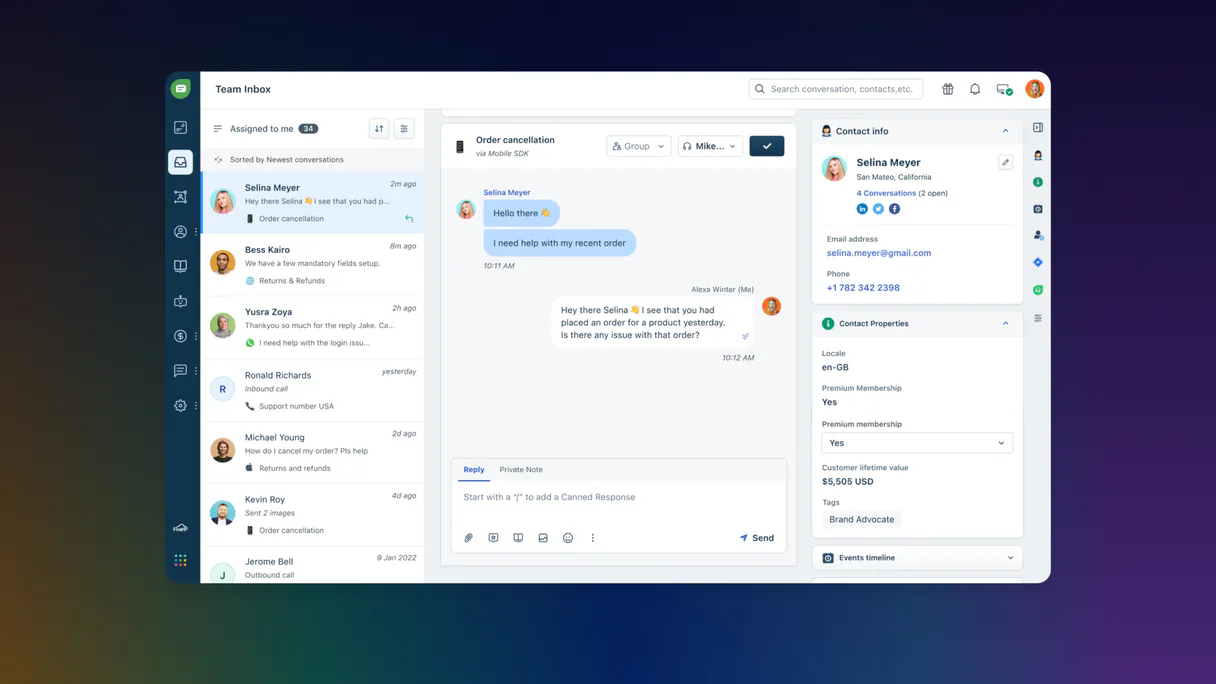
Freshchat MCP Server manages customer conversations, tracks messages, and lets agents oversee chat flows. Connect your AI client to manage support interactions across web, mobile, and social channels.
You can list open chats, send real-time messages, and pull detailed user profiles directly through natural conversation.
What your AI agents can do
Check account status
Verifies the current configuration status of the Freshchat account.
Get agent profile
Retrieves specific metadata for a support agent.
Get chat user details
Retrieves metadata about a chat participant.
Verifies the configuration of the Freshchat account.
Retrieves metadata for a specific support agent.
Retrieves detailed metadata for a chat participant or user.
Fetches metadata about a specific chat conversation.
Retrieves a list of defined support agent groups.
Retrieves a list of available configured messaging channels.
Gets the full message history for a given conversation ID.
Lists all users involved in a specific chat conversation.
Gets a list of currently active chat sessions.
Retrieves a list of all support agents available in the system.
Searches for and retrieves a user record using their email address.
Posts a new message into an existing chat conversation.
Ask AI about this MCP
Supported MCP Clients
Gemini Waiting for input…
Freshchat MCP Server: 12 Tools for Support Automation
These 12 tools allow your AI client to manage everything from retrieving user profiles and listing conversations to sending real-time messages within Freshchat.
019d75a0check account status
Verifies the current configuration status of the Freshchat account.
019d75a0get agent profile
Retrieves specific metadata for a support agent.
019d75a0get chat user details
Retrieves metadata about a chat participant.
019d75a0get conversation details
Fetches the metadata for a specific chat conversation.
019d75a0list agent groups
Lists all defined groups of support agents.
019d75a0list chat channels
Retrieves a list of configured chat channels.
019d75a0list chat messages
Gets the complete message history for a given conversation ID.
019d75a0list chat users
Lists all participants involved in a specific chat.
019d75a0list conversations
Lists all chats that are currently active.
019d75a0list support agents
Lists all support agents currently available.
019d75a0search chat users
Finds a user's record using their email address.
019d75a0send chat message
Posts a new message into an existing chat conversation.
Choose How to Get Started
Build a custom MCP for your own tools, or connect a ready-made integration from our catalog.
Build Your Own
Turn any API into an MCP. Import a spec, define Agent Skills, or deploy with MCPFusion.
- Import from OpenAPI, Swagger, or YAML specs
- Create Agent Skills with progressive disclosure
- Deploy to edge with MCPFusion framework
- Built in DLP, auth, and compliance on every call
- Real time usage dashboard and cost metering
- Publish to catalog or keep private
Make Your AI Do More
Start with Freshchat, then connect any of our 4,700+ other servers whenever your AI needs more. One click, no limits.
- Use this MCP plus 4,700+ others, all in one place
- Add new capabilities to your AI anytime you want
- Every connection is secured and compliant automatically
- Track usage and costs across all your servers
- Works with Claude, ChatGPT, Cursor, and more
- New servers added to the catalog every week
What you can do with this MCP connector
You connect your AI client to Freshchat via the Model Context Protocol (MCP) to manage customer chats. This setup lets your agent handle support interactions across web, mobile, and social channels. check_account_status verifies the current setup status of the Freshchat account. list_conversations pulls a list of all chats that are currently running. get_conversation_details fetches metadata about a specific chat conversation. list_chat_users lists every participant involved in a specific chat. get_chat_user_details retrieves detailed metadata for a chat participant. search_chat_users finds a user's record using just their email address. list_chat_messages gets the full message history for a given conversation ID. send_chat_message posts a new message into an existing chat conversation. list_support_agents pulls a list of all support agents available. get_agent_profile retrieves specific metadata for a support agent. list_agent_groups lists all defined groups of support agents. list_chat_channels retrieves a list of configured chat channels.
How Freshchat MCP Works
- 1 Subscribe to the server via the Vinkius Marketplace.
- 2 Provide your Freshchat Region Domain and API Token (found in Settings > API Tokens).
- 3 Use your AI client to issue commands, allowing the agent to manage customer messaging.
The bottom line is, your AI client can manage and retrieve all necessary customer data and message history without you leaving your primary workspace.
Who Is Freshchat MCP For?
Support leads and customer success managers need this. They need a single view of customer interactions and agent status without constantly jumping between dashboards. It eliminates the need to manually check multiple tabs to build a full picture of a user's history or an agent's availability.
Uses the server to quickly list open conversations or check agent availability without leaving their main support dashboard.
Gets a real-time overview of customer interactions and user profiles by issuing simple AI commands.
Automates sending follow-up messages or verifies chat history to qualify a lead.
What Changes When You Connect
- List open chats instantly: Use
list_conversationsto see all active chats without navigating tabs. This gives you immediate visibility into who needs help right now. - Send messages in context:
send_chat_messagelets your agent post updates or follow-ups directly to a conversation thread. The customer sees the reply in their chat widget, not in a separate system. - Build user profiles fast: The
search_chat_userstool finds a user by email address. This lets your agent pull up a complete customer record in seconds, no matter which department they belong to. - Track the whole chat lifecycle: By using
list_chat_messagesandget_conversation_details, your agent builds a full audit trail. It retrieves every message for a conversation ID, which is vital for reporting and compliance. - Understand your team's status:
list_support_agentslists who is online and available. This helps agents route tickets to the right person immediately, improving response time. - Manage contacts and groups:
list_chat_usersandlist_agent_groupsprovide structured data on who's involved and how teams are organized, giving full context to the agent.
Real-World Use Cases
The Support Agent needs a full picture of a customer.
A customer calls in. The agent asks the AI agent to run search_chat_users using the customer's email. The AI agent gets the user profile, then runs list_chat_messages for the last conversation ID. The agent now has the history and the current details, solving the lookup problem in minutes instead of hours of manual searching.
The Support Lead needs to know where all the open chats are.
The Support Lead asks the AI agent to execute list_conversations. The agent returns a count and a list of all open chats. The lead doesn't need to log into the Freshchat dashboard; they get the real-time status report directly in their primary workspace.
The Sales Engineer needs to follow up on a qualified lead.
A lead left a chat but didn't buy. The Sales Engineer asks the AI agent to send_chat_message with a follow-up offer to the specific conversation ID. This keeps the conversation open and moves the lead toward qualification without manual intervention.
The Manager needs to check who is available for a crisis chat.
The Manager asks the AI agent to run list_support_agents. The agent checks the list and reports back which specific agents are online and available. This avoids calling multiple team members just to check their status.
The Tradeoffs
Checking agent status manually
The manager opens the Freshchat dashboard, clicks the 'Team' tab, and scrolls through every agent's status indicator to see who is free. This takes several minutes of clicking and reading.
→
Ask your agent to run list_support_agents. It instantly provides a list of all agents and their current availability status.
Finding a user's history via manual search
The agent has an email but must switch to a separate CRM tool, manually search for the user, and then copy/paste the user ID into the chat system to see the history.
→
Use search_chat_users to find the user record using their email, then use list_chat_messages to pull the full history for that user ID.
Sending follow-up messages with guesswork
The agent remembers a follow-up is needed but has to manually locate the conversation ID, switch back to the chat widget, and type the message. This is slow and prone to error.
→
Use send_chat_message to post the follow-up message directly to the specific conversation ID. The system handles the posting process for you.
When It Fits, When It Doesn't
Use this server if your core process involves synthesizing customer data from multiple sources (e.g., checking user profiles, listing conversations, and pulling message history). It’s essential when you need your AI agent to act on structured data—like sending a message or listing agents—rather than just summarizing text.
Don't use this if your only need is to read a static report or compile data outside of a live chat context. For simple data retrieval (e.g., just listing agents), other general database connectors might suffice. But if the task requires real-time action or linking customer identity to a conversation thread, this Freshchat MCP Server is necessary.
Independent Platform Disclaimer: Vinkius is an independent platform and is not affiliated with, endorsed by, sponsored by, verified by, or otherwise authorized by Freshchat. All third-party trademarks, logos, and brand names are the property of their respective owners. Their use on this website is strictly for informational purposes to identify service compatibility and interoperability.
VINKIUS INFRASTRUCTURE
Cloud Hosted
Managed infra
V8 Isolated
Sandboxed per request
Zero-Trust Proxy
No stored credentials
DLP Enforced
Policy on every call
GDPR Compliant
EU data residency
Token Compression
~60% cost reduction
Works with Claude, ChatGPT, Cursor, and more
The Model Context Protocol standardizes how applications expose capabilities to LLMs. Instead of operating in isolation, your AI gains direct access to external platforms, live data, and real-world actions through secure, standardized connections.
This server provides 12 capabilities that interface natively with Claude, ChatGPT, Cursor, and any MCP client. No middleware. No custom integration required.
Available Capabilities
Getting a full customer view shouldn't require jumping between five different tabs.
Today, if you need to understand a customer's issue, you open the chat dashboard. You check the 'Conversations' tab to see if it's open. Then you have to click the user profile to verify their account status. Next, you might open a separate 'History' tab just to pull the message thread. It's a lot of clicking and context switching just to answer 'What's wrong with this user?'
With this MCP server, your AI agent handles the whole sequence. You tell it: 'Get the user profile and list all messages for conversation X.' It runs `search_chat_users`, pulls the metadata, and then executes `list_chat_messages`—all in one sequence. You get the full context instantly.
Send Chat Messages with Freshchat MCP Server
Before this, updating a customer required the agent to manually find the conversation ID, navigate to the chat widget, and type the follow-up text. This is slow, and if the ID changes, the message fails to post.
Now, your agent uses the `send_chat_message` tool. You provide the conversation ID and the text. The agent posts the message directly, guaranteeing the update hits the customer's live chat widget without manual navigation.
Common Questions About Freshchat MCP
How do I find a user's record using the Freshchat MCP Server's search_chat_users tool? +
You use search_chat_users and provide the user's email address. The tool returns a specific user record ID, which you can then use for other actions like checking their chat history.
Can I see all active chats using the Freshchat MCP Server's list_conversations tool? +
Yes, running list_conversations provides a list of all currently open chat sessions. This lets you quickly triage and identify conversations that need immediate attention.
What information does get_agent_profile provide via the Freshchat MCP Server? +
The get_agent_profile tool retrieves metadata about a specific support agent. This helps your agent verify the agent's role, team, or current status before taking action.
How do I get the full message history using the Freshchat MCP Server? +
You must use list_chat_messages and provide the specific conversation ID. This tool pulls the entire message thread, ensuring you have the full context for reporting or review.
Is the Freshchat MCP Server useful for tracking team availability? +
Yes, you can use list_support_agents to list all support agents and check their current availability status, giving you a real-time overview of team capacity.
How do I use the `list_chat_channels` tool to understand my messaging groups? +
The list_chat_channels tool lists every configured messaging channel. You can use this to understand the routing logic or group structure within your support setup.
What does the `check_account_status` tool verify about my Freshchat connection? +
This tool verifies your overall account configuration. It lets you confirm that your API connection and credentials are set up correctly for agent use.
Can the `send_chat_message` tool handle different types of communication? +
The send_chat_message tool posts new messages to existing conversations. It's designed for sending text updates directly into the chat widget.
How do I get an API Token for Freshchat? +
Log in to Freshchat, navigate to Settings > API Tokens, and click on 'Generate Token' to retrieve your Bearer Token.
What is my 'Region Domain'? +
Your domain depends on where your account is hosted (e.g. 'api.freshchat.com' for US, 'api.eu.freshchat.com' for Europe).
Can I send files or images through the agent? +
Currently, the 'send_chat_message' tool focuses on sending text content. Supporting rich media typically requires separate upload operations.
Is it possible to see the chat history of a customer? +
Yes! Use the 'list_chat_messages' tool and provide the Conversation ID. The agent will retrieve the historical message history for that thread.
Use it with your favorite AI tools
Connect this server to Cursor, Claude, VS Code, and more.
More in this category

MonkeyLearn
Analyze and extract data from text via MonkeyLearn — sentiment analysis and keyword extraction directly from your AI agent.
Zenvia Conversion
Manage your Zenvia Conversion (Sirena) leads and messages directly through AI.

HelpCrunch
Engage customers with live chat, email automation, and a knowledge base that reduces support workload and boosts satisfaction.
You might also like
Yodiz
Manage user stories, sprints, bugs, and epics on Yodiz — the all-in-one agile project management and issue tracking tool.
Datadog
Monitor applications via Datadog — query performance metrics, search logs, and list active monitors directly from any AI agent.

WhatsApp Business
Send text, media, and interactive messages on WhatsApp — the world's most popular messaging platform.