
Freshmarketer MCP. Manage contacts, lists, and events via conversation.
 Gemini
 Works with every AI agent you already use
…and any MCP-compatible client









Just plug in your AI agents and start using Vinkius.
Freshmarketer. Manage your entire marketing stack—contacts, lists, and journeys—from a single chat window. This MCP server lets your AI agent perform complex marketing tasks like updating contact profiles, segmenting audiences, and triggering targeted email campaigns without leaving your AI client.
It connects to Freshmarketer to automate everything from data sync to event tracking.
What your AI agents can do
Check account status
Verifies the current API status of your Freshmarketer account.
Create mailing list
Creates a new, defined mailing list within Freshmarketer.
Get contact details
Retrieves detailed metadata for a specific contact record.
You can list contacts, check a single person's profile, or create/update a contact record instantly via get_contact_details and upsert_contact.
Use list_mailing_lists to see your current segments, or call create_mailing_list to build a new one for a campaign.
Execute a specific email campaign for one person using send_transactional_email, directly from the chat interface.
Programmatically add custom events to a contact's timeline via post_custom_event, which triggers automation flows.
List all active or paused marketing journeys using list_journeys to see where your audience is in the funnel.
The server maintains synchronization between your marketing data and CRM records.
Ask AI about this MCP
Supported MCP Clients
Gemini Waiting for input…
019d75a0check account status
Verifies the current API status of your Freshmarketer account.
019d75a0create mailing list
Creates a new, defined mailing list within Freshmarketer.
019d75a0get contact details
Retrieves detailed metadata for a specific contact record.
019d75a0list contacts
Lists all marketing contacts available in your account.
019d75a0list custom events
Retrieves a list of all custom events configured in your account.
019d75a0list journeys
Lists all active and paused marketing automation journeys.
019d75a0list mailing lists
Retrieves a list of all configured mailing lists.
019d75a0post custom event
Adds a custom event to a contact's timeline to trigger specific automation flows.
019d75a0send transactional email
Triggers a specific, predefined email campaign for a given contact.
019d75a0upsert contact
Creates a new contact record or updates an existing one with provided data.
Choose How to Get Started
Build a custom MCP for your own tools, or connect a ready-made integration from our catalog.
Build Your Own
Turn any API into an MCP. Import a spec, define Agent Skills, or deploy with MCPFusion.
- Import from OpenAPI, Swagger, or YAML specs
- Create Agent Skills with progressive disclosure
- Deploy to edge with MCPFusion framework
- Built in DLP, auth, and compliance on every call
- Real time usage dashboard and cost metering
- Publish to catalog or keep private
Make Your AI Do More
Start with Freshmarketer, then connect any of our 4,700+ other servers whenever your AI needs more. One click, no limits.
- Use this MCP plus 4,700+ others, all in one place
- Add new capabilities to your AI anytime you want
- Every connection is secured and compliant automatically
- Track usage and costs across all your servers
- Works with Claude, ChatGPT, Cursor, and more
- New servers added to the catalog every week
What you can do with this MCP connector
Manage Contact Data
Need to know what's up with your contacts? You can list every marketing contact in your account using list_contacts, or pull up the deep details for one specific person with get_contact_details. If you need to add a new contact or change up an existing profile, you just call upsert_contact with the data you got.
Segment and Build Lists
To see what segments you've already set up, run list_mailing_lists. If you need a new list for a campaign, you can whip one up instantly using create_mailing_list.
Track Marketing Journeys
Check on your audience's progress by listing all active or paused marketing journeys using list_journeys. You can also check which custom events you've configured with list_custom_events.
Trigger Targeted Emails
Trigger a specific, predefined email campaign for a single contact straight from the chat using send_transactional_email. You can also make a contact's timeline move forward by programmatically adding a custom event with post_custom_event.
How Freshmarketer MCP Works
- 1 Subscribe to the server on Vinkius and enter your Freshmarketer Domain prefix and API Key.
- 2 Your AI client connects, authenticating your marketing credentials.
- 3 You prompt your agent with a request (e.g., 'Update John Doe's status and send him a follow-up email'), and the agent executes the necessary tools sequentially.
The bottom line is you manage your marketing stack from your AI client, without needing to open the Freshmarketer dashboard.
Who Is Freshmarketer MCP For?
Marketing Managers, Growth Engineers, and Sales Ops need this. If your job involves coordinating who gets what message, when, and why, this is for you. It takes the pain out of jumping between CRM dashboards, email platforms, and reporting tools. You can automate complex, multi-step customer interactions directly from your agent.
Checks active mailing lists and marketing journeys without manually navigating the Freshmarketer dashboard. Triggers mass email sends or segment updates instantly.
Automates the posting of custom events to contacts to ensure specific customer journeys fire correctly, treating the AI agent as a programmatic trigger system.
Verifies contact details and triggers personalized follow-up emails for key accounts directly through simple AI commands, keeping the CRM and marketing platforms aligned.
What Changes When You Connect
- Stop manually navigating dashboards. You can instantly
list_mailing_listsorlist_journeysfrom your AI agent, getting immediate visibility into your audience segments and active campaigns. - Update customer records without logging into the CRM. Use
upsert_contactto correct or enrich contact data, keeping all systems synchronized in real-time. - Automate the customer lifecycle. Use
post_custom_eventto programmatically add an event to a contact, which fires off a specific journey without manual intervention. - Handle personalized follow-ups at scale. Run
send_transactional_emailfor targeted campaigns, directing a specific email campaign to an individual contact based on conversation context. - Build data integrity checks.
get_contact_detailslets you pull specific metadata on a contact, verifying details before triggering a major workflow or update.
Real-World Use Cases
Need to update a client's status and alert them.
A sales rep needs to change a prospect's record and send a follow-up email. They ask their agent to run upsert_contact with the new status, followed immediately by send_transactional_email to trigger the 'Next Steps' campaign. The system handles the sequence and confirms both actions.
Segmenting a list based on recent activity.
A marketing manager needs to find all users who viewed the pricing page. They ask the agent to run post_custom_event for 'Pricing Page View' for a set of contacts, and then run list_mailing_lists to create a new 'Pricing Viewers' segment for follow-up.
Checking if a contact record is complete before outreach.
A team member wants to email a lead but isn't sure if the email address is current. They first use get_contact_details to verify the record, and if successful, they use send_transactional_email to send a welcome sequence.
Debugging a broken automation journey.
The growth engineer notices a journey isn't firing. They use list_journeys to confirm the journey's status, then use list_custom_events to check if the required trigger event is configured and visible to the system.
The Tradeoffs
Copy-pasting list IDs
Manually opening the Freshmarketer dashboard, copying the exact name of a mailing list, and pasting it into the API call parameters, risking typos or using an outdated ID.
→
Just tell your agent to list_mailing_lists. The agent finds the correct name and passes it to create_mailing_list or other tools, eliminating manual copy/paste errors.
Running full data checks sequentially
Calling list_contacts multiple times with different filters just to gather a basic list of users, which is slow and fails to provide a holistic view.
→
Use list_contacts with clear parameters and then follow up with get_contact_details only for the handful of users you need to verify, keeping the process targeted.
Trying to trigger everything at once
A developer attempts to script a massive, multi-action update that doesn't account for failures in one step, leading to a half-finished, corrupted customer record.
→
Structure your request: first, use upsert_contact to stage the data changes. Then, use post_custom_event to signal the change. Finally, run send_transactional_email for the final touchpoint. This makes the process atomic.
When It Fits, When It Doesn't
Use this if you need to coordinate multiple steps in marketing: changing a contact's data, segmenting them, and sending a specific message. This is for workflows, not single actions. For instance, if you need to verify a contact's phone number, use get_contact_details. If you just want to see what lists exist, run list_mailing_lists. Don't use this if you only need to check if the API is up; use check_account_status. This tool is for complex, multi-step campaigns where the outcome of one tool (like post_custom_event) must trigger the next (like send_transactional_email).
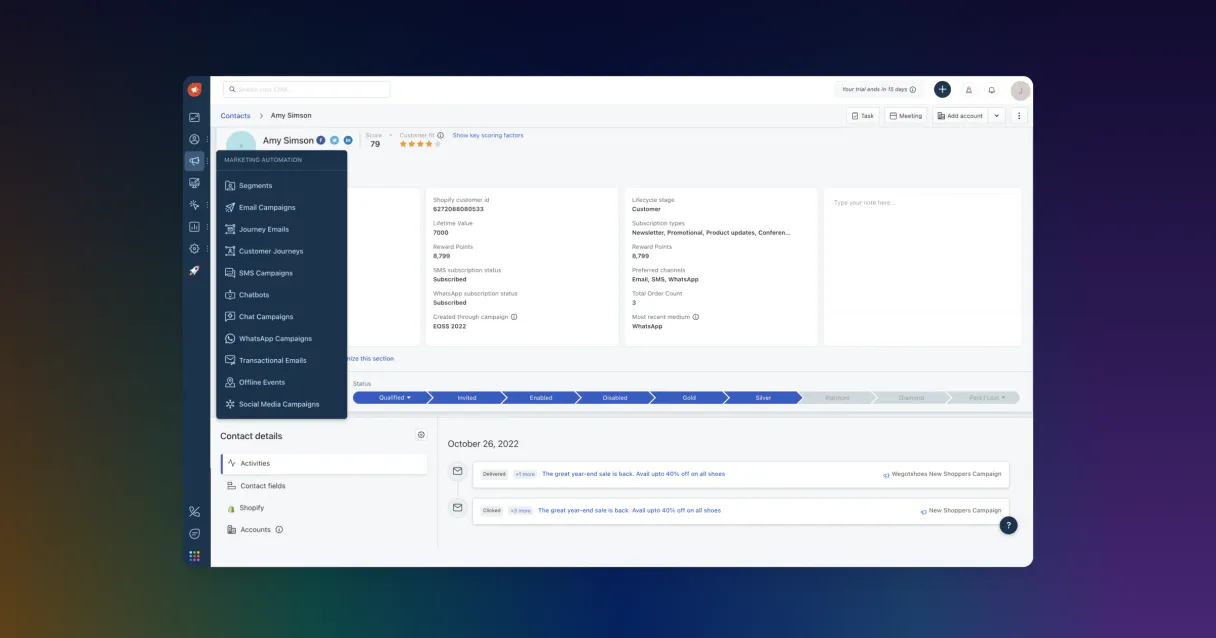
Independent Platform Disclaimer: Vinkius is an independent platform and is not affiliated with, endorsed by, sponsored by, verified by, or otherwise authorized by Freshmarketer. All third-party trademarks, logos, and brand names are the property of their respective owners. Their use on this website is strictly for informational purposes to identify service compatibility and interoperability.
VINKIUS INFRASTRUCTURE
Cloud Hosted
Managed infra
V8 Isolated
Sandboxed per request
Zero-Trust Proxy
No stored credentials
DLP Enforced
Policy on every call
GDPR Compliant
EU data residency
Token Compression
~60% cost reduction
Works with Claude, ChatGPT, Cursor, and more
The Model Context Protocol standardizes how applications expose capabilities to LLMs. Instead of operating in isolation, your AI gains direct access to external platforms, live data, and real-world actions through secure, standardized connections.
This server provides 10 capabilities that interface natively with Claude, ChatGPT, Cursor, and any MCP client. No middleware. No custom integration required.
Available Capabilities
Manually updating contact records is a constant mess.
Every time a sales rep closes a deal or a customer changes their role, someone has to go into the Freshmarketer dashboard. They find the contact, click 'Edit,' change the status, and then maybe copy the email and paste it into a separate sequence trigger. It's slow, and they always miss a step.
With the Freshmarketer MCP Server, you just tell your agent: 'Update John Doe's status to 'Client' and trigger the onboarding email.' The agent runs `upsert_contact` and then `send_transactional_email`. It handles the sequence, and the job gets done.
Freshmarketer MCP Server: Programmatically trigger events and emails.
Before, triggering a campaign meant logging into the journey builder, selecting the contact, and clicking 'Execute.' If the contact record was stale, the campaign failed silently, and you had to manually check the logs.
Now, you simply ask your agent to `post_custom_event` and `send_transactional_email`. You get immediate confirmation that the campaign fired and the data was updated. The whole thing is controlled by conversation.
Common Questions About Freshmarketer MCP
How do I get an API Key for Freshmarketer? +
Log in to your Freshmarketer account, go to Settings (gear icon), and select API Settings to generate or view your API Key.
What is my 'Domain prefix'? +
Your domain prefix is the first part of your Freshmarketer URL (e.g. if your URL is 'acme.freshmarketer.com', the prefix is 'acme').
Can I send a one-off transactional email through the agent? +
Yes, use the 'send_transactional_email' tool and provide the recipient's email and the Campaign ID configured in your account.
How do I trigger an automation journey via chat? +
Use the 'post_custom_event' tool to log an event for a specific contact. If a journey is configured to start on that event, it will trigger automatically.
How do I use the `list_contacts` tool to find a user's full profile? +
The list_contacts tool provides a summary view. You then need to use the contact's ID with get_contact_details to pull the full metadata and history.
What should I do if I need to update a contact's email address using `upsert_contact`? +
Just pass the updated email and the existing contact ID to upsert_contact. This function handles both creation and modification, so you don't need two steps.
Can I create a new mailing list using `create_mailing_list`? +
Yes, create_mailing_list generates the list immediately. You'll need to specify the name and initial members when calling the tool.
How does `post_custom_event` affect a contact's journey status? +
Posting a custom event directly updates the contact's timeline and can trigger specific automation flows defined within Freshmarketer's system.
Use it with your favorite AI tools
Connect this server to Cursor, Claude, VS Code, and more.
More in this category

Newslit
Track news coverage, analyze media impact, and discover press opportunities with media intelligence tools for communications teams.

Infobip (Omnichannel Communications)
Send SMS, WhatsApp, and Email via Infobip — manage omnichannel messages and customer profiles in People CDP.

Manage your LinkedIn presence — audit organizations, posts, and profile via AI.
You might also like
Chatwoot
Manage customer engagement via Chatwoot — track conversations, reply to messages, and manage contacts directly from any AI agent.

Civo (Cloud-native Kubernetes Cloud Provider API)
Manage Civo cloud infrastructure — provision Kubernetes clusters, control compute instances, and monitor usage directly via AI.

FDIC BankFind Suite
Access comprehensive FDIC data on financial institutions, branches, history, and financial performance directly from your AI agent.