
Internet Archive Metadata MCP. Pull full item records and file history from the archive.
 Gemini
 Works with every AI agent you already use
…and any MCP-compatible client









Just plug in your AI agents and start using Vinkius.
Internet Archive Metadata: Get detailed metadata, file listings, reviews, and stats for any archived item. Connect this to your AI agent to pull complete records, including title, creator, dates, file formats (PDF, MP3, etc.), community reviews, and usage statistics.
Track the full history of an item, from its initial upload to every change made.
What your AI agents can do
Get collections
Gets a list of collections the item belongs to, helping you understand its categorization.
Get derivatives
Gets auto-generated derivative files, showing what processed formats are available for the item.
Get files
Lists all downloadable files for the item, including formats and sizes.
Call get_parents to map the item's location within the archive's category structure.
Use get_files to list every available downloadable file and its format (PDF, MP3, EPUB, etc.).
Execute get_history to pull a record of every modification made to the item's metadata or files.
Run get_reviews to gather community ratings and specific review text for the item.
Call get_stats to get current access counts and usage metrics for the item.
Run get_metadata for a full dump of structured data: title, creator, date, description, and subjects.
Ask AI about this MCP
Supported MCP Clients
Gemini Waiting for input…
Internet Archive Metadata: 10 Tools for Archival Data
Query, fetch, and retrieve detailed metadata, file formats, historical changes, and usage statistics for Internet Archive items.
019d75b6get collections
Gets a list of collections the item belongs to, helping you understand its categorization.
019d75b6get derivatives
Gets auto-generated derivative files, showing what processed formats are available for the item.
019d75b6get files
Lists all downloadable files for the item, including formats and sizes.
019d75b6get history
Retrieves a timeline of changes made to the item's record over time.
019d75b6get metadata
Gets complete structured data for the item, including title, creator, and subjects.
019d75b6get metadata only
Gets only the basic metadata fields, useful for quick lookups without files or reviews.
019d75b6get parents
Shows the parent collections of the item, defining its broader categorization structure.
019d75b6get reviews
Gets user reviews, including star ratings and the actual review text, if they exist.
019d75b6get server info
Retrieves technical details about where the item's files are hosted and stored.
019d75b6get stats
Pulls access statistics, showing how frequently the item has been accessed.
Choose How to Get Started
Build a custom MCP for your own tools, or connect a ready-made integration from our catalog.
Build Your Own
Turn any API into an MCP. Import a spec, define Agent Skills, or deploy with MCPFusion.
- Import from OpenAPI, Swagger, or YAML specs
- Create Agent Skills with progressive disclosure
- Deploy to edge with MCPFusion framework
- Built in DLP, auth, and compliance on every call
- Real time usage dashboard and cost metering
- Publish to catalog or keep private
Make Your AI Do More
Start with Internet Archive Metadata, then connect any of our 4,700+ other servers whenever your AI needs more. One click, no limits.
- Use this MCP plus 4,700+ others, all in one place
- Add new capabilities to your AI anytime you want
- Every connection is secured and compliant automatically
- Track usage and costs across all your servers
- Works with Claude, ChatGPT, Cursor, and more
- New servers added to the catalog every week
What you can do with this MCP connector
Internet Archive Metadata: Extract Files & Records
Need the full scoop on any item in the Internet Archive? Connect this server to your agent. You get more than just a title; you pull the whole record.
- Get Core Item Details: Run
get_metadatafor a full dump of structured data, grabbing the title, creator, date, description, and subjects. For a quick look, useget_metadata_onlyto pull basic fields without needing the files or reviews. - List All Assets and Formats: Use
get_filesto list every downloadable file for the item, including its format and size. You can also useget_derivativesto see what auto-generated processed formats are available. - Analyze Item Provenance: Call
get_parentsto map the item's location within the archive's category structure. You can also see which collections the item belongs to withget_collections, or what broader parent collections define its structure. - Track Item Changes Over Time: Execute
get_historyto pull a detailed record of every modification made to the item's metadata or files. - Assess Public Reception: Run
get_reviewsto gather community ratings and the specific review text if it exists. You can also pull current access counts and usage metrics withget_statsto measure its popularity. - Technical Info: Grab technical details about where the item's files are stored and hosted using
get_server_info.
How Internet Archive Metadata MCP Works
- 1 Provide your agent with the item's unique identifier (e.g., from the item URL).
- 2 Your agent calls the specific tool (e.g.,
get_reviews) needed to extract the data. - 3 The server executes the tool and returns the requested, structured data payload.
The bottom line is, your agent talks to the tools, and the tools hand back clean, actionable data.
Who Is Internet Archive Metadata MCP For?
Digital archivists, historical researchers, and content auditors need this. They deal with records—media, texts, and data—that exist in fragmented states across multiple systems. Their pain point is manually stitching together a full data lineage: figuring out what format a file came in, who last touched the metadata, and what people thought of it. This tool aggregates all that data into one query.
Uses get_metadata and get_files to create comprehensive digital records, ensuring all associated file types and contextual data are logged.
Runs get_reviews and get_stats to understand the public reception and usage patterns of historical media or documents.
Uses get_history and get_parents to audit an item's full lifecycle, checking who modified it and which category it belongs to.
What Changes When You Connect
- See the complete file inventory using
get_files. You don't have to guess what formats are available; it lists every downloadable file (PDF, MP4, EPUB, etc.) and its size. - Measure the item's impact by running
get_stats. This gives you access counts and usage metrics, showing how popular the item is in the community. - Trace the item's entire life cycle with
get_history. This tracks every single change made—from metadata updates to file additions—over time. - Understand the item's context with
get_parentsandget_collections. These tools map the item's place in the archive's hierarchy, showing its relationships. - Gather community context by calling
get_reviews. You get the raw review text and average star rating, letting you judge public reception. - Get all core facts instantly with
get_metadata. This single call provides the title, creator, date, description, and subjects in one structured package.
Real-World Use Cases
Analyzing a Media Asset's Scope
A student needs to know if a historical video has multiple formats. They ask their agent to use get_files. The agent runs the tool and returns a list showing the original MP4, plus derivatives like OGV and various metadata files, so the student knows exactly what they can download.
Auditing a Digital Collection's Integrity
An archivist suspects a core document's metadata was changed. They ask the agent to run get_history and get_metadata. The agent returns a log showing the date, user, and specific fields that were altered, allowing the archivist to verify the integrity of the record.
Researching Cultural Significance
A researcher wants to know the public reception of a famous film clip. They ask the agent to use get_reviews and get_stats. The agent compiles the average rating and the total view count, giving the researcher immediate insight into the clip's cultural impact.
Mapping a Resource's Context
You are building a knowledge graph. You need to know not just what an item is, but where it sits. You ask the agent to use get_parents and get_collections. The agent maps the item's full lineage, defining its place in the archive's taxonomy.
The Tradeoffs
Only asking for the title and creator
Prompting, 'What is the item about?' and getting only the basic title and creator. This leaves you blind to file formats, usage counts, or community feedback.
→
Don't just run get_metadata_only. Instead, chain calls: run get_metadata first, then follow up with get_files and get_stats to get the full context.
Assuming the data is static
Relying on one snapshot of data, like running get_metadata once, and assuming it's the final word on the item's record.
→
Always check the timeline. Run get_history to see who last modified the item and when. Then check get_server_info for the hosting details.
Over-relying on one source of truth
Only looking at the description field from get_metadata, assuming that's the full context of the item.
→
Cross-reference the description by using get_collections to understand its categorization, and get_parents to understand its lineage. This builds a complete picture.
When It Fits, When It Doesn't
Use this if you need a complete, multi-faceted view of a digital asset. Specifically, if you need to know how an item is categorized (get_parents), what formats it exists in (get_files), and how popular it is (get_stats). Don't use it if you just need a single piece of data, like a simple list of titles—use get_metadata_only for that. If you're building a full data lineage, you must use get_metadata alongside get_history and get_reviews to gather the full picture.
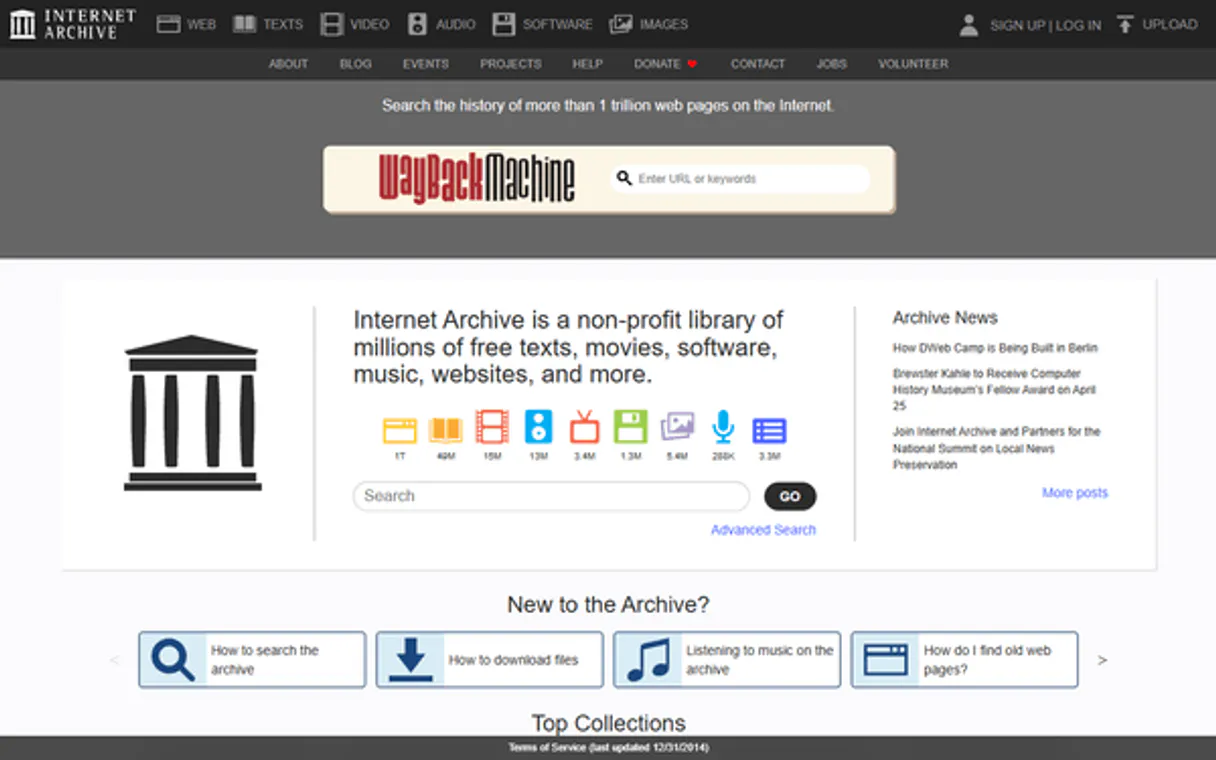
Independent Platform Disclaimer: Vinkius is an independent platform and is not affiliated with, endorsed by, sponsored by, verified by, or otherwise authorized by Internet Archive Metadata. All third-party trademarks, logos, and brand names are the property of their respective owners. Their use on this website is strictly for informational purposes to identify service compatibility and interoperability.
VINKIUS INFRASTRUCTURE
Cloud Hosted
Managed infra
V8 Isolated
Sandboxed per request
Zero-Trust Proxy
No stored credentials
DLP Enforced
Policy on every call
GDPR Compliant
EU data residency
Token Compression
~60% cost reduction
Works with Claude, ChatGPT, Cursor, and more
The Model Context Protocol standardizes how applications expose capabilities to LLMs. Instead of operating in isolation, your AI gains direct access to external platforms, live data, and real-world actions through secure, standardized connections.
This server provides 10 capabilities that interface natively with Claude, ChatGPT, Cursor, and any MCP client. No middleware. No custom integration required.
Available Capabilities
Trying to build a data sheet from fragmented web pages.
Today, gathering data on an archive item means opening three tabs: the main info page, the download list, and the history log. You copy the title from one place, the file formats from another, and the usage stats from a third. You spend twenty minutes just stitching the record together.
With this MCP server, you ask your agent for the item's full record. It runs the necessary tools and returns a single, clean payload containing the title, every file format, the usage counts, and the full metadata structure. It's all in one go.
Internet Archive Metadata MCP Server: Get the full record.
Forget manually checking the item's file section for PDFs, EPUBs, and MP3s. You just run `get_files`. The agent gives you a structured list of every asset and its format, no guessing required.
Now you can programmatically confirm every single available file type and size. It's a massive time saver that lets your agent treat the archive like a clean, structured database.
Common Questions About Internet Archive Metadata MCP
How do I use get_metadata to get all the information? +
You must provide the item's unique identifier. This tool returns the full data set, including the title, creator, date, description, and subjects. You'll get a comprehensive view of the item's core data.
What does get_files do for the item? +
It lists every downloadable file associated with the item. The response includes the file format (PDF, EPUB, MP3) and the specific file size, so you know exactly what you're dealing with.
Can I check the history using get_history? +
Yes, get_history retrieves a chronological log of all changes made to the item. You can track when metadata was updated or if files were added.
Is get_metadata_only good enough for quick checks? +
It's fine for quick checks. get_metadata_only returns only the basic fields, skipping the file lists and reviews. Use it when you just need the item's title and creator.
How do I find out the item's categories? +
Use get_parents or get_collections. get_parents shows the high-level categorization structure, while get_collections shows specific groups the item belongs to.
How do I use get_stats to measure an item's popularity? +
The get_stats tool returns access statistics for an item. It shows how often the item is downloaded or accessed, letting you measure its popularity and reach within the archive.
What is the difference between get_metadata and get_metadata_only? +
Use get_metadata_only for fast queries that only need basic item fields. get_metadata pulls everything—title, creator, reviews, and stats—providing a full, comprehensive record.
If I need to see all available formats, should I use get_files or get_derivatives? +
get_files lists every downloadable format from the original uploads (like PDF or EPUB). get_derivatives shows auto-generated files, such as thumbnails or OCR text, processed by the system.
How do I get the identifier for an item? +
The identifier is the unique string in the item's URL. For example, from https://archive.org/details/big_buck_bunny, the identifier is "big_buck_bunny". You can also get identifiers from search results using the ia-search-mcp server.
What file formats are typically available? +
It depends on the item type. Texts often have PDF, EPUB, MOBI, plain text, and Daisy formats. Movies have MP4, OGV, and archival formats. Audio has MP3, OGG, and FLAC. The get_files tool shows all available formats for each item.
Can I see who reviewed an item? +
Yes! Use the get_reviews tool. It returns the reviewer's username, star rating (1-5), review text, and review date. Not all items have reviews — community-contributed items tend to have more user feedback.
Use it with your favorite AI tools
Connect this server to Cursor, Claude, VS Code, and more.
More in this category

Calibre-Web
Browse and manage your Calibre-Web library via OPDS and Kobo sync — access catalogs, specific shelves, and device metadata directly.
Bot9
Manage your AI agents via Bot9 — orchestrate bots, train them, and automate conversations directly from any AI agent.

GitBook
Manage technical documentation via GitBook — list organizations and spaces, handle document pages, search content, and audit collections directly from any AI agent.
You might also like

Eurostat Demographics — EU Population & Labor
EU demographics and labor market: population by age and sex, monthly unemployment rates, employment data, immigration by citizenship, life expectancy, and minimum wages for all 27 EU member states.

GoHighLevel
Equip your AI agent with direct access to GoHighLevel — manage contacts, pipelines, and campaigns without opening the CRM dashboard.

Wrike
Collaborative project management to manage tasks, projects, and team workflows with AI.