
Jibble MCP. Automate HR and Workforce Reporting
 Gemini
 Works with every AI agent you already use
…and any MCP-compatible client









Just plug in your AI agents and start using Vinkius.
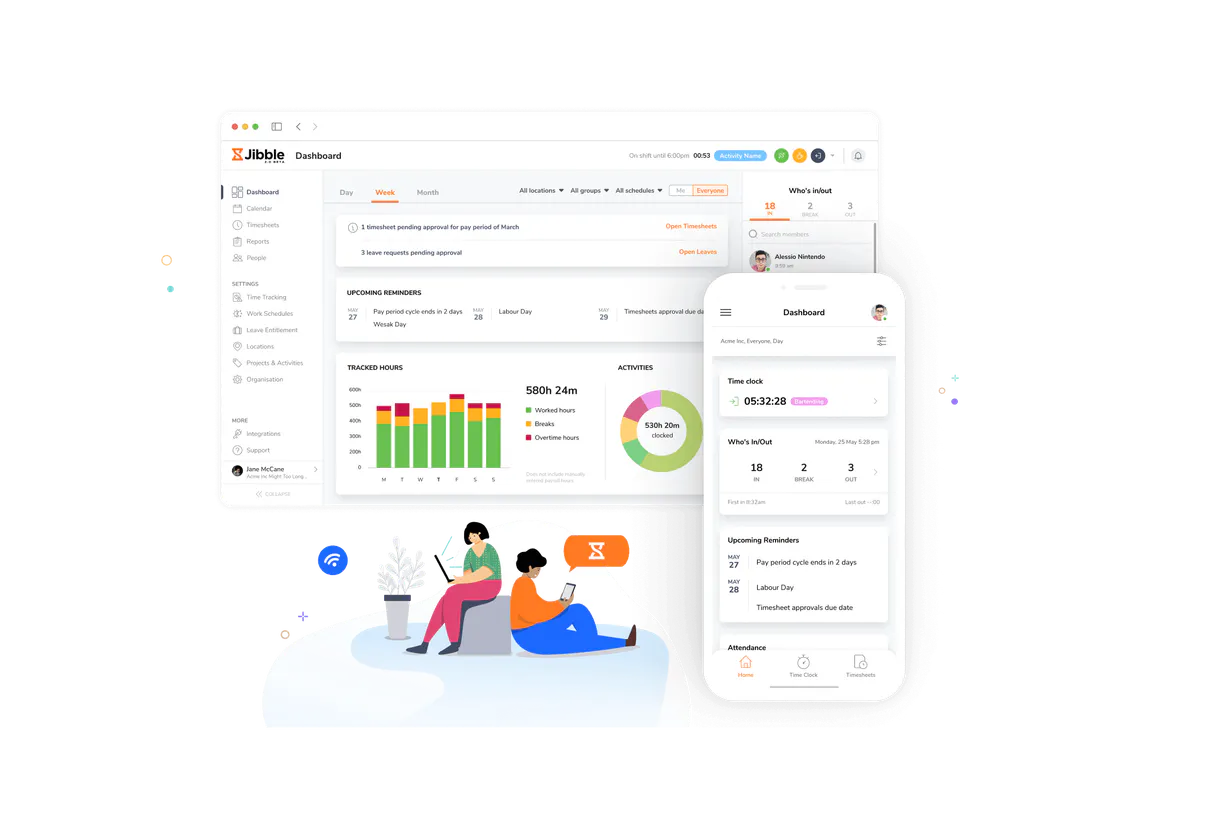
Jibble MCP Server tracks time, attendance, and projects. Your AI client uses this to pull workforce data, check who worked where, and analyze time logs against projects.
It gives you API access to list people, projects, clients, and detailed time entries, making manual payroll and resource allocation tasks automatic.
What your AI agents can do
Get organization
Retrieves overall configuration details for your entire Jibble account.
Get person
Gets detailed information for a single employee based on their ID.
Get time entry
Fetches specific location data, activity notes, and device details for one employee time log.
You can retrieve location data, activity notes, and device information for a single, specific employee time log.
The server lists all people in your organization, providing their names, emails, and internal IDs for use in other reports.
You can list all configured groups, locations, activities, and projects to understand the full scope of your organization.
The server retrieves high-level configuration details for the entire organization account.
You can list every time entry and get basic information like employee IDs and total durations.
Ask AI about this MCP
Supported MCP Clients
Gemini Waiting for input…
Jibble MCP Server: 10 Tools for Workforce Reporting
Analyze time entries, track activities, and audit workforce distribution by connecting your AI client to Jibble's full suite of HR tools.
019d75bcget organization
Retrieves overall configuration details for your entire Jibble account.
019d75bcget person
Gets detailed information for a single employee based on their ID.
019d75bcget time entry
Fetches specific location data, activity notes, and device details for one employee time log.
019d75bclist activities
Lists every activity type (like 'Meeting' or 'Break') that employees can select when clocking in.
019d75bclist clients
Lists all external clients configured in the system for billing purposes.
019d75bclist groups
Lists all defined organizational groups, such as 'Sales Team' or 'Remote Workers', for reporting.
019d75bclist locations
Lists all physical sites or addresses where employees are allowed to clock in.
019d75bclist people
Lists all people in your organization, providing names, emails, and internal IDs.
019d75bclist projects
Lists all active projects that employees can assign time to.
019d75bclist time entries
Lists all recorded time entries across the organization, including IDs and durations.
Choose How to Get Started
Build a custom MCP for your own tools, or connect a ready-made integration from our catalog.
Build Your Own
Turn any API into an MCP. Import a spec, define Agent Skills, or deploy with MCPFusion.
- Import from OpenAPI, Swagger, or YAML specs
- Create Agent Skills with progressive disclosure
- Deploy to edge with MCPFusion framework
- Built in DLP, auth, and compliance on every call
- Real time usage dashboard and cost metering
- Publish to catalog or keep private
Make Your AI Do More
Start with Jibble, then connect any of our 4,700+ other servers whenever your AI needs more. One click, no limits.
- Use this MCP plus 4,700+ others, all in one place
- Add new capabilities to your AI anytime you want
- Every connection is secured and compliant automatically
- Track usage and costs across all your servers
- Works with Claude, ChatGPT, Cursor, and more
- New servers added to the catalog every week
What you can do with this MCP connector
This server connects your AI client to Jibble, giving your agent direct access to all your workforce data. You use it to automate reports and track time across projects without ever logging into Jibble. You can pull everything from basic people lists to detailed time logs and project structures.
list_people lets your agent pull a list of every person in your company, giving you their names, emails, and internal IDs.
list_projects gives you a list of every active project you're tracking time against.
list_clients lists every external client you've set up for billing.
list_groups lists all defined organizational groups, like 'Sales Team' or 'Remote Workers', which you can use for reporting.
list_locations lists every physical site or address where employees are allowed to clock in.
list_activities lists every activity type—like 'Meeting' or 'Break'—that employees can select when they clock in.
When you need a snapshot of your whole company, get_organization pulls high-level configuration details for your entire Jibble account.
To get specific people data, use get_person to pull all the details for a single employee based on their ID.
Tracking time is what it does best. list_time_entries lists every time entry across the whole organization, giving you basic IDs and total durations for each log.
get_time_entry lets you audit a specific work time by pulling the location data, activity notes, and device details for one employee log.
Finally, you can map your whole operation. list_people identifies all workforce members; list_groups maps your team structure; list_locations tells you where they work; list_activities tracks what they're doing; and list_projects defines what they're billing against. You just run the tools, and your agent does the heavy lifting.
How Jibble MCP Works
- 1 Your AI client tells the server exactly what data it needs—for example, 'I need the names of all employees who worked on Project X.'
- 2 The server calls the appropriate tool (like
list_peopleorlist_projects) and passes the necessary parameters to the Jibble API. - 3 The server takes the raw data, structures it, and sends back a clear JSON list that your AI client can immediately use to answer the prompt or continue the workflow.
The bottom line is, your AI client treats Jibble's backend like a database, allowing it to run complex HR queries using simple conversation.
Who Is Jibble MCP For?
Operations managers and HR analysts need this. If you spend time exporting CSVs from Jibble just to cross-reference who worked on which project or where they clocked in, this saves you hours of manual cleanup. This is for people who need structured data to run payroll or audit resource allocation, not just basic report viewing.
Uses list_people and list_time_entries to build workforce reports and verify employee data before payroll runs.
Runs list_projects and list_clients to build billable hour reports and track resource utilization across multiple jobs.
Calls list_groups and list_locations to verify organizational structure and calculate departmental costs for budgeting.
Uses get_time_entry and list_activities to audit specific employee time logs for compliance or error checking.
What Changes When You Connect
- Streamline Payroll Audits: Use
list_time_entriesandlist_peopletogether. Instead of manually pulling logs and cross-referencing names, your agent gets a clean list of all work hours and the associated employee IDs immediately. - Track Billable Hours: Combine
list_clientsandlist_projects. Your agent can pull all active projects and the associated clients, allowing you to build accurate, client-specific billing reports instantly. - Deep Dive Compliance Checks: If you suspect a time log error, use
get_time_entry. This tool doesn't just give the time; it provides location data, activity notes, and device info, which is critical for auditing. - Understand Team Structure: Use
list_groupsandlist_locations. You can map out which teams are assigned to which physical sites, giving you a clear picture of your organizational distribution. - Know Your Workforce: Start with
list_people. This provides the foundational list of names, emails, and IDs, which you then feed intolist_time_entriesorget_personto build out any subsequent report. - Understand Tasks: Use
list_activitiesto see the full menu of clock-in options. This context is useful when building workflows that need to know which task categories are even available.
Real-World Use Cases
Running the Monthly Payroll Report
The HR manager needs to verify total hours worked by every employee. They ask their agent to 'Get all time entries for the last month.' The agent calls list_time_entries and then uses list_people to attach the full names to the raw IDs, generating a clean, audit-ready report.
Client Billing Dispute Investigation
A client disputes the hours charged for 'Project Alpha.' The Project Manager asks the agent to check the logs. The agent calls list_projects to confirm the project ID, then uses get_time_entry to pull the specific notes and location data for the disputed time segment.
Auditing Team Deployment
The Ops Analyst needs to know if the remote team is logging time from an approved location. They call list_locations to get the approved list, and then use get_time_entry to cross-reference the location data from the actual time logs.
Onboarding New Employees
The manager needs to create a full profile for a new hire. They first call list_people to verify the internal ID, then use get_person to pull all necessary contact and profile details for the HR system.
The Tradeoffs
Trying to guess the correct IDs
Manually reading the Jibble UI and trying to copy-paste a group ID or project name into a spreadsheet, which often fails because the ID format is inconsistent.
→
Don't guess. First, run list_groups or list_projects to get the canonical list of IDs and names. Then, use those exact IDs when querying specific data with tools like list_time_entries.
Asking for 'all data' in one go
A prompt like 'Give me everything about time tracking' leads to an unmanageable data dump that is impossible for the agent to parse into a useful report.
→
Break it down. Start with list_people to define the scope, then use list_time_entries to get the raw data, and finally, use list_activities to categorize the entries. Layer the calls.
Ignoring the project context
Pulling a list of time entries without knowing which project or client they belong to, leaving the data useless for billing or resource planning.
→
Always anchor your query. Start by calling list_projects or list_clients first. This gives you the context needed to narrow down your search using list_time_entries.
When It Fits, When It Doesn't
Use this server if your primary bottleneck is transforming raw, siloed workforce data (names, logs, projects) into structured, actionable reports. You need the capability to query specific data points—like a single time entry's location—and combine that with large lists (like all people or all projects).
Don't use this if your goal is simple data visualization (i.e., building a dashboard). This is an API data retrieval layer, not a charting tool. If you only need to know 'how many people are logged in right now,' you might use a simpler, real-time webhook or dashboard connection instead. This server is for deep, back-end data processing and compliance checks. When you need to audit who, what, and when, this is the tool.
Independent Platform Disclaimer: Vinkius is an independent platform and is not affiliated with, endorsed by, sponsored by, verified by, or otherwise authorized by Jibble. All third-party trademarks, logos, and brand names are the property of their respective owners. Their use on this website is strictly for informational purposes to identify service compatibility and interoperability.
VINKIUS INFRASTRUCTURE
Cloud Hosted
Managed infra
V8 Isolated
Sandboxed per request
Zero-Trust Proxy
No stored credentials
DLP Enforced
Policy on every call
GDPR Compliant
EU data residency
Token Compression
~60% cost reduction
Works with Claude, ChatGPT, Cursor, and more
The Model Context Protocol standardizes how applications expose capabilities to LLMs. Instead of operating in isolation, your AI gains direct access to external platforms, live data, and real-world actions through secure, standardized connections.
This server provides 10 capabilities that interface natively with Claude, ChatGPT, Cursor, and any MCP client. No middleware. No custom integration required.
Available Capabilities
Pulling workforce data used to take hours of clicks.
Today, if you need to check who worked on a specific project, you have to jump between the main time dashboard, the employee roster, and the project settings page. You're copying IDs, filtering by dates, and then exporting three separate, messy CSV files. Then you open Excel and spend an hour trying to merge them and clean up the column headers.
With the Jibble MCP Server, you just tell your agent the goal. It calls `list_projects` for the context, then `list_time_entries` for the data, and finally, it uses `list_people` to fill in the names. The result is a single, clean JSON object ready for your report.
Jibble MCP Server: Full visibility into employee activity.
Before, auditing a single time entry meant drilling down into a specific user's profile, checking the activity notes, and verifying the device used. It was a tedious, multi-step process just to answer, 'Was this logged correctly?'
Now, your agent calls `get_time_entry` with the ID. It returns all the necessary data—location, notes, device info—in one structured block. You get the full audit trail, instantly.
Common Questions About Jibble MCP
How do I use the `list_people` tool in Jibble MCP Server? +
You call list_people with no parameters to get a full list of all employees. This list provides the internal IDs, names, and emails you need to reference when querying other data like time logs.
Does `get_time_entry` provide location data? +
Yes, get_time_entry returns location data, activity notes, and associated device information. This is essential for verifying where and how a specific time log was created.
Can I list all active projects using the `list_projects` tool? +
Yes, running list_projects provides a complete list of all configured projects in your Jibble account, giving you the names and IDs needed for time breakdown reports.
What is the difference between `list_time_entries` and `list_people`? +
list_people gives you a list of who is in the organization. list_time_entries gives you a list of recorded work periods, including who worked and for how long.
How do I use `get_organization` to check account setup? +
The get_organization tool retrieves core details for your account. You can use this to verify general configuration, like the name or billing status, before running other time tracking queries.
Does `get_person` provide enough detail for payroll reporting? +
Yes, get_person provides names, emails, and internal IDs. These are the key identifiers you need to pull individual records and compile accurate payroll reports.
How can I find out what categories are available using `list_activities`? +
The list_activities tool shows every activity type configured in Jibble. This list includes options like 'Meeting' or 'Development,' letting you guide your AI agent on how to categorize time.
What data does `list_groups` return for workforce analysis? +
list_groups returns all configured work groups, such as 'Sales Team' or 'Remote Workers.' This allows your AI client to group data and run performance reports across specific teams.
How do I get Jibble API credentials? +
Log in to your Jibble account, navigate to Organization Settings > API, and generate a new Client ID and Client Secret.
Does it support activities and projects? +
Yes, you can list and retrieve data for both activities and projects using this MCP.
Can I see real-time attendance? +
Yes, the list_time_entries tool provides access to current and historical time tracking data.
Use it with your favorite AI tools
Connect this server to Cursor, Claude, VS Code, and more.
More in this category

Five9 QM
Manage agent evaluations, review recorded interactions, and track quality metrics via AI agents with Five9 QM.

Learn Amp
Combine learning, engagement, and performance in one people development platform that helps employees grow and organizations thrive.

eCompliance
Equip your AI agent to manage safety incidents, track inspections, and monitor action items via the eCompliance API.
You might also like

Mistral AI (Frontier LLMs & Embeddings)
Manage AI inference via Mistral — execute chat completions, generate RAG embeddings, and audit frontier models.
DoorLoop
Manage rental properties, collect rent online, screen tenants, and handle maintenance requests from one landlord platform.

Omie ERP
Manage your Omie ERP data via API — list clients, products, sales orders, financial accounts, and inventory directly from any AI agent.