
journy.io MCP. See account health and user behavior data.
 Gemini
 Works with every AI agent you already use
…and any MCP-compatible client









Just plug in your AI agents and start using Vinkius.
journy.io MCP Server manages SaaS growth, user profiles, and account health. It lets your AI client list all users, track their specific events, view account status, and analyze defined growth segments using the journy.io API.
Use it to build automated customer success workflows and measure user behavior against defined business goals.
What your AI agents can do
Get account
Retrieves the status and lifecycle details for one specific business account.
Get me
Gets details about your own authenticated API identity.
Get user
Retrieves a specific user's full profile, including custom properties and event history.
Get the full status, health metrics, and lifecycle details for a specific company account.
Retrieve a user's full profile, including custom properties and a summary of their event history.
List and analyze pre-defined audience segments, such as 'Power Users' or 'Churn Risk'.
List every recorded user event—like 'Logged In' or 'Plan Upgraded'—to understand usage patterns.
List and check progress against configured business goals, like 'User Activation'.
List all available metadata fields (properties) to understand what data can be collected on users and accounts.
Ask AI about this MCP
Supported MCP Clients
Gemini Waiting for input…
019d75beget account
Retrieves the status and lifecycle details for one specific business account.
019d75beget me
Gets details about your own authenticated API identity.
019d75beget user
Retrieves a specific user's full profile, including custom properties and event history.
019d75belist accounts
Lists all company accounts tracked in journy.io.
019d75belist campaigns
Lists every marketing campaign that has been tracked.
019d75belist events
Lists all tracked user behavior events, like logins or upgrades.
019d75belist goals
Lists all defined growth goals for the platform.
019d75belist properties
Lists all available metadata fields for users and accounts.
019d75belist segments
Lists all defined audience groups, such as 'Churn Risk'.
019d75belist users
Lists all users tracked in journy.io, providing IDs, names, and health scores.
Choose How to Get Started
Build a custom MCP for your own tools, or connect a ready-made integration from our catalog.
Build Your Own
Turn any API into an MCP. Import a spec, define Agent Skills, or deploy with MCPFusion.
- Import from OpenAPI, Swagger, or YAML specs
- Create Agent Skills with progressive disclosure
- Deploy to edge with MCPFusion framework
- Built in DLP, auth, and compliance on every call
- Real time usage dashboard and cost metering
- Publish to catalog or keep private
Make Your AI Do More
Start with journy.io, then connect any of our 4,700+ other servers whenever your AI needs more. One click, no limits.
- Use this MCP plus 4,700+ others, all in one place
- Add new capabilities to your AI anytime you want
- Every connection is secured and compliant automatically
- Track usage and costs across all your servers
- Works with Claude, ChatGPT, Cursor, and more
- New servers added to the catalog every week
What you can do with this MCP connector
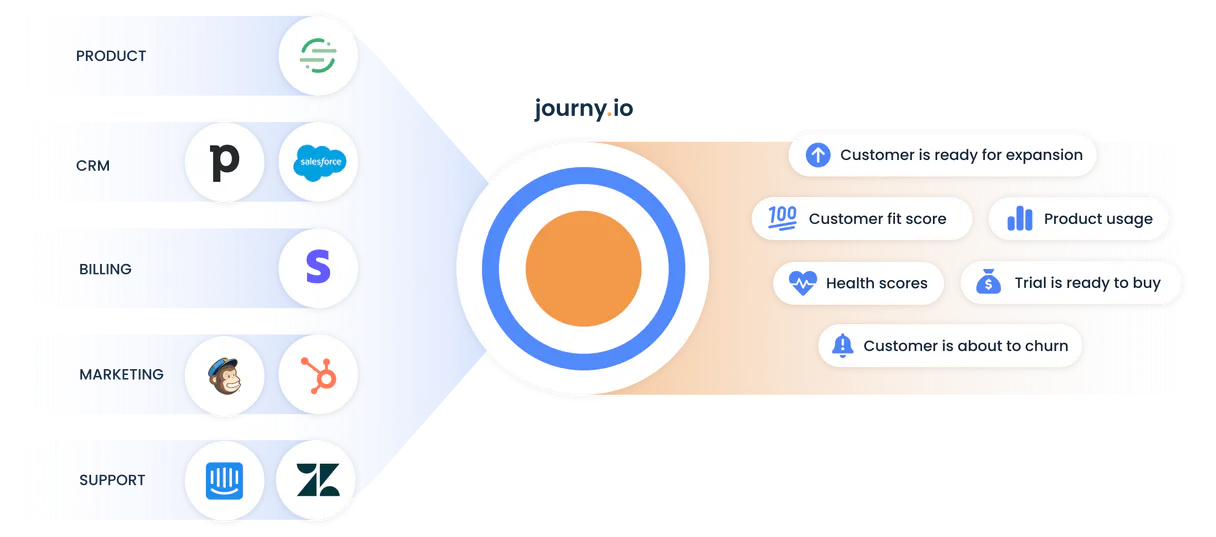
journy.io MCP Server connects your AI client directly to the journy.io API. You'll use it to read core customer intelligence—everything from a user's sign-up event to a company's current account health score. You'll build automated customer success workflows and measure user behavior against defined business goals.
Analyze Account Statusget_account retrieves the full status and lifecycle details for a single business account. list_accounts lists every company account tracked in journy.io.
Profile Individual Usersget_user retrieves a specific user's full profile, including custom properties and event history. list_users lists all users tracked in journy.io, providing IDs, names, and health scores.
Map Audience Cohortslist_segments lists all defined audience groups, like 'Churn Risk' or 'Power Users'. list_properties lists all available metadata fields for users and accounts, letting you see what data you can collect. list_goals lists all defined growth goals for the platform, like 'User Activation'.
Track Behavior Eventslist_events lists every recorded user event, such as 'Logged In' or 'Plan Upgraded', letting you understand usage patterns. list_campaigns lists all tracked marketing campaigns.
Assess Growth Progresslist_goals lists all defined growth goals for the platform, letting you check progress against configured business targets. get_me gets details about your own authenticated API identity.
How journy.io MCP Works
- 1 Your AI client first identifies the core data needed (e.g., 'I need to know the health of our high-risk users').
- 2 It calls a specific tool, like
list_segmentsto find 'Churn Risk', and then useslist_usersto get the IDs of those users. - 3 Finally, it uses
get_userfor each ID to pull the detailed profile and event history needed to write a report.
The bottom line is that your agent runs multi-step queries across distinct data silos (users, accounts, events) to build a complete picture of customer health.
Who Is journy.io MCP For?
This is for the Customer Success Manager who needs to proactively flag at-risk accounts before they churn. It's for the Growth Marketing Analyst who needs to tie campaign performance to specific user actions. It’s for the Product Manager who needs to verify if a new feature is actually driving desired user behavior.
Uses get_user and list_segments to identify key customers who haven't logged in recently or whose accounts are flagged as high risk.
Uses list_campaigns and list_events to measure which marketing efforts correlate directly with high-value user actions.
Uses list_goals and list_properties to validate if the product is meeting its design objectives and if the right data points are being collected.
What Changes When You Connect
- Identify at-risk customers: Use
list_segmentsandget_userto pull the profiles of users flagged as 'Churn Risk,' letting you intervene before they leave. - Build marketing attribution models: Call
list_campaignsand thenlist_eventsto see exactly which campaigns drive high-value actions like 'Plan Upgraded.' - Validate product data collection: Use
list_propertiesto check what metadata is available. This prevents your agent from asking for data points that don't exist. - Get a full picture of the company: Run
list_accountsto list all companies, then useget_accountto get the detailed health status for a specific one. - Measure true product adoption: Use
list_goalsto track progress toward business objectives, linking user actions to defined metrics. - Automate user identification: Start with
list_usersto get a master list of IDs, then useget_userto pull deep, actionable intelligence on any individual.
Real-World Use Cases
Auditing a high-churn account.
A CSM needs to understand why Account ID '123' is struggling. They ask their agent to use list_accounts first, then get_account('123'). Next, the agent uses get_user to pull the profile of the main contact, and finally runs list_events to see what the user did last week. The agent combines all this data into a single summary for the CSM.
Determining campaign effectiveness.
The marketing team wants to know if the Q3 campaign was good. They prompt the agent to use list_campaigns to get all names. Then, they ask the agent to use list_events and filter the results by the campaign ID, showing only events like 'Signed Up' or 'Logged In'. This links marketing spend directly to early user activity.
Building a user segmentation model.
A data scientist needs to find all 'Power Users'. They ask the agent to use list_segments to confirm the segment exists. Then, they use list_users and filter by the segment criteria, giving them a clean list of IDs ready for reporting.
Checking for missing metadata.
A developer builds a new integration and needs to know what fields are available. They ask the agent to run list_properties. The agent returns a full list of available properties, allowing the developer to correctly structure their next API call without guessing.
The Tradeoffs
Asking for everything at once
I need the user data, the account data, the events, the goals, and the segments for the last month. Give me everything.
→
Break it down. First, use list_accounts to get the target company IDs. Then, for each ID, use get_account. Finally, use list_users and get_user to pull the people associated with that account.
Missing context for user actions
The user seems inactive. Tell me why.
→
You need context. First, use list_users to find the user ID. Then, use get_user to pull the event history summary. If that's insufficient, run list_events to get the raw, chronological list of actions.
Over-relying on a single list call
Just run list_users and I'll figure it out.
→
Don't stop at a list. If you need deep details on a specific user, use get_user. If you need a list of all users, use list_users. Use both when you need a full scope.
When It Fits, When It Doesn't
Use this if you need to build workflows that move beyond simple data retrieval. You need to link a user's actions (events) to a business objective (goals) and track that against a company's overall status (account). If your task is 'Tell me the status of X,' use get_account. If your task is 'Show me what X did,' use get_user. If you need to know what data is available to build the report, start with list_properties or list_segments. Don't use this if you only need to check your API access; use get_me for that. It's a data backbone, not a single dashboard view.
Independent Platform Disclaimer: Vinkius is an independent platform and is not affiliated with, endorsed by, sponsored by, verified by, or otherwise authorized by journy.io. All third-party trademarks, logos, and brand names are the property of their respective owners. Their use on this website is strictly for informational purposes to identify service compatibility and interoperability.
VINKIUS INFRASTRUCTURE
Cloud Hosted
Managed infra
V8 Isolated
Sandboxed per request
Zero-Trust Proxy
No stored credentials
DLP Enforced
Policy on every call
GDPR Compliant
EU data residency
Token Compression
~60% cost reduction
Works with Claude, ChatGPT, Cursor, and more
The Model Context Protocol standardizes how applications expose capabilities to LLMs. Instead of operating in isolation, your AI gains direct access to external platforms, live data, and real-world actions through secure, standardized connections.
This server provides 10 capabilities that interface natively with Claude, ChatGPT, Cursor, and any MCP client. No middleware. No custom integration required.
Available Capabilities
Manually compiling user health reports is a click-heavy nightmare.
Right now, figuring out a user's true health requires hopping between the user dashboard, the event log, and the account overview. You export the list of users, open the account tab to get the health score, and then manually cross-reference the event log to see if they used the new feature. It's a dozen tabs and three spreadsheets.
With the journy.io MCP Server, your agent pulls all that data in one go. You ask, 'What is the health of our top 5 accounts?' and the agent runs `list_accounts` and `get_account` for each one, delivering a synthesized report instantly.
journy.io MCP Server: Get the full story on user behavior.
Before this server, checking a user's activity meant running multiple queries: one for their profile, one for their custom properties, and another for every event they triggered. You were always missing the connection between the raw event and the user's defined segment.
Now, your agent combines `get_user` with `list_segments`. You don't just get a list of events; you get the *meaning* of those events within the context of their growth goals. It's the difference between data and insight.
Common Questions About journy.io MCP
How do I use the `get_user` tool? +
Use get_user by providing the specific user ID. It pulls the user's full profile, including custom properties and a summary of their activity, which is ideal for deep analysis.
What is the difference between `list_users` and `get_user`? +
list_users returns a summary list of all users (IDs, names, health scores). get_user requires a specific ID and returns the detailed profile, event history, and custom data for only that user.
Which tool should I use to check account health? +
Use get_account to check the detailed health metrics and lifecycle status of a specific company account. If you need a list of all accounts, run list_accounts first.
How do I check what kinds of data are available? +
Run list_properties to get a full list of metadata fields (properties) available for users and accounts. This tells you what data you can ask for.
Can I see what campaigns are driving users? +
Use list_campaigns to list all campaigns, then use list_events and filter by the campaign name to see which events were triggered by that marketing effort.
How do I use `list_segments` to find targeted groups? +
Use list_segments to see all defined audience groups. This lets your agent identify specific user cohorts, like 'Churn Risk' or 'Power Users', for targeted marketing actions.
What tool should I use to see what data properties are available for users and accounts? +
The list_properties tool lists all metadata available for users and accounts. This tells your AI client exactly what properties—like 'industry' or 'setup_wizard_completed'—it can use for filtering or analysis.
How do I verify my connection identity using the tools? +
Run get_me to get details about your authenticated API identity. This confirms your connection is working and provides system-level details for security checks.
How do I get journy.io API credentials? +
Log in to your journy.io account, navigate to Settings > API, and find your API Key.
Can I see user properties? +
Yes, the list_properties and get_user tools allow you to retrieve all data points associated with your tracked users.
Does it support event tracking? +
Yes, you can list tracked events using the list_events tool to monitor user interactions.
Use it with your favorite AI tools
Connect this server to Cursor, Claude, VS Code, and more.
More in this category

Weimob / 微盟
Leading E-commerce and marketing SaaS platform in China — manage products, orders, and members via AI.

Typeform
Create beautifully designed forms and surveys that ask one question at a time and get dramatically higher completion rates.
Lemlist
Equip your AI agent with direct access to Lemlist — manage cold email campaigns, track lead engagement, and automate outreach without opening the Lemlist dashboard.
You might also like
Mailshake
Manage cold outreach campaigns, leads, and prospects via the Mailshake REST API.
Aspose.Words
Generate, convert, and manipulate Word documents programmatically with enterprise-grade document processing capabilities.

Mapbox
Geocode addresses, get directions, calculate distances and generate maps with Mapbox's location platform.