
Little Green Light MCP. Automate Donor Data Entry & Fundraising Audits
 Gemini
 Works with every AI agent you already use
…and any MCP-compatible client









Just plug in your AI agents and start using Vinkius.
Little Green Light connects your AI agent directly to your donor database. It lets you query and update constituent profiles, record new gifts, and audit active fundraising appeals using simple conversation.
You don't need to build a custom dashboard; you just ask for the data.
What your AI agents can do
Create new donor
Creates an entirely new donor profile in the system using provided names or organization names.
Get donor details
Retrieves all specific information for a known constituent ID.
Get gift details
Pulls detailed records about one specific gift transaction.
Retrieve full records for existing donors or list every constituent in your database.
Submit new donation amounts and gift dates, linking the money to a specific donor ID.
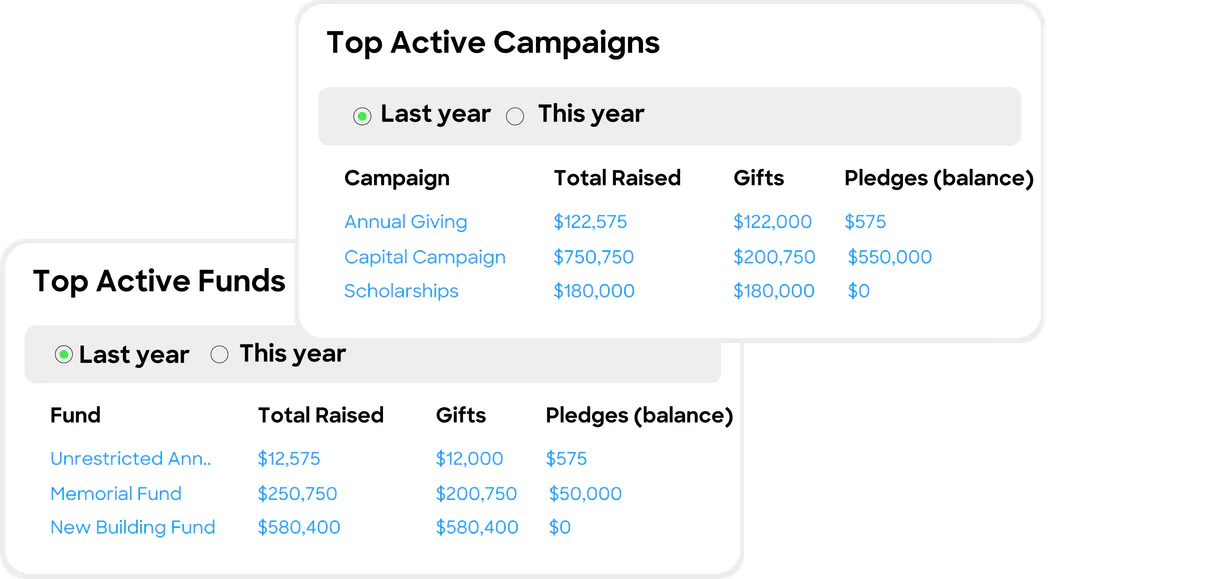
List all ongoing fundraising appeals, campaigns, or available organizational funds for auditing.
Add entirely new donor profiles or organization records to the system using key details like name.
Ask AI about this MCP
Supported MCP Clients
Gemini Waiting for input…
Little Green Light MCP Server: 9 Tools for Fundraising
Use these tools to interact with your Little Green Light database. Your agent can create donors, list appeals, record gifts, and manage profiles directly through conversation.
019d75c8create new donor
Creates an entirely new donor profile in the system using provided names or organization names.
019d75c8get donor details
Retrieves all specific information for a known constituent ID.
019d75c8get gift details
Pulls detailed records about one specific gift transaction.
019d75c8list donation gifts
Generates a list of multiple recorded gifts and donations within the system.
019d75c8list donor constituents
Retrieves an exhaustive list of all registered donor profiles in the database.
019d75c8list fundraising appeals
Shows a list of all active fundraising appeals currently running.
019d75c8list fundraising campaigns
Lists all general fundraising campaigns managed by the organization.
019d75c8list organizational funds
Provides a list of funds available to the organization for financial tracking.
019d75c8record new donation
Processes and records a new donation gift, requiring a donor ID, amount, and date.
Choose How to Get Started
Build a custom MCP for your own tools, or connect a ready-made integration from our catalog.
Build Your Own
Turn any API into an MCP. Import a spec, define Agent Skills, or deploy with MCPFusion.
- Import from OpenAPI, Swagger, or YAML specs
- Create Agent Skills with progressive disclosure
- Deploy to edge with MCPFusion framework
- Built in DLP, auth, and compliance on every call
- Real time usage dashboard and cost metering
- Publish to catalog or keep private
Make Your AI Do More
Start with Little Green Light, then connect any of our 4,700+ other servers whenever your AI needs more. One click, no limits.
- Use this MCP plus 4,700+ others, all in one place
- Add new capabilities to your AI anytime you want
- Every connection is secured and compliant automatically
- Track usage and costs across all your servers
- Works with Claude, ChatGPT, Cursor, and more
- New servers added to the catalog every week
What you can do with this MCP connector
Little Green Light connects your AI agent directly to your donor database. Forget logging into clunky dashboards or running reports manually every time you need data. Your agent handles the heavy lifting; you just ask for what you want, and it gets it done using natural language. This server lets you manage everything from finding a donor's profile to recording a new gift in seconds.
People Management: You can check out your entire roster of supporters using list_donor_constituents, which pulls an exhaustive list of every registered person or organization in the system. If you know who you're looking for, calling get_donor_details retrieves all specific information attached to a known constituent ID. Need to track someone who just showed up? Use create_new_donor to build out an entirely new profile using names or organization details.
Transaction Tracking: When it comes to money, your agent has full visibility into the gift lifecycle. You can generate a list of multiple recorded donations and gifts by calling list_donation_gifts. If you need the deep dive on just one specific payment, get_gift_details pulls up every record about that single transaction.
To process incoming funds, you use record_new_donation, which requires you to give it a donor ID, the amount, and the date of the gift. This links new money right into the system.
System Auditing & Oversight: The server doesn't just track donors; it manages your whole fundraising structure. You can check all active appeals with list_fundraising_appeals or look at general efforts by calling list_fundraising_campaigns. Need to see what funds the organization has available for accounting? Use list_organizational_funds to get a full list of those accounts.
If you need to know about all the money being tracked, this system keeps records for it.
Basically, your agent lets you query and update donor profiles, record gifts, and audit every single fundraising appeal using nothing but plain conversation. You don't have to build a custom dashboard; you just speak up and get the data.
How Little Green Light MCP Works
- 1 First, subscribe to the Little Green Light server and provide your API Key (Bearer Token).
- 2 Next, tell your AI client what you need. For example: 'List all donors who gave over $500 last year.'
- 3 The agent runs the necessary tools—like
list_donor_constituentsorlist_donation_gifts—and gives you a clean answer in chat.
The bottom line is, your AI client handles all the API calls; you just talk to it.
Who Is Little Green Light MCP For?
You're here if you spend too much time jumping between a CRM dashboard and an Excel spreadsheet. This is for development directors who need quick spending reports, non-profit admins who are tired of manual data entry, or tech teams building custom donor portals that need reliable financial hooks.
Uses the agent to pull lists of high-value donors (list_donor_constituents) and check if they've been updated recently.
Records immediate donations using record_new_donation without leaving their primary communication tool.
Checks the status of current appeals and campaigns by calling list_fundraising_appeals before sending out a mailing.
What Changes When You Connect
- Stop manually compiling donor lists. Use
list_donor_constituentsto instantly get a full roster of donors, saving time compared to exporting and cleaning data in Excel. - Never lose track of a gift again. Call
record_new_donationwith just the constituent ID, amount, and date. The system handles all the complex ledger updates. - Quickly audit your efforts by listing appeals. Use
list_fundraising_appealsto see exactly which campaigns are currently active, ensuring your communications hit the right target. - Build profiles efficiently. Need a new donor? Just call
create_new_donor. It handles the initial record creation so you don't have to manually input basic contact info. - Understand the money flow. Use
list_organizational_fundsandlist_fundraising_campaignstogether to map out your entire financial logic, something that usually takes a finance meeting.
Real-World Use Cases
Checking for Duplicate Records
A developer needs to know if John Smith already exists before creating his profile. They ask the agent: 'First, run list_donor_constituents and check for John Smith.' The agent runs the tool and immediately reports back whether the ID is present, stopping redundant work before it starts.
Processing a Walk-In Gift
A donor gives $500 cash at an event. Instead of finding a form, the admin just says: 'Record a donation of $500 for constituent ID 9876.' The agent uses record_new_donation, ensuring the gift is logged instantly with today's date.
Preparing for an Annual Report
The manager needs to report on all active money-making efforts. They ask the agent to run both list_fundraising_appeals and list_fundraising_campaigns. The agent pulls both lists, giving a complete picture of where the organization's focus is right now.
Investigating Missing Data
A board member questions why certain funds aren't being used. They prompt: 'Show all available organizational funds.' The agent runs list_organizational_funds and immediately provides the list, letting the team know what financial structures exist.
The Tradeoffs
Writing one massive prompt.
I need to find all donors who gave money last year for campaign X, and then I want to create a new profile for them if they don't exist.
→
Don't try to do it in one go. First, run list_donor_constituents to check existence. Then, use the resulting IDs and call get_gift_details or record_new_donation separately.
Forgetting required parameters.
I just need to record a donation of $100, but I forget to provide the constituent ID or the date.
→
Always check the tool requirements. When you use record_new_donation, you absolutely must include the constituent_id, the amount, and the gift date for it to work.
Over-relying on general data calls.
I just ask 'What's going on with fundraising?' and get a huge dump of unrelated campaign names.
→
Be specific. If you need appeals, use list_fundraising_appeals. If you want campaigns, call list_fundraising_campaigns to keep the data clean.
When It Fits, When It Doesn't
Use this server if your primary bottleneck is moving donor and financial data from a conversation into action. This tool stack is perfect for organizations that need real-time audit trails—like checking specific gift details (get_gift_details) or viewing who exists (list_donor_constituents).
Don't use this if you are trying to analyze unstructured documents (use an RAG/knowledge base type tool instead). Also, don't rely on it for complex financial projections; it just records transactions. If your goal is 'what should we do next?' rather than 'what did happen?', you need a dedicated analytics platform.
This server excels at the transaction level: read specific data (get_donor_details) or write new data (record_new_donation).
Independent Platform Disclaimer: Vinkius is an independent platform and is not affiliated with, endorsed by, sponsored by, verified by, or otherwise authorized by Little Green Light. All third-party trademarks, logos, and brand names are the property of their respective owners. Their use on this website is strictly for informational purposes to identify service compatibility and interoperability.
VINKIUS INFRASTRUCTURE
Cloud Hosted
Managed infra
V8 Isolated
Sandboxed per request
Zero-Trust Proxy
No stored credentials
DLP Enforced
Policy on every call
GDPR Compliant
EU data residency
Token Compression
~60% cost reduction
Works with Claude, ChatGPT, Cursor, and more
The Model Context Protocol standardizes how applications expose capabilities to LLMs. Instead of operating in isolation, your AI gains direct access to external platforms, live data, and real-world actions through secure, standardized connections.
This server provides 9 capabilities that interface natively with Claude, ChatGPT, Cursor, and any MCP client. No middleware. No custom integration required.
Available Capabilities
Tracking donor activity used to mean jumping between five different tabs.
Today, if you want a simple list of donors who gave last quarter, you open the dashboard. You filter by date range, then click 'Export CSV.' That file usually goes into Dropbox, and then someone has to clean out the names that are missing zip codes or current contact info.
With this MCP server, you just ask your agent: 'Give me a list of all constituents who gave in Q2.' The agent runs `list_donor_constituents`, filters the data live, and spits out a structured list directly into your chat. It's instant.
Little Green Light MCP Server: Record new donations instantly
Before this, processing a physical gift meant printing a form, finding the correct constituent ID in the CRM, manually entering the amount and date into three different fields, and then emailing it to accounting for confirmation.
Now, you just tell your agent: 'Record $750 for donor 4421 today.' The server calls `record_new_donation`, handles the ledger update, and confirms the record. It's done.
Common Questions About Little Green Light MCP
How do I check if a donor exists using list_donor_constituents? +
You ask your agent to run list_donor_constituents first. This gives you the master list of IDs and names, so you know exactly which constituent ID to use when recording anything.
Can I record a donation without knowing the donor's name? +
Yes, as long as you have their existing constituent ID. The record_new_donation tool requires the constituent_id, the amount, and the date. Name isn't strictly necessary for the transaction itself.
What if I need to find out how much money was raised this year? +
You should run a combination of tools: use list_fundraising_campaigns first to narrow down the scope, then check list_donation_gifts for recent activity against those campaigns.
Is getting gift details the same as listing all donations? +
No. get_gift_details pulls a deep dive into one specific transaction using an ID. list_donation_gifts, however, gives you a summary list of many recorded gifts at once.
What happens if I need to update a constituent's address after running `get_donor_details`? +
You must use the dedicated API endpoint for updates, as the current tools focus on retrieval and creation. Your agent needs explicit write permission to modify existing profiles.
How do I filter results when I run `list_fundraising_appeals` by a specific date range? +
The API accepts start and end dates as parameters, allowing you to narrow the scope. This lets your agent pull only appeals active during that time period.
When I use `record_new_donation`, do I need a donor ID or just the name? +
You must provide a valid constituent ID for the donation to attach correctly. Using the ID ensures the gift records against the right person or organization.
If my API key expires, how does it affect running `list_donor_constituents`? +
The connection fails immediately with an authentication error. You must refresh your bearer token and re-authenticate the server before running any listing commands.
How do I find my LGL API Key? +
Log in to your Little Green Light account, navigate to Settings > Integration Settings > LGL API to enable and copy your unique API key.
What fields are required to create a gift? +
You must provide a constituent_id, an amount (numerical), and a gift_date (YYYY-MM-DD).
Can I associate a gift with a specific campaign? +
Yes, when using the record_new_donation tool, you can include a campaign_id, appeal_id, or fund_id within the JSON body.
Use it with your favorite AI tools
Connect this server to Cursor, Claude, VS Code, and more.
More in this category

Simplicate
Manage your Dutch professional services firm with CRM, project management, and invoicing designed for the Benelux market.

Line-Up
Manage events, check ticket availability, and process bookings via the Line-Up API.
journy.io
Manage SaaS growth, users, and accounts via journy.io API.
You might also like

VAT Tax Validator
Ensure B2B compliance instantly. Validate European VAT numbers and global Tax IDs using strict local mathematical algorithms.

Polar
Manage digital products, subscriptions, orders and customers via Polar — create checkouts, manage discounts and track revenue from any AI agent.
Wherefour
Manage inventory, traceability, and orders with Wherefour ERP through AI.