
MotionTools MCP. Manage your entire urban logistics workflow from chat.
 Gemini
 Works with every AI agent you already use
…and any MCP-compatible client









Just plug in your AI agents and start using Vinkius.
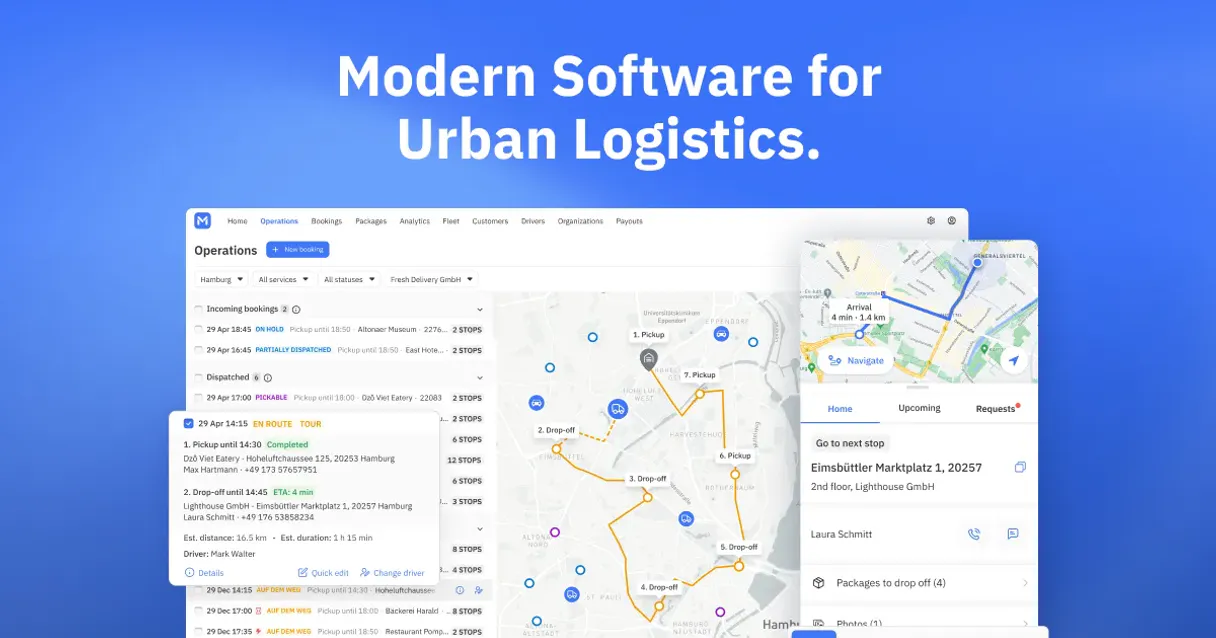
MotionTools connects your AI agent directly to your logistics API. It lets you manage fleet operations—track drivers, view service areas, list bookings, and create new deliveries—all from a single conversation.
Stop jumping between dashboards; handle all your urban logistics and dispatch tasks instantly.
What your AI agents can do
Create booking
Logs a new delivery or service appointment into your system.
Get booking
Retrieves all specific details about a single booking using its unique ID.
Get driver
Gets detailed status and assignment information for one specific driver.
You run create_booking to log a new delivery or service appointment with specific pickup and dropoff details.
You use get_booking when you need the full status, history, or metadata for a job using its unique ID.
The agent calls list_drivers to get an overview of all available fleet drivers and their current assignments.
You access list_vehicles to see every registered vehicle, noting which ones are currently assigned or free.
The agent uses list_service_areas when you need to inspect the geographic boundaries where your operations run.
Ask AI about this MCP
Supported MCP Clients
Gemini Waiting for input…
MotionTools: 10 Tools for Dispatch & Fleet Management
Use these tools to run complex logistics queries—from listing all assets to creating new delivery jobs—all through your AI agent.
019d75d9create booking
Logs a new delivery or service appointment into your system.
019d75d9get booking
Retrieves all specific details about a single booking using its unique ID.
019d75d9get driver
Gets detailed status and assignment information for one specific driver.
019d75d9get service area
Pulls metadata and current boundaries for a defined service zone.
019d75d9get vehicle
Retrieves the full profile and current status of one specific vehicle.
019d75d9list bookings
Provides an overview list of all recent or active logistics bookings in your account.
019d75d9list customers
Generates a list of every customer that has booked services through your system.
019d75d9list drivers
Lists all drivers in the fleet, showing their current status and assignments.
019d75d9list service areas
Displays a list of all active geographic service areas defined for your operations.
019d75d9list vehicles
Generates an overview of every registered vehicle in the fleet, showing their last known status.
Choose How to Get Started
Build a custom MCP for your own tools, or connect a ready-made integration from our catalog.
Build Your Own
Turn any API into an MCP. Import a spec, define Agent Skills, or deploy with MCPFusion.
- Import from OpenAPI, Swagger, or YAML specs
- Create Agent Skills with progressive disclosure
- Deploy to edge with MCPFusion framework
- Built in DLP, auth, and compliance on every call
- Real time usage dashboard and cost metering
- Publish to catalog or keep private
Make Your AI Do More
Start with MotionTools, then connect any of our 4,700+ other servers whenever your AI needs more. One click, no limits.
- Use this MCP plus 4,700+ others, all in one place
- Add new capabilities to your AI anytime you want
- Every connection is secured and compliant automatically
- Track usage and costs across all your servers
- Works with Claude, ChatGPT, Cursor, and more
- New servers added to the catalog every week
What you can do with this MCP connector
MotionTools connects your AI agent directly to your logistics API. You can manage every single thing happening across your fleet—from logging a new drop-off to checking where everyone is right now—all through chat. Forget jumping between ten different dashboards; you handle all your dispatch and urban movements in one conversation.
Managing Jobs and Bookings
When you need to book something, you run create_booking to log a new delivery or service appointment. You just feed it the pickup spot and the dropoff spot, and boom—it gets logged into your system. If you're trying to figure out what happened with one specific job, use get_booking. That pulls every bit of history and metadata about that single booking using its unique ID.
For a quick overview, you can run list_bookings to see an entire list of all the recent or active jobs in your account. Need deep details on what's going on with one specific driver? The agent calls get_driver, giving you detailed status and assignment info for that person. To check out every registered vehicle, use list_vehicles; it gives you a full profile and the last known status of each asset.
Checking Out Your Assets and Zones
You can also list all active geographic service areas defined for your whole operation by using list_service_areas. If you need to verify how far out your current operational boundaries go, get_service_area pulls that metadata right up. When you're dealing with the people side of things, running list_drivers shows you every driver in the fleet along with their current status and assignments.
To see who’s been booked through your system, you pull a list from list_customers; it generates a rundown of every customer that's used your services.
Getting Specific Data
Need to check out all the registered vehicles for an overview? You run list_vehicles. To get specifics on any one vehicle—its profile and current status—you use get_vehicle. You never gotta leave your AI client. Just talk to it, and it runs the necessary tools to give you a straight answer.
How MotionTools MCP Works
- 1 Subscribe to the server and provide your MotionTools API Token. This gives your AI client access to all 10 operational tools.
- 2 Ask your agent for a logistics action (e.g., 'What's the status of bookings in downtown?'). The agent maps this request to the necessary tools, like
list_bookingsandget_service_area. - 3 The server executes the calls, processes the data, and returns a clean summary directly into your chat window.
The bottom line is: you talk to your agent, and it handles all the API calls needed to answer or act on logistics requests.
Who Is MotionTools MCP For?
Dispatch coordinators who are tired of logging into three different systems just to track one delivery. Fleet managers who need real-time visibility into vehicle assignments and service gaps. Operations teams that handle booking overflow need this to automate routine data collection.
Using list_bookings or get_booking, you quickly check the status of a delivery, find out why it's delayed, and confirm if another driver is available.
You monitor vehicle assignments by running list_vehicles to ensure all assets are accounted for. You also check service coverage using list_service_areas.
When a new job comes in, you use create_booking immediately and then follow up with get_driver to assign the nearest available person.
What Changes When You Connect
- Check driver availability instantly. Instead of opening the fleet management dashboard, you just ask for
list_driversstatus and get a clean list right away. - Eliminate data silos. You can check customer records (
list_customers) and immediately follow up with a new booking usingcreate_booking, all in one chat session. - Pinpoint service gaps fast. Need to know if your operations cover the new neighborhood? Use
list_service_areasinstead of drawing boundaries on a map and manually comparing them. - Deep-dive into problems. If a booking fails, use
get_bookingwith the ID to pull all metadata—status changes, associated drivers, everything—without touching multiple tabs. - See your entire fleet status at a glance. Running
list_vehiclesgives you an immediate count of available vs. assigned assets across the whole company.
Real-World Use Cases
The Morning Dispatch Check
A dispatcher needs to know if they have enough capacity for a major event today. They ask their agent, 'How many available vehicles and drivers do we have?' The agent runs both list_vehicles and list_drivers, cross-referencing the data to confirm 12 assets are ready before starting the day's shift.
Handling a Failed Delivery
A client calls about a delayed job. The agent uses get_booking with the booking ID. This instantly pulls up the full timeline, showing exactly when the assigned driver was last seen and which service area it belongs to, solving the 'where did it go?' question.
Setting Up a New Route
An ops manager plans a new zone. They first run list_service_areas to see existing zones. Then they use get_service_area for the specific boundary data, ensuring their next booking using create_booking falls within approved limits.
Quarterly Review of Clients
A sales manager needs a list of all clients to prepare renewal reports. They prompt the agent to run list_customers, getting the full roster in seconds, eliminating hours spent exporting data from different departmental portals.
The Tradeoffs
Asking for 'All Data'
Typing: 'Give me all info on everything today.' This is too vague and will result in the agent failing to narrow down which tool or data set you need.
→
Be specific. Instead of asking generally, use list_bookings first, then ask for details on a subset, like: 'Show me bookings from yesterday that are still In Progress.' This directs the agent to the right tools.
Assuming Real-Time Status
Asking the agent, 'Where is VAN-45 right now?' without context. The tool needs more parameters (like a date or service area) to function correctly.
→
Always check location context first. Run list_vehicles to see which vehicles are currently assigned and then use get_vehicle with the ID for the most accurate status.
Mixing Up Tools
Trying to list drivers before checking service zones. You might get a list of people who aren't actually allowed in your operational area.
→
Start with geography: Check list_service_areas first. This confirms the boundaries. Then, you can use that context when running list_drivers to filter for local staff.
When It Fits, When It Doesn't
You should use MotionTools if your core business involves dispatching physical assets (vehicles and people) based on defined geographic service zones. If your process is: 1) Find a customer; 2) Check availability; 3) Log the job, this server works for you. It's built for transactional flow.
Don't use this if your main need is simply to manage contact info (use general CRM tools instead). Also, don't rely on it for financial reporting or payroll—it handles logistics status, not money movement. If the only thing you need is a simple list of customer names with no booking history attached, list_customers works, but you might be better served by a pure contact management API.
Bottom line: This is your single source of truth for 'where things are' and 'what jobs are running'.
Independent Platform Disclaimer: Vinkius is an independent platform and is not affiliated with, endorsed by, sponsored by, verified by, or otherwise authorized by MotionTools. All third-party trademarks, logos, and brand names are the property of their respective owners. Their use on this website is strictly for informational purposes to identify service compatibility and interoperability.
VINKIUS INFRASTRUCTURE
Cloud Hosted
Managed infra
V8 Isolated
Sandboxed per request
Zero-Trust Proxy
No stored credentials
DLP Enforced
Policy on every call
GDPR Compliant
EU data residency
Token Compression
~60% cost reduction
Works with Claude, ChatGPT, Cursor, and more
The Model Context Protocol standardizes how applications expose capabilities to LLMs. Instead of operating in isolation, your AI gains direct access to external platforms, live data, and real-world actions through secure, standardized connections.
This server provides 10 capabilities that interface natively with Claude, ChatGPT, Cursor, and any MCP client. No middleware. No custom integration required.
Available Capabilities
Tracking deliveries shouldn't require logging into three different screens.
Today, if a driver calls with an issue, you open your dispatch dashboard to see the booking status. Then you switch over to the vehicle GPS portal just to check if it's in their service zone. Finally, you might have to jump into a separate sheet to confirm who was assigned—it’s clicking through four different systems and copying data like crazy.
With MotionTools MCP Server, that whole sequence vanishes. You tell your agent: 'Check the status of booking BK-999.' It instantly runs `get_booking`, pulls the current location via associated tools, and tells you exactly what happened—all in one response.
MotionTools MCP Server gives you full control over dispatch flow.
You stop manually cross-referencing driver lists with vehicle availability. Instead, you can prompt the agent to 'Find an available van in Sector B and assign it to this new booking.' The server runs `list_vehicles`, checks against `list_drivers`, and attempts a `create_booking`—all automatically.
You aren't just viewing data; your AI client is executing complex, multi-step logistics plans. You own the entire dispatch lifecycle from one chat window.
Common Questions About MotionTools MCP
How do I list all bookings and their statuses using list_bookings? +
You just ask your agent to run list_bookings. It pulls an overview of every active or completed job. You can then follow up by asking for the specific status of 'BK-123' using the get_booking tool.
Can I assign a new driver? Do I need create_booking first? +
No, you don't have to. If you already have an open booking ID, you can ask your agent to use get_driver or even initiate the assignment flow directly, referencing the existing job details.
Does list_vehicles show me if a vehicle is in my service area? +
It shows general status (available/assigned). To confirm location boundaries, you must run list_service_areas first. The agent can then cross-reference the data for you.
I need to create a booking but I don't know the customer ID. What should I do? +
First, use list_customers to find the correct client ID or name. Once you have that reference point, running create_booking will allow you to tie the new job directly to an existing account.
When I use list_customers, what happens if the customer ID is incorrect? +
You'll receive a specific API error code indicating the invalid ID. The system won't return partial data; you'll just get an explicit failure message telling you exactly what went wrong.
How do I filter results when calling list_bookings to see only completed deliveries? +
You must pass a status parameter during the list_bookings call. The API accepts common statuses like 'Completed' or 'Cancelled', letting you narrow down the dataset instantly.
What happens if I run get_driver for a driver who is currently off-shift? +
The tool retrieves the driver's profile and last known status. It will show their current assigned state, which might be 'Off Duty' or 'Inactive', along with their next scheduled shift details.
Are there any performance limits if I call list_vehicles many times in quick succession? +
Yes, the Vinkius Marketplace manages standard rate limiting to prevent abuse. If you hit a limit, your agent will receive an HTTP 429 error. Wait a minute or two and try again.
How do I get a MotionTools API Token? +
You can generate a long-lived API token in your MotionTools dashboard. These are specifically designed for server-to-server integrations.
Can I track individual driver statuses? +
Yes! Use the get_driver tool with a specific Driver ID to see their current availability and assignment status.
How do I see our operational areas? +
The list_service_areas tool will provide all defined geographic zones in your account, and get_service_area will give you the specific boundaries for a zone.
Use it with your favorite AI tools
Connect this server to Cursor, Claude, VS Code, and more.
More in this category

GoFood
Automate GoFood merchant operations — manage outlets, menus, orders, promos, and payments directly from any AI agent.

Shopify
Build and grow your online store with the e-commerce platform that powers millions of businesses from first sale to global scale.

Duoplane
Equip your AI agent to manage multi-vendor orders, track purchase orders, and monitor vendor inventory via the Duoplane API.
You might also like

ntfy (Push Notifications)
Send and receive push notifications via ntfy topics directly from your AI agent to any device.

SemVer Version Manager
Stop LLMs from guessing software versions. Deterministically evaluate semantic version bounds, compatibilities, and sort releases perfectly.

Zhumu / 瞩目
Leading video conferencing platform in China — manage meetings, users, and recordings via AI.