
Serper Alternative MCP. Run specialized web searches—from patents to local maps.
 Gemini
 Works with every AI agent you already use
…and any MCP-compatible client









Just plug in your AI agents and start using Vinkius.
Serper Alternative delivers fast, structured access to Google's entire search ecosystem through your AI agent. Don't just run a general query—access specific data types instantly: organic web results, local maps, real-time news feeds, visual assets (images/videos), and academic papers from Google Scholar or patent databases.
It turns complex, multi-step research into a single command.
What your AI agents can do
Get autocomplete
Predicts search terms by getting Google autocomplete suggestions for a given query.
Search google
Performs a general Google search to retrieve detailed snippets and links from organic web results.
Search images
Runs a visual search across Google, returning image results for content trend analysis.
Runs structured Google searches to retrieve detailed snippets, links, and organic results on any topic.
Searches for both images and videos across the web, allowing your agent to track visual content trends.
Queries Google Maps and local business listings (search_places) to gather addresses, ratings, and geographic details.
Accesses specialized databases like Google Scholar and patent search tools for academic papers and intellectual property records.
Retrieves real-time news results, allowing your agent to monitor industry developments or PR updates instantly.
Ask AI about this MCP
Supported MCP Clients
Gemini Waiting for input…
Serper Alternative MCP Server: 10 Tools for Deep Web Discovery
This server gives your AI client ten specialized tools to run everything from general web searches to highly specific patent and local business queries.
019d847dget autocomplete
Predicts search terms by getting Google autocomplete suggestions for a given query.
019d847dsearch google
Performs a general Google search to retrieve detailed snippets and links from organic web results.
019d847dsearch images
Runs a visual search across Google, returning image results for content trend analysis.
019d847dsearch maps
Queries Google Maps to find and display specific locations and points of interest.
019d847dsearch news
Retrieves real-time news articles and headlines from Google News for trend tracking.
019d847dsearch patents
Searches the Google Patent database to find intellectual property filings based on keywords or classes.
019d847dsearch places
Finds and gathers details about local businesses, venues, and points of interest near a specified location.
019d847dsearch scholar
Queries Google Scholar specifically for academic papers and research articles.
019d847dsearch shopping
Performs searches focused on e-commerce, retrieving results from major online shopping platforms.
019d847dsearch videos
Runs a search for video content across Google, useful for tracking media visibility.
Choose How to Get Started
Build a custom MCP for your own tools, or connect a ready-made integration from our catalog.
Build Your Own
Turn any API into an MCP. Import a spec, define Agent Skills, or deploy with MCPFusion.
- Import from OpenAPI, Swagger, or YAML specs
- Create Agent Skills with progressive disclosure
- Deploy to edge with MCPFusion framework
- Built in DLP, auth, and compliance on every call
- Real time usage dashboard and cost metering
- Publish to catalog or keep private
Make Your AI Do More
Start with Serper Alternative, then connect any of our 4,700+ other servers whenever your AI needs more. One click, no limits.
- Use this MCP plus 4,700+ others, all in one place
- Add new capabilities to your AI anytime you want
- Every connection is secured and compliant automatically
- Track usage and costs across all your servers
- Works with Claude, ChatGPT, Cursor, and more
- New servers added to the catalog every week
What you can do with this MCP connector
Listen up. This isn't your average search wrapper. When you hook up this MCP Server, your agent gets structured access to Google’s whole damn ecosystem. You don't just run a query and wait for random links; you tell it exactly what kind of data you need, and it pulls it out clean.
Want to figure out what people are gonna search next? Use get_autocomplete. It spits back predictive suggestions right off Google’s autocomplete list so your agent can nail down the precise query before it even executes a full search. For general knowledge, the search_google tool runs deep searches, giving you detailed snippets and links straight from organic web results, letting you audit specific topics instantly.
Need to track how things look visually? You've got two options: search_images handles visual searches across Google, perfect for analyzing content trends based on images. If it’s video you need, search_videos runs the search specifically for video content, helping you monitor media visibility.
When you gotta find a physical spot or check out local businesses, this server has your back. Use search_maps to query Google Maps directly; it finds and displays specific locations and points of interest with geographic data. For nearby venues and stores, search_places gathers details about local spots—you get addresses, ratings, and all the neighborhood info you need.
For serious research, specialized databases are what you want. If you're digging into academia, search_scholar queries Google Scholar exclusively for academic papers and research articles. When intellectual property is on the line, use search_patents; it searches the Google Patent database so your agent finds IP filings based on keywords or classes.
And if you're doing market research focused on consumer goods, search_shopping runs e-commerce searches, retrieving results from major online shopping platforms.
If timing is everything, use search_news. This tool pulls real-time news articles and headlines directly from Google News, letting your agent track industry developments or PR updates as they happen. For broad web coverage on a topic, the core capability runs structured searches providing detailed snippets, links, and organic results on any subject.
It's about building context. You tell your agent to find something—say, "the nearest coffee shop and three recent articles about its competition." The server executes multiple specialized queries across different domains: it uses search_places for the location details, then fires off several calls to search_news or search_google to build one coherent context block for your agent.
You can track visual content trends using both image and video searches while simultaneously verifying a company's academic standing with search_scholar, or auditing their legal claims via search_patents. The server doesn't just search; it gathers highly specific, structured data points from ten different specialized endpoints.
How Serper Alternative MCP Works
- 1 Subscribe to the Serper Alternative server and enter your required API key.
- 2 Your AI client sends a command specifying multiple data types (e.g., 'Search for X, then find its patents').
- 3 The MCP Server executes the necessary specialized calls (
search_google,search_patents) and returns structured results to your agent.
The bottom line is: you direct your AI client to run multiple, distinct search queries simultaneously, getting a compiled context rather than just one link.
Who Is Serper Alternative MCP For?
This is for the data analyst who can't afford to manually check five different Google tabs. It’s for market researchers who need competitor snippet audits before writing a single word, or IP analysts who spend too much time navigating between Scholar and patent sites.
Uses search_google and search_places to audit competitor web presence and gather local business data for market sizing.
Runs search_news and search_images to verify trending topics and find visual assets before planning a publication cycle.
Executes rapid comparisons using search_patents and search_scholar to maintain strict control over intellectual property risk.
What Changes When You Connect
- Get real-time news results using
search_news. You monitor industry developments without needing a separate RSS feed or multiple tab tabs open for PR tracking. - Audit competitor web snippets and general visibility with
search_google. It delivers detailed organic results directly into your workflow, letting you compare against actual search rankings instantly. - Gather precise location data using
search_placesandsearch_maps. You automate the process of understanding geographic distribution for a new branch or pop-up store concept. - Deep dive into intellectual property with
search_patentsandsearch_scholar. You maintain strict control over IP research by querying specialized databases instead of relying on general web crawls. - Analyze visual content trends using
search_imagesandsearch_videos. This lets you quickly gauge the public's visual interest in a topic or product category without manually scrolling through galleries.
Real-World Use Cases
Competitive Audit for a New Product Line
A brand manager needs to know everything about 'smart composting units'. They ask their agent to run search_google and search_patents. The server delivers the top web results alongside any existing IP claims, letting them immediately identify market gaps.
Planning a Store Launch in a New City
An operations lead needs to know where competitor stores are located. They run search_places and search_maps for 'coffee shops' in the target zip code. The agent provides addresses, ratings, and density data immediately, guiding physical strategy.
Verifying Academic Claims
A scientific writer must verify a theory mentioned online. They prompt their AI client to use search_scholar for the key terms. The server filters out general articles and provides direct links to peer-reviewed papers, grounding the research immediately.
Tracking Brand Mentions After a Crisis
A PR team needs an instant status update after a product recall. They instruct their agent to use search_news and search_google. The server provides real-time headlines and the top web mentions, allowing them to adjust messaging in minutes.
The Tradeoffs
Treating search as a single action
Asking your agent simply: 'What's happening with AI?' This forces the server to use general web data, missing specialized context.
→
Don't just ask generally. Be specific and layered. Ask for two things: 1) The latest news on AI (search_news), AND 2) Any recent patents filed in the field of LLMs (search_patents). This forces a structured, multi-tool query.
Ignoring data source specialization
Asking for research papers using only search_google results. You get random blog posts mixed with actual academic sources.
→
Use the dedicated tool: search_scholar. This guarantees that the results are pulled from a database of scholarly content, keeping your data clean and verifiable.
Forgetting local context
Searching for 'Italian food' without specifying a location. You get generic national chains, not local spots.
→
Always pair the general search with search_places. Specify both the query and the geographic coordinates to narrow results down to actual, physical businesses.
When It Fits, When It Doesn't
Use this server if your research requires synthesizing data from multiple, distinct categories (e.g., combining academic proof, local business context, and real-time news). This is essential when a single search query isn't enough to build a complete picture.
Don't use it if you just need to browse Wikipedia or read an opinion piece that doesn't require structured data validation. If your goal is simply browsing—a general web browser works fine. But if your job involves auditing, intelligence gathering, market sizing, or IP checking, this server is necessary because it separates the search mechanics (the tools) from the AI reasoning (your agent).
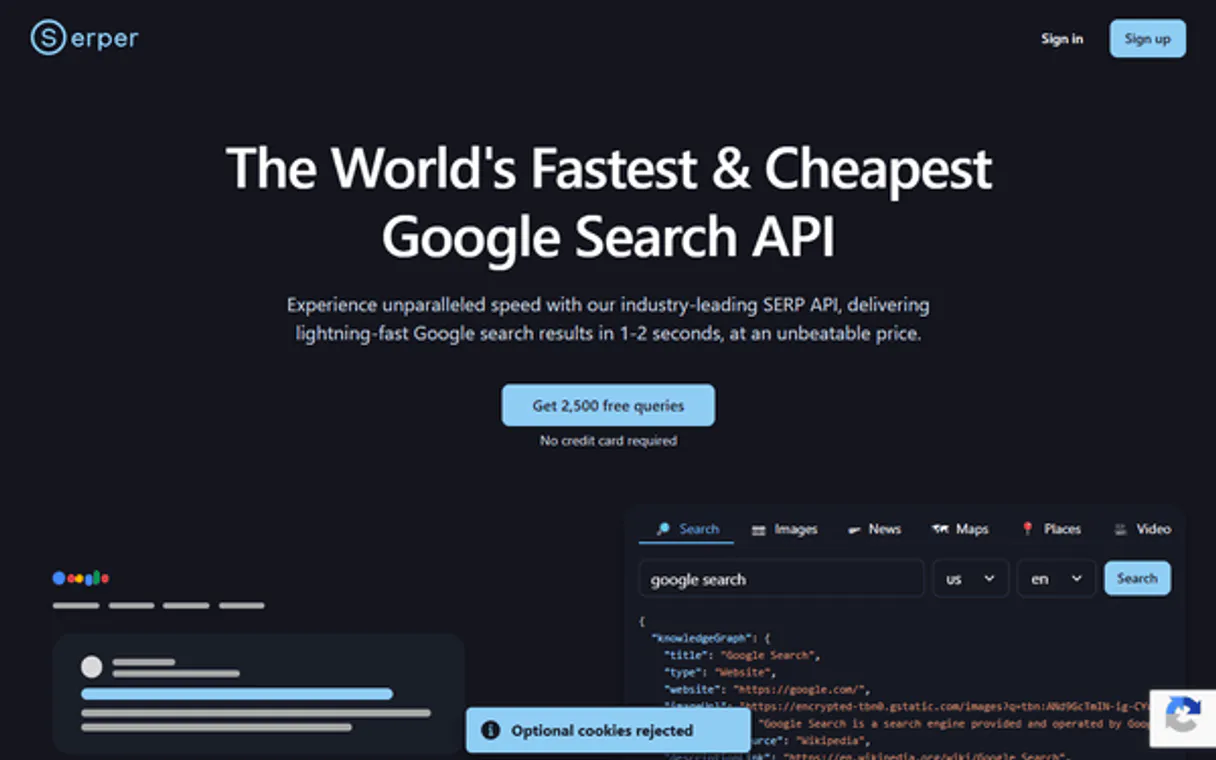
Independent Platform Disclaimer: Vinkius is an independent platform and is not affiliated with, endorsed by, sponsored by, verified by, or otherwise authorized by Serper. All third-party trademarks, logos, and brand names are the property of their respective owners. Their use on this website is strictly for informational purposes to identify service compatibility and interoperability.
VINKIUS INFRASTRUCTURE
Cloud Hosted
Managed infra
V8 Isolated
Sandboxed per request
Zero-Trust Proxy
No stored credentials
DLP Enforced
Policy on every call
GDPR Compliant
EU data residency
Token Compression
~60% cost reduction
Works with Claude, ChatGPT, Cursor, and more
The Model Context Protocol standardizes how applications expose capabilities to LLMs. Instead of operating in isolation, your AI gains direct access to external platforms, live data, and real-world actions through secure, standardized connections.
This server provides 10 capabilities that interface natively with Claude, ChatGPT, Cursor, and any MCP client. No middleware. No custom integration required.
Available Capabilities
Doing deep research shouldn't require opening a dozen tabs.
Today, finding comprehensive data means clicking through five different tabs: one for news, one for images, one for local listings, and then manually cross-referencing the results against Google Scholar. You spend half your time managing the browser and the other half reading.
With this MCP server, you just tell your agent what you need—'Find out about X.' The agent runs `search_news`, `search_places`, and `search_google` simultaneously. You get all three result sets compiled into one single context block. It cuts the research time by 80%.
Serper Alternative MCP Server: Get structured web data from a chat.
Instead of manually running searches for images, then separately checking patents against those findings, you tell your agent to use `search_images` and cross-reference the results with any relevant IP filings via `search_patents`. The system handles the complex piping.
The difference is control. You’re not just getting links; you’re getting structured data from specialized sources. That changes how fast you can move from 'discovery' to 'action'.
Common Questions About Serper Alternative MCP
How do I use the `search_patents` tool? +
You prompt your agent with keywords or classes, and it runs the search against Google Patents. This is ideal for vetting product ideas before they go to market.
Should I use `search_google` or `search_places` for finding a store? +
search_places is better because it provides structured data like addresses, average ratings, and contact info directly. General search results are just links that might lead to an outdated page.
What's the difference between `search_scholar` and `search_google`? +
search_scholar filters strictly for academic papers, keeping out commercial articles. If you need peer-reviewed proof, use Scholar; if you just need general web context, use search_google.
Can I track brand mentions using `search_news`? +
Yes. By running search_news, your agent gathers real-time headlines and sources related to your brand or topic, helping you monitor public sentiment immediately after an event.
How do I authenticate my request when running the `search_google` tool? +
You must pass a valid API key during setup. Your AI client uses this credential to prove identity and authorize every query for organic results.
What happens if I run into rate limits while using `search_news`? +
The system returns an HTTP 429 error code. This tells your agent you've exceeded the allowed queries per time period, requiring a wait before retrying.
What format does the data come in when I call `search_places`? +
It returns structured JSON containing specific fields like address, average rating, and category. This structure makes it easy for your agent to reliably parse local business details.
Can `search_images` provide deep context beyond just the picture? +
No, search_images focuses only on delivering visual search results. It provides links and captions but doesn't pull descriptive text or article snippets about the image.
How do I find my Serper API Key? +
Log in to your Serper.dev dashboard, and you will find your API Key on the main page. Copy and paste it below.
Can the agent search for images and news separately? +
Yes. This server includes specialized tools for Google Images (search_images) and Google News (search_news), allowing your agent to query specific verticals based on your needs.
Is it possible to retrieve local business details via the agent? +
Yes. The search_places tool allows your agent to query Google Places for business information, including addresses and ratings, ensuring your local research is accurate.
Use it with your favorite AI tools
Connect this server to Cursor, Claude, VS Code, and more.
More in this category
Formbricks
Capture user feedback with open-source surveys that trigger at the right moment inside your product for actionable insights.

Common Room
Unify community signals from Slack, Discord, GitHub, and social media to identify your most engaged users and advocates.

Rightmove
Manage Rightmove property listings, track performance metrics, and retrieve branch leads directly through your AI agent.
You might also like

Guance Cloud / 观测云
Modern observability platform — manage monitors, dashboards, and events via AI.

Everflow Partner Marketing
Equip your AI agent to manage marketing offers, track affiliates, and monitor network performance via the Everflow API.
Toast
Manage restaurant orders, menus, employees, labor, tables, and payments for your Toast POS through natural conversation.