
Sunsama MCP. Manage tasks and schedule your day from chat.
 Gemini
 Works with every AI agent you already use
…and any MCP-compatible client









Just plug in your AI agents and start using Vinkius.
Sunsama MCP Server connects Sunsama's daily planning system directly into your AI agent. It lets you manage tasks, view schedules, map organizational contexts, and update assignments—all from a chat window.
You don't have to switch tabs; your AI client handles the scheduling work for you.
What your AI agents can do
Create task
Adds a brand new task to Sunsama, accepting text content and an optional due date.
Delete task
Permanently removes a task from your plan. Note: this action cannot be reversed.
Get task details
Pulls all the specific information tied to one particular task item.
The agent can list all tasks in Sunsama, allowing you to see what's due today or next week via the list_tasks tool.
You can get deep details on any single task using get_task_details, or change its status, assignee, and date with update_task.
Use the create_task tool to add new action items directly into your plan, specifying both text and an optional due date.
The connector allows you to list existing work channels (list_channels) or tag frameworks (list_contexts) so the agent knows where to file items.
The get_user_profile tool retrieves your current user metadata, confirming operational boundaries for the AI client.
Ask AI about this MCP
Supported MCP Clients
Gemini Waiting for input…
Sunsama MCP Server: 8 Tools for Daily Planning
Use these tools to read, write, and manage every aspect of your schedule—from listing tasks to updating project milestones.
019d760ecreate task
Adds a brand new task to Sunsama, accepting text content and an optional due date.
019d760edelete task
Permanently removes a task from your plan. Note: this action cannot be reversed.
019d760eget task details
Pulls all the specific information tied to one particular task item.
019d760eget user profile
Fetches and validates your current user account metadata within Sunsama.
019d760elist channels
Returns a list of all available organizational channels (e.g., 'Work' or 'Personal').
019d760elist contexts
Provides a list of active tag frameworks, letting you know the available categorization tags.
019d760elist tasks
Retrieves all tasks from your plan. You can filter this list by date range to narrow results.
019d760eupdate task
Modifies an existing task's details, such as its status, assignee, or due date.
Choose How to Get Started
Build a custom MCP for your own tools, or connect a ready-made integration from our catalog.
Build Your Own
Turn any API into an MCP. Import a spec, define Agent Skills, or deploy with MCPFusion.
- Import from OpenAPI, Swagger, or YAML specs
- Create Agent Skills with progressive disclosure
- Deploy to edge with MCPFusion framework
- Built in DLP, auth, and compliance on every call
- Real time usage dashboard and cost metering
- Publish to catalog or keep private
Make Your AI Do More
Start with Sunsama, then connect any of our 4,700+ other servers whenever your AI needs more. One click, no limits.
- Use this MCP plus 4,700+ others, all in one place
- Add new capabilities to your AI anytime you want
- Every connection is secured and compliant automatically
- Track usage and costs across all your servers
- Works with Claude, ChatGPT, Cursor, and more
- New servers added to the catalog every week
What you can do with this MCP connector
Forget jumping between your IDE, web browser, and task dashboard just to manage a couple of assignments. This connector plugs Sunsama’s entire daily planning system right into your AI agent. You handle all your scheduling work from one single chat window; you never gotta switch tabs for it.
Your AI client now treats Sunsama like another tool in the shed, letting you view tasks, update statuses, and map out organizational context without ever leaving your current workflow. It’s about making sure everything that needs doing—everything's right there to talk about.
Retrieving Your Plan:
You can pull a full list of every task in your plan using list_tasks. This tool lets you narrow down the results by date range, so you only see what's due today or maybe next week. Need more detail on just one item? Run get_task_details and you get all the specific context tied to that single task.
Handling Assignments:
You can drop brand new action items into your plan using create_task, specifying both the text content and an optional due date for it. If something changes, use update_task. This lets you modify an existing assignment's status, change who it's assigned to, or shift its due date without manual clicking.
And when a task is completely done—or maybe it needs to disappear forever—you can run delete_task to permanently remove it from your plan. Remember, that action can’t be reversed.
Setting Up Your Context:
The agent also knows how to organize your work. You can check the boundaries of your organization by running list_channels, which returns a list of all available containers (like 'Work' or 'Personal'). If you need to categorize something, use list_contexts to pull a list of active tag frameworks so the system knows where it needs to file that item.
Account Verification:
Before doing anything else, your agent can check your operational boundaries. Use get_user_profile to fetch and validate your current user account metadata within Sunsama, confirming everything's good to go for the AI client.
How Sunsama MCP Works
- 1 First, activate the Sunsama MCP module orchestrator as a system integration in Vinkius.
- 2 Next, bind your verified
SUNSAMA_API_KEYdirectly to your environment parameters. - 3 Finally, you tell your AI client what to do: 'List my pending tasks for today, create a new block under the Development channel, and mark yesterday's review as complete.'
The bottom line is that once set up, your AI agent executes multi-step scheduling commands using Sunsama's native tools without needing human intervention or context switching.
Who Is Sunsama MCP For?
Anyone who manages their day with structured tasks—Founders, Project Managers, and Software Engineers. If you spend time hopping between a task list and your calendar just to move items around, this is for you. You get back focused work and fewer forgotten deadlines.
You centralize your day's planned agenda inside your IDE or local terminal. Your agent reports progress in real-time by calling update_task.
You track team deliverables and personal timelines without opening a separate, bloated task interface. You use the agent to consolidate activities safely.
You mitigate schedule conflicts instantly. Instead of manually rescheduling, you direct agenda adjustments via your analytical AI agent calling list_tasks and create_task.
What Changes When You Connect
- Stop Context Switching: You never have to leave your IDE or CLI. Your agent handles task retrieval (
list_tasks) and updates (update_task) in the background, letting you stay focused on coding or writing. - Structured Planning: The connector lets you map work into specific organizational domains by calling
list_channelsandlist_contexts. This ensures every new item is filed correctly from day one. - Instant Task Generation: Need to dump a list of action items? Use
create_taskto write them instantly. You specify the text and can even set an initial due date in one prompt. - Full Visibility on Tasks: Don't just see the title; get full context. Running
get_task_detailspulls every relevant piece of metadata for any single item, giving you a complete picture. - Know Your Boundaries: Before running major commands, use
get_user_profile. It verifies your current status and permissions, ensuring the agent only performs actions within your authorized scope.
Real-World Use Cases
The Morning Handoff
A PM needs to know what's due today. They ask their agent: 'What tasks are pending for me today?' The agent runs list_tasks and reports the full list, letting them see blockers immediately without opening Sunsama.
Completing a Design Review
An engineer finishes a task. Instead of going to Sunsama to change its status, they prompt: 'Mark the design review as complete.' The agent runs update_task using the necessary ID and changes the status.
Organizing a New Project
A team leader needs to scope out new work. They ask the agent to list all available departments (list_channels) and tag types (list_contexts). This helps them decide where to file the project's initial tasks using create_task.
Audit My Scope
Before setting up a new workflow, you verify your access rights. You prompt: 'What is my current user status?' The agent runs get_user_profile, giving you immediate confirmation of your operational role.
The Tradeoffs
Trying to update a task without context
User tries: 'Update the design review to done.' The agent fails because it needs more than just text; it needs the specific ID or exact title.
→
First, run list_tasks to get the accurate name and ID. Then, use that data point when running update_task. Always check the list first.
Deleting a core task
The agent runs delete_task('Q3 Goals'). The user realizes this was a critical milestone and cannot recover it.
→
delete_task is irreversible. Always double-check the name and context of any item before executing this command.
Assuming task details are available
User asks: 'Tell me about that meeting from last Tuesday.' The agent can't answer because it doesn't know which specific task to look up.
→
You must first use list_tasks or specify the exact name, then run get_task_details on the returned item.
When It Fits, When It Doesn't
Use this MCP Server if your primary workflow involves constantly moving tasks between planning stages—from 'To Do' to 'In Progress' to 'Done.' You need a single source of truth for task status, and you hate switching tabs. The server gives you the full lifecycle control: reading (list_tasks, get_task_details), writing (create_task), and correcting (update_task). Don't use this if all you do is manually write down tasks on paper or if your team uses a dedicated, non-Sunsama system for tracking. If your only need is to check one thing once in a while, a simple calendar widget might be enough. But if managing the process of work matters, this tool is necessary.
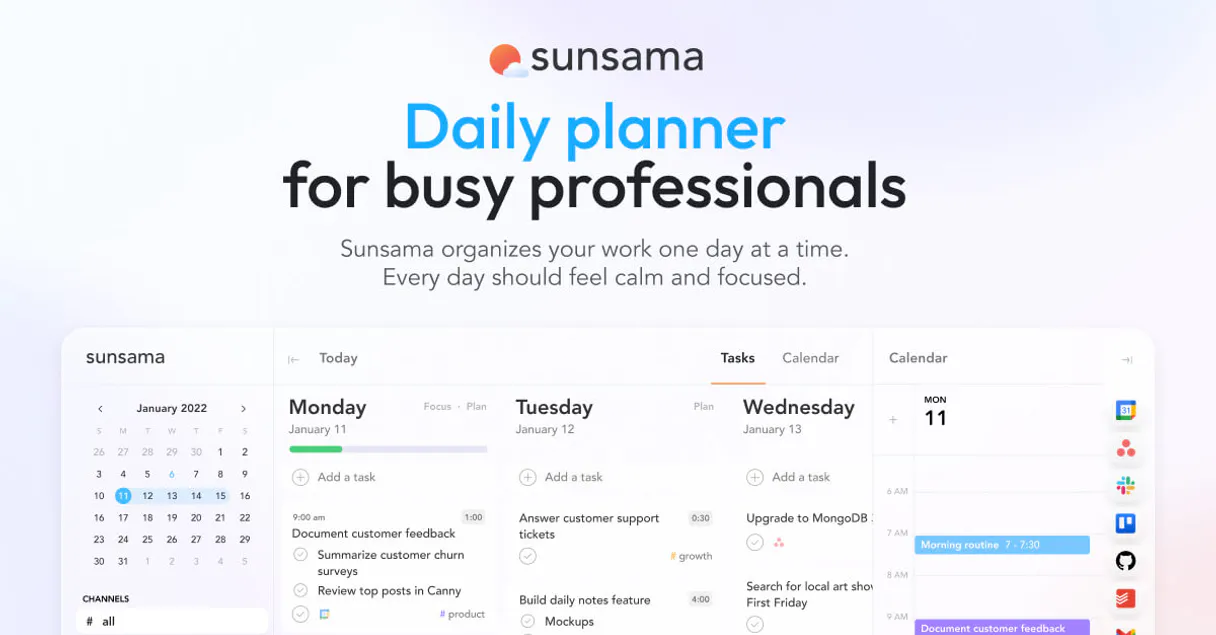
Independent Platform Disclaimer: Vinkius is an independent platform and is not affiliated with, endorsed by, sponsored by, verified by, or otherwise authorized by Sunsama. All third-party trademarks, logos, and brand names are the property of their respective owners. Their use on this website is strictly for informational purposes to identify service compatibility and interoperability.
VINKIUS INFRASTRUCTURE
Cloud Hosted
Managed infra
V8 Isolated
Sandboxed per request
Zero-Trust Proxy
No stored credentials
DLP Enforced
Policy on every call
GDPR Compliant
EU data residency
Token Compression
~60% cost reduction
Works with Claude, ChatGPT, Cursor, and more
The Model Context Protocol standardizes how applications expose capabilities to LLMs. Instead of operating in isolation, your AI gains direct access to external platforms, live data, and real-world actions through secure, standardized connections.
This server provides 8 capabilities that interface natively with Claude, ChatGPT, Cursor, and any MCP client. No middleware. No custom integration required.
Available Capabilities
Manually updating tasks across different apps wastes time and breaks focus.
Right now, moving a task means clicking into Sunsama, finding the item, opening the details pane, changing its status dropdown, maybe adding a note. If you do this for 20 items before lunch, that's 3-4 minutes of pure, unproductive clicking and switching tabs.
With the MCP Server attached, your agent handles it all. You tell your client: 'Mark yesterday's review as done.' It runs `update_task` instantly. The task is moved, updated, and you never left your chat window.
Sunsama MCP Server gives you full control over the task lifecycle.
Before this module, if you wanted to know what was planned for next week, you had to open Sunsama and use its native date filter. If you needed to add a new item, you were limited by the app's UI flow.
Now you just ask: 'List all tasks between Friday and Monday.' The agent runs `list_tasks` with parameters, giving you precise data instantly. It’s that directness that changes how fast your work moves.
Common Questions About Sunsama MCP
How do I find out what is due today using list_tasks? +
Run list_tasks and specify the current date in the parameters. This tool retrieves every task scheduled for that day, letting you see your full workload at a glance.
Can I create a recurring task with create_task? +
The create_task tool handles the initial creation of a single task. For recurrence logic, you'll need to manage that flow outside the agent or use a different dedicated system.
What if I mess up and delete a task using delete_task? +
delete_task is permanent; there’s no undo. Always confirm the exact name of the task you intend to remove before running this tool.
Does get_user_profile tell me my current workload? +
No, get_user_profile only confirms your account metadata and operational status within Sunsama. Use list_tasks for workload information.
What contextual details does `get_task_details` retrieve for a specific task? +
It pulls deep context beyond the title. This includes associated organizational channels and any necessary inputs required to mark the task as complete.
How do I use `list_channels` and `list_contexts` to filter my tasks? +
You list these first to map your available domains. Then, you pass those IDs into your query parameters to restrict the search scope of any task listing.
What specific information must I provide when using `update_task`? +
You must provide the existing Task ID and the new data fields. The system requires these core identifiers; otherwise, the update fails.
What boundary metadata does `get_user_profile` provide besides my name? +
It retrieves your full operational status and user role metadata. This includes associated time zone settings, which keeps scheduling accurate for you.
Are organizational channels safely isolated when using programmatic executions? +
Yes. The AI intrinsically utilizes list_channels and list_contexts effectively to accurately parse pre-existing frameworks before assignment seamlessly.
Can the agent inadvertently destroy historical tracking via deletion? +
The tool bounds the logic reliably using isolated mutation calls like delete_task. These are triggered explicitly, protecting chronological historical records systematically effectively internally.
Does the integration sync with external calendars like Google Calendar? +
The MCP operates through the Sunsama API, which already consolidates events from Google Calendar, Outlook, and other connected services. Tasks you create or update via the AI will appear alongside your synced calendar events.
Use it with your favorite AI tools
Connect this server to Cursor, Claude, VS Code, and more.
More in this category
Logseq (Knowledge Management)
Manage your knowledge base via Logseq — create pages, insert outliner blocks, and search across your local graph.

Breakthrough Ideation Prover
AI agents default to safe, obvious ideas or hallucinate impossible ones. This tool forces breakthrough ideation: challenge convention with facts, integrate real constraints, map a concrete roadmap, and prove feasibility for every blocker. Radical AND realizable.
idloom
Manage events, attendees, and invoices via idloom.events API.
You might also like

Start.gg
Manage esports tournaments via Start.gg — fetch event IDs, track standings, and report match results directly from any AI agent.

EIA Energy Outlook — Forecasts & Projections
Official U.S. energy forecasts: the Short-Term Energy Outlook (18-month price and supply projections), Annual Energy Outlook (30-year U.S. projections), International Energy Outlook (world projections), and country-level global energy data.

TarotAPI
Draw tarot cards, get readings, and explore card meanings via AI.