
ValueSERP MCP. Pull real-time data from any corner of Google.
 Gemini
 Works with every AI agent you already use
…and any MCP-compatible client









Just plug in your AI agents and start using Vinkius.
ValueSERP gives your AI agent real-time, programmatic access to Google Search data—including organic results, images, news, Scholar abstracts, and Shopping listings.
It bypasses CAPTCHAs and typical search blocks so you can pull live web intelligence directly into your conversational flow.
What your AI agents can do
Custom serp search
Runs a highly customized Google search by accepting advanced parameters in a JSON object.
Get related questions
Retrieves 'People Also Ask' questions and their answers directly from Google SERP data.
Get search suggestions
Provides predictive search terms based on what users are currently typing into Google autocomplete.
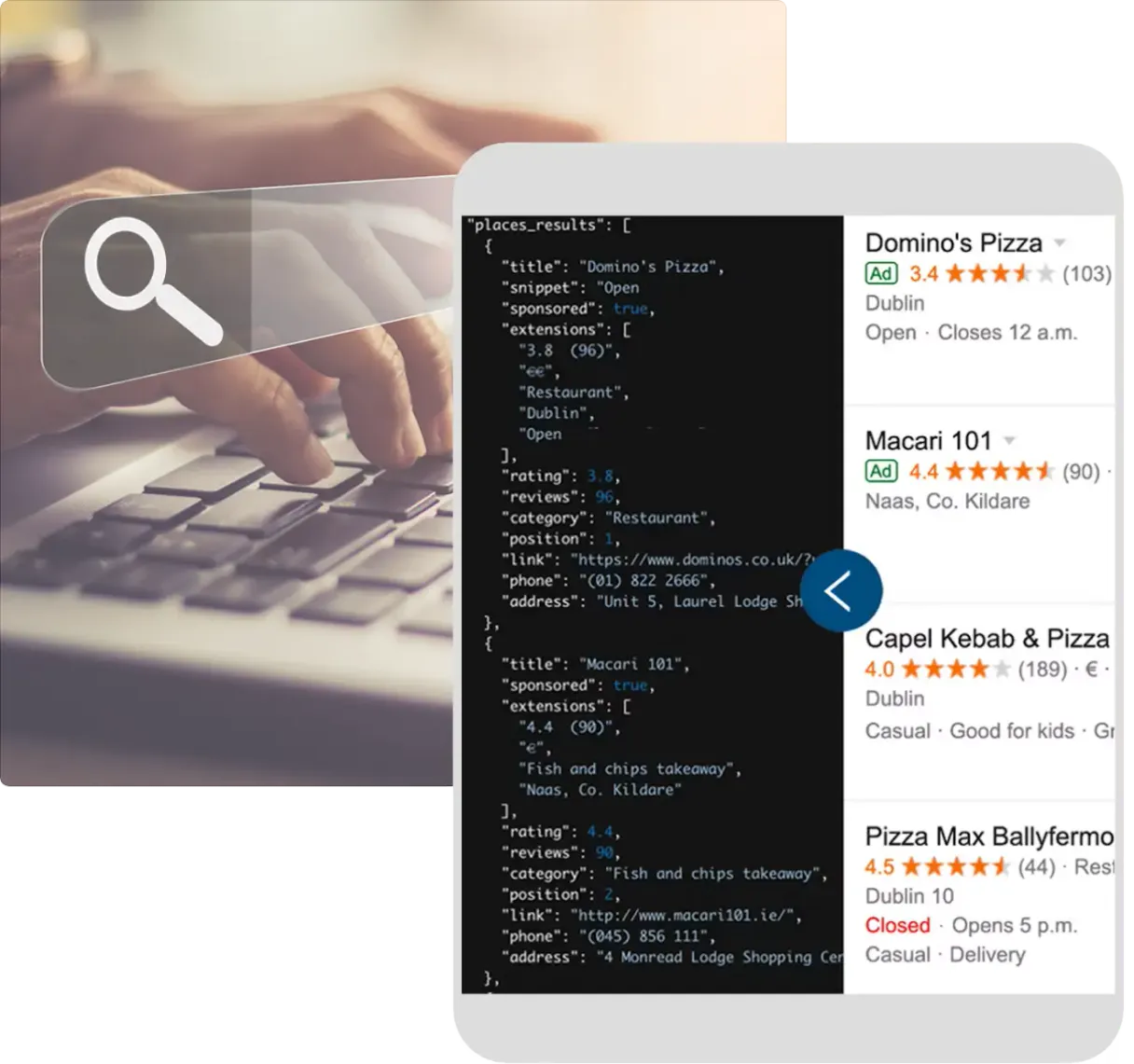
You run google_places_search to pull structured info—like ratings, coordinates, and hours—for specific businesses on Google Maps.
By using google_shopping_search, your agent pulls product names, current prices, and merchant links from Google Shopping results.
The google_scholar_search tool retrieves abstracts and citation details for papers on specific scientific topics.
get_related_questions fetches 'People Also Ask' snippets, showing you secondary questions users ask after searching a main topic.
The custom_serp_search tool executes advanced, highly customized searches using specific parameter sets.
Ask AI about this MCP
Supported MCP Clients
Gemini Waiting for input…
ValueSERP MCP Server: 10 Tools for Web Intelligence
These tools allow your agent to perform targeted searches across every major Google domain, from local listings and shopping data to academic research.
019d761acustom serp search
Runs a highly customized Google search by accepting advanced parameters in a JSON object.
019d761aget related questions
Retrieves 'People Also Ask' questions and their answers directly from Google SERP data.
019d761aget search suggestions
Provides predictive search terms based on what users are currently typing into Google autocomplete.
019d761agoogle image search
Searches Google and returns direct URLs to images for visual content gathering.
019d761agoogle news search
Performs a search specifically targeting recent news articles indexed by Google.
019d761agoogle places search
Finds local businesses and points of interest on Google Maps given a place name and location.
019d761agoogle scholar search
Searches for academic publications, providing abstracts and citation details from Google Scholar.
019d761agoogle search
Performs a standard organic search query on Google using only a text string and optional location.
019d761agoogle shopping search
Searches for products across Google Shopping, returning names, prices, and merchant links.
019d761agoogle video search
Runs a search query specifically against video content indexed by Google.
Choose How to Get Started
Build a custom MCP for your own tools, or connect a ready-made integration from our catalog.
Build Your Own
Turn any API into an MCP. Import a spec, define Agent Skills, or deploy with MCPFusion.
- Import from OpenAPI, Swagger, or YAML specs
- Create Agent Skills with progressive disclosure
- Deploy to edge with MCPFusion framework
- Built in DLP, auth, and compliance on every call
- Real time usage dashboard and cost metering
- Publish to catalog or keep private
Make Your AI Do More
Start with ValueSERP, then connect any of our 4,700+ other servers whenever your AI needs more. One click, no limits.
- Use this MCP plus 4,700+ others, all in one place
- Add new capabilities to your AI anytime you want
- Every connection is secured and compliant automatically
- Track usage and costs across all your servers
- Works with Claude, ChatGPT, Cursor, and more
- New servers added to the catalog every week
What you can do with this MCP connector
ValueSERP gives your agent real-time, programmatic access to Google Search data. You're not just getting a basic search; you're pulling live web intelligence directly into your chat flow. This thing runs deep, bypassing CAPTCHAs and the typical blocks that trip up standard scrapers. When you connect it to your AI client, you get raw, reliable search parsing across multiple Google domains—organic results, images, news feeds, Scholar abstracts, and Shopping listings—all without switching tabs.
When you need a basic text query on Google, the google_search tool handles it using just a simple string and optionally a location. But when that isn't enough, you hit up the custom_serp_search. This lets you execute super advanced searches by feeding it specific JSON parameters, letting you target geographic bounds or language codes for pinpoint accuracy.
For visual content, you've got options. You can run a general search and pull images straight out with google_image_search, grabbing direct URLs for your visuals. If the topic is current events, google_news_search targets only recent news articles indexed by Google. And if you’re tracking products or need price points, google_shopping_search pulls product names, current prices, and merchant links across the whole Shopping network.
You can also focus on video content specifically using google_video_search.
Beyond basic text searches, your agent handles specific data sets. For local analysis, you run google_places_search, which finds structured info—like ratings, coordinates, and hours—for any business or point of interest right off Google Maps. If you're doing academic research, the google_scholar_search tool retrieves abstracts and citation details for papers on a specific topic.
To map out user intent, two tools are killer. First, get_related_questions fetches 'People Also Ask' snippets, showing you secondary questions users ask after landing on a main search topic. Second, get_search_suggestions gives you predictive autocomplete terms based on what people are typing into Google right now—that’s gold for content strategy.
And if you want to run highly customized queries targeting specific parameters, the custom_serp_search tool executes advanced searches using precise parameter sets that control everything from language codes to device simulation. It handles all the heavy lifting so your AI client just needs to ask for the data and get it ready to use.
How ValueSERP MCP Works
- 1 Subscribe to the ValueSERP server and plug in your unique API Key.
- 2 Ask your agent for a search result (e.g., 'Find all local coffee shops near downtown').
- 3 The agent triggers the necessary tool (
google_places_search), pulls the raw data, and presents it in natural language.
The bottom line is that you get structured, live web intelligence from Google—no manual scraping or API key management needed on your end; just ask your agent for what you want.
Who Is ValueSERP MCP For?
Anyone who needs to turn vague research questions into actionable data points. This is for the SEO Analyst tired of manually checking Google's 'People Also Ask' section, or the Growth Marketer who needs to track competitor pricing across different markets without leaving their main workflow.
Uses get_related_questions and google_search to map out topic clusters, ensuring every piece of content answers secondary user questions.
Runs google_shopping_search against competitor SKUs and uses custom_serp_search to compare pricing across different geographic regions.
Pulls specific abstracts from Google Scholar using google_scholar_search, compiling citation data for literature reviews without leaving their writing environment.
What Changes When You Connect
- Find local ratings and coordinates fast. Instead of clicking through multiple map pages,
google_places_searchgives you a structured table with the top businesses' addresses and GPS coords immediately. - Track market changes instantly. Use
google_shopping_searchto monitor product pricing or availability across competitors without running manual queries for every item. - Understand user intent depth. The
get_related_questionstool pulls 'People Also Ask' snippets, letting you know the exact secondary questions your audience is asking after they search a main topic. - Accelerate academic review. For researchers,
google_scholar_searchbypasses keyword searches and delivers abstracts and citation counts for papers directly into your agent chat. - Maintain flow across all Google verticals. You don't need ten different tabs—you run standard web searches (
google_search), image searches (google_image_search), and news reports (google_news_search) all through one command.
Real-World Use Cases
Competitive pricing check for e-commerce.
A growth marketer needs to compare the price of a niche gadget across three major retailers. They use google_shopping_search with the product name and region, getting instant results that include merchant links and current prices in one table. They avoid manually visiting each store's site.
Structuring academic literature review.
A PhD student needs to summarize recent work on a complex topic. They use google_scholar_search, passing the main keywords. The agent returns 10 abstracts, allowing the student to pull key findings and citation counts without leaving their research document.
Mapping content gaps for SEO.
An SEO analyst wants to write a comprehensive guide on 'remote work law.' They first run google_search to establish baseline topics, then use get_related_questions to find the secondary user concerns (e.g., tax implications or visa rules), guiding their content outline.
Finding local service providers.
A small business owner needs a list of highly-rated plumbers in their zip code. They execute google_places_search with the location and 'plumbers.' The agent returns names, ratings (e.g., 4.7 stars), addresses, and even GPS coordinates for immediate use.
The Tradeoffs
Trying to do everything in one prompt
Asking the agent: 'What are the best businesses, what's happening with news about them, and what prices are they charging?' This forces the AI to guess which tools to use and often fails.
→
Break it down. First, run google_places_search for the list of businesses (getting names/coords). Second, use those names in a targeted google_shopping_search to check prices. Finally, query google_news_search using the business name.
Forgetting intent context
Just running google_search with a broad topic like 'renewable energy.' The results are overwhelming and lack specific focus.
→
Before the main search, use get_related_questions. This narrows your scope by identifying exactly what users care about next (e.g., solar panel financing or offshore wind regulations), making the subsequent google_search highly effective.
Assuming general web data is enough
Using only a standard search to find academic facts, resulting in commercial or non-peer-reviewed articles.
→
Always use google_scholar_search when the topic requires scientific backing. This tool filters results specifically for peer-reviewed abstracts and citation data.
When It Fits, When It Doesn't
Use this server if your research depends on structured, real-time data extracted from multiple, distinct Google domains (e.g., comparing Scholar papers to local business ratings). You need the breadth of tools—like running google_shopping_search and then cross-referencing that with a general google_search result—to build a complete picture.
Don't use this if you just need simple facts or internal company data. If your information is locked behind proprietary paywalls, the search won't help. Also, if you only need to verify one single, established fact (like a phone number), using google_places_search might be overkill; a simple targeted query works fine. This server excels at comparison and discovery, not simple retrieval.
Independent Platform Disclaimer: Vinkius is an independent platform and is not affiliated with, endorsed by, sponsored by, verified by, or otherwise authorized by ValueSERP. All third-party trademarks, logos, and brand names are the property of their respective owners. Their use on this website is strictly for informational purposes to identify service compatibility and interoperability.
VINKIUS INFRASTRUCTURE
Cloud Hosted
Managed infra
V8 Isolated
Sandboxed per request
Zero-Trust Proxy
No stored credentials
DLP Enforced
Policy on every call
GDPR Compliant
EU data residency
Token Compression
~60% cost reduction
Works with Claude, ChatGPT, Cursor, and more
The Model Context Protocol standardizes how applications expose capabilities to LLMs. Instead of operating in isolation, your AI gains direct access to external platforms, live data, and real-world actions through secure, standardized connections.
This server provides 10 capabilities that interface natively with Claude, ChatGPT, Cursor, and any MCP client. No middleware. No custom integration required.
Available Capabilities
Sifting through manual SERP data is slow.
Today, pulling together market intel means opening Google Maps, checking the local listings; then switching over to News to see recent events; and finally jumping to Shopping to check competitor prices. You copy-paste names, manually cross-reference ratings, and spend 20 minutes just compiling a basic competitive matrix.
With ValueSERP, you run one command: 'Give me the top three local businesses and their current pricing.' The agent executes `google_places_search` for locations and then triggers `google_shopping_search` to pull product data against those locations. You get a single, comprehensive table with everything you need.
ValueSERP MCP Server: Structured Data from Google.
You no longer have to manually check the 'People Also Ask' box after every search. You use `get_related_questions` and get that data pulled into your chat instantly, letting you map out user intent without opening a new tab.
The difference is process control. Instead of treating Google as ten separate services you have to visit, your agent treats it like one giant, programmable data source. It's all in the conversation.
Common Questions About ValueSERP MCP
How do I find local business info using google_places_search? +
You provide the place name and location to google_places_search. The tool returns a structured list of results, including ratings, addresses, and GPS coordinates for nearby businesses.
Can I track competitor product prices with google_shopping_search? +
Yes. You pass the product name to google_shopping_search. It returns a list of results that include merchant links, current pricing information, and the retailer's name.
Does google_scholar_search give me full papers? +
No. The tool retrieves abstracts and citation data from Google Scholar. You get enough detail to build a literature review or see which papers are most cited, without needing the full PDF.
How do I check what people are searching for next? +
Use get_related_questions. This tool retrieves 'People Also Ask' snippets from Google. It helps you discover secondary search intents that guide your content strategy.
How do I authenticate my account when using the `custom_serp_search` tool? +
You must subscribe to the ValueSERP server and provide your unique API Key. Your AI agent uses this key directly for all queries, ensuring reliable access without needing manual setup in your client.
If I execute multiple searches using `google_search` rapidly, are there rate limits? +
The server is built for high throughput and handles rate limiting automatically. It manages the request volume to prevent blocks, letting you run continuous data pulls without interruption.
Does `google_image_search` provide more than just direct image file URLs? +
It returns direct URLs pointing straight to the images found on Google. While it provides the link and context, deep metadata like original camera settings requires external processing after retrieval.
What information does `google_video_search` provide about video content? +
The tool finds relevant video results from Google. It gives you titles, channel names, and direct links to the videos, allowing your agent to source specific multimedia evidence.
Can my AI agent find real-time product prices on Google Shopping? +
Yes! You can ask your agent: search Google Shopping for 'Sony WH-1000XM5 headphones' in the US. The agent uses the googleShoppingTool to instantly return a clean, structured list of current prices, merchant names, and direct links without ever getting blocked by Captchas.
How can I discover what questions people are asking about a topic? +
Content marketers adore this. Instead of manually clicking through Google's 'People Also Ask' boxes, just tell your AI: get related questions for 'indoor plants care'. The agent dynamically queries the SERP and extracts all those rich question snippets perfectly formatted for outlining your next blog post.
Can I perform a highly localized/geo-specific search? +
Absolutely. ValueSERP natively supports extreme customization. You can ask your agent to perform a custom search for 'best coffee shops' simulating a mobile device physically located in Brooklyn, NY. The AI maps your intent into precise API parameters (gl, hl, location, device) yielding exactly what local users see.
Use it with your favorite AI tools
Connect this server to Cursor, Claude, VS Code, and more.
More in this category
Kraken
Get real-time cryptocurrency prices, OHLC data, order books and trades from Kraken exchange.

Tomorrow.io Alternative
Access hyperlocal weather intelligence — real-time conditions, forecasts, historical archives, severe alerts and route weather from the Tomorrow.io API.

crowd.dev (LFX CDP)
Equip your AI agent to manage community members, activities, and organizations directly via the crowd.dev (LFX) API.
You might also like

SugarCRM
Intelligent CRM platform for sales and marketing.

Hiro.fm
Create and distribute audio content with a podcast-like platform that lets you build a private audio feed for your audience.

Magic Minutes
Generate meeting minutes automatically with AI that listens, summarizes key decisions, and distributes action items to your team.