
Withings MCP. Correlate weight changes with blood pressure and sleep scores.
 Gemini
 Works with every AI agent you already use
…and any MCP-compatible client









Just plug in your AI agents and start using Vinkius.
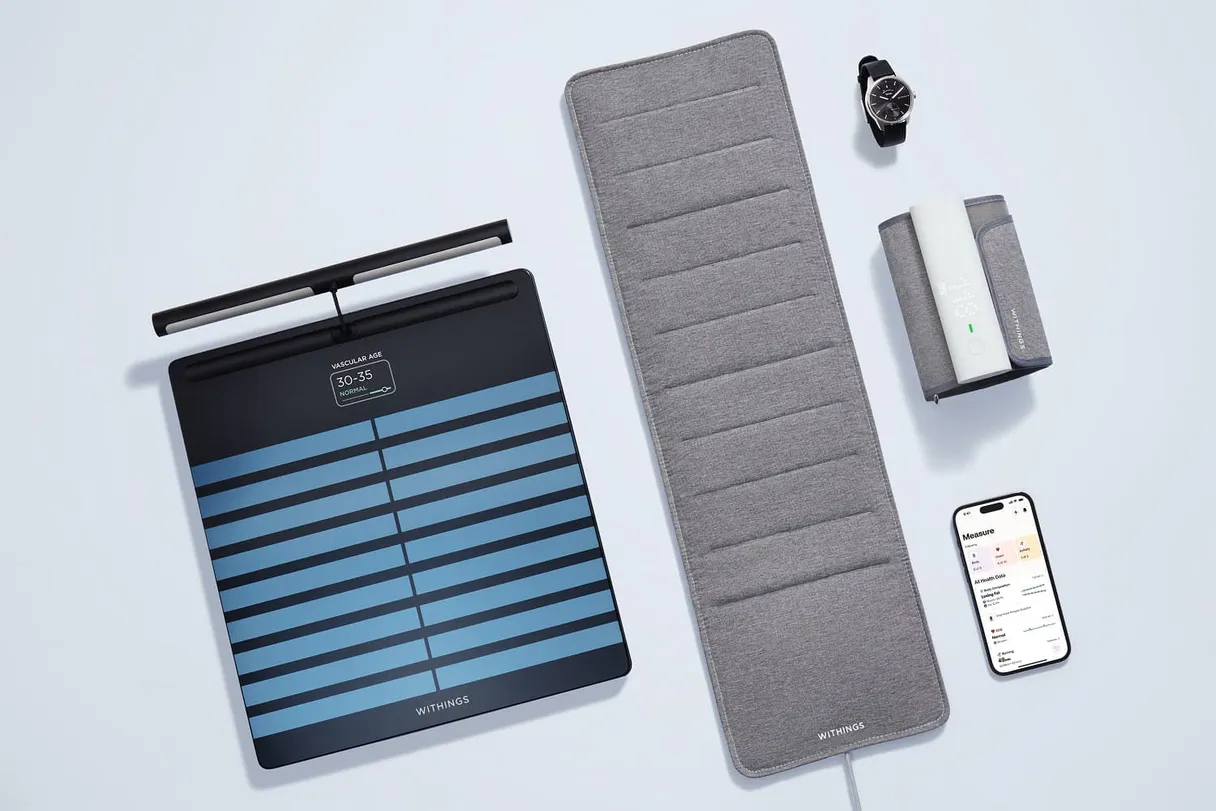
Withings MCP Server accesses biometric data from smart scales, watches, and medical devices. Your agent can retrieve trends for weight, blood pressure, heart rate, activity levels, sleep cycles, and logged workouts over time.
What your AI agents can do
Get activity
Retrieves a summary of daily physical activity, including total steps and estimated calories burned.
Get heart rate
Gets specific recorded measurements for heart rate at a given time or date.
Get intraday activity
Fetches detailed, high-frequency activity data captured throughout the day.
Retrieve time-series data for multiple metrics—like tracking weight and body fat percentage over the last six months.
Pull detailed records of your deep, light, and REM sleep stages to assess nightly recovery patterns.
Combine data from get_workouts and get_heart_rate to see how specific exercise types affect resting heart rate.
Check the battery life or connection health of all connected Withings hardware devices using get_user_devices.
Configure webhooks to make your agent instantly notify you when a specific event, like a morning weigh-in, occurs.
Ask AI about this MCP
Supported MCP Clients
Gemini Waiting for input…
Withings MCP Server: 10 Tools for Biometric Health Data
These ten tools give your agent direct access to every measurable piece of health data—from daily steps to deep sleep stages.
019d849eget activity
Retrieves a summary of daily physical activity, including total steps and estimated calories burned.
019d849eget heart rate
Gets specific recorded measurements for heart rate at a given time or date.
019d849eget intraday activity
Fetches detailed, high-frequency activity data captured throughout the day.
019d849eget measurements
Retrieves core physiological measurements (weight, blood pressure, body temp) using type codes and dates.
019d849eget sleep details
Gets a detailed breakdown of sleep data, including the duration spent in deep, light, and REM stages.
019d849eget sleep summary
Retrieves a simple overview of daily sleep metrics, such as total time slept and overall score.
019d849eget user devices
Lists all physical Withings devices associated with the user's account.
019d849eget user goals
Retrieves the health and fitness targets that the user has set for themselves (e.g., weight loss target).
019d849eget workouts
Gets a log of all completed workouts, detailing category, duration, distance, and calories burned.
019d849esubscribe notifications
Sets up webhooks to send instant alerts when specific measurements (weight, BP, sleep) are recorded.
Choose How to Get Started
Build a custom MCP for your own tools, or connect a ready-made integration from our catalog.
Build Your Own
Turn any API into an MCP. Import a spec, define Agent Skills, or deploy with MCPFusion.
- Import from OpenAPI, Swagger, or YAML specs
- Create Agent Skills with progressive disclosure
- Deploy to edge with MCPFusion framework
- Built in DLP, auth, and compliance on every call
- Real time usage dashboard and cost metering
- Publish to catalog or keep private
Make Your AI Do More
Start with Withings, then connect any of our 4,700+ other servers whenever your AI needs more. One click, no limits.
- Use this MCP plus 4,700+ others, all in one place
- Add new capabilities to your AI anytime you want
- Every connection is secured and compliant automatically
- Track usage and costs across all your servers
- Works with Claude, ChatGPT, Cursor, and more
- New servers added to the catalog every week
What you can do with this MCP connector
Withings MCP Server: Your Biometric Data Source
When you hook up your Withings account, your agent gains direct access to years of biometric data collected from smart scales, watches, and medical devices. It's a massive feed of personal health metrics—weight changes, blood pressure readings, heart rate spikes, sleep cycles, and every workout you log. Instead of wading through spreadsheets, your AI client pulls these trends for you.
Getting Your Vitals Straight
To monitor core physiological measurements, your agent uses get_measurements, which retrieves vital stats like weight, body fat percentage, systolic blood pressure, and diastolic blood pressure using specific type codes and dates. If you need a snapshot of heart rate at a precise moment, get_heart_rate pulls those exact measurements for a given time or date.
You can also check your overall progress against the health and fitness goals you set up with get_user_goals. When building historical trends—say, tracking how your weight or body fat percentage changed over six months—your agent analyzes this time-series data from these tools.
Tracking Activity and Workouts
For activity, the server gives you layers of detail. If you just need a quick count of total steps or an estimate of calories burned for the day, your client calls get_activity. But if you want the granular breakdown—the high-frequency data captured moment by moment throughout the day—you use get_intraday_activity.
For specific exercise sessions like running or swimming, the get_workouts tool pulls a full log. It details the workout category, how long it lasted, the distance covered, and the calories you burned during that time. Your agent can combine this workout data with heart rate measurements from get_heart_rate; for instance, it'll show you if running really spikes your resting heart rate compared to a rest day.
Sleeping Like an Expert
When it comes to sleep, the server gives you both a quick score and deep metrics. You can grab a simple overview of daily sleep using get_sleep_summary, which spits out total time slept and your overall nightly score. For a deeper dive into recovery patterns, get_sleep_details pulls everything: exactly how long you spent in deep sleep, light sleep, and REM stages.
Your agent compiles this data so you can compare the quality of different nights.
Managing Devices and Alerts
Your client doesn't just read data; it manages your setup too. To check if all your gear is working right—like seeing the battery life or connection health on every physical Withings device—you run get_user_devices. When you need to be notified instantly, you set up alerts with subscribe_notifications. This tool configures webhooks so your agent will ping you immediately when a specific event happens, whether it's a morning weigh-in or a new blood pressure reading.
You can also pull detailed records of all completed workouts using the get_workouts log.
It’s basically an entire health record system accessible through simple commands from your AI client.
How Withings MCP Works
- 1 Subscribe to the Withings MCP Server on Vinkius.
- 2 Register an application at the Withings Developer Portal and generate your OAuth Access Token.
- 3 Call any tool (e.g.,
get_measurements) from your AI client, passing in required filters like date ranges or measurement types.
The bottom line is that you use your agent to talk to the API, which pulls clean, structured data directly into your workflow.
Who Is Withings MCP For?
This server is for Quantified Self enthusiasts and health tech developers who are tired of manually logging or cross-referencing data across five different apps. If you need to spot a pattern—like how late workouts affect your next night's sleep score—you need this.
Programmatically check client compliance against weight goals and review workout logs using get_workouts.
Analyze large sets of physiological data, such as correlating blood pressure changes (get_measurements) with activity levels over a study period.
Prototype integrations by calling specific tools like get_intraday_activity to test high-frequency data streams from connected devices.
What Changes When You Connect
- See how your activity impacts recovery. Use
get_workoutsalongsideget_sleep_detailsto see if running on Saturday affects your REM cycles Sunday morning. - Track full health history in one place. Call
get_measurementswith specific type codes (e.g., 10 for Systolic BP) to pull years of vitals data instantly. - Monitor activity changes hour-by-hour. Use
get_intraday_activitywhen you need more granularity than the simple daily step count fromget_activityallows. - Know exactly what changed overnight. Compare your current sleep score using
get_sleep_summaryagainst historical data to spot deteriorating patterns. - Automate follow-up actions. Use
subscribe_notificationsto ensure your agent triggers a message the moment you weigh yourself in the morning.
Real-World Use Cases
I want to know if my diet changes affect my BP.
A user suspects their high-sodium meals are affecting their blood pressure. They ask their agent to run get_measurements for systolic/diastolic BP over the last month and compare those dates against a log of dietary entries, identifying potential spikes.
I need to track my recovery from intense training.
A runner wants to know if their marathon prep is paying off. The agent runs get_workouts (for running distance) and then pulls get_heart_rate data for the days following, looking for a stable resting heart rate trend.
I need an automated reminder to check my stats.
A patient needs regular monitoring. Instead of checking manually, they set up a webhook using subscribe_notifications that alerts their agent every morning at 7 AM, which then calls get_user_devices to confirm the scale is connected.
I want to analyze my overall fitness journey.
A coach needs a big picture. The agent gathers data using three tools: get_activity for steps, get_measurements for weight, and get_sleep_summary for sleep scores—all compiled into one longitudinal report.
The Tradeoffs
Trying to get a full daily picture.
Just calling get_activity gives you steps and calories, but that misses the deeper sleep or blood pressure insights. You think it covers everything.
→
You need multiple tools for a complete view. Combine get_activity with get_sleep_details and get_measurements to get step counts, deep/light sleep stages, and current weight in one analysis.
Ignoring device status.
A user gets weird data points but doesn't know why. They assume the numbers are wrong when they might just be pulling old or disconnected readings.
→
Always run get_user_devices first. This confirms that all your hardware is connected and ready to feed fresh data into the agent.
Querying vague date ranges for vitals.
Asking the agent, 'Show me my weight around last week.' The API needs precision, or it just returns garbage or nothing at all.
→
Use get_measurements and specify exact YYYY-MM-DD dates along with the specific type code (e.g., 1 for Weight). Precision is everything here.
When It Fits, When It Doesn't
Use this server if your goal involves time-series analysis or correlation across different body metrics. You need to know how one thing influences another—like how a lack of sleep (get_sleep_details) impacts the next day's activity levels (get_activity).
Don't use it if you just need simple data input validation (e.g., validating that a number is between 0 and 100). In those cases, an internal schema tool or dedicated form validator works better. Also, don't rely on the server to tell you why your numbers changed—it only retrieves them; your agent has to do the analysis.
Independent Platform Disclaimer: Vinkius is an independent platform and is not affiliated with, endorsed by, sponsored by, verified by, or otherwise authorized by Withings. All third-party trademarks, logos, and brand names are the property of their respective owners. Their use on this website is strictly for informational purposes to identify service compatibility and interoperability.
VINKIUS INFRASTRUCTURE
Cloud Hosted
Managed infra
V8 Isolated
Sandboxed per request
Zero-Trust Proxy
No stored credentials
DLP Enforced
Policy on every call
GDPR Compliant
EU data residency
Token Compression
~60% cost reduction
Works with Claude, ChatGPT, Cursor, and more
The Model Context Protocol standardizes how applications expose capabilities to LLMs. Instead of operating in isolation, your AI gains direct access to external platforms, live data, and real-world actions through secure, standardized connections.
This server provides 10 capabilities that interface natively with Claude, ChatGPT, Cursor, and any MCP client. No middleware. No custom integration required.
Available Capabilities
Manually tracking health data is a nightmare of spreadsheets and logins.
Right now, getting an overview of how you feel requires opening three separate apps: one for sleep scores, one for weight, and another for workouts. You copy the numbers into your private spreadsheet, manually noting down dates and trying to spot a trend line that only exists in your head.
With this MCP server, you just ask your agent. It runs `get_measurements`, `get_sleep_summary`, and `get_activity` simultaneously. The result isn't three screenshots—it's one clean narrative showing how your weight changed while your sleep score dropped.
The Withings MCP Server: Get deep insights into your vitals.
You no longer have to wait for the data. You can programmatically request specific, complex comparisons—for example, linking `get_heart_rate` readings taken during intense exercise to your daily recovery status via `get_sleep_details`. This used to take a week of manual data compilation.
Now, it’s instant. Your agent acts as the central brain connecting all those disparate health metrics into one actionable report. You just tell it what you want to know.
Common Questions About Withings MCP
How do I get my weight and blood pressure history using get_measurements? +
You call get_measurements and specify the type codes. Use '1' for Weight, '9' for Diastolic BP, and '10' for Systolic BP. Always include a date range (YYYY-MM-DD) to narrow down results.
What is the difference between get_activity and get_intraday_activity? +
get_activity gives you a simple daily summary of steps and calories. get_intraday_activity provides high-frequency data, giving you a much more detailed picture of activity spikes throughout the day.
Can I make my agent alert me when I weigh myself? +
Yes. Use the subscribe_notifications tool and provide the appropriate code (1 for weight) to set up a webhook. Your system will then get an instant alert on Vinkius.
Do I need to run get_user_devices first? +
It's smart practice to run get_user_devices early. This confirms all your hardware is connected and accessible, preventing errors when you call other tools like get_heart_rate.
What permissions must I scope for my token to use `get_workouts`? +
You need read access for both activity logs and measurements. Requesting the correct scopes ensures your agent can pull workout data alongside biometric metrics, keeping the connection secure and targeted.
How should I interpret the output after calling `get_sleep_details`? +
The tool provides detailed sleep staging information. You'll get timestamps and durations for Deep, Light, and REM cycles. This lets your agent analyze true restorative rest time separate from total hours slept.
Does running `get_user_goals` help my agent compare actual results to targets? +
Yes, the tool retrieves your current health goals. Your AI client compares raw data—like steps from get_activity or weight from get_measurements—directly against these stored goals for immediate analysis.
If I ask for a huge date range using `get_measurements`, will it fail? +
Large requests hit rate limits. Always filter your data into smaller chunks, like 30-day blocks. The server handles pagination, but chunking the request prevents timeouts and keeps your workflow stable.
How do I filter for specific measurements like Body Fat or Blood Pressure? +
Use the meastype parameter with the get_measurements tool. Common types: 1 (Weight), 4 (Height), 8 (Fat Mass), 9 (Diastolic BP), 10 (Systolic BP), 11 (Heart Pulse), 71 (Body Temperature).
What is the difference between sleep summary and sleep details? +
get_sleep_summary returns one overall score and total duration per night. get_sleep_details returns high-frequency intraday data, detailing exactly what time you entered REM, deep sleep, or woke up throughout the night.
Can I receive real-time notifications when I step on the scale? +
Yes, use the subscribe_notifications tool with an appli ID of 1 (Weight). Withings will then send a POST webhook to the callback URL you specify the moment a new weight measurement is synced.
Use it with your favorite AI tools
Connect this server to Cursor, Claude, VS Code, and more.
More in this category

Kisi
Control building access with cloud-managed smart locks, mobile credentials, and audit trails that replace traditional key cards.

Particle IoT
Access Particle IoT devices via API — read sensor variables, control device functions, manage devices, and publish events from any AI agent.
Parkopedia
Global parking search, EV charging, and restrictions data via Parkopedia API.
You might also like

Mirror.xyz (Web3 Publishing Platform)
Access and read decentralized publications on Mirror.xyz — fetch publication entries and retrieve full content via ENS domains and Arweave digests.

Younium
Manage B2B subscriptions, accounts, and financial metrics on Younium — the leading subscription management and billing platform.

GAN.ai
Generate personalized videos at scale, track generation status, and oversee campaigns via AI agents with GAN.ai.