
Applitools MCP. Spot UI changes and manage visual baselines from chat.
 Gemini
 Works with every AI agent you already use
…and any MCP-compatible client









Just plug in your AI agents and start using Vinkius.
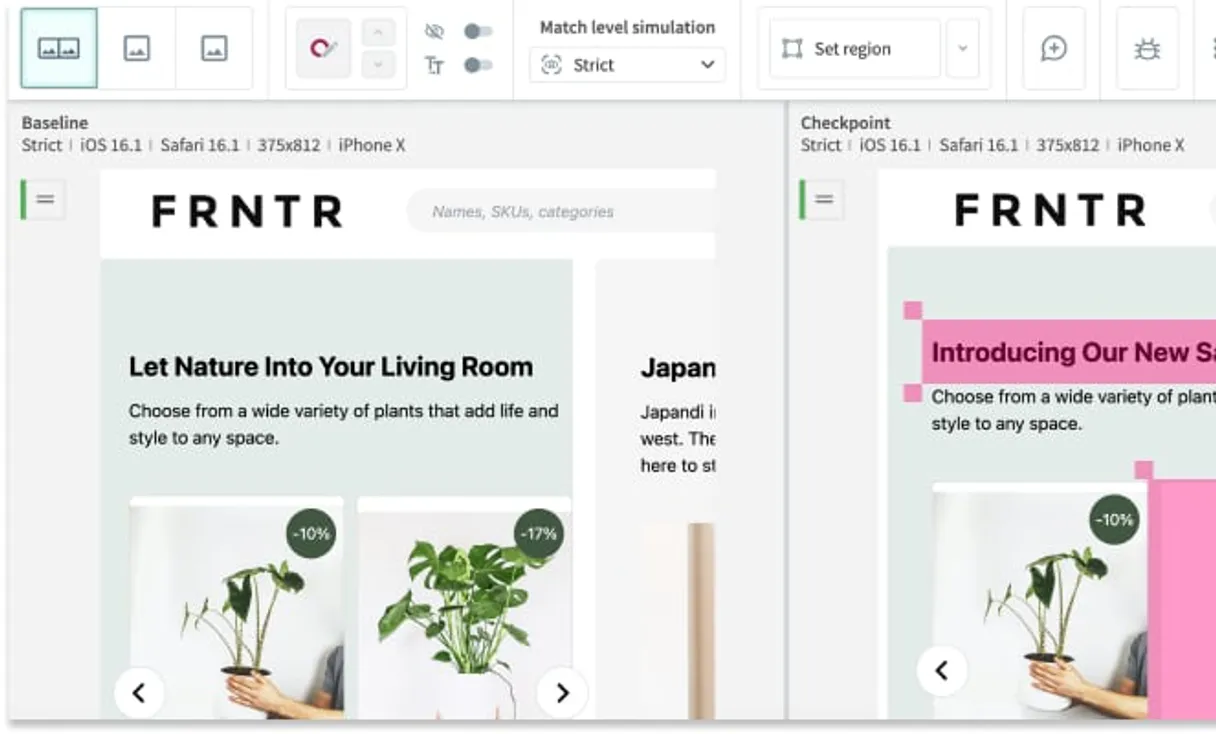
Applitools MCP Server lets your AI agent handle visual regression testing directly. You can query test batches, check session failures, and manage baselines without opening the Applitools dashboard.
Use it to spot UI changes, validate golden baselines, and assess testing health dynamically from your chat interface.
What your AI agents can do
Delete baseline
Deletes an Applitools test baseline when it is outdated or the page has been redesigned.
Delete batch
Deletes an entire test batch; this action is irreversible and does not affect baselines.
Get batch
Retrieves complete details for a specific, identified Applitools test batch.
Retrieves summary counts of passed, failed, unresolved, and new results for a specific test batch.
Retrieves a list of all test batches, including their IDs, names, current status, and test counts.
Fetches the full details and results for a specified test batch ID.
Retrieves detailed results for a specific test session within a known batch.
Lists or deletes 'golden' visual baselines, either for the whole app or a specific Git branch.
Validates the Applitools API key and connectivity before running any tests.
Ask AI about this MCP
Supported MCP Clients
Gemini Waiting for input…
Applitools MCP Server: 10 Tools for Visual Testing
These tools let you manage, analyze, and query the entire Applitools visual regression pipeline directly through your AI agent.
019d7550delete baseline
Deletes an Applitools test baseline when it is outdated or the page has been redesigned.
019d7550delete batch
Deletes an entire test batch; this action is irreversible and does not affect baselines.
019d7550get batch
Retrieves complete details for a specific, identified Applitools test batch.
019d7550get batch stats
Gets a summary count of passed, failed, unresolved, and new results for a test batch.
019d7550get session
Retrieves full details for a test session, requiring both a batch ID and a session ID.
019d7550list baselines
Lists visual baselines for an application, allowing filtering by app name.
019d7550list batches
Lists all test batches, showing their IDs, names, statuses, and test counts.
019d7550list branch baselines
Lists visual baselines specifically tied to a given Git branch.
019d7550list results
Lists all individual test results contained within a specific Applitools batch.
019d7550validate key
Validates the Applitools API key to confirm connectivity before running any visual tests.
Choose How to Get Started
Build a custom MCP for your own tools, or connect a ready-made integration from our catalog.
Build Your Own
Turn any API into an MCP. Import a spec, define Agent Skills, or deploy with MCPFusion.
- Import from OpenAPI, Swagger, or YAML specs
- Create Agent Skills with progressive disclosure
- Deploy to edge with MCPFusion framework
- Built in DLP, auth, and compliance on every call
- Real time usage dashboard and cost metering
- Publish to catalog or keep private
Make Your AI Do More
Start with Applitools, then connect any of our 4,700+ other servers whenever your AI needs more. One click, no limits.
- Use this MCP plus 4,700+ others, all in one place
- Add new capabilities to your AI anytime you want
- Every connection is secured and compliant automatically
- Track usage and costs across all your servers
- Works with Claude, ChatGPT, Cursor, and more
- New servers added to the catalog every week
What you can do with this MCP connector
You've got the Applitools MCP Server. It lets your AI agent handle visual regression testing—you manage your whole pipeline without ever touching the Applitools dashboard. You can have your agent spot UI changes, validate golden baselines, and check the testing health straight from your chat interface.
Checking API Connectivity: You run validate_key to confirm your Applitools API key works and that your agent can talk to the service before you even start any visual tests.
Listing Test Batches: You can use list_batches to get a list of all your test batches; it shows you the IDs, names, statuses, and how many tests are in each batch.
Getting Batch Statistics: You run get_batch_stats to get a summary count for a specific test batch, telling you how many tests passed, failed, are unresolved, and how many are new.
Getting Detailed Batch Results: When you need the full scoop, you use get_batch to fetch all the details for a specific test batch ID.
Listing Test Results: You use list_results to get a list of every individual test result that's inside a specific Applitools batch.
Inspecting Test Sessions: To dig into the weeds, you use get_session to get the full details for a specific test session, but you gotta provide both the batch ID and the session ID.
Managing Visual Baselines: You can check out your 'golden' visual baselines using list_baselines to filter by app name, or you can use list_branch_baselines to see baselines tied to a specific Git branch.
Deleting Baselines: If a baseline is outdated or the page got redesigned, you can run delete_baseline to wipe it out.
Deleting Batches: You've got delete_batch, which wipes out an entire test batch. Just remember, that's irreversible and it doesn't touch your baselines.
This lets your agent manage everything: list all test batches using list_batches, check batch stats with get_batch_stats, get full batch details with get_batch, inspect sessions with get_session, check baselines with list_baselines or list_branch_baselines, delete baselines with delete_baseline, and delete batches with delete_batch. You can also list all test results inside a batch using list_results.
How Applitools MCP Works
- 1 Subscribe to the Applitools server and provide your API Key.
- 2 Ask your agent to perform a high-level query, like 'What are the statuses of the last five test batches?'
- 3 The agent runs the query, pulls the status report, and presents the visual bug summary directly in the chat.
The bottom line is, you manage your entire visual testing pipeline from the chat interface, without ever leaving your workflow.
Who Is Applitools MCP For?
The QA Automation Engineer who gets tired of clicking through dashboards at 2 am. The Frontend Developer who needs to validate a PR's visual state without context switching. Or the Engineering Manager who needs high-level batch stats instantly to sign off on a release.
Asks the agent to summarize unresolved test batches and pinpoint exact OS/browser failure combinations.
Verifies branch-specific visual baselines during PRs without leaving the IDE.
Pulls high-level batch statistics to ensure release criteria are visually met.
What Changes When You Connect
- See the status of all test runs instantly. Instead of clicking through dashboards, ask the agent to run
list_batchesto get a summary of Passed, Failed, or Unresolved status for every test run. - Deep-dive into failures without context switching. Use
get_sessionwith a batch ID and session ID to pull failure images and specific browser differences, right in your chat window. - Keep your codebase clean. Use
list_baselinesto review and thendelete_baselineto purge outdated 'golden' images, ensuring your baselines are always relevant to the current app state. - Validate PRs instantly. Use
list_branch_baselinesto check visual baselines specific to a Git branch, letting you confirm visual states during a pull request review. - Check API health first. Run
validate_keybefore any major pipeline trigger. It confirms connectivity to the visual AI engine, preventing wasted time on failed runs. - Reduce manual sign-off. Use
get_batch_statsto get high-level metrics (Passed/Failed/Unresolved) and confirm release criteria are met before deployment.
Real-World Use Cases
The QA team needs a quick overview of recent failures.
The QA engineer runs list_batches and sees three recent batches. They know one is 'Unresolved' and needs to know why. They then ask the agent to use get_batch_stats on the ID and immediately see the failure count, allowing them to start debugging the specific failure area.
A developer needs to confirm a visual fix on a specific branch.
A developer opens a PR for a dark mode feature. Instead of manually checking the Applitools UI, they ask the agent to run list_branch_baselines for the 'feature/dark-mode-header' branch. The agent returns the relevant baseline IDs and names, confirming the visual state for the PR review.
An Ops Engineer needs to clean up old test data.
The Ops Engineer runs list_baselines and finds several baselines for old apps. They ask the agent to identify and then use delete_baseline on the outdated ones, keeping the visual regression pipeline clean and efficient.
Investigating a complex UI bug across browsers.
The QA team runs get_batch for a known failure batch. The agent extracts the session details using get_session, pointing out that the mismatch is a 12% pixel drift on the 'Payment Modal' step, specifically on Chrome 114 vs. Safari 16.
The Tradeoffs
Manual Dashboard Navigation
Logging into the Applitools dashboard, manually filtering by date, finding the correct batch ID, then clicking into session details to check failure images.
→
Use the agent to run list_batches to get the IDs. Then, tell the agent to use get_batch_stats on that ID. It gives you the summary, and you can drill down with get_session—all in the chat.
Running tests without checking keys
Assuming the Applitools API key is correct and running a large batch of tests, only to have the entire pipeline fail immediately because the key is invalid or expired.
→
Always run validate_key first. This confirms the Applitools API key works and the connection is live before you spend time on actual test runs.
Forgetting to clean up baselines
Letting outdated, 'golden' baselines accumulate for old features, which clogs the system and makes finding current visual standards difficult.
→
Run list_baselines to see what you have. If they're old, use delete_baseline to remove them. Keep your visual library tight.
When It Fits, When It Doesn't
Use this if your primary bottleneck is visibility and context switching. You need to move visual testing analysis out of a dedicated UI and into your existing chat/IDE workflow. You need to query batch statuses, check visual diffs, or manage baselines without opening the Applitools dashboard.
Don't use this if you are building a brand new test suite from scratch, or if your core need is to write the test code itself. For that, you'll need a dedicated testing framework. If you only need to delete a single batch and nothing else, delete_batch is enough. But if you need the context (like knowing why you're deleting it), use the full suite.
Independent Platform Disclaimer: Vinkius is an independent platform and is not affiliated with, endorsed by, sponsored by, verified by, or otherwise authorized by Applitools. All third-party trademarks, logos, and brand names are the property of their respective owners. Their use on this website is strictly for informational purposes to identify service compatibility and interoperability.
VINKIUS INFRASTRUCTURE
Cloud Hosted
Managed infra
V8 Isolated
Sandboxed per request
Zero-Trust Proxy
No stored credentials
DLP Enforced
Policy on every call
GDPR Compliant
EU data residency
Token Compression
~60% cost reduction
Works with Claude, ChatGPT, Cursor, and more
The Model Context Protocol standardizes how applications expose capabilities to LLMs. Instead of operating in isolation, your AI gains direct access to external platforms, live data, and real-world actions through secure, standardized connections.
This server provides 10 capabilities that interface natively with Claude, ChatGPT, Cursor, and any MCP client. No middleware. No custom integration required.
Available Capabilities
Visual regression checking used to mean switching tabs and digging through dashboards.
Today, checking for UI changes is a tedious process. You have to log into the Applitools dashboard, then manually find the right test batch. You filter by date, then you click into the batch, and then you drill down into specific sessions just to see if the button alignment shifted by 12 pixels.
With the Applitools MCP Server, you just tell your agent what you need. It runs the query, pulls the failure images, and presents the full visual diff analysis directly in the chat. You get the bug details without leaving your workflow.
Applitools MCP Server: Get detailed visual state reports.
You no longer have to wait for a QA engineer to pull the batch stats. You can ask the agent to use `list_batches` and then `get_batch_stats` on the resulting ID. You get the full status report immediately, showing exactly how many tests passed, failed, or are still unresolved.
The Applitools MCP Server lets you treat complex visual validation like a simple conversation. You get real-time, actionable data—no more waiting for dashboard updates.
Common Questions About Applitools MCP
How do I check if my Applitools API key is working before running tests with validate_key? +
Yes, running validate_key confirms that your Applitools API key is valid and that the server can connect to your visual AI engine. It's the first step before any test run.
What is the difference between `get_batch_stats` and `get_batch`? +
get_batch_stats gives you a quick count (passed/failed/unresolved). get_batch pulls the full, detailed record for that batch, giving you more comprehensive information.
Can I check baselines for a specific Git branch using list_branch_baselines? +
Yes, list_branch_baselines is designed to list baselines that are specifically tied to a given Git branch, making branch-specific visual comparison easy.
If I delete a batch using delete_batch, does it affect my baselines? +
No, delete_batch only deletes the test run data. It does not affect your stored visual baselines. Use it with care, as this action is irreversible.
How do I find all available test batches using list_batches? +
Run list_batches. This command returns a list of all your test batches, including their IDs, names, and current status. You'll need the resulting batch ID for subsequent calls.
When should I use the `delete_baseline` tool, and how does it interact with `list_baselines`? +
You use delete_baseline when a baseline is outdated or the page structure changes. Running list_baselines first lets you identify the exact ID of the stale baseline you need to remove.
If I want to inspect a specific test session, do I need to use `get_session` with the correct IDs? +
Yes, you must provide the batch ID and session ID to get_session. This allows your agent to retrieve detailed information, like failed step images or specific browser mismatches, for that single test run.
How do I get a list of all test results within a batch using `list_results`? +
The list_results tool gathers all test outcomes within a specified Applitools batch. This is useful for quickly seeing a comprehensive report of every test run without needing full session details.
Can my AI agent resolve a test failure on its own? +
No. The MCP server is designed for pulling state data—it retrieves batches, session diff links, and match levels so you can review them locally. Approving a new baseline or resolving a mismatch still requires human intervention within the Applitools Eyes dashboard to maintain absolute testing safety.
Can I use the agent to delete old UI snapshots? +
Yes. If your UI has undergone major structural changes and old baselines are causing false positives, you can authorize the agent to execute the delete_baseline tool. Provide the exact baseline ID to instantly discard the legacy screenshot from your workspace.
How fast can I summarize test errors after my CI/CD action triggers? +
Almost instantly. Rather than scrolling through dozens of Applitools logs, ask your agent to 'Get batch stats for ID 123'. It will immediately return the aggregation of Passed, Failed, and Unresolved runs, saving you countless minutes of digging.
Use it with your favorite AI tools
Connect this server to Cursor, Claude, VS Code, and more.
More in this category
Linear (Issue Tracking & PM)
Manage product development via Linear — track issues, monitor sprint cycles, and audit team projects.

Bitbucket
Manage your Git repositories via Bitbucket — list pull requests, commits, and pipelines directly from any AI agent.
Apify
Command Apify scrapers from your AI agent — run actors, extract web data, poll datasets, and automate browser tasks seamlessly.
You might also like

Deepgram
Power audio AI via Deepgram — perform high-speed speech-to-text, generate lifelike text-to-speech, track usage, and manage API keys directly from any AI agent.

Nifty (All-in-One Project Management)
Manage projects via Nifty — create tasks, track sprint milestones, and audit project portfolios.
Laravel Forge
Manage Laravel Forge servers, orchestrate site deployments, and query databases directly from your AI agent.