
Cometly MCP. Attribution data and campaign stats in natural language.
 Gemini
 Works with every AI agent you already use
…and any MCP-compatible client









Just plug in your AI agents and start using Vinkius.
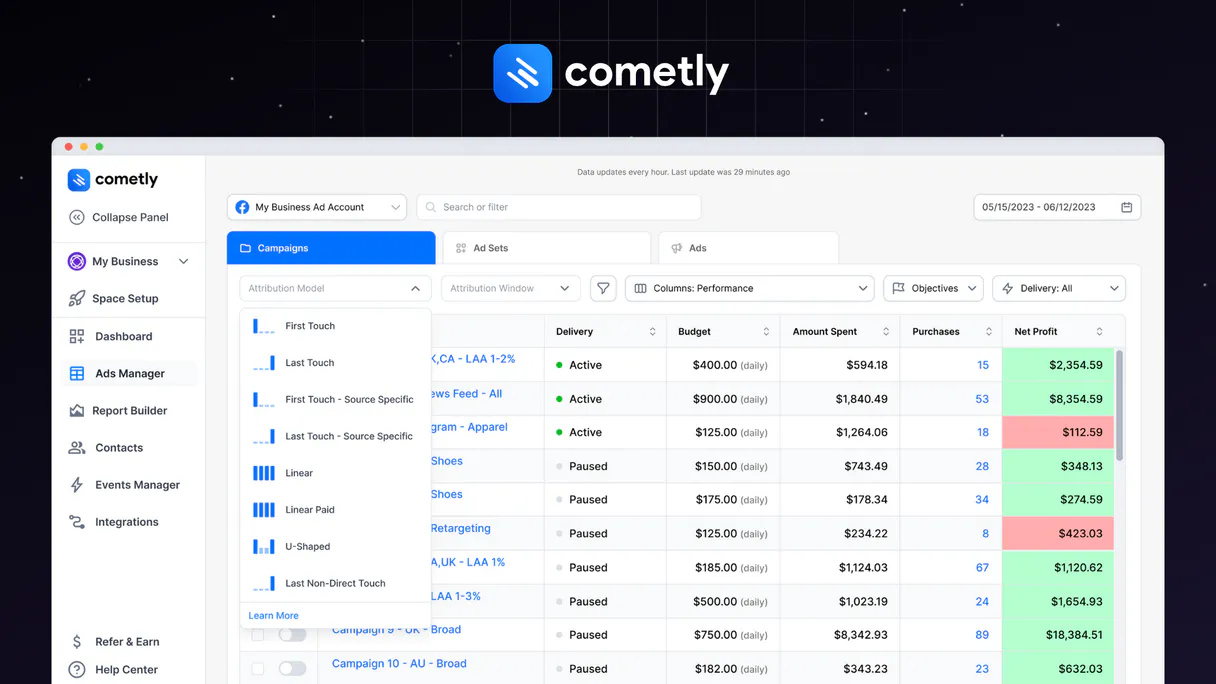
Cometly. Track conversions, pull ad attribution data, and monitor entire ad campaigns using your AI agent. Cometly connects your AI to Meta, Google, and TikTok ad data, letting your agent query ROAS, CPA, and conversion stats instantly.
You can track purchases, leads, and custom events directly from a chat prompt, getting full attribution metadata without opening a dashboard.
It's pure, actionable performance data for marketing ops.
What your AI agents can do
Get campaign stats
Gets performance stats (ROAS, CPA) for a single, named ad campaign.
List ad accounts
Retrieves a list of all connected ad accounts (Meta, Google, etc.) you run.
List campaigns
Pulls a list of every ad campaign Cometly is currently tracking.
Retrieves key metrics like ROAS and CPA for a specific ad campaign.
Provides a list of all connected ad accounts across platforms like Meta and Google.
Retrieves a complete list of all active and tracked ad campaigns.
Retrieves a list of contacts, showing their attributed journey and customer data.
Retrieves a list of all event types and conversion records tracked in Cometly.
Sends a specific conversion event (like a Purchase or Lead) to Cometly for attribution tracking.
Ask AI about this MCP
Supported MCP Clients
Gemini Waiting for input…
Cometly MCP Server: 8 Tools for Campaign & Event Tracking
These tools let your agent query ad performance, list accounts, and send structured conversion events across multiple ad platforms.
019d7578get campaign stats
Gets performance stats (ROAS, CPA) for a single, named ad campaign.
019d7578list ad accounts
Retrieves a list of all connected ad accounts (Meta, Google, etc.) you run.
019d7578list campaigns
Pulls a list of every ad campaign Cometly is currently tracking.
019d7578list contacts
Gets a list of contacts, including their full customer journey and attributed source data.
019d7578list events
Retrieves a list of all tracked event types in the system.
019d7578track event
Sends a general conversion event (like a custom action) to Cometly for attribution.
019d7578track lead
Quickly sends a new lead event to Cometly for tracking.
019d7578track purchase
Quickly sends a purchase event (with order details) to Cometly.
Choose How to Get Started
Build a custom MCP for your own tools, or connect a ready-made integration from our catalog.
Build Your Own
Turn any API into an MCP. Import a spec, define Agent Skills, or deploy with MCPFusion.
- Import from OpenAPI, Swagger, or YAML specs
- Create Agent Skills with progressive disclosure
- Deploy to edge with MCPFusion framework
- Built in DLP, auth, and compliance on every call
- Real time usage dashboard and cost metering
- Publish to catalog or keep private
Make Your AI Do More
Start with Cometly, then connect any of our 4,700+ other servers whenever your AI needs more. One click, no limits.
- Use this MCP plus 4,700+ others, all in one place
- Add new capabilities to your AI anytime you want
- Every connection is secured and compliant automatically
- Track usage and costs across all your servers
- Works with Claude, ChatGPT, Cursor, and more
- New servers added to the catalog every week
What you can do with this MCP connector
You connect your AI agent to Cometly, the ad attribution platform for Meta, Google, and TikTok. Your agent lets you pull performance data and track conversions across all your ad channels, all without opening a dashboard. You talk to your agent like you talk to a person—no APIs, just natural language.
list_ad_accounts lets your agent pull a list of every ad account you run, whether it's Meta, Google, or something else.list_campaigns gives you a complete rundown of every ad campaign Cometly is tracking.get_campaign_stats pulls key metrics like ROAS and CPA for any single ad campaign you name.list_contacts pulls a list of contacts, showing their whole journey and where they came from, complete with attributed source data.list_events shows you every type of event and conversion record Cometly tracks.track_lead sends a new lead event to Cometly for tracking.track_purchase sends a purchase event, including all the order details, to Cometly for attribution.track_event sends a general conversion event, like a custom action, to Cometly for tracking.
How Cometly MCP Works
- 1 Add the Cometly integration to your AI toolset and enter your API Key in the account settings.
- 2 Give your agent a prompt: 'Show me the ROAS for the 'Summer Sale' campaign last month.'
- 3 The agent calls
get_campaign_stats, which fetches the data, and then summarizes the results for you.
The bottom line is, you get real-time, attributed marketing data right in the chat, without ever leaving your AI environment.
Who Is Cometly MCP For?
Performance marketers, growth leads, and e-commerce managers who need to prove ROI fast. If you're tired of clicking through five different dashboards—Meta, Google Ads, your CRM—just to figure out where the money came from, this is for you. It puts attribution data directly in your workflow.
Uses the agent to pull ROAS breakdowns or compare CPA across multiple ad campaigns instantly.
Runs quick checks on attribution, like tracking a new lead or listing contacts to see which channel generated them.
Asks the agent to list all purchase events and check the total revenue attributed to a specific ad platform.
What Changes When You Connect
- See the true ROAS for any campaign. Instead of logging into Google Ads and clicking through, ask the agent to run
get_campaign_statsand get the ROAS number immediately. - Track a conversion event instantly. If a user buys something, use
track_purchasein a prompt. The agent handles the complex attribution logic across Meta and Google. - Know exactly where your users came from. Use
list_contactsto get a list of people and see the exact ad path that brought them into your funnel. - List every campaign you run. Need to know if you missed a campaign? Use
list_campaignsto pull the full list of tracked campaigns without manual UI checks. - Stop losing data points. If a custom action happens (like a demo request), use
track_eventto record it and keep your full attribution record. - See all your channels in one place. Use
list_ad_accountsto verify which ad accounts the agent can currently pull data from.
Real-World Use Cases
Figure out why Q3 revenue dipped.
The e-commerce director sees revenue drop. They tell their agent: 'Check the top 3 campaigns by ROAS and give me the contact list for those. Also, run get_campaign_stats for the last 30 days.' The agent combines the data, identifies the drop-off, and lists the accounts responsible for the dip.
Need to manually log a high-value purchase.
A sales rep closes a deal outside of the usual funnel. They prompt the agent: 'Track a purchase of $5,000 for customer X, order Y.' The agent calls track_purchase, logging the transaction and attributing it to the nearest ad source automatically.
Auditing a new ad account setup.
The marketing ops specialist needs to ensure all channels are connected. They ask the agent to run list_ad_accounts and list_campaigns. The agent checks the list and reports back if any critical accounts are missing data.
Analyzing a specific user's journey.
A growth team member wants to know how a specific user found the site. They prompt the agent to run list_contacts for that user ID. The agent returns the full attributed journey, showing every ad interaction and event.
The Tradeoffs
Relying on static CSV exports
Exporting a campaign's metrics to a CSV, then manually comparing it to your CRM data to see the true source of revenue. This process takes hours and often misses the attribution metadata.
→
Instead, prompt your agent: 'Compare the revenue from campaign X against the contacts in the CRM.' The agent uses get_campaign_stats and list_contacts to run the comparison live and provide an immediate summary.
Ignoring the event source
Thinking that because a user visited the site, that's enough data. You only track page views, missing the actual conversion point (e.g., clicking 'Submit' or adding to cart).
→
Always track specific actions. Use track_purchase or track_lead to send the conversion event. This tells the agent exactly what happened and when.
Over-relying on dashboard filters
Spending 20 minutes clicking through date ranges, device types, and ad platforms just to isolate one metric. The filters are too complex and slow.
→
Just ask the agent: 'What was the ROAS for Meta ads in the last 7 days?' The agent uses get_campaign_stats and provides the answer in seconds.
When It Fits, When It Doesn't
Use this if you need to connect high-level ad spend data (ROAS, CPA) with granular, real-time user behavior (purchase/lead tracking). You need to know why a number is what it is. Don't use this if you just need to view a simple, static list of contacts or campaigns. If your core problem is data visualization—you just want to see a beautiful graph of data—you'll need a dedicated BI tool. But if the problem is actionable data and attribution, this is the right fit. The tools like list_campaigns and list_ad_accounts provide the scope, but get_campaign_stats and track_purchase provide the insight.
Independent Platform Disclaimer: Vinkius is an independent platform and is not affiliated with, endorsed by, sponsored by, verified by, or otherwise authorized by Cometly. All third-party trademarks, logos, and brand names are the property of their respective owners. Their use on this website is strictly for informational purposes to identify service compatibility and interoperability.
VINKIUS INFRASTRUCTURE
Cloud Hosted
Managed infra
V8 Isolated
Sandboxed per request
Zero-Trust Proxy
No stored credentials
DLP Enforced
Policy on every call
GDPR Compliant
EU data residency
Token Compression
~60% cost reduction
Works with Claude, ChatGPT, Cursor, and more
The Model Context Protocol standardizes how applications expose capabilities to LLMs. Instead of operating in isolation, your AI gains direct access to external platforms, live data, and real-world actions through secure, standardized connections.
This server provides 8 capabilities that interface natively with Claude, ChatGPT, Cursor, and any MCP client. No middleware. No custom integration required.
Available Capabilities
Manually stitching together ad performance data is a nightmare.
Today, proving ROI is a scavenger hunt. You jump between Google Ads, Meta Ads Manager, and your CRM. You download CSVs, spend hours trying to match campaign IDs to contact IDs, and then manually build pivot tables to find the true ROAS. It's slow, and you always miss the nuances of multi-channel attribution.
With Cometly, your agent does the heavy lifting. You ask, 'What was the ROAS for the 'Summer Sale' campaign?' and it runs the complex attribution math using `get_campaign_stats`. You get the definitive, real-time number in your chat.
Cometly MCP Server: Track Purchases and Leads with Cometly MCP Server
Before Cometly, logging a purchase meant updating a spreadsheet and hoping someone remembered to send the attribution metadata. You only knew the dollar amount, not which ad set or ad copy caused the sale.
Now, when a purchase happens, you use `track_purchase`. The agent logs the sale, and crucially, it attaches the full attribution data—Meta, Google, and the specific campaign—in seconds. That's the difference.
Common Questions About Cometly MCP
How do I use the `track_purchase` tool with Cometly MCP Server? +
You prompt your agent to track the purchase. You need to provide the order ID, the total amount, and the customer email. The agent calls track_purchase and logs the data, syncing it to all connected ad platforms.
What data does `get_campaign_stats` give me? +
get_campaign_stats returns core metrics: spend, conversions, revenue, ROAS, and CPA. You just need to specify which campaign and what date range you want.
Can I list all my connected ad accounts using `list_ad_accounts`? +
Yes, list_ad_accounts retrieves a clean list of every connected ad account (Meta, Google, etc.). This is useful for verifying coverage before running reports.
Is `list_contacts` the right tool to check a user's journey? +
Yes. list_contacts pulls the full customer journey data, showing not just that they converted, but which specific ad and channel they first interacted with.
Does `track_event` track everything? +
Yes, track_event is flexible. You use it for any custom action—like a 'demo request' or 'pricing page view'—and Cometly tracks it with attribution metadata.
How do I use `list_campaigns` to find a specific campaign? +
You can filter the results by name or status. After running list_campaigns, you can narrow down the list by providing keywords or filtering by active/paused status.
What happens if I try to `track_purchase` without an ad attribution source? +
The system tracks the purchase event even if attribution data is missing. It records the core purchase details (order ID, amount) and flags the attribution source as unknown for later review.
Does `list_contacts` require me to specify a date range? +
Yes, you must specify a date range to limit the contacts retrieved. Providing start and end dates ensures you only pull relevant customer journey data for your analysis.
How do I get my Cometly API key? +
Log in to Cometly, go to Account Settings > API Keys, copy your key, and paste it below.
Is this the same as Meta Conversions API (CAPI)? +
No. Cometly acts as a bridge: it receives events, attributes them, and syncs data back to Meta, Google, TikTok, etc.
What event types are supported? +
Standard events: Purchase, Lead, Add To Cart, Initiate Checkout. You can also use custom event names.
Use it with your favorite AI tools
Connect this server to Cursor, Claude, VS Code, and more.
More in this category
Aimtell
Web push notification orchestration — manage campaigns, segments, and subscribers via AI.

Ometria Intelligence
Analyze customer data and retail marketing via Ometria — track contacts, orders, and segments directly from your AI agent.

SimilarWeb Analytics
Universal website intelligence — get traffic stats, global ranks, and category insights via AI.
You might also like
NiftyImages
Manage personalized images and dynamic content via NiftyImages — track images, widgets, and countdown timers directly from your AI agent.
Spotify Music
Control playback, search library, get audio features, and manage playlists via Spotify API.

Chuanyun
Enterprise workflow automation and digital engine — manage business objects, forms, and approval history via AI.