
Cradl AI MCP. Convert documents into structured data from chat.
 Gemini
 Works with every AI agent you already use
…and any MCP-compatible client









Just plug in your AI agents and start using Vinkius.
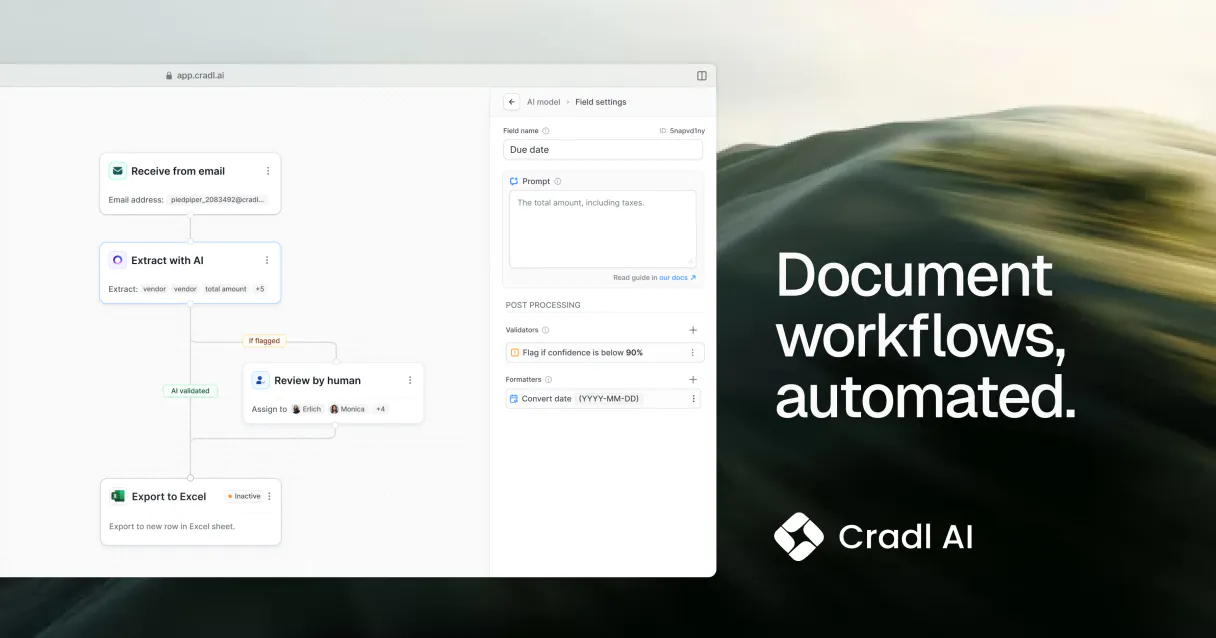
Cradl AI. Extract structured data from any document, no matter the format. This MCP Server uses deep learning to pull actionable data from invoices, receipts, IDs, and custom forms.
Your AI agent processes document URLs, listing and managing custom extraction models to automate data entry for finance and operations.
What your AI agents can do
Extract data from url
Triggers a new data extraction prediction using a file URL and a specified model.
Get batch details
Retrieves the status and summary details for a specific group of processed documents.
Get flow details
Gets the structure and settings for a specific document processing workflow.
Sends a document URL to the server and returns structured key-value pairs, executing the extraction process.
Retrieves metadata, version numbers, and training status for every custom data extraction model available in the account.
Queries a specific task ID to get the completion status and the extracted key-value pairs.
Retrieves the structure, configuration, and rules for a specific automated document processing workflow.
Provides a summary and status check for a group of documents that were processed together.
Filters the list of available models based on a keyword search term.
Generates a list of all defined document processing flow IDs and their triggers.
Ask AI about this MCP
Supported MCP Clients
Gemini Waiting for input…
Cradl AI MCP Server: 10 Tools for Data Extraction
These tools let your agent manage the entire data lifecycle: from listing available models and workflows to extracting data and checking task status.
019d757dextract data from url
Triggers a new data extraction prediction using a file URL and a specified model.
019d757dget batch details
Retrieves the status and summary details for a specific group of processed documents.
019d757dget flow details
Gets the structure and settings for a specific document processing workflow.
019d757dget model details
Fetches detailed metadata, accuracy scores, and schema definitions for a specific extraction model.
019d757dget task status
Checks the completion status and the extracted key-value pairs for a single document task ID.
019d757dlist batches
Lists all document batches, providing their IDs, creation dates, and total document counts.
019d757dlist extraction models
Lists all available data extraction models, including their names, versions, and training status.
019d757dlist processing tasks
Lists recent document processing tasks, showing IDs, statuses (PENDING, COMPLETED, FAILED), and timestamps.
019d757dlist workflows
Lists all configured document processing flows, showing their IDs, triggers, and processing steps.
019d757dsearch models by name
Searches and finds extraction models using a name keyword.
Choose How to Get Started
Build a custom MCP for your own tools, or connect a ready-made integration from our catalog.
Build Your Own
Turn any API into an MCP. Import a spec, define Agent Skills, or deploy with MCPFusion.
- Import from OpenAPI, Swagger, or YAML specs
- Create Agent Skills with progressive disclosure
- Deploy to edge with MCPFusion framework
- Built in DLP, auth, and compliance on every call
- Real time usage dashboard and cost metering
- Publish to catalog or keep private
Make Your AI Do More
Start with Cradl AI, then connect any of our 4,700+ other servers whenever your AI needs more. One click, no limits.
- Use this MCP plus 4,700+ others, all in one place
- Add new capabilities to your AI anytime you want
- Every connection is secured and compliant automatically
- Track usage and costs across all your servers
- Works with Claude, ChatGPT, Cursor, and more
- New servers added to the catalog every week
What you can do with this MCP connector
Cradl AI lets your AI client pull structured data out of any document, no matter what the format is. It handles everything from invoices and receipts to IDs and your own custom forms. Your agent processes document URLs, lets you list and manage custom extraction models, and automates data entry for finance and operations. extract_data_from_url sends a document URL to the server and returns structured key-value pairs, running the extraction process.
You can use list_extraction_models to get metadata, version numbers, and training status for every custom data extraction model you've built. If you want to narrow it down, search_models_by_name lets you find specific extraction models using a name keyword. You can check the status and results of a single document task using get_task_status, which queries a specific task ID for completion status and extracted key-value pairs.
To manage groups of documents, list_batches provides IDs, creation dates, and total document counts for all processed document batches. For a deeper look at a specific group, get_batch_details retrieves a summary and status check for that batch. You can check the structure and rules for an automated process using get_flow_details, which gets the structure and settings for a specific document processing workflow. list_workflows gives you a list of all defined document processing flow IDs and their triggers.
You'll also need to know what's going on with your processing jobs; list_processing_tasks lists recent document processing tasks, showing IDs, statuses (PENDING, COMPLETED, FAILED), and timestamps. These tools let you get a complete picture of your document processing pipeline.
How Cradl AI MCP Works
- 1 Connect the Cradl AI integration to your AI agent and authorize it with your API key.
- 2 Your agent calls a tool, like
extract_data_from_url, passing a document URL and the required model name. - 3 The server processes the document, returns the structured data, and provides a task ID for status checking.
The bottom line is that your AI agent uses the server to convert raw documents into structured data without you touching a dashboard.
Who Is Cradl AI MCP For?
The Operations Manager who gets tired of manually checking statuses across multiple SaaS dashboards. The Finance Analyst who hates copy-pasting invoice data. The Developer who needs to audit model performance during integration testing.
Runs the AI agent to process batches of receipts and invoices, ensuring all financial data fields are extracted and formatted for ledger entry.
Uses the AI agent to monitor high-volume document pipelines, checking the status of entire batches or specific workflows for accuracy.
Integrates the server by calling tools like list_extraction_models and get_model_details to audit model performance and test integration points.
What Changes When You Connect
- Automate data entry. Instead of manually entering data from invoices or receipts, calling
extract_data_from_urlfeeds the structured results directly to your agent. This saves hours of manual labor. - Audit complex pipelines. Use
list_workflowsandget_flow_detailsto map out exactly how your documents are processed. You see the triggers and steps without needing to check a separate UI. - Keep track of everything. The agent can list all tasks (
list_processing_tasks) or check the status of a specific batch (get_batch_details) just by name. You get instant visibility into document flow. - Manage your models. Need to know if your 'ID Scanner' model is up to date? Call
list_extraction_modelsorget_model_detailsto check the version and training status before running a job. - Process data in bulk. If you have hundreds of files,
list_batcheslets your agent gather the IDs and total counts, making large-scale data processing easier to manage. - Pinpoint failures. When a job fails, don't guess. Use
get_task_statusto resolve the confidence score and extracted key-value pairs for a specific task ID.
Real-World Use Cases
Processing a large payroll cycle
The Operations Manager needs to process 500 payroll receipts. They start by calling list_batches to get the IDs. Next, they loop through the IDs, calling extract_data_from_url for each file. Finally, they check the status using get_task_status until all results are confirmed.
Onboarding a new client's documents
A developer needs to audit the data ingestion process for a new client. They first use list_workflows to see all defined document paths, then use get_flow_details to verify the specific rules applied to the client's ID and contracts.
Quickly checking invoice data
A Finance Analyst receives a new invoice link. Instead of opening a PDF and typing, they send the URL to their agent and call extract_data_from_url. The agent immediately gets the structured JSON data, ready for accounting software.
Finding the right data model
The AI agent needs to know which model to use. It calls list_extraction_models to see all options, then uses search_models_by_name to narrow it down, finally using get_model_details to confirm the correct version and schema.
The Tradeoffs
Treating data extraction as simple text input
Pasting a PDF or image file into the chat and asking the agent to 'read the data.' The agent fails because it can't reliably distinguish between text and image structure.
→
Always use extract_data_from_url and provide the direct link to the document. This forces the server to run the document through the deep learning models, giving you reliable, structured data.
Ignoring process failures
Running a large batch of documents and only checking the final summary. You won't know which specific document failed or why the flow stopped.
→
After the job runs, use list_processing_tasks to get all task IDs. Then, call get_task_status for each ID. This pinpoints the exact failure point and provides the confidence score.
Not validating the required model
Running extract_data_from_url without specifying the correct model (e.g., using a general model for a specific invoice format). The data output will be unreliable or incomplete.
→
First, use list_extraction_models to see what models are available. Then, use get_model_details to confirm the exact schema and version before calling extract_data_from_url.
When It Fits, When It Doesn't
Use this if you need to turn unstructured documents (PDFs, images, scans) into clean, structured data, and if you need to monitor the entire pipeline lifecycle. You're dealing with finance, HR, or compliance data.
Don't use this if your data is already clean CSV or JSON, or if you only need to list general document metadata (like file size or upload date). For simple metadata retrieval, a dedicated file system tool is better.
If you are building a complex, multi-step data pipeline, use list_workflows to define the process, and then rely on get_flow_details to ensure the steps are configured correctly before triggering any extraction.
Independent Platform Disclaimer: Vinkius is an independent platform and is not affiliated with, endorsed by, sponsored by, verified by, or otherwise authorized by Cradl AI. All third-party trademarks, logos, and brand names are the property of their respective owners. Their use on this website is strictly for informational purposes to identify service compatibility and interoperability.
VINKIUS INFRASTRUCTURE
Cloud Hosted
Managed infra
V8 Isolated
Sandboxed per request
Zero-Trust Proxy
No stored credentials
DLP Enforced
Policy on every call
GDPR Compliant
EU data residency
Token Compression
~60% cost reduction
Works with Claude, ChatGPT, Cursor, and more
The Model Context Protocol standardizes how applications expose capabilities to LLMs. Instead of operating in isolation, your AI gains direct access to external platforms, live data, and real-world actions through secure, standardized connections.
This server provides 10 capabilities that interface natively with Claude, ChatGPT, Cursor, and any MCP client. No middleware. No custom integration required.
Available Capabilities
Reading a PDF is still a manual, multi-step process.
Today, processing a single invoice means downloading the PDF, opening it in a reader, manually locating the invoice number, then switching to a spreadsheet, and copy-pasting the date, vendor name, and amounts. It takes minutes per document, and the chance of a typo is high.
With Cradl AI, you send the document URL to your agent. The server handles the deep learning extraction automatically. You get clean, structured JSON data—ready to pipe into your database—without ever opening a spreadsheet or clicking a single 'copy' button.
Cradl AI MCP Server: Extract structured data from documents
You eliminate the need to monitor separate dashboards. Instead of clicking 'View Batch Status' then 'Check Task ID' then 'Retrieve Result', your agent manages the entire lifecycle. It calls `list_batches` to see the scope, `get_task_status` to confirm the result, and provides the final structured data in one chat exchange.
This isn't just faster; it changes the architecture. It moves data processing from a series of manual steps to a reliable, programmatic function call.
Common Questions About Cradl AI MCP
How do I start using the `extract_data_from_url` tool with Cradl AI? +
You must provide the full URL to the document. You also need to specify which trained model you want to use (e.g., 'Invoice Parser'). The agent will then trigger the extraction process.
What is the difference between `list_batches` and `list_processing_tasks`? +
list_batches provides a summary of groups of documents (IDs, dates, total count). list_processing_tasks gives a list of individual, specific jobs with statuses like PENDING or FAILED.
Can I check the status of a document using `get_task_status`? +
Yes, get_task_status takes a single task ID. It returns the completion status, the confidence score, and the actual extracted key-value pairs once finished.
How do I manage my custom models in Cradl AI? +
You can list all available models with list_extraction_models, and get detailed information on a specific one using get_model_details.
What if my workflow fails? Should I use `get_flow_details` first? +
If a workflow fails, check get_flow_details first. This shows the configured structure and rules for that specific flow, helping you identify if the error is in the setup, not the data.
How do I use `list_extraction_models` to find the right model for a new document type? +
It lists all available data extraction models. You can use the resulting names and versions to decide which model is best suited for the document type. You'll need to check the model's training status and schema definition.
What information does `get_batch_details` provide about a group of processed documents? +
It gives a summary for a specific batch of documents. You get details like the total document count and the overall processing summary. This helps you audit the entire group after processing.
If a document extraction fails, what should I check using `get_task_status`? +
It tells you the current status and results of a specific document task. Look for the status to see if it's 'FAILED' and check the error logs for why the extraction failed.
How do I get a Cradl AI API Key? +
Log in to your Cradl AI dashboard and navigate to the API section to generate a new key. Ensure you keep this key secure.
Which document formats are supported? +
Cradl AI supports major formats including PDF, JPEG, PNG, and TIFF for data extraction.
Can I train custom models via chat? +
This integration currently focuses on executing extractions and monitoring tasks. Model training should be performed through the Cradl AI dashboard.
Use it with your favorite AI tools
Connect this server to Cursor, Claude, VS Code, and more.
More in this category

MarketMuse (AI Content Strategy & SEO)
Plan and optimize content via MarketMuse AI — analyze topic authority, generate content briefs, and audit SEO performance.

Leonardo.ai (Generative AI & Models)
Generate high-fidelity images via Leonardo.ai — orchestrate generations, audit AI models, and manage visual assets.

LMNT (Ultra-low Latency Speech Synthesis)
Synthesize ultra-low latency AI speech, clone voices instantly, and manage your LMNT audio assets directly from any AI agent.
You might also like

Parseur
Automate document processing via Parseur — list mailboxes, upload PDFs/Emails, extract structured data pipelines, and trigger template logic natively.

Moz (SEO Metrics & Link Research)
Manage SEO metrics via Moz — audit Domain Authority (DA), analyze backlinks, and track site rankings.
DeckMatch
Match startup pitch decks with investors using AI that analyzes fit, tracks outreach, and surfaces the right funding connections.