
Emarsys MCP. Manage campaigns, lists, and automation via chat.
 Gemini
 Works with every AI agent you already use
…and any MCP-compatible client









Just plug in your AI agents and start using Vinkius.
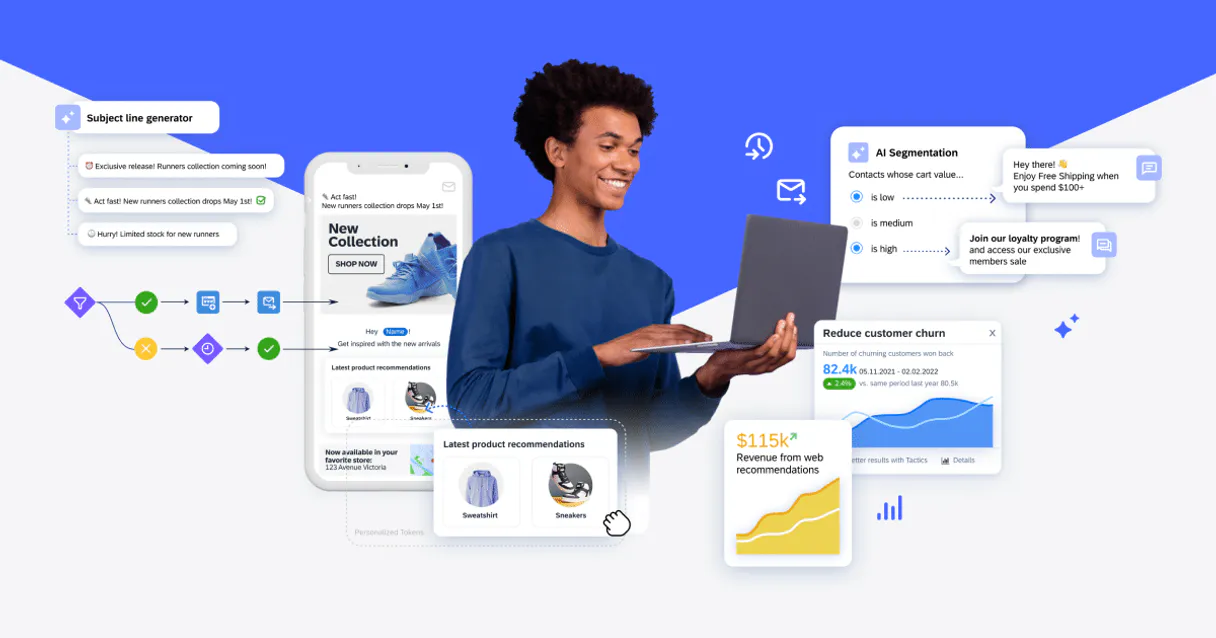
Emarsys. Manage your entire customer engagement workflow—from list hygiene to campaign deployment—using your AI client. This MCP Server lets your agent read campaign statuses, segment audience groups, audit automation flows, and check account metadata using natural language.
It’s your single point of access to Emarsys data without leaving your chat window.
What your AI agents can do
Get campaign details
Retrieves the specific settings and current status of one email campaign.
Get contact list details
Gets detailed settings for a single, specific contact list.
Get emarsys account metadata
Retrieves account metadata and general settings for your Emarsys account.
You can list all email campaigns and pull detailed settings, including subject lines and launch statuses, for any specific campaign.
The agent can list all available audience segments and provide their structural details and filter criteria.
You can list all automation workflows and programs, checking their active statuses and the trigger events they rely on.
Get a high-level summary of your campaign volume, list activity, and general organizational marketing metadata.
List all configured marketing contact lists and retrieve detailed settings for a specific list.
List all subscription and registration forms used across your account.
Ask AI about this MCP
Supported MCP Clients
Gemini Waiting for input…
Emarsys MCP Server: 10 Tools for Marketing Automation
Use these tools to list campaigns, audit audience segments, monitor automation flows, and check overall account metadata through your AI agent.
019d758fget campaign details
Retrieves the specific settings and current status of one email campaign.
019d758fget contact list details
Gets detailed settings for a single, specific contact list.
019d758fget emarsys account metadata
Retrieves account metadata and general settings for your Emarsys account.
019d758flist audience segments
Lists all audience segments (filters) currently set up in your account.
019d758flist automation programs
Lists all automation programs and workflows available in your account.
019d758flist email campaigns
Lists every email campaign configured in your Emarsys account.
019d758flist marketing contact lists
Lists every contact list configured in your organization.
019d758flist registration forms
Lists all subscription and registration forms you use.
019d758flist trigger events
Lists all external events that can trigger an automation program.
019d758fquick engagement volume audit
Provides a high-level summary of campaigns, lists, and automation programs to check overall marketing health.
Choose How to Get Started
Build a custom MCP for your own tools, or connect a ready-made integration from our catalog.
Build Your Own
Turn any API into an MCP. Import a spec, define Agent Skills, or deploy with MCPFusion.
- Import from OpenAPI, Swagger, or YAML specs
- Create Agent Skills with progressive disclosure
- Deploy to edge with MCPFusion framework
- Built in DLP, auth, and compliance on every call
- Real time usage dashboard and cost metering
- Publish to catalog or keep private
Make Your AI Do More
Start with Emarsys, then connect any of our 4,700+ other servers whenever your AI needs more. One click, no limits.
- Use this MCP plus 4,700+ others, all in one place
- Add new capabilities to your AI anytime you want
- Every connection is secured and compliant automatically
- Track usage and costs across all your servers
- Works with Claude, ChatGPT, Cursor, and more
- New servers added to the catalog every week
What you can do with this MCP connector
Emarsys MCP Server - Campaign & List Management
Your agent handles your entire customer engagement workflow right in the chat. You can check campaign statuses, segment audience groups, audit automation flows, and check account metadata using natural language. This server gives your AI client direct access to Emarsys data, so you don't have to jump between dashboards.
Campaign Oversight
Your agent can list every email campaign configured in Emarsys, and you can get the specific settings and current status for any single campaign using get_campaign_details. You can also check the subject lines for any campaign and see its launch status. List all email campaigns using list_email_campaigns. Manage all marketing contact lists by listing every configured list with list_marketing_contact_lists, and you can get detailed settings for any specific list using get_contact_list_details. View all subscription and registration forms with list_registration_forms.
Audience and Automation Auditing
Your agent can list all available audience segments (filters) with list_audience_segments and provide their structural details and filter criteria. You can list all automation programs and workflows with list_automation_programs, checking their active statuses and the trigger events they rely on. You can also list all external events that can trigger an automation program using list_trigger_events.
Overall Health Checks and Account Metadata
To get a high-level summary of your marketing health, you can run quick_engagement_volume_audit, which covers campaign volume, list activity, and automation programs. You can also list all automation programs and workflows using list_automation_programs. You can always check general account settings and metadata using get_emarsys_account_metadata.
How Emarsys MCP Works
- 1 Connect the Emarsys integration to your AI client.
- 2 Authorize access using your Emarsys API User and Secret Key.
- 3 Tell your agent what data you need (e.g., 'List all active campaigns'). The agent runs the necessary tools and delivers the data directly to your chat.
The bottom line is, you get marketing automation data streamed to your chat, so you don't have to open the Emarsys dashboard.
Who Is Emarsys MCP For?
Marketing Ops engineers who spend too much time switching between Emarsys, spreadsheets, and internal dashboards. CRM Specialists who need to cross-reference segment definitions against current campaign statuses. Marketing Directors who need a quick, data-backed overview of the whole system's health without getting lost in menus.
Uses the server to run quick audits, checking overall marketing volumes via quick_engagement_volume_audit and verifying if a new segment needs to be created before campaign launch.
Uses the server to research specific audience segments using list_audience_segments and check the technical criteria for a contact list before advising on a campaign rollout.
Uses the server to ask for a high-level summary of the entire account health, calling quick_engagement_volume_audit to quickly assess operational readiness.
What Changes When You Connect
- See the full scope of your campaigns and lists instantly. Instead of clicking through multiple tabs, running
list_email_campaignsshows you every campaign name and status in one go. - Check segment definitions without leaving the chat. Use
list_audience_segmentsto see the filter criteria for 'High-Value Customers' without opening the segmentation tool. - Audit your entire marketing stack at a glance. Running
quick_engagement_volume_auditprovides a quick snapshot of campaign volume and list activity, saving you the 'Overview' dashboard drill-down. - Track workflow dependencies. Use
list_trigger_eventsto see exactly what external events (like a purchase confirmation) are hooked up to your automation programs, verifying the sequence. - Deep dive into specific assets. Need to know the exact rules for 'VIP Contacts'? Call
get_contact_list_detailsto pull the full configuration right here.
Real-World Use Cases
Campaign status check before a meeting
A Marketing Manager needs to know if the holiday sale email is ready to launch. Instead of logging into Emarsys and clicking through the campaign list, they ask their agent to run list_email_campaigns and then get_campaign_details for the specific campaign. They get the launch status and subject line right in the chat, confirming readiness.
Identifying segment gaps for a new product
A CRM Specialist wants to target people who signed up but haven't bought anything. They first run list_audience_segments to see existing segments. If the perfect segment isn't there, they can then use list_marketing_contact_lists to check if a raw list exists that needs segmentation.
Troubleshooting a broken welcome flow
The Ops Team suspects the welcome sequence is failing. They run list_automation_programs to see the workflow. They then use list_trigger_events to check if the supposed 'Sign-Up' event is active. This pinpoints if the issue is the workflow design or the external event trigger.
Pre-flight check on marketing data integrity
Before a major campaign, the team needs a full health check. They run quick_engagement_volume_audit first for a high-level view. Then, they call get_emarsys_account_metadata to confirm API access and general account parameters are correct.
The Tradeoffs
Trying to remember all API endpoints
Manually reading the Emarsys API documentation, trying to figure out which endpoint handles 'list of all segments' vs. 'details of a segment' and writing the correct calls.
→
Just ask your agent. Tell it, 'Show me all audience segments and their filters.' The agent runs list_audience_segments and handles the endpoint complexity for you.
Assuming data is always clean
Launching a campaign targeting a segment based on last month's data without checking for recent list activity, leading to low open rates and poor ROI.
→
Always audit first. Run quick_engagement_volume_audit and then list_marketing_contact_lists to see if recent list activity suggests decay or issues before you launch anything.
Over-relying on one dashboard view
Assuming the 'Campaigns' dashboard is enough, but missing out on which specific external events are powering the automation, leading to unexpected campaign failures.
→
Check the source. Run list_automation_programs and then list_trigger_events together. This shows you the true dependency map for your workflows.
When It Fits, When It Doesn't
Use this MCP Server if your workflow requires stitching together multiple marketing data points—like checking a campaign's status and verifying the segment it targets and auditing the automation that powers it. You need cross-tool visibility.
Don't use it if you just need a single, static piece of information (e.g., 'What is my API key?'). For that, you might just need to check the get_emarsys_account_metadata tool directly. If your goal is simply to write copy, you don't need this; you need a dedicated writing assistant. Use this for data validation and workflow auditing.
Independent Platform Disclaimer: Vinkius is an independent platform and is not affiliated with, endorsed by, sponsored by, verified by, or otherwise authorized by Emarsys. All third-party trademarks, logos, and brand names are the property of their respective owners. Their use on this website is strictly for informational purposes to identify service compatibility and interoperability.
VINKIUS INFRASTRUCTURE
Cloud Hosted
Managed infra
V8 Isolated
Sandboxed per request
Zero-Trust Proxy
No stored credentials
DLP Enforced
Policy on every call
GDPR Compliant
EU data residency
Token Compression
~60% cost reduction
Works with Claude, ChatGPT, Cursor, and more
The Model Context Protocol standardizes how applications expose capabilities to LLMs. Instead of operating in isolation, your AI gains direct access to external platforms, live data, and real-world actions through secure, standardized connections.
This server provides 10 capabilities that interface natively with Claude, ChatGPT, Cursor, and any MCP client. No middleware. No custom integration required.
Available Capabilities
Marketing operations shouldn't require jumping between five different dashboards.
Today, checking campaign status means logging into Emarsys. You click 'Campaigns,' then find the specific campaign. If you need to know the audience size, you have to navigate to 'Segments' and run a separate report. If you need to check the automation status, you're in a third tab. You're wasting minutes just moving between tabs.
With this MCP Server, you just ask your agent. You say, 'What's the status of the Q3 launch campaign and who is it targeting?' The agent runs `list_email_campaigns`, then `get_campaign_details`, and finally `list_audience_segments`—all in a single chat response. You get the answer, not a list of links.
Emarsys MCP Server: Check campaign and list data in chat.
You no longer have to manually cross-reference a campaign's launch status against the list's current structure. The agent pulls the campaign details (`get_campaign_details`) and the list details (`get_contact_list_details`) side-by-side. You see the direct correlation immediately.
It changes the workflow from 'Open 5 tabs, copy/paste data, manually compare' to 'Ask one question, get the answer.' It cuts the manual data validation time down to seconds.
Common Questions About Emarsys MCP
How do I check the status of a campaign using get_campaign_details? +
You tell your agent to run get_campaign_details and provide the campaign ID or name. It returns the current launch status, subject lines, and detailed settings for that specific campaign.
Can I list all my audience segments using list_audience_segments? +
Yes. Running list_audience_segments provides a list of every segment you have, including the criteria (filters) used to build each one.
What is the quickest way to get a general system health check? +
Run quick_engagement_volume_audit. This tool pulls a high-level summary covering campaign volume, list activity, and automation program status, giving you a broad overview immediately.
How do I see which events trigger my workflows using list_trigger_events? +
Use list_trigger_events. This tool lists all external events (like 'User Signed Up') that are configured to trigger actions in your automation programs.
Does list_marketing_contact_lists show all my contact groups? +
Yes. list_marketing_contact_lists pulls a complete list of every contact list configured in your Emarsys account.
How can I use list_email_campaigns to check for recently paused campaigns? +
Yes, list_email_campaigns returns the status for all campaigns. You can filter the results for 'Paused' or 'Draft' statuses to find campaigns that aren't live.
What does get_contact_list_details show about a specific list? +
It provides granular details, including the list's creation date, associated filters, and its size. This lets you verify if the list structure matches your current needs.
Where can I find information about available automation workflows using list_automation_programs? +
list_automation_programs retrieves a complete catalog of your workflows. The output shows the workflow name, its last run date, and its current active status.
How do I get Emarsys API credentials? +
Log in to your Emarsys account, navigate to Admin > Web Services, and you can create or retrieve your API Username and Secret Key. Ensure the user has the required permissions for the resources you wish to access.
What authentication method does this integration use? +
This integration uses W-SSE authentication, which is the standard for the Emarsys API. It requires both your API Username and Secret Key to securely generate request headers.
Can the agent trigger automation programs? +
This integration currently focuses on listing and auditing programs and events. Triggering specific automation workflows should be managed via external events in the Emarsys dashboard or dedicated transactional API calls.
Use it with your favorite AI tools
Connect this server to Cursor, Claude, VS Code, and more.
More in this category

Repuso
Collect and manage customer reviews effortlessly with Repuso AI agents.

Oktopost
Manage B2B social media via Oktopost — track campaigns, posts, and analytics directly from your AI agent.

Airship
Mobile engagement orchestration — manage push notifications, segments, and channels via AI.
You might also like

AntEater
Monitor website changes, detect content updates, and receive alerts when key pages are modified across your digital properties.
Agendor
CRM for sales teams — manage leads, organizations, and pipelines via AI.

AntChain
Alibaba's enterprise blockchain API hub — query blocks, transactions, smart contracts, and accounts on AntChain BaaS.