
Fixably MCP. Manage orders, inventory, and customers from chat.
 Gemini
 Works with every AI agent you already use
…and any MCP-compatible client









Just plug in your AI agents and start using Vinkius.
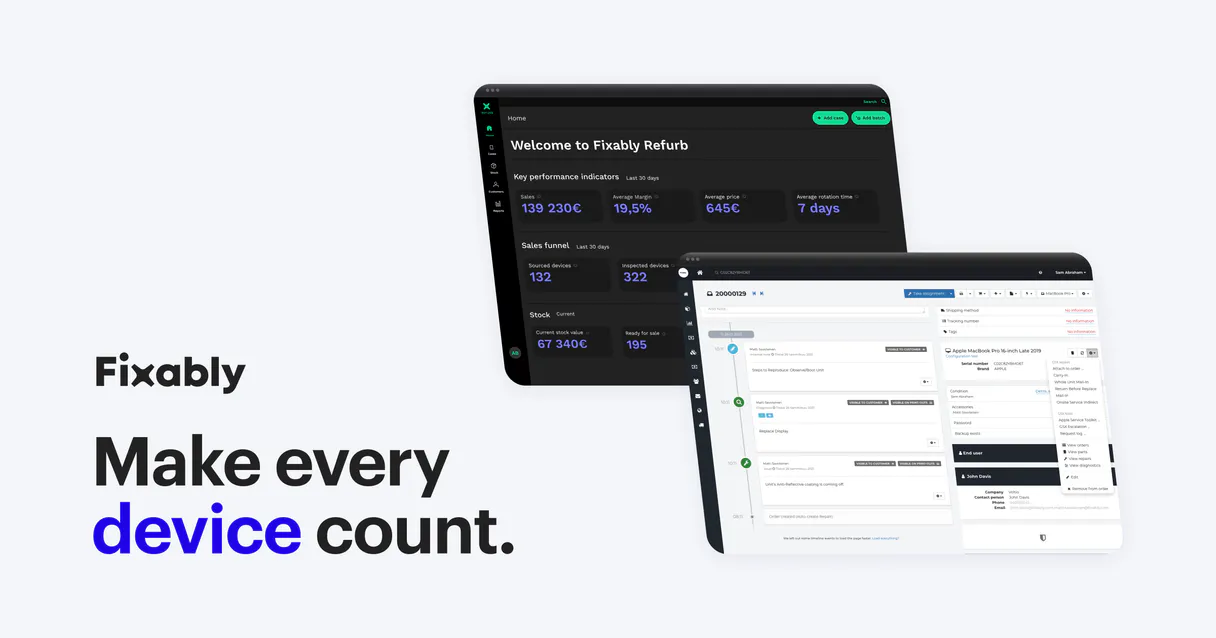
Fixably MCP Server manages your service center operations. Connect your AI client to track orders, manage inventory, and update customer records.
Use tools like `list_orders` to see active repair tickets, `get_stock` to check parts availability across locations, and `add_order_note` to update technician notes—all from a single chat interface.
What your AI agents can do
Add order note
Adds a note to a specific repair order.
Change internal location
Changes the tracked internal location of a device.
Create order
Creates a brand new repair order record.
Create, list, and update repair orders, and retrieve all associated order metadata.
Check stock levels and list products available at specific inventory locations or sites.
Change the internal location of a device or post diagnostic notes directly to a repair order.
Retrieve specific customer profiles or list accounts using names and emails.
List all files and attachments linked to a given repair order.
Ask AI about this MCP
Supported MCP Clients
Gemini Waiting for input…
Fixably MCP Server: 12 Tools for Service Operations
Use these 12 tools to manage every aspect of your repair lifecycle—from checking parts inventory to updating customer history.
019d759aadd order note
Adds a note to a specific repair order.
019d759achange internal location
Changes the tracked internal location of a device.
019d759acreate order
Creates a brand new repair order record.
019d759aget customer
Retrieves specific details for a customer profile.
019d759aget order
Retrieves full details for a specific repair order.
019d759aget stock
Checks the available stock and details for specific parts.
019d759alist customers
Retrieves a list of all customer accounts.
019d759alist order files
Lists all documents and files attached to a repair order.
019d759alist orders
Lists all existing repair orders in the system.
019d759alist stock products
Lists all distinct products that are currently in stock.
019d759alist stocks
Lists all available inventory locations (e.g., warehouse, store).
019d759aupdate order
Updates existing details on a repair order.
Choose How to Get Started
Build a custom MCP for your own tools, or connect a ready-made integration from our catalog.
Build Your Own
Turn any API into an MCP. Import a spec, define Agent Skills, or deploy with MCPFusion.
- Import from OpenAPI, Swagger, or YAML specs
- Create Agent Skills with progressive disclosure
- Deploy to edge with MCPFusion framework
- Built in DLP, auth, and compliance on every call
- Real time usage dashboard and cost metering
- Publish to catalog or keep private
Make Your AI Do More
Start with Fixably, then connect any of our 4,700+ other servers whenever your AI needs more. One click, no limits.
- Use this MCP plus 4,700+ others, all in one place
- Add new capabilities to your AI anytime you want
- Every connection is secured and compliant automatically
- Track usage and costs across all your servers
- Works with Claude, ChatGPT, Cursor, and more
- New servers added to the catalog every week
What you can do with this MCP connector
Yo, if you run a service center, you know the grind. This Fixably MCP Server lets your AI client handle the whole mess—from taking down a new order to tracking parts inventory—all through chat. You'll use it to manage everything: orders, customers, and stock.
Managing Orders
You can pull up a list of every open repair ticket using list_orders. Need details on one specific job? Use get_order. If you gotta start a new job, create_order does it. And if something changes on an existing ticket, you use update_order to fix it. You can also write notes to any order with add_order_note, or change where a device is physically sitting in the shop using change_internal_location.
You can get all the files and attachments tied to a job with list_order_files.
Handling Customers
You can look up a customer's profile with get_customer, or if you need the whole roster, list_customers gives you a list of all accounts. That keeps you right on top of who's bringing in the gear.
Controlling Inventory
To see what parts you got, get_stock checks availability for specific items across different spots. If you want to see every distinct product we're keeping track of, list_stock_products gives you that list. You can figure out all the locations you're tracking—like the main warehouse or a branch store—by running list_stocks.
Putting It Together
Your AI client lets you check stock levels for parts and list out available locations with get_stock and list_stocks, then use that info to create a new job with create_order or update an existing one with update_order.
How Fixably MCP Works
- 1 Subscribe to the server on the Vinkius Marketplace.
- 2 Enter your Fixably Subdomain and API Token (from User Settings > Integrations).
- 3 Ask your AI client to perform a task (e.g., 'List all active orders and check stock for the iPhone 13').
The bottom line is, your AI client connects to your service center data and runs the necessary actions without you leaving your chat window.
Who Is Fixably MCP For?
This is for the service center, store, and support staff who spend too much time clicking between separate databases and internal dashboards. If your team needs to manage equipment repairs, track parts, and keep customers updated, this saves hours of context switching.
Quickly check order details or add a diagnostic note without leaving their main workspace. They use the agent to pull up tickets and log findings instantly.
Get a real-time overview of inventory across multiple store locations and update the status of an order via simple commands.
Automate the retrieval of order updates and customer history to answer customer questions faster and keep records accurate.
What Changes When You Connect
- Update Statuses Instantly: Need to move a device? Use
change_internal_locationto update a device's location (e.g., from 'SERVICE' to 'STORE') and record the change immediately. This keeps inventory data current. - Get Full Order History: Don't dig through tabs. Run
get_orderto get all details for a single ticket, including customer info, parts used, and the entire history. It's one query, all the data. - Streamline Customer Lookups: Instead of searching by ID, use
get_customerorlist_customersto pull up a customer's full profile just by their name or email. Faster resolution, cleaner records. - Control Inventory at Scale: When you run
get_stock, you don't just see a number. You see exactly which parts are available and where they are stocked, helping managers plan fulfillment. - Document Everything: Use
list_order_filesto pull up every document and attachment linked to a repair order, making sure nobody misses a crucial diagnostic report. - Automate Note Logging: Use
add_order_noteto log diagnostic findings or internal communications directly to the order record. It's instant, auditable, and never gets lost in an email chain.
Real-World Use Cases
Client needs to start a new service job.
A customer calls in with a broken laptop. The agent runs list_orders to check if a ticket already exists. If not, the agent uses create_order to open the ticket, and then runs get_customer to attach the correct profile data. The job is logged, and the client can confirm the new order number.
Store manager needs to check stock before a sale.
A manager needs to know if they have enough parts for a big repair batch. They run list_stocks to see all locations, then get_stock for the specific part number. This prevents them from promising parts they don't actually have, keeping the store running smoothly.
Technician needs to update an order and move a device.
The tech finishes diagnosis and moves the device from the workbench to the parts staging area. They run add_order_note to log the diagnostic result, followed by change_internal_location to update the device's status in the system. Both actions are logged automatically.
Support agent needs to resolve an old ticket quickly.
The agent receives a complaint about a delayed order. They use get_order to retrieve the full order details and list_order_files to find the original quote. They can then use update_order to send a status change directly to the customer record.
The Tradeoffs
Searching by remembering the ID
Trying to find an order by remembering its internal ID number. This is slow, hard to remember, and fails if the ID changes or isn't easily accessible.
→
Use list_orders to get a list of recent tickets, then ask the agent to run get_order on the relevant ticket name or number. This keeps you focused on the business context, not the database keys.
Manually checking inventory sheets
Opening a spreadsheet, cross-referencing it with the live system, and manually updating status changes in two places. This is where human error happens, and it costs time.
→
The agent handles the checks. Ask it to get_stock for the part and then, if needed, use update_order to reflect the part usage on the order record. The system keeps both records consistent.
Calling every tool just in case
Running list_customers, then list_orders, then list_stocks even if you only needed one piece of information. This floods the chat, slows down the agent, and wastes tokens.
→
Be specific. If you need to know about stock, just ask the agent to get_stock for the part and the location. Let the AI figure out which tools it needs.
When It Fits, When It Doesn't
Use this MCP Server if your team's primary bottleneck is context switching—if staff spend more time clicking between the order management system, the inventory tracker, and the CRM than they do actually fixing things. It's ideal for service centers that need a single source of truth for a physical asset's entire life cycle. Don't use it if you only need to write quick internal notes; those might be better handled by a dedicated messaging tool. If your workflow requires integrating payment processing or fraud checks, this server won't help—you'll need to connect a payment gateway service instead.
Independent Platform Disclaimer: Vinkius is an independent platform and is not affiliated with, endorsed by, sponsored by, verified by, or otherwise authorized by Fixably. All third-party trademarks, logos, and brand names are the property of their respective owners. Their use on this website is strictly for informational purposes to identify service compatibility and interoperability.
VINKIUS INFRASTRUCTURE
Cloud Hosted
Managed infra
V8 Isolated
Sandboxed per request
Zero-Trust Proxy
No stored credentials
DLP Enforced
Policy on every call
GDPR Compliant
EU data residency
Token Compression
~60% cost reduction
Works with Claude, ChatGPT, Cursor, and more
The Model Context Protocol standardizes how applications expose capabilities to LLMs. Instead of operating in isolation, your AI gains direct access to external platforms, live data, and real-world actions through secure, standardized connections.
This server provides 12 capabilities that interface natively with Claude, ChatGPT, Cursor, and any MCP client. No middleware. No custom integration required.
Available Capabilities
Juggling tabs for customer repairs and inventory counts is a full-time job.
Today, handling a single repair requires opening at least three separate screens: the CRM to check customer history, the ticket system to see the order status, and the inventory dashboard to verify part availability. You'll copy the customer's name from the CRM, paste it into the ticket system, and then switch to the inventory site, manually entering the part SKU.
With this MCP server, you just talk to your agent. You tell it, "Find the order for Jane Doe, check if we have the LCD Assembly in stock, and tell me if the tech needs to update the location." It pulls all that data in one conversation. You get the complete picture and the ability to update records instantly—no copy-pasting required.
Fixably MCP Server: Update order details and inventory status.
Before, updating an order meant logging into the ticket system, finding the order, and manually changing the status dropdown. Then, if the parts moved, you had to log into the separate warehouse management tool and change the device's physical location. Two logins, two sets of clicks.
Now, you tell the agent, "Update order #123 to 'Awaiting Parts' and move the device to the staging area." The agent runs `update_order` and `change_internal_location` in sequence. The entire workflow is handled by the conversation. It's seamless, and it's right where you are.
Common Questions About Fixably MCP
How do I use the `add_order_note` tool with Fixably MCP Server? +
You simply tell your agent to add a note. Give it the order ID and the text you want to add. The agent posts the note directly to the order record for everyone to see.
Can I use `get_stock` to check inventory across multiple locations? +
Yes. You ask the agent to check stock, specifying the product and the locations. The agent gathers data from all relevant sites and gives you a consolidated report.
What's the difference between `list_orders` and `get_order`? +
list_orders shows you a quick list of all tickets. get_order pulls the full, deep details for just one specific order, including all its files and metadata.
How do I update a customer profile using `get_customer`? +
You don't update the profile directly with the tool. You use get_customer to retrieve the data, which you then provide to the agent to formulate the update action.
Do I need to manually run `list_stocks` before running `get_stock`? +
No. The agent manages the sequence. You just ask for the stock check, and the agent knows it needs to check the available locations first.
How does the `create_order` tool handle required fields for a new repair ticket? +
The create_order tool validates required fields before submission. You must provide at least the customer ID and the device model to successfully create an order.
What if I need to check stock levels in a specific location using `get_stock`? +
You pass the exact location ID to the get_stock tool. This ensures you only get inventory data for that specific site, preventing inaccurate readings.
Can I combine `list_customers` and `get_order` to verify a service record? +
Yes, you can use both tools sequentially. First, use list_customers to get the customer ID, then use that ID with get_order to retrieve the associated service record.
How do I change the internal location of a device using the agent? +
You can use the 'change_internal_location' tool. Simply provide the Order ID and the new location string (e.g., 'SERVICE', 'STORE', or 'CUSTOMER'). The agent will update the record in Fixably immediately.
Can I see which products are available at a specific stock location? +
Yes! Use the 'list_stock_products' tool and provide the Stock ID. The agent will return a list of all products currently held at that specific inventory location.
How do I add an internal update to a repair order? +
Use the 'add_order_note' tool. You'll need the Order ID and the text of your note. This allows you to document repair progress or internal findings directly from your chat interface.
Use it with your favorite AI tools
Connect this server to Cursor, Claude, VS Code, and more.
More in this category

Odoo eCommerce
List shop products, manage eCommerce orders, browse categories and customers — Odoo Website & eCommerce through natural conversation.
Clearstory
Manage construction change orders and T&M tags via Clearstory — track projects, monitor CORs, and manage project rates directly from any AI agent.

ConnectWise
Equip your AI to seamlessly manage ConnectWise PSA tickets, clients, and technical documentation via text.
You might also like

Zakeke
Manage customized product designs, 3D configurations, and orders via Zakeke.

Flip
Manage disbursements, validate bank accounts, and receive payments via AI agents with Flip.

Gusto
Manage employees, run payroll, view benefits and time-off policies — HR automation for AI agents.