
Fusioo MCP. Manage every record and app from natural conversation.
 Gemini
 Works with every AI agent you already use
…and any MCP-compatible client









Just plug in your AI agents and start using Vinkius.
Fusioo lets your AI agent manage your custom workspaces, apps, and databases via the Model Context Protocol (MCP). You can list all apps, read schemas, fetch record counts, and update records—all through natural conversation.
It’s your AI interface for complex, private databases.
What your AI agents can do
Create app record
Adds a new record to a specified custom application.
Get app record count
Returns the total number of records for a specific custom app.
Get app schema
Retrieves the metadata and field definitions for a custom application.
List all custom applications in your workspace and retrieve the full schema, including field definitions and unique IDs.
Create, read, and modify specific records within any custom app using natural language commands.
Get real-time record counts for specific apps, helping track project volume or lead growth instantly.
List all workspace users and teammates, keeping context of who is involved in which application.
Fetch high-level snapshots by listing configured widgets and saved reports.
Ask AI about this MCP
Supported MCP Clients
Gemini Waiting for input…
Fusioo MCP Server: 12 Tools for Database Operations
These tools let your AI agent interact with every facet of your custom workspace: listing apps, checking schemas, reading records, and updating data.
019d75a1create app record
Adds a new record to a specified custom application.
019d75a1get app record count
Returns the total number of records for a specific custom app.
019d75a1get app schema
Retrieves the metadata and field definitions for a custom application.
019d75a1get my identity
Fetches the profile information of the currently authenticated user.
019d75a1get record details
Retrieves the specific metadata and data for a single record.
019d75a1list app records
Lists multiple records from a specified custom application.
019d75a1list apps
Retrieves a list of all custom applications available in the workspace.
019d75a1list dashboard widgets
Lists the available widgets and configured reports on your dashboard.
019d75a1list workspace reports
Retrieves a list of saved and available reports across the workspace.
019d75a1list workspace users
Lists all users and teammates currently associated with the workspace.
019d75a1update app record
Modifies the data within an existing record in a custom application.
019d75a1verify api connection
Checks the connection status and authentication credentials for the server.
Choose How to Get Started
Build a custom MCP for your own tools, or connect a ready-made integration from our catalog.
Build Your Own
Turn any API into an MCP. Import a spec, define Agent Skills, or deploy with MCPFusion.
- Import from OpenAPI, Swagger, or YAML specs
- Create Agent Skills with progressive disclosure
- Deploy to edge with MCPFusion framework
- Built in DLP, auth, and compliance on every call
- Real time usage dashboard and cost metering
- Publish to catalog or keep private
Make Your AI Do More
Start with Fusioo, then connect any of our 4,700+ other servers whenever your AI needs more. One click, no limits.
- Use this MCP plus 4,700+ others, all in one place
- Add new capabilities to your AI anytime you want
- Every connection is secured and compliant automatically
- Track usage and costs across all your servers
- Works with Claude, ChatGPT, Cursor, and more
- New servers added to the catalog every week
What you can do with this MCP connector
Fusioo lets your AI agent manage your custom workspaces, apps, and databases via the Model Context Protocol (MCP). Your agent can list all apps, read schemas, fetch record counts, and update records—all through natural conversation. It's your AI interface for complex, private databases.
Discovering App Structures
Your agent can use list_apps to pull a list of every custom application in your workspace. For any specific app, it can then run get_app_schema to retrieve the full metadata, including field definitions and unique IDs. You can also check out list_dashboard_widgets to see what reports are set up on your dashboard, and list_workspace_reports to get a list of saved reports across the whole workspace.
Managing Records
Your agent handles the entire data lifecycle. It'll use create_app_record to drop a new record into a specified custom application. You can update existing data by calling update_app_record on a record's data. Need to look at what's already there? Your agent can run list_app_records to grab multiple records from an app.
For deep dives, it uses get_record_details to pull the specific metadata and data for one record. It can also use get_app_record_count to get a real-time count of records for any custom app.
Tracking Team Context
Your agent keeps track of who's doing the work. It uses list_workspace_users to pull a list of every user and teammate associated with the workspace. It can also run get_my_identity to fetch the profile information of the user currently authenticated. You can always confirm the connection is good by running verify_api_connection.
Getting the Full Picture
Your agent can pull a list of all available reports using list_workspace_reports, and it can also pull a list of widgets using list_dashboard_widgets. You'll get a complete picture of the whole workspace and all the data flowing through it.
How Fusioo MCP Works
- 1 Subscribe to the server on Vinkius, then provide your Fusioo Client ID and Client Secret.
- 2 Direct your AI client (like Claude or Cursor) to the Fusioo MCP endpoint.
- 3 Ask your agent to perform an action, such as 'List all apps' or 'Get the count for the Projects app.' The agent executes the necessary tool call.
The bottom line is, your AI agent can talk directly to your private databases and apps without you having to navigate the dashboard.
Who Is Fusioo MCP For?
Project Managers who are tired of clicking through dashboards to get status updates. CRM Admins who need a real-time overview of leads without writing complex queries. Operations Teams that need to automate record creation and update fields across multiple apps.
Quickly check project statuses or get the record count for the 'Projects' app without manually navigating the dashboard.
Get a real-time overview of leads and customer profiles by asking the agent to query the 'Clients' app.
Automate the creation of new records or verify field schemas before updating client data.
What Changes When You Connect
- Get real-time data volume checks instantly. Instead of navigating to a dashboard just to count leads, use
get_app_record_countto know the total number of records in your 'Leads' app right away. - Automate data entry and modifications. You can create new records or update existing ones using
create_app_recordorupdate_app_recordwithout ever opening a manual form. - Understand your data structure immediately. Running
get_app_schemashows you every field definition and unique ID for an app, letting you know exactly what data you can access. - Keep track of people. Use
list_workspace_usersto see who is in the workspace, giving full context about the people involved in a specific project or app. - Summarize reports on the fly. Instead of digging through multiple tabs, use
list_dashboard_widgetsorlist_workspace_reportsto get immediate, high-level snapshots of the data. - Access user context.
get_my_identityfetches your profile data, confirming your current access level before any action is taken.
Real-World Use Cases
Project Status Check
A project manager needs to know if the 'Projects' app has enough records to warrant a review. Instead of opening the dashboard and clicking the counter widget, they ask their agent to run get_app_record_count. The agent returns the number, and the PM decides the next step.
CRM Lead Update
A sales representative qualifies a lead and needs to update their record. Instead of logging into the CRM and manually finding the record, they tell their agent to use update_app_record, specifying the ID and the new data points. The record updates instantly.
New App Discovery
An operations team member is unsure how a new app is structured. They run list_apps to see all options, then use get_app_schema on the correct app to map out all available fields before building a report.
Team Audit
Before starting a project, a team needs to confirm who has access. They run list_workspace_users to get a current list of all involved teammates, ensuring everyone has the right permissions.
The Tradeoffs
Treating it like a simple database query
Asking the agent to 'Get all records' without specifying the app or necessary fields. The agent might fail or return an unmanageable data dump.
→
Always start by listing the apps using list_apps. Then, use get_app_schema to confirm the exact field names, and finally, use list_app_records or get_record_details with the correct app ID.
Over-relying on the UI
Manually clicking through dashboard widgets and reports to piece together a single summary. This takes five minutes of clicking and copy-pasting data.
→
Use the agent to list reports via list_workspace_reports, and then ask the agent to pull the specific data points you need from those reports directly. It's much faster.
Skipping the connection check
Assuming the connection works and running complex commands like update_app_record or create_app_record. This risks failure if the API credentials expired or changed.
→
Always run verify_api_connection first. This confirms the server is online and your credentials are valid before you commit to any data changes.
When It Fits, When It Doesn't
Use Fusioo if your workflow requires interacting with multiple, complex, private databases or custom apps. You need to read data (e.g., list_app_records), check counts (get_app_record_count), and modify records (update_app_record) based on structured data. Don't use it if you only need to read data from a single, simple source—a basic database connector might suffice. It's overkill if you just need a simple list of names. It works best when your agent needs to discover the structure (list_apps, get_app_schema) before it can perform the action.
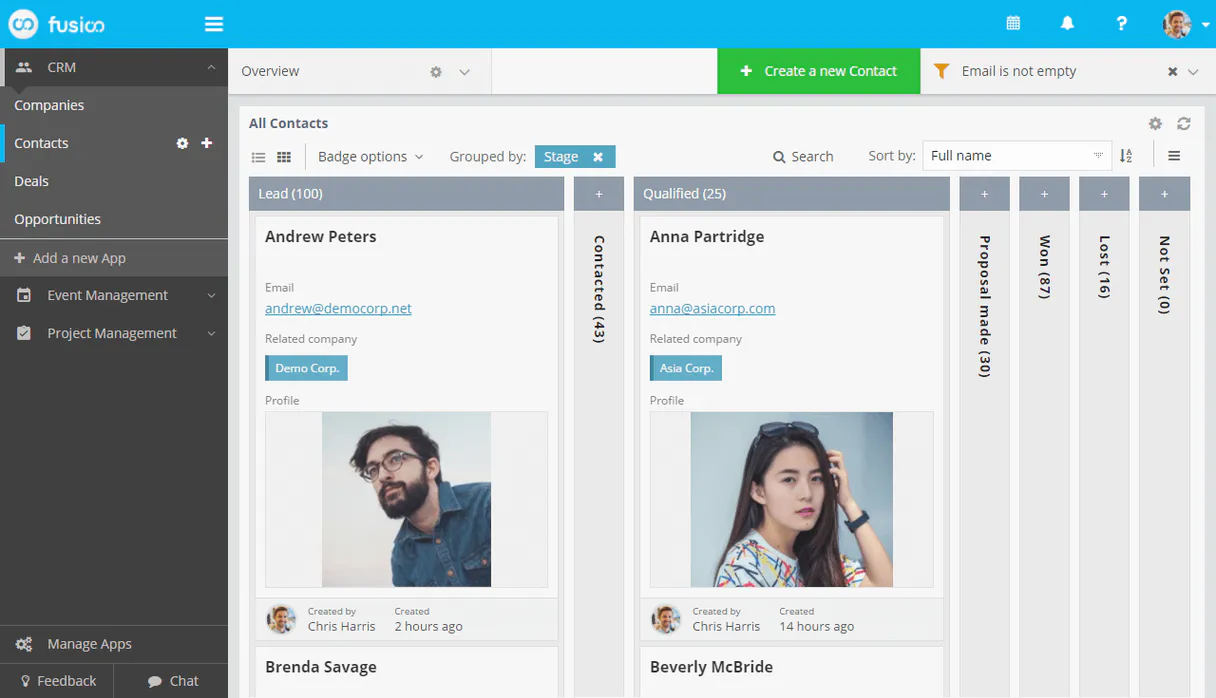
Independent Platform Disclaimer: Vinkius is an independent platform and is not affiliated with, endorsed by, sponsored by, verified by, or otherwise authorized by Fusioo. All third-party trademarks, logos, and brand names are the property of their respective owners. Their use on this website is strictly for informational purposes to identify service compatibility and interoperability.
VINKIUS INFRASTRUCTURE
Cloud Hosted
Managed infra
V8 Isolated
Sandboxed per request
Zero-Trust Proxy
No stored credentials
DLP Enforced
Policy on every call
GDPR Compliant
EU data residency
Token Compression
~60% cost reduction
Works with Claude, ChatGPT, Cursor, and more
The Model Context Protocol standardizes how applications expose capabilities to LLMs. Instead of operating in isolation, your AI gains direct access to external platforms, live data, and real-world actions through secure, standardized connections.
This server provides 12 capabilities that interface natively with Claude, ChatGPT, Cursor, and any MCP client. No middleware. No custom integration required.
Available Capabilities
Sifting through dashboards just to get a count or status.
Today, checking a simple project status means opening the workspace, navigating to the 'Projects' tab, finding the status widget, and then manually reading the number. If you need a count for three different apps, you repeat this painful process, opening three tabs and three different dashboards.
With Fusioo MCP, you just ask the agent, 'How many records are in the Projects, Clients, and Tasks apps?' The agent runs `get_app_record_count` three times and gives you the three numbers back in a single reply. No clicking required.
Fusioo MCP Server: Manage Records with `update_app_record`
Updating a client record manually means logging into the CRM, searching for the client by name, opening the profile, finding the correct field, and typing in the new status. This process is slow and error-prone.
Now, you tell your agent: 'Update the 'Clients' app record for John Doe, setting the status to 'Follow Up' and adding the note about the call.' The agent executes `update_app_record` and handles the data change directly, skipping the entire manual UI flow.
Common Questions About Fusioo MCP
How do I check if Fusioo MCP Server is connected? +
Run the verify_api_connection tool. This tool immediately confirms if the server is online and if your client credentials are valid for use.
What is the difference between `list_apps` and `list_app_records`? +
list_apps gives you a list of all custom applications available in the workspace. list_app_records requires you to specify an app and then returns a list of records from that specific app.
Can I change data using `update_app_record`? +
Yes, update_app_record modifies the data within an existing record. You must provide the record's unique identifier and the specific fields you want to change.
Do I need to know the schema before I can use `create_app_record`? +
While you can create a record without knowing the schema, running get_app_schema first is best practice. It shows you all the field definitions, preventing you from misspelling a field name.
How do I get a list of users using `list_workspace_users`? +
Simply call list_workspace_users. This tool pulls a list of every teammate in the workspace, giving you context on who is involved with the data.
What should I use to see how many entries are in a specific app? (get_app_record_count) +
You use get_app_record_count to get a total count. This tool returns the current number of records for a specified app ID, letting you track project volume without listing every single entry.
Can I list all the reports I have available in my workspace? (list_workspace_reports) +
You call list_workspace_reports to see all configured reports. This lists the names and IDs of saved reports, which your AI client can then use to fetch high-level data insights.
How do I check what fields are available in an app? (get_app_schema) +
Run get_app_schema to fetch the app's metadata. This provides the full schema, including field names, data types, and unique identifiers, which is necessary before you can reliably use create_app_record.
How do I get a Client ID and Secret for Fusioo? +
Log in to your Fusioo workspace, navigate to Integrations > Custom Integrations, and create a new integration to retrieve your Client ID and Client Secret.
Where do I find my App ID or Record ID? +
Open any record in your Fusioo app, click the options menu (three dots), and select 'Developer Information' to see the IDs for the App, Record, and Fields.
Can I filter records through the agent? +
The 'list_app_records' tool retrieves the most recent records. For advanced filtering, ensure you have the correct App ID or use the 'get_record_details' if you have the specific ID.
What is the difference between an App and a Record? +
In Fusioo, an App is a collection or database table (e.g., 'Projects'), while a Record is a specific entry in that collection (e.g., 'Website Launch').
Use it with your favorite AI tools
Connect this server to Cursor, Claude, VS Code, and more.
More in this category

Safepoint
Protect your business data with secure backup, disaster recovery, and cloud-to-cloud replication for critical SaaS applications.
Odoo Project
Create projects, manage tasks, log timesheets — Odoo Project Management through natural conversation.
Trakt
Track TV shows and movies — search titles, get ratings, discover trending content and manage your watchlist.
You might also like

An API of Ice And Fire
Explore the world of A Song of Ice and Fire — query books, characters, and noble houses of Westeros directly from any AI agent.
Cradl AI
Equip your AI agent to extract structured data from any document using Cradl AI's deep learning models.

Assembled
Manage support workforce and scheduling with Assembled — track agent states, teams, and forecasts via AI.