
Greenspark MCP. Automate carbon offsetting and track total environmental impact.
 Gemini
 Works with every AI agent you already use
…and any MCP-compatible client









Just plug in your AI agents and start using Vinkius.
Greenspark gives your AI client programmatic control over climate action. Use it to trigger verifiable environmental impacts—like planting trees or offsetting carbon—and track your total sustainability metrics in real time.
It calculates carbon footprints from transactions and lets you manage your entire environmental impact portfolio via natural language commands.
What your AI agents can do
Create impact
Triggers a new, verifiable climate impact, such as planting a tree or offsetting CO2.
Create webhook
Sets up a new API webhook endpoint to keep your internal systems updated on project changes.
Estimate footprint
Calculates the carbon footprint (CO2e) for any given transaction amount and merchant category.
The agent determines the carbon footprint of a specific transaction based on its merchant category and value.
The agent triggers a new, verifiable climate impact, such as planting a set number of trees or offsetting CO2.
The agent retrieves an aggregated summary report detailing the account's total environmental contribution to date.
The agent lists and provides details on vetted environmental projects that the business supports.
The agent pulls a chronological list of all past climate impacts recorded for the account.
Ask AI about this MCP
Supported MCP Clients
Gemini Waiting for input…
Greenspark MCP Server: 12 Tools for Climate Impact Tracking
Use these 12 tools to manage every facet of your environmental data—from calculating a single transaction's footprint to triggering a global climate action.
019d75abcreate impact
Triggers a new, verifiable climate impact, such as planting a tree or offsetting CO2.
019d75abcreate webhook
Sets up a new API webhook endpoint to keep your internal systems updated on project changes.
019d75abestimate footprint
Calculates the carbon footprint (CO2e) for any given transaction amount and merchant category.
019d75abget impact
Retrieves specific details for a single, recorded climate impact event.
019d75abget impact summary
Retrieves a summary report showing the account's total aggregated environmental impact data.
019d75abget project
Retrieves detailed information about a specific environmental project supported by Greenspark.
019d75abget subscription
Retrieves details about the current Greenspark account subscription status.
019d75ablist badges
Lists all available impact badges and widgets you can use to display your verified environmental contribution.
019d75ablist impact types
Provides a list of all available categories of climate impact (e.g., tree planting, ocean cleanup).
019d75ablist impacts
Lists a full history of all climate impact events generated for the account.
019d75ablist projects
Lists all vetted environmental projects that Greenspark supports globally.
019d75ablist webhooks
Lists all currently configured API webhook endpoints for auditing purposes.
Choose How to Get Started
Build a custom MCP for your own tools, or connect a ready-made integration from our catalog.
Build Your Own
Turn any API into an MCP. Import a spec, define Agent Skills, or deploy with MCPFusion.
- Import from OpenAPI, Swagger, or YAML specs
- Create Agent Skills with progressive disclosure
- Deploy to edge with MCPFusion framework
- Built in DLP, auth, and compliance on every call
- Real time usage dashboard and cost metering
- Publish to catalog or keep private
Make Your AI Do More
Start with Greenspark, then connect any of our 4,700+ other servers whenever your AI needs more. One click, no limits.
- Use this MCP plus 4,700+ others, all in one place
- Add new capabilities to your AI anytime you want
- Every connection is secured and compliant automatically
- Track usage and costs across all your servers
- Works with Claude, ChatGPT, Cursor, and more
- New servers added to the catalog every week
What you can do with this MCP connector
Greenspark gives your AI client programmatic control over climate action. You can use it to trigger verifiable environmental impacts—like planting trees or offsetting carbon—and track your total sustainability metrics in real time. It calculates carbon footprints from transactions and lets you manage your entire environmental impact portfolio via natural language commands.
Calculate Transaction Footprint
Your agent determines the carbon footprint (CO2e) for any transaction amount and merchant category using estimate_footprint. You can also get a summary report showing the account's total aggregated environmental impact data using get_impact_summary. You'll find a full history of all past climate impacts recorded for the account via list_impacts. To understand which specific environmental projects your contributions support, your agent can list all vetted environmental projects globally using list_projects, and get details on a specific one with get_project.
Record Climate Action
Use create_impact to trigger a new, verifiable climate impact, such as planting a tree or offsetting CO2. Your agent can also provide a list of all available categories of climate impact using list_impact_types, so you know what actions you can take. To keep your internal systems updated on project changes, you can set up a new API webhook endpoint using create_webhook, and list all configured API webhook endpoints for auditing purposes with list_webhooks.
When you need details for a single recorded climate impact, get_impact handles that. You can also list all available impact badges and widgets you can use to display your verified environmental contribution by calling list_badges.
Explore Projects and Monitor History
Your agent pulls a chronological list of all past climate impacts recorded for the account using list_impacts. You can view the account's total aggregated environmental impact data with get_impact_summary. To see all the vetted environmental projects Greenspark supports globally, your agent lists them with list_projects, and provides detailed info about a specific one using get_project.
You can also check your account's current Greenspark subscription status with get_subscription.
Manage Data and Sync Systems
To manage your environmental data, your agent retrieves detailed information about a specific climate impact event using get_impact, and compiles a summary of your total environmental contribution using get_impact_summary. You can also list all available impact types using list_impact_types to make sure you're tracking everything. If you need to keep your internal systems synced up, your agent can set up a new API webhook endpoint with create_webhook, or list existing ones using list_webhooks.
How Greenspark MCP Works
- 1 First, subscribe to the Greenspark MCP Server and input your API Key (found in your Greenspark Dashboard under Settings > API).
- 2 Next, tell your AI agent what you need—for example, 'Calculate the carbon offset for a $100 flight purchase.'
- 3 The agent uses the available tools to call the necessary endpoints, processes the data, and returns the calculated impact or action status.
The bottom line is that your AI client handles the connection and API calls, letting you automate complex, multi-step sustainability reporting using plain language.
Who Is Greenspark MCP For?
Sustainability Officers who track environmental metrics daily. Product Managers embedding climate rewards into user flows. Operations Engineers who must calculate and offset the carbon cost of business travel and sales. If your job involves proving a positive environmental impact, this is for you.
Monitors real-time impact metrics, audits project funding, and reports on total environmental contributions using natural language queries.
Automates climate rewards into user journeys—for instance, triggering a tree planting action when a user hits a major milestone.
Calculates and offsets the carbon footprint of company operations, travel, and sales transactions synchronously.
What Changes When You Connect
- Track your total environmental footprint instantly. Instead of manually summing up CO2 costs from multiple sources, using
get_impact_summarygives you a single, aggregate number of your total contribution. - Automate carbon compliance. When a sale happens, use
estimate_footprintto calculate the exact CO2 cost based on the merchant category, and then usecreate_impactto offset it immediately. - Prove your commitment with badges. Use
list_badgesto get the available impact widgets and show off your verified sustainability achievements directly in your product UI. - Audit everything with webhooks. Use
create_webhookandlist_webhooksto ensure that any change to a project or impact record automatically updates your internal systems without manual intervention. - Keep your data clean. If you only need to check one specific transaction's impact, use
get_impactinstead of running a full summary report, making the query faster and more targeted. - Discover funding sources. Use
list_projectsandget_projectto show users exactly where their offset money goes, providing transparency for every tree planted or ton of CO2 mitigated.
Real-World Use Cases
Calculating Travel Emissions for Q3 Reports
The operations team needs to file Q3 reports that require knowing the carbon cost of all air travel. They ask their agent to calculate the footprint for several flight purchases using estimate_footprint. The agent returns a total CO2 figure, which they then use to trigger a comprehensive offset via create_impact.
Building a User Milestone Reward System
A Product Manager wants to reward users who hit 10,000 sign-ups. They configure the system to trigger an action using create_impact (e.g., planting 10 trees) every time the threshold is met, automatically integrating sustainability into the user journey.
Debugging a Data Discrepancy
A Sustainability Officer sees a discrepancy in the dashboard. Instead of running a full report, they ask the agent to use get_impact with a specific ID. The agent pulls the exact record details, allowing them to pinpoint where the data failed or was missing.
Syncing External Compliance Systems
The backend team needs to ensure that when a major environmental project status changes, their internal billing system updates immediately. They use create_webhook to configure the necessary endpoint and then use list_webhooks to audit the setup.
The Tradeoffs
Over-relying on the summary report
Asking the agent only to 'Show me the total impact' and accepting the result without checking the source data. This hides which specific projects or impact types contributed to the total.
→
Always follow up the get_impact_summary call by using list_impacts or list_projects. This verifies the underlying data, ensuring the total number isn't based on outdated or generalized figures.
Ignoring transaction details
Calculating the carbon offset for a large purchase simply by category (e.g., 'Retail') without providing a specific dollar amount. This results in an inaccurate, non-compliant offset calculation.
→
You must use estimate_footprint and provide both the exact transaction amount and the specific merchant category. This gives the necessary granularity for accurate offsetting.
Treating impact as a single source
Assuming that a project's status is fixed and that all data is available through one endpoint. This fails when a project requires manual auditing or has multiple funding sources.
→
Use list_projects to see all available options, then use get_project to pull the current status and details. This gives you a comprehensive view of the project's funding and scope.
When It Fits, When It Doesn't
Use this if your primary need is to prove, calculate, or automate verifiable environmental accountability. Specifically, if you need to link a financial transaction (via estimate_footprint) to a measurable, offset action (via create_impact), or if you need to provide transparent reporting of total cumulative impact (get_impact_summary).
Don't use this if you simply need to list all available types of data or projects. If you just want a list of possible impact types, use list_impact_types. If you need a list of all potential funding partners, use list_projects. This keeps your agent's calls focused and prevents unnecessary data retrieval.
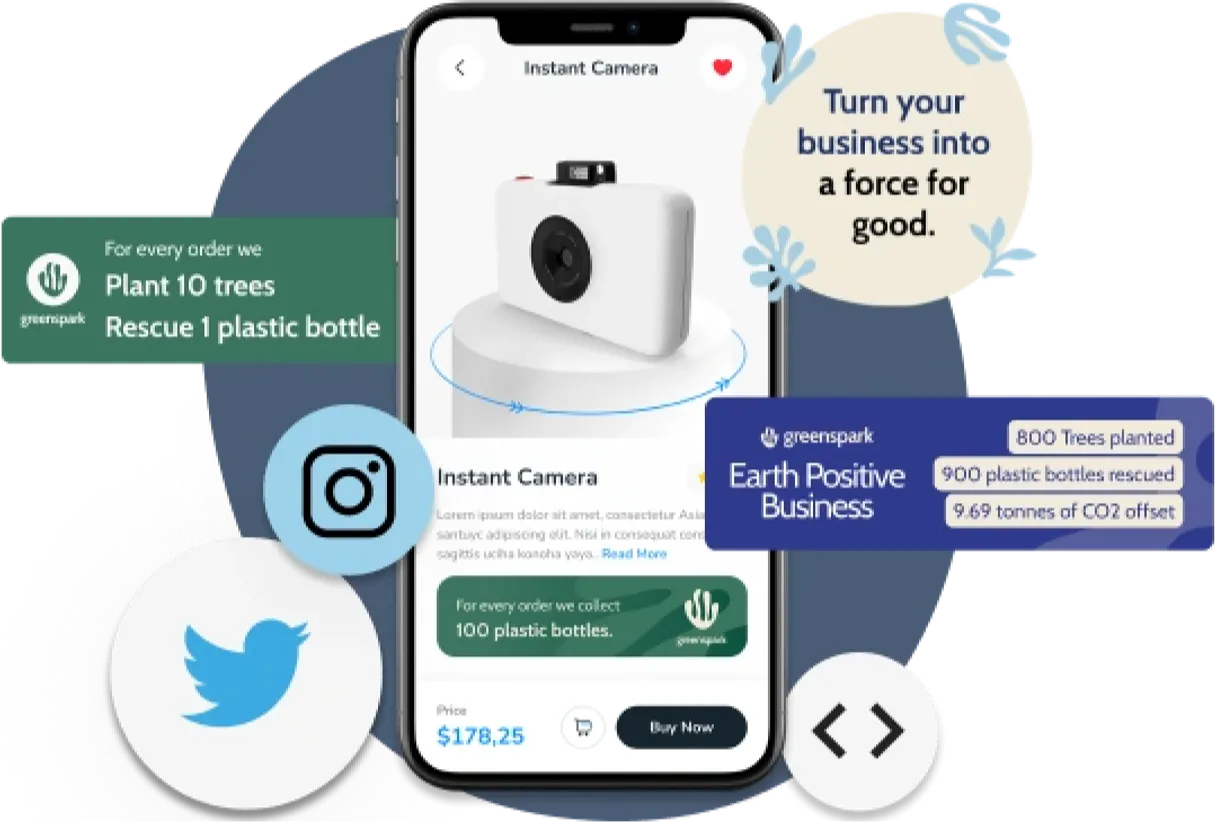
Independent Platform Disclaimer: Vinkius is an independent platform and is not affiliated with, endorsed by, sponsored by, verified by, or otherwise authorized by Greenspark. All third-party trademarks, logos, and brand names are the property of their respective owners. Their use on this website is strictly for informational purposes to identify service compatibility and interoperability.
VINKIUS INFRASTRUCTURE
Cloud Hosted
Managed infra
V8 Isolated
Sandboxed per request
Zero-Trust Proxy
No stored credentials
DLP Enforced
Policy on every call
GDPR Compliant
EU data residency
Token Compression
~60% cost reduction
Works with Claude, ChatGPT, Cursor, and more
The Model Context Protocol standardizes how applications expose capabilities to LLMs. Instead of operating in isolation, your AI gains direct access to external platforms, live data, and real-world actions through secure, standardized connections.
This server provides 12 capabilities that interface natively with Claude, ChatGPT, Cursor, and any MCP client. No middleware. No custom integration required.
Available Capabilities
The manual process of tracking corporate environmental impact is a nightmare.
Right now, figuring out your company's carbon cost is a nightmare. You have to jump between the finance dashboard, the travel system, and the marketing platform. You manually export data, copy the merchant category, and then cross-reference it with a separate carbon calculation sheet. The process is slow, prone to copy/paste errors, and the final report is always a patchwork of different, incomplete data sets.
With the Greenspark MCP Server, you tell your agent the transaction details. It runs `estimate_footprint`, immediately calculating the CO2 cost. You then tell it to `create_impact` to offset that exact amount. The whole thing happens in a single conversational turn. You get the verifiable action and the compliance report—no spreadsheets needed.
Greenspark MCP Server: Automate Impact Tracking
Before, setting up a system to notify you when a project status changed meant building a complex web service that queried multiple APIs and then updating your internal database manually. It was a massive integration headache just to stay synced.
Now, you just use `create_webhook` and `list_webhooks`. You configure the necessary endpoints through natural language. Your AI client manages the API call and the audit trail. Your system stays synced automatically. It's that simple.
Common Questions About Greenspark MCP
How do I use the `get_impact_summary` tool with Greenspark? +
You simply ask your agent to 'Show my total climate impact summary.' The agent runs get_impact_summary and returns a consolidated report covering trees planted, CO2 offset, and plastic rescued to date.
What is the best way to calculate carbon footprint using `estimate_footprint`? +
To get the most accurate calculation, provide the transaction amount and the specific merchant category. For example: 'Estimate the footprint for a $50 transaction in the Airlines category.'
Does `create_impact` require specific project details? +
Yes. When you trigger an impact, you need to specify the desired action (e.g., 'plant 10 trees') and the quantity. The tool handles the verification and execution of that climate action.
How can I check the status of a project using `get_project`? +
You ask the agent to retrieve details for a specific project name or ID. The agent runs get_project and returns the project's current status, goals, and supporting details.
How do I check which climate impacts are available using `list_impact_types`? +
You call list_impact_types with no arguments. This function returns a list of all available climate impact types, like 'tree planting' or 'plastic removal'. This lets your AI client know exactly what kind of environmental action it can trigger.
If I need to set up a continuous data feed, how do I use `create_webhook`? +
You use create_webhook by specifying the target URL and event type. This sets up a webhook that notifies your internal system whenever a specific project milestone or impact occurs, keeping your databases synced automatically.
What information do I need to provide when I call `list_projects`? +
You call list_projects with no parameters. It retrieves a comprehensive list of all vetted environmental projects Greenspark supports. This allows your AI agent to know which global initiatives it can recommend or track.
Can I check my account's overall status using `get_subscription`? +
Yes, get_subscription fetches your current Greenspark account details. You get information about your subscription tier and any associated usage limits, which is key for managing your budget and ensuring continuous operation.
Can my agent trigger a climate impact like planting a tree through chat? +
Yes. Use the 'create_impact' tool. By passing the impact type (e.g., 'tree') and the quantity, the agent can programmatically trigger verified climate actions natively through Greenspark's API.
How do I check my total accumulated impact via chat? +
You can use the 'get_impact_summary' tool. Your agent will fetch the total count of trees planted, kg of CO2 offset, and plastic bottles rescued, providing a real-time overview of your sustainability goals flawlessly.
Can I calculate the carbon footprint of a transaction through the agent? +
Absolutely. Use the 'estimate_footprint' tool. Provide the transaction amount and merchant category, and your agent will return the estimated CO2e impact using Greenspark's estimation engines synchronously.
Use it with your favorite AI tools
Connect this server to Cursor, Claude, VS Code, and more.
More in this category

Spoonacular
The most comprehensive recipe API — search recipes, plan meals, find dishes by ingredients, and get full nutritional analysis for everything you cook.

Harvest
Automate time tracking and invoicing via Harvest — manage clients, invoices, and time entries directly from any AI agent.
Kissflow
Build low-code workflows, process apps, and case management solutions that digitize operations without heavy IT involvement.
You might also like
Treinta App
Empower Latin American SMBs automating Treinta app. Access ledgers, manage client debt, and review store inventories actively from chat.

Toast
Manage restaurant orders, menus, employees, labor, tables, and payments for your Toast POS through natural conversation.
DeckMatch
Match startup pitch decks with investors using AI that analyzes fit, tracks outreach, and surfaces the right funding connections.