
Lunatask MCP. Automate tasks, habits, and journal entries securely.
 Gemini
 Works with every AI agent you already use
…and any MCP-compatible client









Just plug in your AI agents and start using Vinkius.
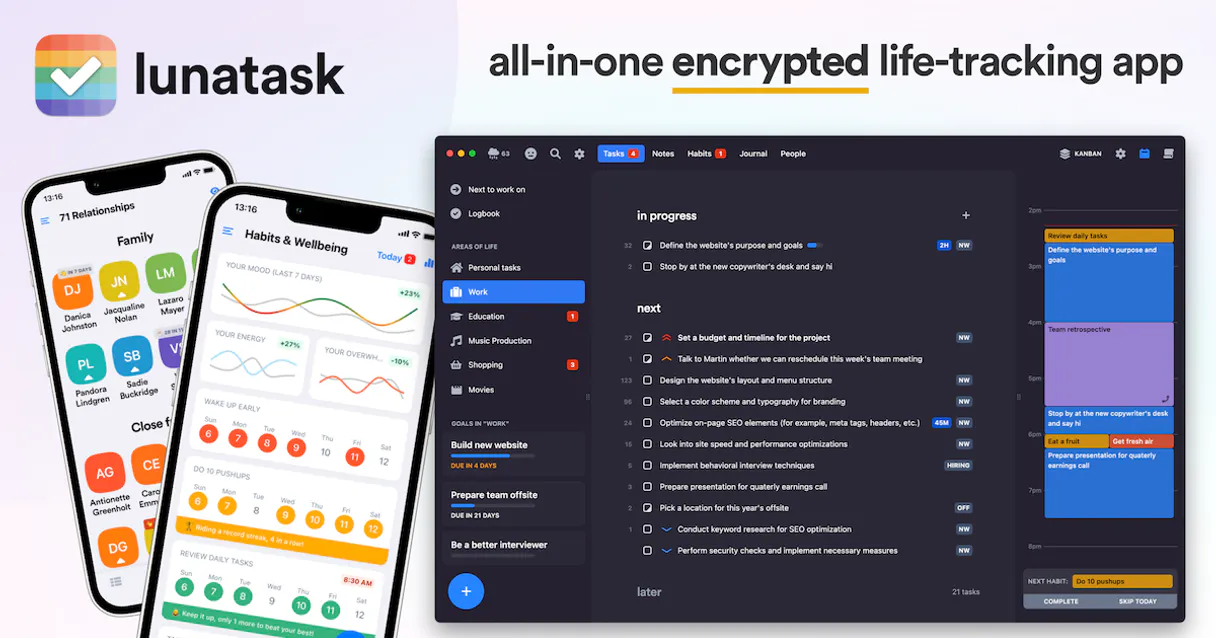
Lunatask connects your AI agent directly to a private task and journaling system. This server lets your client create, update tasks across different life areas, log daily habits, or write secure journal entries—all without compromising your data's encryption.
You manage structured notes and personal goals using only technical metadata (IDs and statuses), keeping the actual content locked down.
What your AI agents can do
Create journal entry
Adds a new, end-to-end encrypted journal entry via an API call.
Create new task
Creates a brand new task and assigns it to a specified area of life.
Delete task
Removes an existing task from your Lunatask account.
The server adds a task to a specific 'Area of Life' with an initial status (like 'next' or 'later').
It marks a daily habit as completed, updating your personal consistency record.
The server changes the status or priority of an existing task that you've already created.
It creates a new, encrypted journal log directly from your conversation prompt.
The server lists the technical metadata for every single task you own, letting you see what's active and what needs attention.
Ask AI about this MCP
Supported MCP Clients
Gemini Waiting for input…
Lunatask MCP Server: 8 Tools for Productivity
These tools allow your agent to perform specific actions like creating tasks, logging habits, and managing notes within the private Lunatask environment.
019d75cbcreate journal entry
Adds a new, end-to-end encrypted journal entry via an API call.
019d75cbcreate new task
Creates a brand new task and assigns it to a specified area of life.
019d75cbdelete task
Removes an existing task from your Lunatask account.
019d75cbget task metadata
Retrieves specific technical status data for one single, identified task.
019d75cblist notes metadata
Lists the metadata for every note stored in your account.
019d75cblist tasks metadata
Lists the technical metadata (IDs, statuses) for all tasks, but not their names or notes due to encryption.
019d75cbtrack habit completion
Logs that you successfully completed a specified habit goal.
019d75cbupdate existing task
Changes the status or details of an already existing task.
Choose How to Get Started
Build a custom MCP for your own tools, or connect a ready-made integration from our catalog.
Build Your Own
Turn any API into an MCP. Import a spec, define Agent Skills, or deploy with MCPFusion.
- Import from OpenAPI, Swagger, or YAML specs
- Create Agent Skills with progressive disclosure
- Deploy to edge with MCPFusion framework
- Built in DLP, auth, and compliance on every call
- Real time usage dashboard and cost metering
- Publish to catalog or keep private
Make Your AI Do More
Start with Lunatask, then connect any of our 4,700+ other servers whenever your AI needs more. One click, no limits.
- Use this MCP plus 4,700+ others, all in one place
- Add new capabilities to your AI anytime you want
- Every connection is secured and compliant automatically
- Track usage and costs across all your servers
- Works with Claude, ChatGPT, Cursor, and more
- New servers added to the catalog every week
What you can do with this MCP connector
Lunatask connects your agent straight into your private task and journaling system. This server lets your client handle all your structured productivity data—creating tasks, tracking habits, or writing journal entries—without ever compromising how encrypted your info is. You manage personal goals using only technical metadata (IDs and statuses), keeping the actual content locked down tight.
Task Management: Creating and Moving Goals
You can build new objectives by calling create_new_task, which adds a task to a specified 'Area of Life' with an initial status, like setting it for 'next week' or 'later.' If you need to change what's going on with an item you already started, use update_existing_task; this changes the status or priority of that specific task.
To keep things clean and clear, your agent can also execute delete_task to remove old items completely. You never lose visibility into your goals, though; calling list_tasks_metadata spits out the technical metadata—the IDs and statuses—for every single task you own, letting you see exactly what's active or needs attention without exposing names or notes.
If you only need details on one specific item, use get_task_metadata to pull that particular technical status data for an identified task.
Habit Tracking: Logging Consistency
Keeping up with habits is simple. When you log a successful routine check-in, your agent calls track_habit_completion. This instantly logs that specific habit as complete, updating your personal consistency record without needing to touch any other data structure.
Journaling & Notes: Secure Logging
Writing down thoughts is secure. Your client uses create_journal_entry to add a brand new journal entry; this action sends the content through an end-to-end encrypted API call, keeping it private. You can also review all your stored notes by listing their metadata with list_notes_metadata.
The Deal: Metadata Only
The most important thing you gotta know is that while the server writes and updates content, it never reads back sensitive details to your agent. The AI client only sees technical metadata—the IDs, dates, and statuses—but it doesn't see the actual text of your tasks or journal entries. It keeps everything locked down.
How Lunatask MCP Works
- 1 First, subscribe to this MCP server on Vinkius and provide your unique Lunatask Access Token.
- 2 Next, prompt your AI client (e.g., Claude or Cursor) with a command like: 'Create a task for reviewing the budget in my Finance area.'
- 3 Your agent translates that into an API call to
create_new_taskand confirms the action was taken successfully.
The bottom line is, you tell your AI client what needs doing; it handles the secure connection and executes the function against Lunatask.
Who Is Lunatask MCP For?
This server is for people who take their personal data seriously—the kind of professional whose organizational system can't be leaked or compromised. You need to automate routine tasks (logging habits, updating statuses) without trusting a third party with your actual notes or project names.
Needs to quickly log client deliverables and update task milestones across multiple 'Areas of Life' without managing dozens of different SaaS tools.
Wants an AI agent that can track daily habits (like reading 30 minutes) and journal thoughts right from a single chat interface, keeping the data locked down.
Uses the server to automatically clean up task pipelines—updating priorities or moving tasks to 'later' status when a feature is blocked.
What Changes When You Connect
- It keeps your data private. Because the server only handles metadata (IDs/statuses), your actual notes remain fully encrypted—you never expose the content of your life to an external tool.
- Manage goals without context switching. You can update a task's priority or change its status directly through natural language commands, eliminating manual clicks in separate apps.
- Stay consistent with routine tasks. Use
track_habit_completionto log daily habits (like 'walk the dog') instantly from your chat client; it updates your record without any friction. - Keep everything in one place. Instead of opening a task manager, then opening a journal app, you use your AI agent to handle both tasks and secure entries via
create_journal_entry. - See your whole picture at a glance. Running
list_tasks_metadatagives you a clean status report on every project area without ever compromising the sensitive details of what those projects are.
Real-World Use Cases
The Weekly Review Cleanup
A PM finishes a sprint and needs to update 15 tasks. Instead of opening the task app and manually changing statuses, they prompt their agent: 'Move all completed tasks from the Q3 area to archived status.' The agent calls update_existing_task for each item, instantly clearing out the pipeline.
The Morning Habit Check-in
A user wakes up and needs to log their routine tasks. They tell their agent: 'I finished my meditation habit today.' The agent runs track_habit_completion, immediately updating the consistency score in Lunatask, all within a single chat session.
The Brain Dump Session
A consultant has an idea late at night. Instead of opening a dedicated journaling app and worrying about sync issues, they just tell their agent: 'Write down my notes on the new client pitch.' The agent uses create_journal_entry to securely log the thought without ever exposing its content.
The Project Status Check
A manager needs a quick status report before a meeting. They ask their agent to run list_tasks_metadata. The server returns a list of all task IDs and current statuses ('next', 'later'), giving them the overview they need without revealing confidential project names.
The Tradeoffs
Trying to read notes by name
The user prompts: 'What were my thoughts about Q1 marketing?' The agent fails because the API cannot return content, only metadata.
→
Don't ask for the actual text. Instead, use list_notes_metadata to see all available note IDs and statuses first. You get structure, not secrets.
Updating tasks manually in multiple places
The user updates a task on Trello, then remembers it in Notion, leading to conflicting data and wasted time.
→
Use the agent's update_existing_task tool. Tell your agent: 'Move the Q4 budget review task from next to later.' It handles the update directly in Lunatask.
Ignoring encrypted data limitations
A developer assumes they can pass a full, unencrypted text prompt and expects the response to contain that text.
→
Remember: the server only handles technical metadata. If you need to list tasks, use list_tasks_metadata—you get IDs and statuses; you don't get names or notes.
When It Fits, When It Doesn't
Use this MCP server if your core pain point is managing structured personal data (tasks, habits) while maintaining absolute privacy. You need the AI to act as a hands-free scheduler that only interacts with technical identifiers and statuses. This is perfect for goal tracking and routine maintenance.
Don't use it if you need rich text editing or full content search. If your primary workflow involves generating large drafts of journal entries and needing to read them back into the chat window, this server will frustrate you because its purpose is secure logging, not reading. For pure data retrieval and complex querying across multiple services, look at a dedicated data warehousing connection instead.
Independent Platform Disclaimer: Vinkius is an independent platform and is not affiliated with, endorsed by, sponsored by, verified by, or otherwise authorized by Lunatask. All third-party trademarks, logos, and brand names are the property of their respective owners. Their use on this website is strictly for informational purposes to identify service compatibility and interoperability.
VINKIUS INFRASTRUCTURE
Cloud Hosted
Managed infra
V8 Isolated
Sandboxed per request
Zero-Trust Proxy
No stored credentials
DLP Enforced
Policy on every call
GDPR Compliant
EU data residency
Token Compression
~60% cost reduction
Works with Claude, ChatGPT, Cursor, and more
The Model Context Protocol standardizes how applications expose capabilities to LLMs. Instead of operating in isolation, your AI gains direct access to external platforms, live data, and real-world actions through secure, standardized connections.
This server provides 8 capabilities that interface natively with Claude, ChatGPT, Cursor, and any MCP client. No middleware. No custom integration required.
Available Capabilities
Ticking off tasks shouldn't feel like managing spreadsheets.
Right now, keeping track of goals means opening the task app for status updates, then switching to a separate calendar view just to see deadlines, and finally jumping into a third spot to log how many hours you actually worked. It's constant context switching and manual data entry.
With this server, your agent handles it all in one conversation. You tell it: 'Update the budget task status.' Done. The tool runs `update_existing_task` and confirms success. All that complexity is hidden behind a simple chat command.
Using Lunatask to track habits via `track_habit_completion`
Manual habit tracking requires you to remember which app tracks what, or worse, open an old sheet and manually type in 'Done' for the day. It takes effort just to record a simple completion.
Now, it’s instant. You tell your agent: 'Log my running habit today.' The tool calls `track_habit_completion`, updates your streak counter, and you move on with your actual work. Zero friction.
Common Questions About Lunatask MCP
Can I use Lunatask to read back the notes from a journal entry? +
No. Because of end-to-end encryption, the server cannot read back the names or content of your entries. It only provides technical metadata when you call list_notes_metadata.
How do I create a new task using Lunatask? +
You use the create_new_task tool. You must provide both a name for the task and an 'area_id' to place it in, otherwise the function will fail.
Does Lunatask handle complex project dependencies? +
It handles status updates and prioritization well using update_existing_task. However, if you need logic that checks Task A before updating Task B, you'll need multi-step automation outside of this single tool call.
Is it safe to use Lunatask with my most sensitive data? +
Yes. The server is designed with end-to-end encryption for content. Your AI agent only handles technical metadata, keeping the actual notes and names locked down.
When using `create_new_task`, what authentication method does Lunatask require? +
You must provide a valid Lunatask Access Token. Your AI client uses this token to authenticate every request, ensuring only authorized agents can modify your data. This setup secures all interactions with tools like update_existing_task.
Does running `list_tasks_metadata` reveal the actual task names and descriptions in Lunatask? +
No, it only reveals technical metadata (IDs, statuses). Because of end-to-end encryption, the API cannot read back your private content. You see structural data—like 'next' or 'later' status—but never the note itself.
If I need to remove an item, how do I use the `delete_task` tool in Lunatask? +
You send a direct command with the unique ID of the task. The agent sends this request, and Lunatask handles the deletion immediately. You just need that specific identifier to make sure you delete the right item.
After using `track_habit_completion`, can I also list my general notes metadata via Lunatask? +
Yes, you can use separate tools for different data types. To see your journal entries, you simply call the list_notes_metadata tool. The system manages these distinct record types independently.
Why can't the agent read my task names? +
Lunatask uses end-to-end encryption. Task names and note bodies are encrypted on your device before being sent to the server. The API only has access to metadata like IDs and statuses.
Where do I find my Area ID? +
In the Lunatask desktop app, go to an Area's settings. The unique Area ID (UUID) is displayed there for use in the API.
Can I track habits using this agent? +
Yes, use the track_habit_completion tool with the unique habit ID to log a successful completion event.
Use it with your favorite AI tools
Connect this server to Cursor, Claude, VS Code, and more.
More in this category
Docdown
Equip your AI agent to generate documents, manage templates, and track output files via the Docdown API.

XML JSON Converter
Parse legacy systems easily. Deterministically convert massive XML, SOAP, or RSS feeds into clean JSON (and back) without LLM hallucinations.

Paperless-ngx
Manage your digital archive via Paperless-ngx — search documents, upload files, manage tags, and organize correspondents directly from any AI agent.
You might also like
OpenEI
US electricity rate intelligence — query utility rates by location, sector, and tariff via AI for solar and energy analysis.

BLS Jobs — Nonfarm Payrolls & Wages
Access the definitive source for US employment growth. Query Nonfarm Payrolls, private sector job creation, and average hourly earnings tracked by the BLS Current Employment Statistics (CES) program.

GameScorekeeper
Access live sports scores, fixtures, lineups, team form, and player statistics via AI — covering major football competitions worldwide.