
Docdown MCP. Automate document creation from structured data.
 Gemini
 Works with every AI agent you already use
…and any MCP-compatible client









Just plug in your AI agents and start using Vinkius.
Docdown equips your AI agent to automate document creation from templates. You connect it via MCP and tell it what you need—the agent handles listing templates, checking required data fields, generating PDFs or Word files from JSON inputs, and tracking the status of every output file.
What your AI agents can do
Generate new document
Creates a new PDF or Word document using a specific template ID and your provided data object.
Get docdown account metadata
Retrieves usage limits and general metadata for your Docdown account.
Get document status
Checks the current state (processing, complete) and retrieval link for a document ID.
Your agent can pull a full roster of available document templates, or narrow the list down by name.
You check which specific fields (like 'Client Name' or 'Invoice Amount') are needed to populate a template correctly.
The agent takes your raw data object and runs it through a chosen template to generate a completed document file.
You track if a generated document is 'Processing,' 'Completed,' or stalled, and get the final download URL when ready.
Ask AI about this MCP
Supported MCP Clients
Gemini Waiting for input…
Docdown MCP Server: 10 Tools for Document Automation
These tools let your AI client manage the entire document lifecycle—from listing available templates to generating final files and tracking their download status.
019d7587generate new document
Creates a new PDF or Word document using a specific template ID and your provided data object.
019d7587get docdown account metadata
Retrieves usage limits and general metadata for your Docdown account.
019d7587get document status
Checks the current state (processing, complete) and retrieval link for a document ID.
019d7587get template details
Fetches all metadata about a specific template, including its name and version.
019d7587get template field schema
Identifies the exact data fields needed for a template to populate correctly.
019d7587list doc templates
Returns a list of all templates available in your Docdown account.
019d7587list generated documents
Lists every document that has been generated previously, providing basic metadata.
019d7587list published templates
Filters and lists only those templates that are currently marked as 'Published' and ready for use.
019d7587list recently generated docs
Retrieves a list of documents created within the last 24 hours.
019d7587search templates by name
Finds specific templates by providing just a keyword or fragment of the name.
Choose How to Get Started
Build a custom MCP for your own tools, or connect a ready-made integration from our catalog.
Build Your Own
Turn any API into an MCP. Import a spec, define Agent Skills, or deploy with MCPFusion.
- Import from OpenAPI, Swagger, or YAML specs
- Create Agent Skills with progressive disclosure
- Deploy to edge with MCPFusion framework
- Built in DLP, auth, and compliance on every call
- Real time usage dashboard and cost metering
- Publish to catalog or keep private
Make Your AI Do More
Start with Docdown, then connect any of our 4,700+ other servers whenever your AI needs more. One click, no limits.
- Use this MCP plus 4,700+ others, all in one place
- Add new capabilities to your AI anytime you want
- Every connection is secured and compliant automatically
- Track usage and costs across all your servers
- Works with Claude, ChatGPT, Cursor, and more
- New servers added to the catalog every week
What you can do with this MCP connector
Docdown handles your document workflow by letting your AI client generate structured files directly from templates. You connect it via MCP, and it gives your agent everything it needs to manage, verify, create, and track polished documents.
Listing and Finding Templates
Your agent can pull a complete roster of every template you've got in your Docdown account using list_doc_templates. If you know what you're looking for, use search_templates_by_name to narrow the list down instantly with just a keyword. You can also filter out the junk and only see templates marked as ready-to-use by calling list_published_templates.
Before running anything, check get_template_details whenever you need general info on a template's name or current version.
Data Validation and Schema Check
You don't wanna generate garbage because you forgot a field. You can use get_template_field_schema to see the exact data points—like 'Client Name' or 'Invoice Amount'—a specific template needs to populate correctly. This ensures your input JSON matches what the document requires.
Generating Documents
To make a file, you tell your agent which template ID you want and hand over the structured raw data object (JSON). The generate_new_document tool takes that information and spits out a brand-new PDF or Word file. You'll get a document every time you call this function.
Tracking Documents
The job ain't done when the file is created. You need to know where it is, right? You can check the current status of any generated file using get_document_status; this tells you if it's 'Processing,' 'Complete,' or stalled, and gives you the final download link once it's good to go.
For a history view, use list_generated_documents to see every document created previously with basic metadata. If you just wanna know what got made in the last day, call list_recently_generated_docs. Finally, keep an eye on your account usage limits and general info by running get_docdown_account_metadata.
How Docdown MCP Works
- 1 First, your agent uses
list_doc_templatesto find the correct template ID. If needed, it runsget_template_field_schemato verify all necessary data points. - 2 Next, you send the required data (as a JSON object) and the template ID to
generate_new_document. The system starts processing the file in the background. - 3 Finally, your agent polls the status using
get_document_status. When it reads 'Completed,' you get the secure download URL.
The bottom line is that your AI client manages a multi-step workflow: Discover > Validate Data > Generate > Retrieve Status.
Who Is Docdown MCP For?
This tool is for Operations Managers and Technical Writers. Use it if you deal with documents that must look perfect every single time, like contracts or reports. You're the person who gets annoyed when a document fails because someone forgot to include a required field—or worse, when you have to manually check status links across multiple systems.
You use this to quickly generate client-facing reports or contracts from structured data on demand, without logging into the Docdown web portal.
You audit template schemas using get_template_field_schema and run tests, making sure every new document format is fully validated before publishing.
You build agent workflows that handle the entire lifecycle: listing templates (list_doc_templates), passing data to generate_new_document, and handling error states via status checks.
What Changes When You Connect
- Stop guessing about required fields. Use
get_template_field_schemato know exactly what data your template needs before you even try to generate it. - Manage the entire lifecycle in chat: First, use
list_doc_templatesto find a file; second, rungenerate_new_document; third, check its status withget_document_status. It’s all one conversation flow. - Never lose track of output. The agent can list both all generated files (
list_generated_documents) and just those from the last day (list_recently_generated_docs). - Separate your discovery tools: Use
search_templates_by_namefor quick lookups, but uselist_doc_templateswhen you need a full inventory count. - Go straight to the source of truth. Use
list_published_templatesif you only want to build documents using templates that are officially live and approved.
Real-World Use Cases
Need to generate quarterly compliance reports for 50 clients.
The ops engineer needs a batch of files. They use list_doc_templates first, confirming the correct 'Q-Report' template exists. Then, they feed the agent five data objects and call generate_new_document multiple times in sequence. The agent handles the queueing and uses get_document_status until all 50 files are confirmed complete for download.
A developer needs to test a new contract template before deployment.
Instead of manually filling out sample data, the dev runs get_template_field_schema on 'NDA v3'. This confirms every required field. They then use that schema knowledge to build the input JSON and trigger generate_new_document, instantly testing the template's integrity.
An admin needs to check if a document they requested yesterday is ready.
The admin asks their agent, 'Where is DOC-9021?' The agent uses get_document_status with the ID. If it's done, the link appears immediately; if not, the status tells them exactly why it's stuck.
A team needs to audit all available document formats.
The team lead asks their agent for an inventory. The agent responds by calling list_doc_templates and then filtering that list further using list_published_templates so the team knows exactly which templates are live for production use.
The Tradeoffs
Trying to generate without checking requirements.
The user just sends data and says, 'Make me a contract.' The agent fails because the input JSON is missing fields like 'Effective Date' or 'Governing Law,' causing the generation call (generate_new_document) to fail instantly.
→
Confusing template listing with searching.
The user tries to list only templates related to invoices, but they just run list_doc_templates. They get hundreds of irrelevant files, making the search overwhelming and slow.
→
Assuming a document is ready immediately.
After triggering generate_new_document, the user assumes they can download it right away. The agent will fail because generation takes time, leading to frustration.
→
→
Always check first. Use get_template_field_schema before generating. For focused searches, use search_templates_by_name. Always follow a status check (get_document_status) after calling generate_new_document.
When It Fits, When It Doesn't
Use this Docdown MCP Server if your core job involves turning structured data (like spreadsheets or databases) into formal, branded documents like contracts, invoices, or reports. The workflow must include templating and version control.
Don't use it if you just need general text generation—if you just want an article written about the stock market, connect your agent to a knowledge retrieval tool instead. Don't use it for pure data storage; that requires a database connection. This server is specifically designed for the document output phase of any workflow.
If you find yourself needing to check what fields are required before generating, or if you need to track multiple file status updates, this tool is built for that complexity.
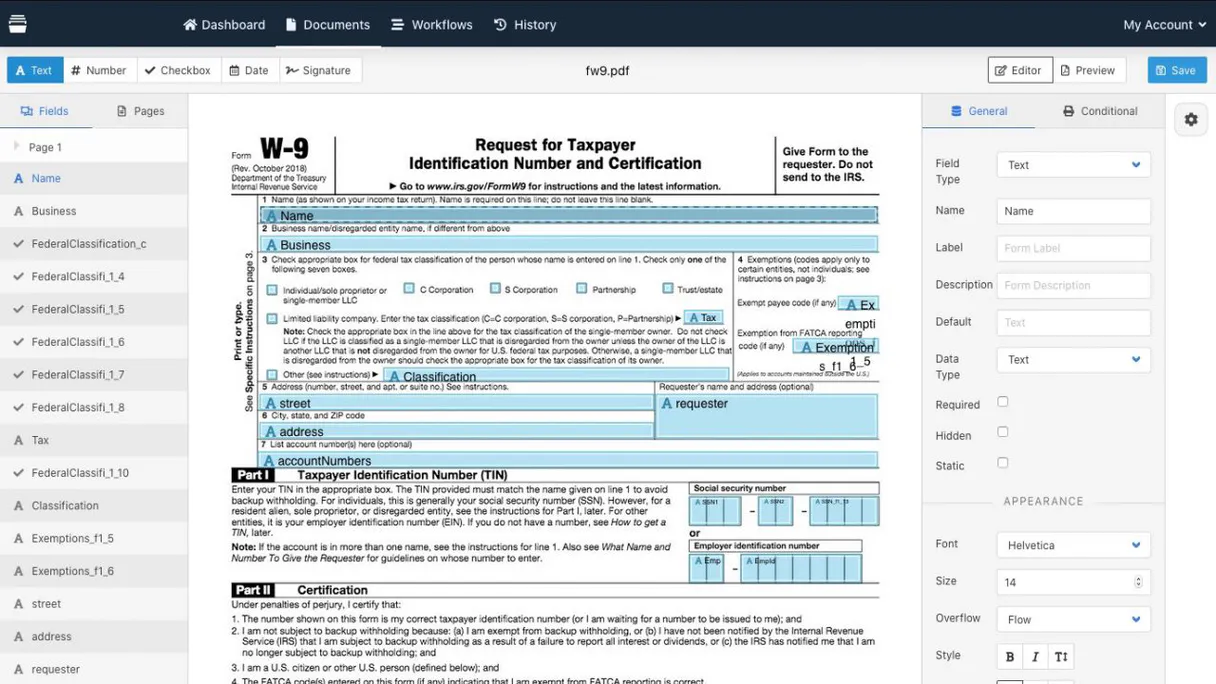
Independent Platform Disclaimer: Vinkius is an independent platform and is not affiliated with, endorsed by, sponsored by, verified by, or otherwise authorized by Docdown. All third-party trademarks, logos, and brand names are the property of their respective owners. Their use on this website is strictly for informational purposes to identify service compatibility and interoperability.
VINKIUS INFRASTRUCTURE
Cloud Hosted
Managed infra
V8 Isolated
Sandboxed per request
Zero-Trust Proxy
No stored credentials
DLP Enforced
Policy on every call
GDPR Compliant
EU data residency
Token Compression
~60% cost reduction
Works with Claude, ChatGPT, Cursor, and more
The Model Context Protocol standardizes how applications expose capabilities to LLMs. Instead of operating in isolation, your AI gains direct access to external platforms, live data, and real-world actions through secure, standardized connections.
This server provides 10 capabilities that interface natively with Claude, ChatGPT, Cursor, and any MCP client. No middleware. No custom integration required.
Available Capabilities
Generating a report shouldn't require copy-pasting data between three different systems.
Today, creating a simple client invoice means logging into the CRM to pull the client name. Then you open Excel to get the line items and manually format them in Word. Finally, you check the document generation folder on your network drive just to see if it finished.
With Docdown, you give your agent the JSON data—the source of truth—and tell it which template to use. The agent runs `generate_new_document` and handles all the formatting, merging, and file creation automatically. You get a ready-to-share document link back in chat.
Docdown MCP Server: Manage templates and documents through chat.
You no longer have to remember if the latest contract template is 'v2' or 'v3'. You just ask your agent, 'What are my published service agreement templates?' The agent runs `list_published_templates` and gives you a clean list of available versions.
The whole process becomes conversational. You don't navigate dashboards; you talk to the system. It handles the API calls, checks the schemas (`get_template_field_schema`), and delivers the final file status—it’s just better.
Common Questions About Docdown MCP
How do I check what data is needed for a template using get_template_field_schema? +
You pass the specific Template ID to get_template_field_schema. The agent then returns an exact list of required fields and their expected data types, letting you build your input JSON perfectly before running generation.
Is there a way to see all my generated files with list_generated_documents? +
Yes. Running list_generated_documents gives you an audit log of everything created in the system, helping you track historical output and metadata for compliance.
Can I find a template if I only know part of its name using search_templates_by_name? +
Absolutely. search_templates_by_name lets your agent narrow down the results based on keywords, so you don't have to scroll through every single document available in your account.
Does generate_new_document handle large datasets? +
The tool takes a structured data object (JSON). As long as that JSON fits within the service limits, generate_new_document processes it into the target file format.
How do I check my current usage limits or rate restrictions using get_docdown_account_metadata? +
The tool returns your account's operational metadata, including active usage counters and API quota thresholds. This lets you plan large batches of document generation without hitting unexpected rate limits.
If I only want to use approved templates, how do I filter them with list_published_templates? +
It returns a list containing only documents marked as 'Published'. You can rely on this list because it filters out drafts and internal test versions, ensuring your AI agent uses official forms.
If my document generation job fails or stalls, how do I check the precise progress using get_document_status? +
It provides a detailed status report for any specific document ID. You'll see not just 'Failed,' but also the underlying error message, helping you troubleshoot data issues immediately.
What do I use if I need to list every single template in my account using list_doc_templates? +
It provides a comprehensive inventory of all templates you have access to. This is useful for cataloging or when your AI agent needs to know the full scope of available document types.
How do I get a Docdown API Key? +
Log in to your Docdown account, navigate to the API section in your settings, and you can generate or retrieve your unique API Key from there.
Which document formats are supported? +
Docdown primarily supports generating high-quality PDF and Microsoft Word (.docx) files from your templates and data.
Can the agent show me the required fields for a template? +
Yes, you can use the get_template_field_schema tool to retrieve exactly which data keys and types are needed to populate a specific template.
Use it with your favorite AI tools
Connect this server to Cursor, Claude, VS Code, and more.
More in this category

Steam
Access game data, player profiles, and community content from the world largest PC gaming platform and digital storefront.

Assembly
Manage Assembly clients, companies, workspaces, and notes.

Accessibility Prover
Validates UI accessibility compliance against WCAG 2.2 AA and EAA 2025 standards. Prevents non-semantic layouts, focus trap failures, contrast issues, and motion risks.
You might also like

Amplitude
Analyze product data via Amplitude — get user activity, calculate retention, analyze funnels, and track revenue directly from any AI agent.
BCB Câmbio — Dólar PTAX, Euro e 150+ Moedas
Official exchange rates from Brazil's Central Bank: daily PTAX dollar quotes (the official BRL/USD reference rate), historical series, any of 150+ currencies against BRL, complete currency catalog, and SGS time series for long-term FX data.

WordPress Post Drafter
This MCP does exactly one thing: it takes content generated by the AI and saves it directly to your WordPress as a Draft. Incredible for turning Claude into an automated SEO content engine.