
Custify MCP. Monitor health scores and track churn risk by conversation.
 Gemini
 Works with every AI agent you already use
…and any MCP-compatible client









Just plug in your AI agents and start using Vinkius.
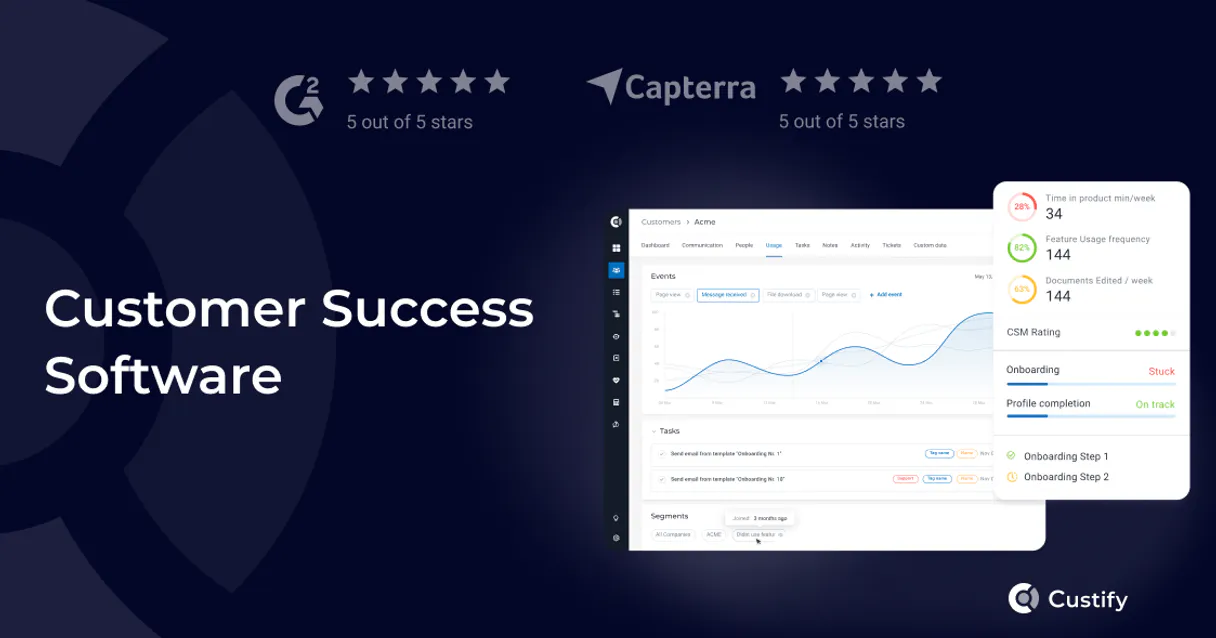
Custify. Manage customer health, track churn risk, and audit account performance directly through your AI agent. This server lets your agent read customer profiles, view KPI definitions, and manage success tasks using natural conversation, making account management instantly actionable.
What your AI agents can do
Create customer profile
Creates a new customer profile in Custify, resolving the ID and setting the validation status.
Get company details
Gets detailed settings and metrics for a specific company, resolving organizational attributes and health scores.
Get customer details
Gets a full profile and health metrics for a specific customer, including recent activity and segment membership.
Retrieves a customer's full profile, health scores, and segment membership using get_customer_details.
Gets detailed settings and metrics for a specific company using get_company_details.
Retrieves a list of all customer IDs, names, emails, and lifecycle stages using list_customers.
Finds customer profiles by name or email using search_customers_by_keyword.
Lists open success tasks or internal CRM notes for a specific customer using list_customer_success_tasks or list_customer_notes.
Retrieves defined KPIs for the account using list_customer_kpis.
Ask AI about this MCP
Supported MCP Clients
Gemini Waiting for input…
019d7580create customer profile
Creates a new customer profile in Custify, resolving the ID and setting the validation status.
019d7580get company details
Gets detailed settings and metrics for a specific company, resolving organizational attributes and health scores.
019d7580get customer details
Gets a full profile and health metrics for a specific customer, including recent activity and segment membership.
019d7580list companies
Lists all companies in Custify, resolving company IDs and domain information.
019d7580list customer kpis
Lists key performance indicators defined in the account, resolving metric definitions and threshold values.
019d7580list customer notes
Lists internal CRM notes for a specific customer, resolving the note content and authorship metadata.
019d7580list customer success tasks
Lists all open and completed customer success tasks, resolving task priority, status, and assigned owners.
019d7580list customers
Lists all customers in Custify, resolving properties like ID, name, email, and lifecycle stage.
019d7580list people
Lists all people associated with accounts, resolving contact details and account associations.
019d7580search customers by keyword
Searches for customers using a name or email, resolving matching customer profiles.
Choose How to Get Started
Build a custom MCP for your own tools, or connect a ready-made integration from our catalog.
Build Your Own
Turn any API into an MCP. Import a spec, define Agent Skills, or deploy with MCPFusion.
- Import from OpenAPI, Swagger, or YAML specs
- Create Agent Skills with progressive disclosure
- Deploy to edge with MCPFusion framework
- Built in DLP, auth, and compliance on every call
- Real time usage dashboard and cost metering
- Publish to catalog or keep private
Make Your AI Do More
Start with Custify, then connect any of our 4,700+ other servers whenever your AI needs more. One click, no limits.
- Use this MCP plus 4,700+ others, all in one place
- Add new capabilities to your AI anytime you want
- Every connection is secured and compliant automatically
- Track usage and costs across all your servers
- Works with Claude, ChatGPT, Cursor, and more
- New servers added to the catalog every week
What you can do with this MCP connector
Custify MCP Server: Manage Customer Health and Predict Churn
Your agent lets you handle customer accounts right in your workflow. You can get a full rundown of a customer's profile, their health scores, and which segment they belong to using get_customer_details. You can also get detailed settings and metrics for a specific company using get_company_details. If you need to see all the companies, list_companies gives you every company ID and domain.
To find a specific customer, use search_customers_by_keyword with a name or email. You can also grab a list of every customer ID, name, email, and lifecycle stage with list_customers. You can start a new customer profile with create_customer_profile, which resolves the ID and sets the validation status. You can check out all open and closed customer success tasks, along with who owns them, using list_customer_success_tasks.
You can review internal CRM notes for a customer with list_customer_notes, getting the note content and who wrote it. You can pull a list of all key performance indicators defined for the account, including metric definitions and their threshold values, with list_customer_kpis. You can list all people associated with accounts, getting their contact details and which accounts they belong to, using list_people.
If you only want to check the customers, list_customer_kpis gives you the necessary metric definitions and threshold values.
How Custify MCP Works
- 1 Connect the Custify integration to your AI client and authorize it with your API Key.
- 2 Instruct your agent to perform a search (e.g., 'Find all customers with low health scores').
- 3 The agent calls the necessary tools (like
search_customers_by_keywordorlist_customers) and synthesizes the results into a single, conversational answer.
The bottom line is, your agent handles the API calls and data synthesis, letting you talk to your customer success data instead of writing complex queries.
Who Is Custify MCP For?
Anyone responsible for keeping customers happy and predicting churn. This is for the Account Manager who needs to check account health on the fly. It’s for the Customer Success Manager who needs to audit tasks across dozens of accounts. If your job involves knowing exactly why a client might leave, this is for you.
Checks account health and churn risk across multiple accounts instantly. Needs to pull recent notes and open tasks for client reviews.
Retrieves company metrics and historical notes during client meetings, proving value and identifying upselling chances.
Audits KPIs and tasks across all customer segments to identify systemic process gaps or compliance issues.
What Changes When You Connect
- Identify at-risk accounts quickly. Instead of manually running reports, your agent calls
search_customers_by_keywordto find all clients whose health score is below a certain threshold. You get a list of names and their current risk level instantly. - Build a full account picture. Need to know everything about a client? Use
get_customer_detailsto get the profile, then callget_company_detailsfor the parent company metrics. The agent links them into one coherent summary. - Audit account activity and tasks. Don't guess why a client is unhappy. Use
list_customer_notesandlist_customer_success_tasksto pull up every internal note and every open task, giving you immediate context for a call. - Understand performance trends. Stop relying on stale dashboards. Call
list_customer_kpisto see the specific metrics and thresholds defining performance, giving you objective data points during a review. - Streamline client discovery. Instead of opening the main customer list and scrolling, use
list_customersorsearch_customers_by_keywordto pinpoint the exact customer record you need, saving minutes on every client review. - Map out relationships. Get contact details for key stakeholders by calling
list_people, ensuring you know exactly who to speak to next, even if you don't have their email handy.
Real-World Use Cases
Client Check-in: Finding the Source of Friction
A client calls complaining about a feature. Instead of opening three different tabs, your agent runs search_customers_by_keyword to find the account. It then uses list_customer_notes to check the last support interaction and get_customer_details to see the current health score. You immediately know if the issue is new or a long-standing problem.
Board Review: Assessing Company Health
The CEO needs a quick rundown of the top 10 accounts. The agent first calls list_companies to get the full list. Then, it runs get_company_details on the top 3, pulling organizational metrics and health scores for the board presentation.
Onboarding Audit: Checking Task Completion
A new Account Manager starts a client. They ask the agent to check the onboarding status. The agent runs list_customer_success_tasks to find all open tasks and then uses list_people to identify who owns the next steps. The manager has a clear, actionable checklist.
Churn Prediction: Identifying Warning Signs
The team suspects a client might be leaving. The agent runs list_customers and filters for low health scores. It then uses list_customer_kpis to see which specific metrics dropped and list_customer_notes to see if the client mentioned a competitor in the last few weeks.
The Tradeoffs
The Spreadsheet Drilldown
Manually logging into the platform, filtering by date, opening the customer tab, clicking on the company tab, and then exporting notes for a single client just to build a summary in Excel.
→
Ask your agent to pull the full picture. Start by running get_customer_details and then follow up with list_customer_notes and list_customer_success_tasks to get a single, merged report.
Ignoring the Company Context
Focusing only on the customer profile (get_customer_details) and missing the overarching health metrics that apply to the entire corporate relationship.
→
Always check the organizational view first. Call get_company_details before looking at customer specifics. This gives context to the relationship's overall health.
Missing the People View
Finding a customer's email but having no idea which specific department contact owns the relationship, so the follow-up gets sent to the wrong person.
→
Use list_people to pull a full list of contacts associated with the account. This tells you exactly who to speak to and their role.
When It Fits, When It Doesn't
Use this if you need to connect three or more data points about a customer (e.g., 'The health score is low AND the task list is empty'). It’s built for deep, complex audits. Don't use it if you just need a simple list of names—list_customers is enough. You should use this if you need to synthesize data points like list_customer_kpis, list_customer_notes, and get_customer_details into a single narrative. If you only need to check basic contact info, stick to list_people or search_customers_by_keyword to keep the process simple.
Independent Platform Disclaimer: Vinkius is an independent platform and is not affiliated with, endorsed by, sponsored by, verified by, or otherwise authorized by Custify. All third-party trademarks, logos, and brand names are the property of their respective owners. Their use on this website is strictly for informational purposes to identify service compatibility and interoperability.
VINKIUS INFRASTRUCTURE
Cloud Hosted
Managed infra
V8 Isolated
Sandboxed per request
Zero-Trust Proxy
No stored credentials
DLP Enforced
Policy on every call
GDPR Compliant
EU data residency
Token Compression
~60% cost reduction
Works with Claude, ChatGPT, Cursor, and more
The Model Context Protocol standardizes how applications expose capabilities to LLMs. Instead of operating in isolation, your AI gains direct access to external platforms, live data, and real-world actions through secure, standardized connections.
This server provides 10 capabilities that interface natively with Claude, ChatGPT, Cursor, and any MCP client. No middleware. No custom integration required.
Available Capabilities
Checking account health shouldn't require jumping between five different tabs.
Today, assessing a client's true status is a clicking nightmare. You have to log into the platform, go to the main dashboard, find the customer, and then click through to the 'Notes' tab, the 'KPI' tab, and the 'Tasks' section. You copy the data into a spreadsheet and spend half an hour cross-referencing timestamps and owners.
With the Custify MCP Server, you just talk to your agent. You ask, 'What's the status of Account X?' and the agent runs the necessary tools (`get_customer_details`, `list_customer_notes`, `list_customer_success_tasks`) and spits out one clear, summarized report. It’s immediate.
Custify MCP Server: Get the full customer story in one query.
The manual process forces you to run separate searches for customer names, company metrics, and specific tasks. Each query is siloed, and you have to piece together the relationship yourself. You miss the context that links a KPI drop to a specific note.
The agent connects all those dots. It runs the full sequence—from `list_customers` to `get_company_details` to `list_customer_kpis`—and presents the whole story. You stop analyzing data; you start acting on it.
Common Questions About Custify MCP
How do I use the Custify MCP Server to check a customer's health score? +
You ask your agent to get the customer details. The agent uses get_customer_details and returns the current health score, segment membership, and activity history for the specific customer you name.
Can I list all companies using the Custify MCP Server? What tool do I use? +
Yes, you use the list_companies tool. This function resolves and lists every company in your Custify account, giving you their IDs and domain information.
How do I find notes or tasks for a specific client using Custify MCP Server? +
You instruct the agent to list notes or tasks. It uses list_customer_notes for internal CRM notes or list_customer_success_tasks for open tasks related to that customer.
Is the search_customers_by_keyword tool better than list_customers? +
Use search_customers_by_keyword when you know part of the name or email. Use list_customers when you need a full list of every customer in the system, regardless of criteria.
What is the best way to see the overall company metrics? +
You use the get_company_details tool. This retrieves the core organizational attributes and overall health metrics for the parent company.
How do I use the `list_customer_kpis` tool to find key performance indicators? +
You use list_customer_kpis to retrieve all defined performance metrics for your account. This shows you the specific KPIs and their threshold values set up in Custify, letting you know exactly what data points track success.
What is the best way to manage B2B relationships using the `get_company_details` tool? +
The get_company_details tool pulls detailed settings and core health metrics for a specific company. This gives your agent the foundational data needed to manage and review B2B relationships during client meetings.
Can I search for a person's contact info using the `list_people` tool? +
Yes, list_people retrieves all contact details and associated account information. You can use this tool to find specific people related to accounts, which is useful for updating contacts or confirming roles.
How do I get a Custify API Key? +
Log in to your Custify account, navigate to Settings > API, and you will find your API Key there. Ensure you have the necessary permissions to manage customer data.
Can the agent update health scores? +
This integration currently focuses on listing and retrieving data. Health scores are typically calculated automatically by Custify based on usage and interaction data.
Does Custify support B2B company tracking? +
Yes, Custify allows you to track both individual customers and company-level entities, which is fully supported by this integration.
Use it with your favorite AI tools
Connect this server to Cursor, Claude, VS Code, and more.
More in this category

Birdeye
Grow your local business reputation with review management, customer surveys, and listings that drive more foot traffic.

Belong Australia
Manage your Belong mobile and broadband services — track usage, list invoices, and check account balance directly from any AI agent.
2Chat
Programmable WhatsApp automation — send messages, manage groups, and verify numbers via AI.
You might also like

Axle
Fleet management and logistics automation — track vehicles, manage drivers, and monitor loads via AI.

SuperTokens
Manage authentication, users, sessions, and roles via SuperTokens Core directly from your AI agent.

Open Finance Brasil
Connect Open Finance Brasil to any AI agent via MCP.