
Emplifi MCP. Manage social data and care workflows from chat.
 Gemini
 Works with every AI agent you already use
…and any MCP-compatible client









Just plug in your AI agents and start using Vinkius.
Emplifi MCP Server gives your AI agent control over your entire customer experience stack. It lets you list managed social media profiles, check performance metrics for posts, and audit care automation rules—all from a single chat interface.
You monitor everything from influencer performance to CX health without leaving your agent.
What your AI agents can do
Get emplifi account metadata
Retrieves metadata and usage limits for your Emplifi account.
Get influencer performance stats
Gets performance metrics for a specific influencer or creator.
Get social post metrics
Gets engagement and performance metrics for a specific social post.
List all social media profiles managed in your Emplifi account using list_social_profiles.
Fetch engagement metrics and performance data for a specific social media post ID via get_social_post_metrics.
List all active customer care automation rules and workflows using list_care_automation_rules.
Calculate and retrieve performance metrics for a specific influencer or creator using get_influencer_performance_stats.
Get a high-level summary of both social performance and care automation status with quick_cx_health_audit.
List all team members and their roles within the organization using list_organization_team_members.
Ask AI about this MCP
Supported MCP Clients
Gemini Waiting for input…
Emplifi MCP Server: 10 Tools for Social & Care Metrics
Use these tools to manage social profiles, track post metrics, audit care workflows, and audit overall customer experience health via your AI agent.
019d758fget emplifi account metadata
Retrieves metadata and usage limits for your Emplifi account.
019d758fget influencer performance stats
Gets performance metrics for a specific influencer or creator.
019d758fget social post metrics
Gets engagement and performance metrics for a specific social post.
019d758flist care automation rules
Lists all active customer care automation rules and workflows.
019d758flist content classification labels
Lists all labels used for content classification and reporting.
019d758flist listening dashboards
Lists all available social listening dashboards and topics.
019d758flist organization team members
Lists all team members and their roles within the organization.
019d758flist social posts
Lists recent social media posts for a specific profile.
019d758flist social profiles
Lists all social media profiles managed in your Emplifi account.
019d758fquick cx health audit
Retrieves a high-level summary of social performance and care automation status.
Choose How to Get Started
Build a custom MCP for your own tools, or connect a ready-made integration from our catalog.
Build Your Own
Turn any API into an MCP. Import a spec, define Agent Skills, or deploy with MCPFusion.
- Import from OpenAPI, Swagger, or YAML specs
- Create Agent Skills with progressive disclosure
- Deploy to edge with MCPFusion framework
- Built in DLP, auth, and compliance on every call
- Real time usage dashboard and cost metering
- Publish to catalog or keep private
Make Your AI Do More
Start with Emplifi, then connect any of our 4,700+ other servers whenever your AI needs more. One click, no limits.
- Use this MCP plus 4,700+ others, all in one place
- Add new capabilities to your AI anytime you want
- Every connection is secured and compliant automatically
- Track usage and costs across all your servers
- Works with Claude, ChatGPT, Cursor, and more
- New servers added to the catalog every week
What you can do with this MCP connector
Your AI agent controls your whole customer experience stack through Emplifi. You can list all social profiles managed in your account using list_social_profiles, and you can pull recent activity for a specific profile with list_social_posts. You'll get metadata and usage limits for your Emplifi account by calling get_emplifi_account_metadata. You can check the overall CX health—social performance and care automation status—with quick_cx_health_audit.
You'll find out what's going on with your team by listing all team members and their roles with list_organization_team_members. To see who's doing well, you can get performance metrics for a specific creator using get_influencer_performance_stats. You can check the engagement and performance data for any social post by running get_social_post_metrics.
You'll get a list of all active customer care automation rules and workflows by calling list_care_automation_rules. You can see what labels you're using for content classification and reporting by running list_content_classification_labels. You'll get a list of all available social listening dashboards and topics by using list_listening_dashboards.
How Emplifi MCP Works
- 1 Connect the Emplifi integration to your AI client and authorize it using your Emplifi API Key.
- 2 Tell your agent the task: 'Check the engagement rate for the latest post on LinkedIn.'
- 3 The agent executes the necessary tool (e.g.,
get_social_post_metrics), pulls the data, and summarizes the findings for you.
The bottom line is you talk to your agent, and it handles the API calls to get and summarize the data.
Who Is Emplifi MCP For?
Anyone managing a brand's public presence needs this. This is for the Social Media Manager who needs to check post performance on the go, or the Customer Care Lead who has to research complex automation rules during an incident. If your job involves coordinating public messaging and operational efficiency, you need this.
Uses the agent to quickly check post performance and engagement rates across different platforms without logging into each native dashboard.
Runs list_care_automation_rules to research workflow triggers or uses quick_cx_health_audit when optimizing team roles.
Monitors social listening trends and organizational CX metadata instantly to flag potential brand risks.
What Changes When You Connect
- Check post performance on the fly. Instead of jumping between platform analytics, ask the agent to run
get_social_post_metricsand get impressions, engagement rates, and reactions for any post ID. - Audit your care rules instantly. Don't read through complex documentation. Use
list_care_automation_rulesto see every active workflow and its trigger conditions. - Get a holistic view of brand health. The
quick_cx_health_auditgives you a single summary of both social performance and care automation, saving you hours of report building. - Track influencer impact. Run
get_influencer_performance_statsto measure a creator's performance metrics, tying their reach directly to your campaign goals. - Know your team structure. Use
list_organization_team_membersto see who reports to whom, or what roles are active across the entire organization. - Map out your content strategy. Use
list_social_profilesto list all managed accounts, and thenlist_social_poststo see the actual recent content for each one.
Real-World Use Cases
The campaign needs a performance check.
A Social Media Manager needs to know if a recent paid post hit its goals. They ask the agent: 'What are the metrics for post ID X?' The agent calls get_social_post_metrics and returns a clear report: 12,500 impressions, 4.2% engagement, and 850 reactions. The campaign manager immediately knows if the post needs a retargeting boost.
A major customer service issue pops up.
A Customer Care Lead receives an urgent inquiry. Instead of searching the knowledge base for rules, they ask the agent to run list_care_automation_rules. The agent returns the three active rules, confirming that 'Urgent Ticket Escalation' is active and functioning normally, allowing the team to respond correctly.
Need to onboard a new influencer.
An Operations Manager needs to vet a potential partner. They ask the agent to run get_influencer_performance_stats for the influencer's handle. The agent provides metrics on their reach and engagement, giving the manager the data needed to decide if the partnership is worth the cost.
Routine brand health check.
A manager wakes up and asks the agent to run quick_cx_health_audit. The agent pulls the overall summary, providing a snapshot of both social performance and care automation health. This replaces the need to manually check three separate dashboards.
The Tradeoffs
Checking metrics one by one
Jumping into the Emplifi dashboard, finding the post ID, clicking 'View Metrics', copying the numbers, and then opening a separate tab to check the rules in the CX section.
→
Tell your agent, 'Give me the performance metrics for post ID X and list the active care automation rules.' The agent runs get_social_post_metrics and list_care_automation_rules sequentially and compiles one answer.
Ignoring context metadata
Assuming all social profiles are connected and functioning when they might be limited by API keys or rate limits.
→
First, run list_social_profiles to see all connected accounts. Then, run get_emplifi_account_metadata to verify your current usage limits before building a strategy.
Overlooking the full team structure
Assuming the right person is available to handle a specific type of query, when in fact, the role might have changed or the team member might be on leave.
→
Run list_organization_team_members first. This confirms who has the role needed and whether they are active before you assign a task or investigate a process.
When It Fits, When It Doesn't
Use this if you need to synthesize data from social media and customer service into actionable insights. You need to know why a campaign is failing (performance data) and what the internal process is (care rules). You must connect the public face of the brand to the private operational rules.
Don't use this if you only need to pull raw data for a single source, like simply listing all titles. For that, a simple list-only tool (like list_social_profiles) is faster. Use this when you need the agent to run multiple tools and tell you the relationship between the results.
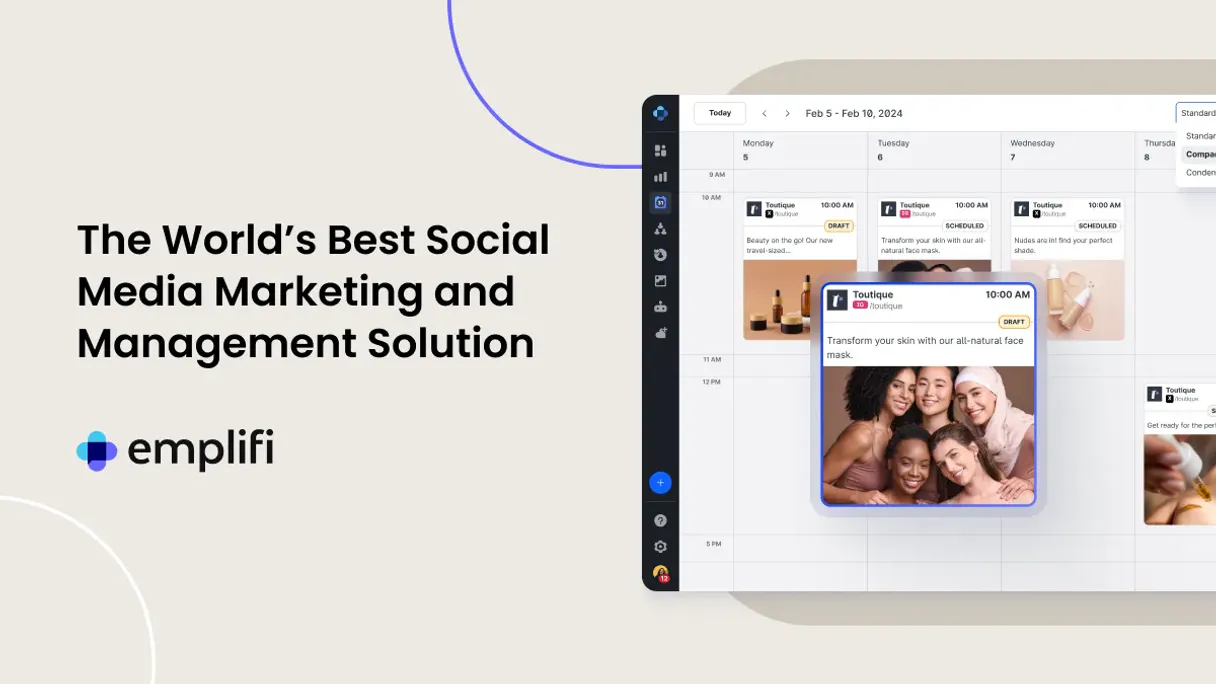
Independent Platform Disclaimer: Vinkius is an independent platform and is not affiliated with, endorsed by, sponsored by, verified by, or otherwise authorized by Emplifi. All third-party trademarks, logos, and brand names are the property of their respective owners. Their use on this website is strictly for informational purposes to identify service compatibility and interoperability.
VINKIUS INFRASTRUCTURE
Cloud Hosted
Managed infra
V8 Isolated
Sandboxed per request
Zero-Trust Proxy
No stored credentials
DLP Enforced
Policy on every call
GDPR Compliant
EU data residency
Token Compression
~60% cost reduction
Works with Claude, ChatGPT, Cursor, and more
The Model Context Protocol standardizes how applications expose capabilities to LLMs. Instead of operating in isolation, your AI gains direct access to external platforms, live data, and real-world actions through secure, standardized connections.
This server provides 10 capabilities that interface natively with Claude, ChatGPT, Cursor, and any MCP client. No middleware. No custom integration required.
Available Capabilities
Manual reporting means switching between 4+ tabs just to check one post.
Right now, checking a single post's performance requires jumping from the social dashboard to copy the post ID, then switching tabs to the analytics view. You check impressions, then open a second tab for the engagement rate, and a third tab to see the overall CX health score. It's a lot of copy-pasting and clicking.
With the Emplifi MCP Server, you just ask your agent: 'What's the performance and overall health of the last post?' The agent runs `get_social_post_metrics` and `quick_cx_health_audit` and gives you a single, summarized answer.
Emplifi MCP Server: Get performance and care rules instantly
You don't have to manually check which automation rules are active or what the post's actual performance numbers are. The agent runs `list_care_automation_rules` and `get_social_post_metrics` in sequence, providing both the workflow details and the data metrics you need.
It's one conversation, two answers. This means your agent handles the complexity of the APIs so you just get the definitive answer.
Common Questions About Emplifi MCP
How do I check the performance of a social post using get_social_post_metrics? +
You ask your agent to run get_social_post_metrics and provide the post ID. The agent returns impressions, engagement rate, and total reactions for that specific post.
Can I list all my connected social media accounts with list_social_profiles? +
Yes. Running list_social_profiles provides a complete list of every social media profile currently managed within your Emplifi account.
What is the purpose of list_care_automation_rules? +
This tool lists all the active customer care automation rules. It shows you what workflows are running and what their trigger conditions are.
How do I get a summary of my overall CX health using quick_cx_health_audit? +
Run quick_cx_health_audit. This single call pulls together a high-level summary of social performance and the status of your care automation.
Can I find out an influencer's performance using get_influencer_performance_stats? +
Yes. You provide the influencer's name or handle, and the agent runs get_influencer_performance_stats to give you their performance metrics.
How do I check my account limits using get_emplifi_account_metadata? +
This tool retrieves your account metadata and API rate limits. It tells you exactly how many calls you have left and what the maximum usage boundaries are, so your AI agent never hits a wall.
Can I list all the current social listening topics with list_listening_dashboards? +
Yes, this lists every social listening dashboard and topic configured in Emplifi. You can see what groups of keywords you're tracking and which topics are active for reporting.
How do I see a team member's role using list_organization_team_members? +
This tool provides a list of all team members and specifies their roles within the organization. It helps your AI agent quickly identify who has access to what features or workflows.
How do I get an Emplifi API Key? +
Log in to your Emplifi dashboard, navigate to Settings > API Management, and you can generate or retrieve your unique API Key from there. API access usually depends on your specific Emplifi package.
Can the agent publish new social posts? +
This integration currently focuses on listing and auditing social profiles, posts, and performance metrics. Scheduling or publishing new content should be managed via the Emplifi Publisher or mobile app.
Does the integration show sentiment analysis? +
While you can retrieve post metrics and listening dashboard summaries, detailed sentiment analysis and natural language processing results should be explored within the Emplifi Listening and Insights modules.
Use it with your favorite AI tools
Connect this server to Cursor, Claude, VS Code, and more.
More in this category

CleverTap
Manage customer engagement and analytics via CleverTap — track campaigns, monitor user segments, and audit event data directly from any AI agent.

SimpleTexting
Send mass text messages, run SMS campaigns, and manage two-way conversations with customers from one simple platform.

Dixa
Equip your AI agent to manage customer conversations, track agents, and monitor support queues via the Dixa API.
You might also like

OpenPanel
Track events, identify users, and manage profile properties directly from your AI agent using OpenPanel analytics.

Skalin
Manage accounts, contacts, and customer health on Skalin with AI agents.
Filemail
Transfer large files up to terabytes securely with password protection, download tracking, and branded transfer pages.