
GatherUp MCP. Manage reviews and customer feedback from chat.
 Gemini
 Works with every AI agent you already use
…and any MCP-compatible client









Just plug in your AI agents and start using Vinkius.
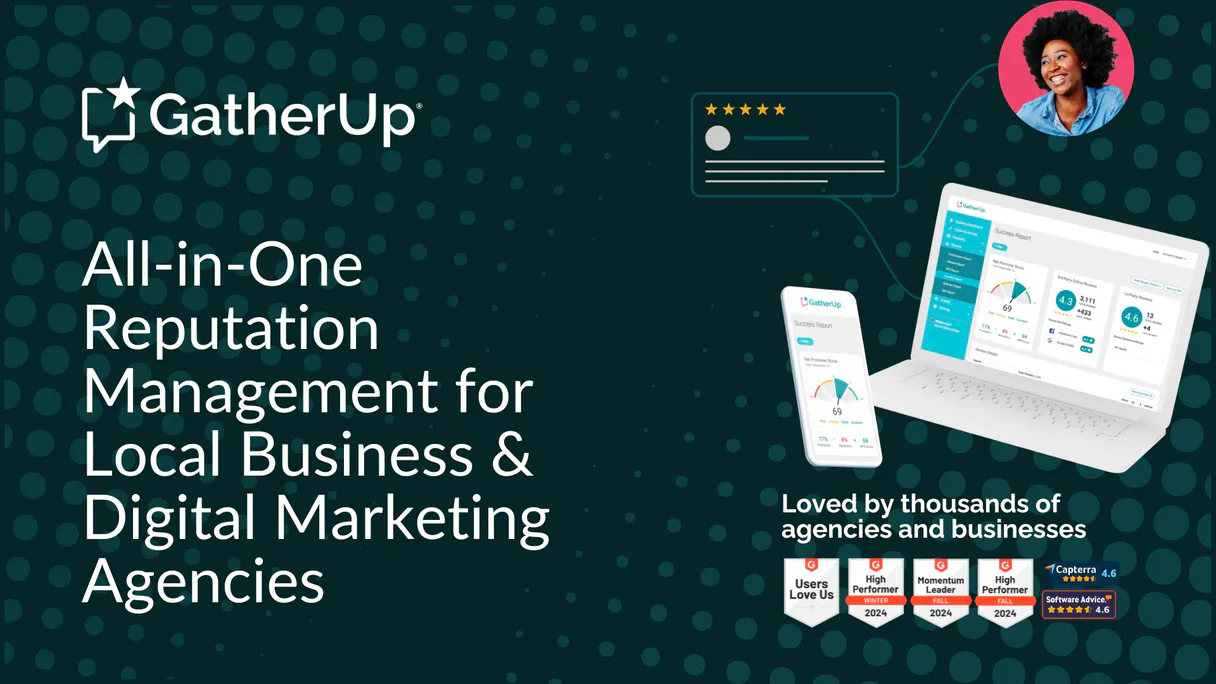
GatherUp. Manage your online reputation and customer feedback directly through your AI agent. This MCP server centralizes review data from Google, Facebook, and Yelp, lets you track internal feedback, and automates review request campaigns.
You can reply to both public and private reviews, view location-specific metrics, and sync customer profiles to keep your reputation management workflow running from your chat client.
What your AI agents can do
Add new customer
Syncs a customer profile and links the account to a specific business location.
Get account info
Retrieves basic user and account identity details.
Get review metrics
Fetches high-level statistics and sentiment analysis for a specific business location.
Retrieves a list of all business units and their associated configuration data.
Retrieves basic user identity information from the connected account.
Fetches high-level statistics and sentiment analysis for a specified business location.
Retrieves a list of customer profiles stored in the system.
Retrieves first-party feedback submitted by customers through GatherUp surveys.
Retrieves third-party reviews from sources like Google and Facebook.
Sends a reply to a specific piece of internal customer feedback.
Sends a reply to a specific external review (Google, Facebook, etc.).
Searches across both internal and external feedback sources for specific keywords or criteria.
Triggers an automated review invitation (via email or SMS) to a specified customer.
Syncs a customer profile and links it to a specific business location.
Checks the current connection status and health of the GatherUp API.
Ask AI about this MCP
Supported MCP Clients
Gemini Waiting for input…
GatherUp MCP Server: 12 Tools for Reputation Management
These tools let you list locations, find reviews, talk to customers, and automate review requests—all through your AI agent's chat interface.
019d75a2add new customer
Syncs a customer profile and links the account to a specific business location.
019d75a2get account info
Retrieves basic user and account identity details.
019d75a2get review metrics
Fetches high-level statistics and sentiment analysis for a specific business location.
019d75a2list business locations
Lists all connected business units and their associated configuration metadata.
019d75a2list customer contacts
Retrieves a list of customer profiles in the system.
019d75a2list internal feedback
Retrieves first-party feedback submitted directly by customers via surveys.
019d75a2list online reviews
Retrieves third-party reviews from platforms like Google and Facebook.
019d75a2reply to feedback
Sends a reply to a specific piece of internal customer feedback.
019d75a2reply to online review
Sends a reply to a specific external review from a platform like Google or Facebook.
019d75a2search all reviews
Searches across all internal and external review sources using keywords or criteria.
019d75a2send review invite
Triggers an automated review invitation to a specific customer via email or SMS.
019d75a2verify api connection
Checks the connection status and health of the GatherUp API.
Choose How to Get Started
Build a custom MCP for your own tools, or connect a ready-made integration from our catalog.
Build Your Own
Turn any API into an MCP. Import a spec, define Agent Skills, or deploy with MCPFusion.
- Import from OpenAPI, Swagger, or YAML specs
- Create Agent Skills with progressive disclosure
- Deploy to edge with MCPFusion framework
- Built in DLP, auth, and compliance on every call
- Real time usage dashboard and cost metering
- Publish to catalog or keep private
Make Your AI Do More
Start with GatherUp, then connect any of our 4,700+ other servers whenever your AI needs more. One click, no limits.
- Use this MCP plus 4,700+ others, all in one place
- Add new capabilities to your AI anytime you want
- Every connection is secured and compliant automatically
- Track usage and costs across all your servers
- Works with Claude, ChatGPT, Cursor, and more
- New servers added to the catalog every week
What you can do with this MCP connector
GatherUp MCP Server lets your agent manage all your business feedback. You'll get access to tools that pull reviews from Google, Facebook, and Yelp, track internal surveys, and even automate review requests. It keeps your whole reputation management process running right from your chat client.
Listing all business locations pulls a list of every business unit and its setup data. Getting account identity retrieves basic info about the user connected to the account. Getting location performance metrics fetches high-level stats and sentiment analysis for a specific business site. Listing customer contacts pulls all the customer profiles stored in the system. Listing direct customer feedback gets the first-party feedback customers submitted through GatherUp surveys. Listing external reviews pulls third-party reviews from sources like Google and Facebook. Replying to internal feedback sends a response to a specific piece of feedback from a customer survey. Replying to online reviews sends a reply to an external review, like one on Google or Facebook. Searching all reviews lets you search every internal and external review source using keywords or criteria. Requesting a review triggers an automated review invitation to a specific customer via email or SMS. Adding a new customer syncs a customer profile and links it to a specific business location. Verifying API connection checks the current connection status and health of the GatherUp API.
How GatherUp MCP Works
- 1 Subscribe to the GatherUp MCP Server on Vinkius and provide your Client ID and API Token.
- 2 Your AI agent uses the chat interface to issue a command, such as 'List all my business locations.'
- 3 The server calls the corresponding tool, returns the data (e.g., a list of locations), and your agent uses that context to continue the workflow.
The bottom line is, your AI agent uses the tools to pull reputation data and interact with your customers, all within a single conversation.
Who Is GatherUp MCP For?
The Marketing Manager who needs to check recent ratings and reply to negative comments without clicking through five different dashboards. The Customer Success Team member who needs a real-time view of customer sentiment across all locations. Operations staff who need to automate review requests and keep customer data synced.
Checks recent ratings or drafts replies to negative feedback across multiple locations without leaving the chat.
Gets a real-time overview of customer sentiment across all business locations using simple AI commands.
Automates the sending of review requests and verifies customer synchronization across different operational systems.
What Changes When You Connect
- See the full scope of your brand's reputation. Use
list_online_reviewsandlist_internal_feedbackto pull every review source—Google, Facebook, and your own surveys—into one view. - Track performance without dashboard clicking. Call
get_review_metricsto instantly get sentiment analysis and high-level stats for any business location, no matter how many sites you run. - Respond instantly, no context switching. Use
reply_to_online_revieworreply_to_feedbackto draft and send replies to both public and private customer comments directly in your chat. - Automate reputation boosts. Running
send_review_invitetriggers review requests via email or SMS, letting you proactively boost your score without manual campaigns. - Maintain clean customer records. Use
add_new_customerto sync profiles and link them to specific locations, ensuring your data is always accurate for targeted outreach.
Real-World Use Cases
Handling a negative public review
A manager sees a 2-star review on Google. Instead of logging into Google's dashboard, they ask their agent to find it. The agent runs list_online_reviews, the manager drafts a public apology, and the agent uses reply_to_online_review to post the reply, solving the PR crisis in minutes.
Checking sentiment across all branches
An operations lead needs to know if the new Westside Bistro location is performing. They ask their agent to check the metrics. The agent runs get_review_metrics for 'Westside Bistro', providing a sentiment score and star average, allowing the lead to instantly prioritize needed fixes.
Following up on a survey response
A customer left feedback via a GatherUp survey. The support agent needs to respond quickly. They ask the agent to find the feedback. The agent runs list_internal_feedback, the agent summarizes the issue, and the agent uses reply_to_feedback to send a personalized follow-up.
Syncing a new client's data
The sales team signs a new client at a new location. They ask the agent to set up the data. The agent runs add_new_customer and list_business_locations to ensure the customer profile is created and linked to the correct operational unit.
The Tradeoffs
Searching for everything manually
Opening Google, Facebook, Yelp, and the internal dashboard separately, then manually copying and pasting the same customer name or review text into a spreadsheet to compare scores.
→
Use search_all_reviews. This single tool searches across all your connected sources—internal and external—so you get a unified view of the customer's entire history instantly.
Only focusing on public reviews
Reacting only to negative reviews found via list_online_reviews, while ignoring valuable, root-cause information found in private survey responses.
→
Always cross-reference public complaints with internal data. Use list_internal_feedback and get_review_metrics to get the full picture, ensuring you fix the systemic issue, not just the visible complaint.
Treating data as static
Assuming a customer profile is complete because you ran get_account_info once, and never checking if a different system updated their contact details later.
→
Run add_new_customer or list_customer_contacts when in doubt. This keeps your customer profiles synced and ensures your AI agent is working with the most current information.
When It Fits, When It Doesn't
Use this if your primary goal is managing and reacting to customer sentiment and feedback across multiple platforms. You need a single source of truth to reply to reviews, track performance metrics, and automate review requests. Don't use this if you just need to manage inventory or process payroll—you'll need a dedicated ERP or accounting tool. If your goal is purely data retrieval (e.g., 'I just need the list of all emails'), you might only need list_customer_contacts and can handle the rest in a simple database query. But if you need the context (e.g., 'List all customers who left a low review last month'), this toolset is necessary.
Independent Platform Disclaimer: Vinkius is an independent platform and is not affiliated with, endorsed by, sponsored by, verified by, or otherwise authorized by GatherUp. All third-party trademarks, logos, and brand names are the property of their respective owners. Their use on this website is strictly for informational purposes to identify service compatibility and interoperability.
VINKIUS INFRASTRUCTURE
Cloud Hosted
Managed infra
V8 Isolated
Sandboxed per request
Zero-Trust Proxy
No stored credentials
DLP Enforced
Policy on every call
GDPR Compliant
EU data residency
Token Compression
~60% cost reduction
Works with Claude, ChatGPT, Cursor, and more
The Model Context Protocol standardizes how applications expose capabilities to LLMs. Instead of operating in isolation, your AI gains direct access to external platforms, live data, and real-world actions through secure, standardized connections.
This server provides 12 capabilities that interface natively with Claude, ChatGPT, Cursor, and any MCP client. No middleware. No custom integration required.
Available Capabilities
Checking your business reputation used to take hours of clicking.
Today, checking your reputation is a mess. You have to open Google, then Facebook, then Yelp. You copy the review text from one tab, paste it into a spreadsheet, and then manually switch to your internal dashboard to see if the customer left a survey response there. It’s a massive amount of copy-pasting and context switching.
With this MCP server, your agent pulls the data. You ask it to check reviews for a specific location. It runs `list_online_reviews` and `list_internal_feedback` and gives you everything in one response. You get the unified view, period.
GatherUp MCP Server: Reply to reviews and feedback instantly
You no longer have to log into Google or Facebook just to reply to a negative comment. You simply tell your agent, 'Reply to the 3-star review on the Westside Bistro page.' The agent runs `reply_to_online_review` for you.
It’s about eliminating the manual hop. You manage the entire customer interaction cycle—from finding the complaint to posting the reply—all from your chat window.
Common Questions About GatherUp MCP
How do I use the `search_all_reviews` tool in GatherUp? +
The search_all_reviews tool searches across every source—both external platforms and internal surveys—at once. Just tell your agent what you’re looking for (e.g., 'Find all reviews mentioning 'wait time'').
Can GatherUp MCP Server handle multiple locations? +
Yes. You can use list_business_locations to find all your units, and then run get_review_metrics for any specific location ID to get its unique performance data.
Is `add_new_customer` required for every customer? +
No, but it's best practice. Using add_new_customer syncs the profile and links the customer to a business unit, which helps keep all your data accurate and connected.
How do I reply to a private feedback message using GatherUp? +
Use the reply_to_feedback tool. This is for internal, first-party feedback left directly through your GatherUp surveys.
Does GatherUp MCP Server work with multiple AI clients? +
Yes. You connect the server to any compatible AI client, including Claude, Cursor, and VS Code, so you can manage reputation wherever you work.
How do I check the API connection health using the `verify_api_connection` tool? +
You run verify_api_connection to confirm your API credentials are active. This checks your connection to the GatherUp v2 environment, ensuring you can use all other tools like list_online_reviews or send_review_invite without issues.
What data does `get_review_metrics` provide for a specific business location? +
get_review_metrics returns high-level statistics and sentiment analysis for a given location ID. This gives you an instant overview of your reputation, including star ratings and overall sentiment, without needing to manually compile data.
Can I use the `add_new_customer` tool to sync multiple contacts at once? +
The add_new_customer tool syncs one customer profile at a time. You need to call the tool repeatedly for each contact you want to add, making sure to provide all necessary location and customer details in each call.
How do I get an API Token for GatherUp? +
Log in to GatherUp, navigate to Settings > API, and you will find your Client ID and can generate a Bearer Token.
What is the difference between Internal Feedback and Online Reviews? +
Internal Feedback (1st-party) is left directly on your GatherUp survey pages. Online Reviews (3rd-party) are retrieved from external sites like Google and Facebook.
Can I reply to Google or Facebook reviews via the agent? +
Yes! The 'reply_to_online_review' tool allows you to send responses to third-party platforms that support direct API replies, such as Google and Facebook.
How do I trigger a new review request? +
Use the 'send_review_invite' tool and provide the specific Customer ID. The agent will trigger the automated email or SMS campaign configured for that business.
Use it with your favorite AI tools
Connect this server to Cursor, Claude, VS Code, and more.
More in this category
Jitbit
Track and resolve IT support tickets with a fast helpdesk that includes automation rules, knowledge base, and SLA monitoring.
Sobot
Leading AI customer support and ticketing platform in China — manage tickets, agents, and knowledge via AI.

Postmark Alternative
Automate transactional email via Postmark — send emails, retrieve templates, inspect bounces, and manage your delivery analytics directly from any AI agent.
You might also like

Braintree
Process and manage payments via Braintree GraphQL API — search transactions, manage customers, and issue refunds directly from any AI agent.

Gamma (AI Presentations)
Generate AI-powered presentations, documents, and webpages. List, update, and manage your Gamma workspace directly from any AI agent.

AppGallery Connect
Manage your AppGallery Connect apps via AI — check stats, submit builds for review, monitor ratings, and reply to user comments.