
Guestmeter MCP. Manage guest feedback and reputation through conversation.
 Gemini
 Works with every AI agent you already use
…and any MCP-compatible client









Just plug in your AI agents and start using Vinkius.
Guestmeter. Automate hospitality reputation management. This MCP Server lets your AI client read and act on guest feedback from surveys, ratings, and comments.
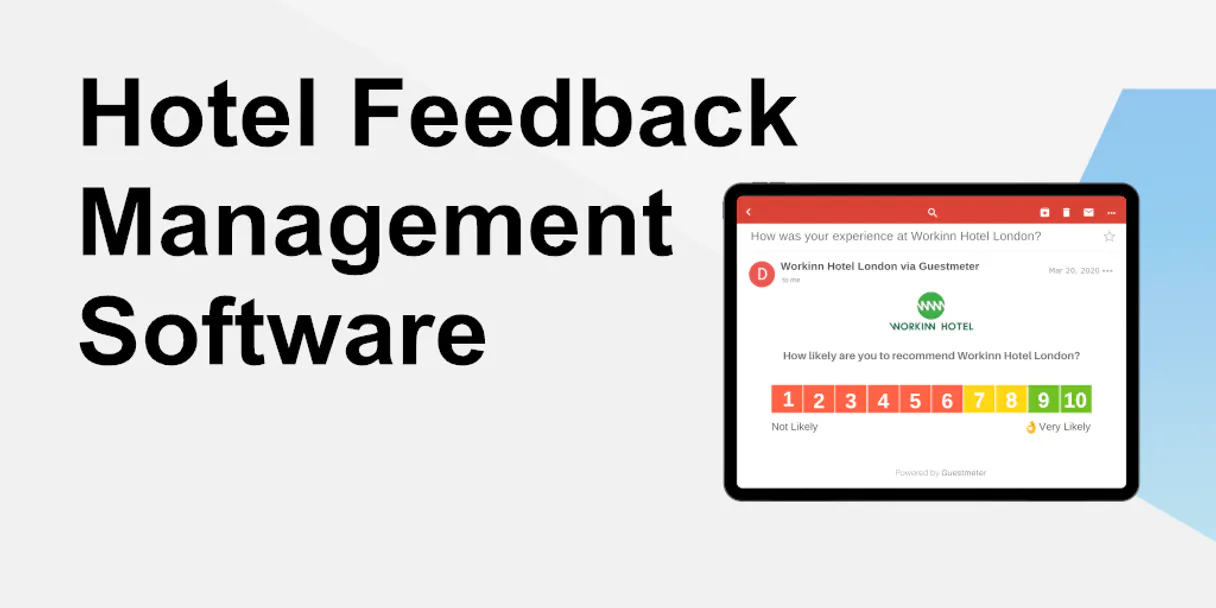
You can instantly list the 50 most recent entries, filter for high-scoring Promoters (9-10) or low-scoring Detractors (1-6), or trigger a satisfaction survey via email or SMS.
It manages your entire feedback loop directly through conversation.
What your AI agents can do
Get guest details
Retrieves the full record and details for a single guest using their unique ID.
List detractors
Generates a list of all guests who provided low ratings (scores 1 through 6).
List guest feedback
Lists all guests and shows their current feedback status or results.
Use list_recent_feedback to pull the 50 most recent comments and ratings into your conversation.
Run list_promoters or list_detractors to get lists of guests who scored high (9-10) or low (1-6).
Trigger a satisfaction survey for a guest using send_survey by providing their email or phone number.
Fetch complete details about one guest using get_guest_details with a specific guest ID.
List all guests and their current feedback status or results using list_guest_feedback.
Ask AI about this MCP
Supported MCP Clients
Gemini Waiting for input…
019d75acget guest details
Retrieves the full record and details for a single guest using their unique ID.
019d75aclist detractors
Generates a list of all guests who provided low ratings (scores 1 through 6).
019d75aclist guest feedback
Lists all guests and shows their current feedback status or results.
019d75aclist promoters
Generates a list of all guests who provided high ratings (scores 9 through 10).
019d75aclist recent feedback
Pulls the 50 most recently submitted guest feedback entries.
019d75acsend survey
Sends a satisfaction survey to a specified guest via email or SMS.
Choose How to Get Started
Build a custom MCP for your own tools, or connect a ready-made integration from our catalog.
Build Your Own
Turn any API into an MCP. Import a spec, define Agent Skills, or deploy with MCPFusion.
- Import from OpenAPI, Swagger, or YAML specs
- Create Agent Skills with progressive disclosure
- Deploy to edge with MCPFusion framework
- Built in DLP, auth, and compliance on every call
- Real time usage dashboard and cost metering
- Publish to catalog or keep private
Make Your AI Do More
Start with Guestmeter, then connect any of our 4,700+ other servers whenever your AI needs more. One click, no limits.
- Use this MCP plus 4,700+ others, all in one place
- Add new capabilities to your AI anytime you want
- Every connection is secured and compliant automatically
- Track usage and costs across all your servers
- Works with Claude, ChatGPT, Cursor, and more
- New servers added to the catalog every week
What you can do with this MCP connector
Guestmeter MCP Server
This server lets your AI client handle your whole guest feedback loop right through conversation. You can pull the 50 most recent entries with list_recent_feedback. You can pull lists of guests who gave high scores (9-10) with list_promoters, or you can pull lists of guests who gave low scores (1-6) with list_detractors.
You can send a satisfaction survey to a specific guest using send_survey by giving it their email or phone number. You can get the full record and details for any single guest using get_guest_details with their unique ID. You can check the overall status or results for every guest using list_guest_feedback.
How Guestmeter MCP Works
- 1 Subscribe to the Guestmeter server and input your API credentials.
- 2 Your AI client executes a tool call (e.g.,
list_detractors) to gather the necessary data. - 3 The AI client processes the results, presenting actionable lists of guests and their feedback directly in the chat.
The bottom line is you stop manually reviewing dashboards and start commanding your AI agent to fetch specific guest data and trigger actions.
Who Is Guestmeter MCP For?
This is for hospitality operations staff who deal with reputation management daily. It helps the front office team stop wasting time clicking between dashboards to track sentiment. It’s built for people who need to turn raw feedback data into immediate, actionable tasks, like following up with a guest or identifying a service failure point.
Uses the server to automate survey triggers for check-out guests and to check guest satisfaction scores during follow-up calls.
Uses the server to filter recent feedback using list_detractors and list_promoters, allowing them to quickly assign follow-up tasks to staff.
Uses the server to run list_guest_feedback and pull detailed reports to identify systemic service gaps across multiple properties.
What Changes When You Connect
- Stop sifting through massive spreadsheets. Running
list_recent_feedbackinstantly pulls the 50 latest comments, letting you see what's trending right now. - Never miss a bad review. Use
list_detractorsto get an immediate, filtered list of every guest who rated you poorly, so you know exactly who needs a call. - Keep your best guests happy.
list_promotersgives you a clean list of your top scores (9-10). You can use these names for marketing or referral programs. - Close the loop on service gaps. After finding a problem with
list_guest_feedback, usesend_surveyto automatically trigger a follow-up survey for better data. - Targeted follow-up saves time. If you find a specific guest ID,
get_guest_detailspulls all their info, letting you follow up with the right context. - See a full picture.
list_guest_feedbackshows the overall status of all guests, giving you a quick health check of your reputation.
Real-World Use Cases
Dealing with a PR crisis.
A manager sees a spike in negative comments. They ask their agent to run list_detractors. The agent returns a list of 15 guests. The manager then uses get_guest_details on the worst offender's ID to understand their stay history. Finally, they use send_survey to send a personalized apology survey, immediately showing the action taken.
Automating follow-ups after a stay.
The front office staff needs to check satisfaction scores for last night's check-outs. They run list_recent_feedback to see the latest ratings. They then ask the agent to run send_survey for the top 5 guests who haven't responded, making the follow-up systematic.
Analyzing a specific service failure.
An executive suspects the breakfast service is failing. They use list_guest_feedback to pull all data. They filter the results and use the insights to identify patterns in the comments, proving where the biggest gaps are.
Managing VIP guest relationships.
The team needs to know who their highest-value guests are. They run list_promoters to get the list of 9-10 scorers. They then use get_guest_details to pull their booking history and send a personalized thank-you survey via send_survey.
The Tradeoffs
Manual Spreadsheet Mining
Opening the Guestmeter dashboard, filtering by date range, copying the names of detractors, pasting them into a separate spreadsheet, and then manually writing follow-up emails.
→
Just ask your agent to run list_detractors. It pulls the list directly. Then, use get_guest_details to get the contact info, and send_survey to automate the follow-up. Everything stays in the chat.
One-Off Data Checks
Running list_recent_feedback once and deciding to ignore the data because it's overwhelming or incomplete.
→
Don't just look at the surface. Check the status of all guests using list_guest_feedback. Then, run list_detractors to zero in on the highest-risk group first. This focuses your attention.
Forgetting to close the loop
Finding a detractor via list_detractors and writing an email, but having no way to track if the guest actually responded or if the issue was resolved.
→
After finding a detractor, use get_guest_details to confirm their contact info. Then, use send_survey to send a targeted survey. This creates a trackable, actionable record.
When It Fits, When It Doesn't
Use this if your main job is tracking and acting on guest sentiment. You need to know who is happy, who is unhappy, and what they said, and then you need a mechanism to follow up. Don't use this if you only need to track booking metrics (use a separate booking management tool) or if you just need to store feedback data (a simple database works). The strength here is the actionability: you don't just see the data; you do something with it. Always start by checking list_recent_feedback to see the current state, and then use list_detractors to prioritize your effort.
Independent Platform Disclaimer: Vinkius is an independent platform and is not affiliated with, endorsed by, sponsored by, verified by, or otherwise authorized by Guestmeter. All third-party trademarks, logos, and brand names are the property of their respective owners. Their use on this website is strictly for informational purposes to identify service compatibility and interoperability.
VINKIUS INFRASTRUCTURE
Cloud Hosted
Managed infra
V8 Isolated
Sandboxed per request
Zero-Trust Proxy
No stored credentials
DLP Enforced
Policy on every call
GDPR Compliant
EU data residency
Token Compression
~60% cost reduction
Works with Claude, ChatGPT, Cursor, and more
The Model Context Protocol standardizes how applications expose capabilities to LLMs. Instead of operating in isolation, your AI gains direct access to external platforms, live data, and real-world actions through secure, standardized connections.
This server provides 6 capabilities that interface natively with Claude, ChatGPT, Cursor, and any MCP client. No middleware. No custom integration required.
Available Capabilities
The pain of reviewing guest feedback manually is exhausting.
Right now, you have to open the dashboard, jump to the 'Reviews' tab, set the date range, filter by score, and then copy names and details into your task management board. It's a multi-tab, copy-paste nightmare just to build a list of who needs a call.
With the Guestmeter MCP Server, you simply ask your agent to run `list_detractors`. It returns a clean, actionable list of the lowest scorers right in the chat window. You get the names, scores, and the ability to immediately act.
Guestmeter MCP Server: Automate follow-up surveys.
Without this server, triggering a survey means manually finding the guest's contact info in one system, logging into another system, and sending the link. If you get the wrong email or forget the room number, the whole process breaks.
Now, you tell your agent to use `send_survey`. You give it the guest's contact info, and the server handles the trigger, making the follow-up immediate and trackable. It’s a closed loop.
Common Questions About Guestmeter MCP
How do I find my Guestmeter API credentials? +
Log in to your Guestmeter dashboard and navigate to Channels > Integration. You will find your unique apiKey and secretKey there.
Can I trigger surveys for both email and SMS? +
Yes! The send_survey tool allows you to provide either a guest_email or a guest_phone number. Guestmeter will automatically deliver the survey via the provided channel.
How does the integration categorize guests into Promoters or Detractors? +
The integration uses the Net Promoter Score (NPS) logic: guests rating 9-10 are Promoters, 7-8 are Passives, and 1-6 are Detractors. You can use specialized tools like list_promoters to quickly access these segments.
Is the survey delivery instant? +
Yes, once the send_survey action is triggered, Guestmeter processes the request immediately and sends the invitation to the guest.
How do I use the `list_recent_feedback` tool to check data volume? +
The list_recent_feedback tool fetches the 50 most recent entries. If you need more than 50, you'll need to adjust your API call or check the documentation for pagination details.
If I run `get_guest_details`, what information does it provide? +
It returns detailed information for the specific guest ID you provide. This data helps you understand the guest's full history beyond just their feedback score.
What happens if I try to use `send_survey` with an invalid email? +
The system will return an error message detailing the invalid format or missing data. You must ensure the provided email or phone number meets the required format for the survey to trigger.
Can I use `list_detractors` or `list_promoters` to check specific date ranges? +
Currently, these tools list all guests matching the criteria (detractors or promoters) without date filtering. You should filter the resulting list in your AI client for date-specific analysis.
Use it with your favorite AI tools
Connect this server to Cursor, Claude, VS Code, and more.
More in this category

Helpwise
Collaborate on customer emails, SMS, and WhatsApp messages in shared team inboxes with assignment and automation rules.

HappyFox
Automate support ticketing via HappyFox — manage tickets, contacts, and help desk categories directly from any AI agent.

Uniphore Conversation AI
Access meeting transcripts, summaries, action items, and analytics via Uniphore API.
You might also like

Winston AI
Detect AI-generated content in essays, articles, and documents with high accuracy for educational institutions and publishers.

Glassnode (On-chain Data)
Access institutional-grade on-chain market data for Bitcoin, Ethereum, and 1000+ assets directly from your AI agent.

Veeqo
Manage multi-channel e-commerce inventory, shipping, and order fulfillment from one platform that syncs with Amazon and beyond.