
MyTime MCP. Manage scheduling, staff, and inventory via chat.
 Gemini
 Works with every AI agent you already use
…and any MCP-compatible client









Just plug in your AI agents and start using Vinkius.
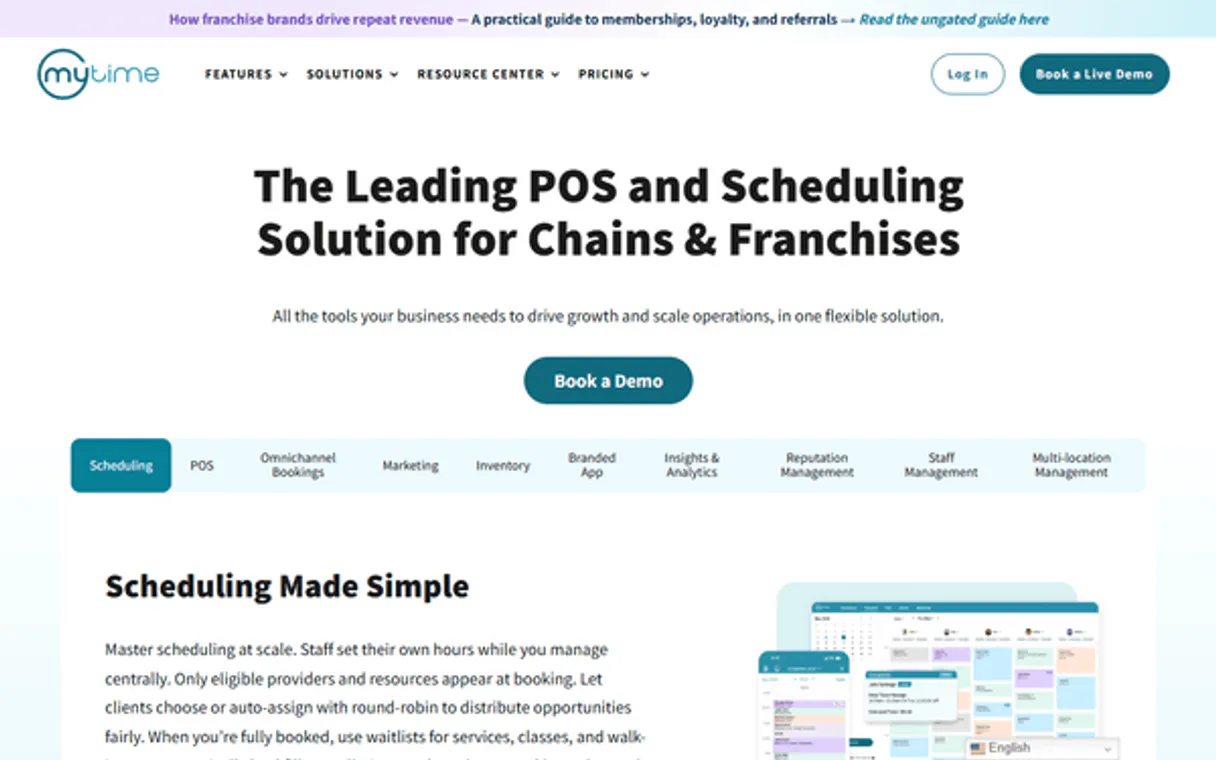
MyTime connects your business operations to your AI agent. It lets you manage staff schedules, check customer history, list inventory products, and track appointments—all through natural conversation.
Forget jumping between the portal and Slack; just ask your agent for the current day's schedule or John Doe’s availability next week.
It handles multi-location data retrieval so you can run operations from a single chat window.
What your AI agents can do
Get appointment
Gets all the specific details for one single scheduled appointment.
Get availability
Checks open time slots for a specified staff member or service type.
Get business info
Pulls basic, high-level information about the entire business.
Retrieves specific information about a single scheduled appointment.
Determines open time slots for staff members based on requested dates and services.
Pulls high-level data points about the overall business structure and operations.
Retrieves a full list of all appointments within a specified time frame or location.
Provides a searchable list of registered business customers and their associated profiles.
Returns a comprehensive list of all physical locations managed by the business.
Retrieves the full catalog of retail goods and available services offered.
Ask AI about this MCP
Supported MCP Clients
Gemini Waiting for input…
MyTime MCP Server: 10 Tools for Business Operations
These ten tools let you manage everything from scheduling and staff rosters to retail product catalogs and customer records through a single, conversational API endpoint.
019d75d9get appointment
Gets all the specific details for one single scheduled appointment.
019d75d9get availability
Checks open time slots for a specified staff member or service type.
019d75d9get business info
Pulls basic, high-level information about the entire business.
019d75d9list appointments
Lists all appointments scheduled across your business for a given date range.
019d75d9list customers
Retrieves a searchable list of all registered customers in the system.
019d75d9list locations
Provides a directory listing of every physical branch or location managed by the company.
019d75d9list products
Fetches the full catalog list and pricing for all retail products sold.
019d75d9list reviews
Retrieves recent customer reviews and feedback data points.
019d75d9list services
Lists every service type offered by the business, including durations and standard pricing.
019d75d9list staff
Retrieves a directory of all staff members and their associated roles/permissions.
Choose How to Get Started
Build a custom MCP for your own tools, or connect a ready-made integration from our catalog.
Build Your Own
Turn any API into an MCP. Import a spec, define Agent Skills, or deploy with MCPFusion.
- Import from OpenAPI, Swagger, or YAML specs
- Create Agent Skills with progressive disclosure
- Deploy to edge with MCPFusion framework
- Built in DLP, auth, and compliance on every call
- Real time usage dashboard and cost metering
- Publish to catalog or keep private
Make Your AI Do More
Start with MyTime, then connect any of our 4,700+ other servers whenever your AI needs more. One click, no limits.
- Use this MCP plus 4,700+ others, all in one place
- Add new capabilities to your AI anytime you want
- Every connection is secured and compliant automatically
- Track usage and costs across all your servers
- Works with Claude, ChatGPT, Cursor, and more
- New servers added to the catalog every week
What you can do with this MCP connector
Listen up. This server connects your whole operation—the stuff running in the background of MyTime—straight to your AI agent. You don't gotta jump between ten different screens just to check a booking or see what stock you got. Your agent handles all that messy data retrieval through natural conversation.
Staffing and Scheduling
If you need to know who’s working, you ask for the roster using list_staff, and it gives you every employee directory entry along with their specific roles and permissions. Need to check if someone's free? You use get_availability to see open time slots for a staff member or even just by service type, based on dates you give it.
When you know who’s available, you can list all appointments using list_appointments, giving you every booking scheduled across your entire business within a date range you specify.
For the details on one specific gig, you use get_appointment to pull up all the fine points of a single booked appointment. If you gotta know what services you offer and how much they cost, run list_services; it lists every service type your business provides, including its standard price and duration.
You can also check out your merchandise catalog using list_products, which pulls the full list and pricing for every retail good you sell.
Client Management and Locations
You gotta keep track of who's buying stuff. If you need a searchable directory of registered clients, use list_customers; it retrieves all customer profiles in the system so your agent can find them fast. If your business operates in more than one spot, you run list_locations to get a list of every physical branch or location managed by the company.
When dealing with customers, the tool also lets your agent pull recent feedback using list_reviews, giving you key data points on what clients are saying.
Operational Overview
Want the big picture? Use get_business_info to get basic, high-level operational details about the entire business structure. You can also run list_services and list_products together to view your full offerings—your services and goods catalog—from one chat window.
Basically, you tell your agent what you need—whether it's checking if John is free Tuesday afternoon, listing every item in the stockroom, or pulling up all client names from last month. The server runs the specific API calls using your credentials, grabs the structured data (JSON), and hands it back to your agent so it can talk to you in plain English.
It’s a single conversation for multi-location data retrieval.
How MyTime MCP Works
- 1 Subscribe to this server using your MyTime Partner API Key. This key authenticates your agent against your business data.
- 2 Your AI client sends a natural language request (e.g., 'Who is available today?'). The agent maps this intent to the correct tool (e.g.,
get_availability). - 3 The server executes the function, pulls the live data from MyTime's backend, and returns structured JSON output that your AI client reads aloud.
The bottom line is: You talk to your agent like a human coworker; it talks to the API like an internal script.
Who Is MyTime MCP For?
The business owner who's sick of manually cross-checking staff calendars against appointment books. The operations manager who needs real-time visibility into service gaps or inventory levels without opening a dozen tabs. Anyone whose job requires synthesizing data from multiple disparate systems (scheduling, POS, CRM) on the fly.
Runs daily reports comparing booked appointments (list_appointments) against staff capacity (get_availability) across different branches using list_locations.
Looks up a customer's full history—checking their profile via list_customers, reviewing past services, and seeing recent feedback from list_reviews during a support chat.
Needs to quickly check the day's staffing needs or review product stock (list_products) without logging into the main portal.
What Changes When You Connect
- Saves time checking staff availability. Instead of logging into a calendar system to check John Doe's schedule, you just ask the agent to run
get_availabilityfor him next Friday. You get the open slots immediately. - Reduces manual data lookups. Need a customer’s history? The agent runs
list_customers, giving you their profile details and linking them directly to past services or reviews fromlist_reviews. No copy-pasting IDs needed. - Handles multi-site complexity. You can check staffing or inventory across all branches (using
list_locationscontext) without running separate queries for every single physical location. - Centralizes catalog data. Get a complete picture of what you sell—from services via
list_servicesto retail goods usinglist_products. It’s one query, not two different systems. - Speeds up operations oversight. Instead of sifting through spreadsheets, the agent runs
list_appointments, summarizing today's schedule and grouping appointments by service type instantly.
Real-World Use Cases
Client Inquiry: When a customer asks about availability.
The client calls in. Instead of manually checking the staff calendar, the agent runs get_availability for the specific provider and service requested. The response is immediate: 'John Doe has 10:30 AM or 2:00 PM open today.' Problem solved before the customer hangs up.
Daily Ops Check: Running a staff capacity report.
The operations manager needs to know if the team is overbooked. They ask the agent to cross-reference list_appointments against list_staff. The system flags any potential conflicts or gaps in coverage for the week.
New Product Launch: Checking inventory and training staff.
A product manager needs to know if they have enough 'Premium Shampoo' (via list_products) before a big weekend. They check the stock, then use list_staff to confirm which employees need retraining on the new items.
Support Follow-up: Verifying customer status.
A support agent needs context for a returning client. They ask the agent to look up the client using list_customers, then immediately pull their most recent review via list_reviews to guide the conversation.
The Tradeoffs
Treating it like an internal search engine
Trying to get a list of appointments by manually querying staff names, then filtering that list for services. This requires 3-4 separate API calls and complex client-side logic.
→
Just use list_appointments. The server handles the multi-dimensional search (staff + service + date) in one call. It's built to handle the context.
Using it for financial reconciliation
Assuming that running get_business_info will give you today's total revenue or payroll figures. This server handles scheduling and inventory, not ledger accounting.
→ This tool is for operational data (who, when, what). For finance, you need a dedicated financial API connection.
Assuming real-time stock counts on every call
Calling list_products and expecting the inventory count to be absolute. While it lists products, actual live stock levels require deeper integration than this server provides.
→
Use list_products for catalog info. For critical inventory checks, verify if your MyTime account has a dedicated 'inventory check' tool.
When It Fits, When It Doesn't
You should use the MyTime MCP Server if your primary problem is synthesizing operational data across distinct business silos (scheduling, CRM, POS). Use it when you need to ask complex questions like: 'Show me all appointments for Haircuts next week that are booked by staff members who have a review score above 4.'
Don't use this server if your workflow requires deep financial ledger access or payroll calculation. If your goal is pure data storage and retrieval (e.g., just fetching raw customer IDs), you might find a dedicated database connector easier to implement. This tool shines because it combines structured tools (list_staff, list_products) into conversational logic, making the outcome feel like an actionable report rather than a dump of JSON.
Independent Platform Disclaimer: Vinkius is an independent platform and is not affiliated with, endorsed by, sponsored by, verified by, or otherwise authorized by MyTime. All third-party trademarks, logos, and brand names are the property of their respective owners. Their use on this website is strictly for informational purposes to identify service compatibility and interoperability.
VINKIUS INFRASTRUCTURE
Cloud Hosted
Managed infra
V8 Isolated
Sandboxed per request
Zero-Trust Proxy
No stored credentials
DLP Enforced
Policy on every call
GDPR Compliant
EU data residency
Token Compression
~60% cost reduction
Works with Claude, ChatGPT, Cursor, and more
The Model Context Protocol standardizes how applications expose capabilities to LLMs. Instead of operating in isolation, your AI gains direct access to external platforms, live data, and real-world actions through secure, standardized connections.
This server provides 10 capabilities that interface natively with Claude, ChatGPT, Cursor, and any MCP client. No middleware. No custom integration required.
Available Capabilities
Checking today's schedule shouldn't take 8 clicks across three different portals.
Today, checking out the day’s operations means opening the scheduling portal, then logging into the staff management system to see who is actually working. Then you have to switch over again to view customer notes or check if a service requires specialized equipment. It's manual context switching that eats up time.
With this MCP server, your agent handles it all in one chat session. You ask: 'What's the schedule for today?' The system runs `list_appointments` and summarizes everything—who’s coming, what they booked, and which location they are at. Instant overview.
MyTime MCP Server: Get a complete view of staffing and services.
Previously, you had to manually cross-reference the staff roster from one system with the available service catalog in another. You’d check `list_staff` for John Doe's role, then open the separate service portal to see what 'Full Massage' actually meant.
Now, just ask your agent: 'Is John Doe qualified to perform a Full Massage?' The server runs both `list_staff` and cross-references it against `list_services`, giving you an immediate yes/no answer with the necessary context. It’s that directness that changes everything.
Common Questions About MyTime MCP
How do I check staff availability using get_availability? +
You ask your agent for the specific staff member and service, plus the date range (e.g., 'Is Jane available for a manicure next Tuesday?'). The tool returns open time slots so you know exactly when they can take bookings.
Can list_appointments handle multiple locations? +
Yes. If you specify the location using list_locations, the agent narrows the search, ensuring you only see appointments relevant to that specific branch or site.
What is the difference between get_appointment and list_appointments? +
Use list_appointments when you need a summary of many bookings (e.g., 'Show me all appointments today'). Use get_appointment only if you already know the specific appointment ID and just need its detailed record.
Does list_customers give me payment history? +
No, it gives you a profile lookup. It lists business customers and their basic contact/service history, but financial or payment transaction details require separate integration.
When using `get_business_info`, what specific credentials must I provide? +
The function requires your MyTime Partner API Key for authentication. This key authorizes your agent to read high-level business metrics, such as total locations and overall revenue summaries.
How can I narrow the search when calling `list_products`? +
You pass filters directly into the list_products tool. You should specify product categories (e.g., 'Shampoo') or minimum stock counts in the request payload to focus results.
Does `list_reviews` allow filtering by date range or star rating? +
Yes, you can narrow the scope of list_reviews using specific parameters. You should pass start and end dates, or request reviews that meet a minimum star rating (1-5).
What data fields does the response include when I call `list_staff`? +
The response from list_staff includes the staff member's name, unique ID, primary role, and current employment status. This lets your agent verify who is active before scheduling.
How do I get a MyTime Partner API Key? +
The MyTime Partner API is a restricted service. You must contact MyTime support or your account manager to have API access enabled for your business and receive your unique key.
Can I check availability for a specific professional? +
Yes! Use the get_availability tool with the professional's Staff ID and the target Service ID to see open slots.
Does this support multiple business locations? +
Yes. The list_locations tool will retrieve all branches associated with your account, and other tools will return data relevant to your entire business scope.
Use it with your favorite AI tools
Connect this server to Cursor, Claude, VS Code, and more.
More in this category

Smaily Alternative
Manage email marketing campaigns, subscribers, and automations directly through Smaily.

Axonaut
All-in-one ERP and CRM automation — manage invoices, quotes, tasks, and company relationships via AI.
Forj
Manage community members, groups, and activity via AI agents with Forj (formerly Mobilize).
You might also like

Openscreen
Dynamic QR code management — generate and track smart QR codes for your assets via Openscreen.

GSA Per Diem Rates
Access official U.S. government per diem rates for lodging and meals by city, state, or ZIP code directly from your AI agent.

Braintree
Process and manage payments via Braintree GraphQL API — search transactions, manage customers, and issue refunds directly from any AI agent.