
TVMaze MCP. Track episode guides and compile full media metadata.
 Gemini
 Works with every AI agent you already use
…and any MCP-compatible client









Just plug in your AI agents and start using Vinkius.
TVMaze MCP Server connects your AI client directly to a comprehensive TV show database. Search for shows, find episode guides, check cast credits, or view broadcast schedules—all without needing an API key.
Get details on any series, from genres and network data to individual actor filmographies.
What your AI agents can do
Get episode
Retrieves the name, season/number, air date, summary, and runtime for a single episode using its ID.
Get full schedule
Returns all known future episodes across multiple shows and networks. You can optionally filter by country code.
Get person
Gets detailed info—including bio, birthplace, and external IDs—for a specific person using their numeric ID.
You call get_show(id) to get all core information about a TV series—genres, network, runtime, status, and external IDs.
Use search_shows or search_people with fuzzy matching when you only know part of the title or name. The agent returns multiple possible matches.
get_episode(id) pulls the season number, air date, summary, and runtime for one single show installment.
The get_show_cast(id) tool returns a list of every person who starred in the show, along with their character name.
You run get_schedule to check what's airing on TV today or on a specific date for a given country code (e.g., 'US').
The get_person_cast_credits(id) tool lists every show and character role the person played, regardless of how many series it was.
Ask AI about this MCP
Supported MCP Clients
Gemini Waiting for input…
TVMaze MCP Server: 15 Tools for Media Metadata
Use these specialized tools to query deep details on TV shows, people, episodes, and schedules from the entire database.
019d8493get episode
Retrieves the name, season/number, air date, summary, and runtime for a single episode using its ID.
019d8493get full schedule
Returns all known future episodes across multiple shows and networks. You can optionally filter by country code.
019d8493get person
Gets detailed info—including bio, birthplace, and external IDs—for a specific person using their numeric ID.
019d8493get person cast credits
Retrieves all recorded show names, character roles, and episode counts for an actor across their entire career.
019d8493get schedule
Checks the TV schedule for a specific date and country code. Each entry lists the show name, airtime, and network.
019d8493get show
Retrieves core details about a TV show: genres, status, network, ratings, summary, and external IDs by its ID.
019d8493get show cast
Gets the names and character roles for every cast member in a specific TV show.
019d8493get show crew
Retrieves the key production staff (directors, writers) for a show, listing their name, role type, and credit details.
019d8493get show episodes
Lists all episodes for a given show, including season/episode numbers, air dates, and summaries. You can include special episodes here.
019d8493get show images
Accesses available posters, banners, and background images for any TV show by ID.
019d8493get show seasons
Lists every season for a show, providing the season number, name, premiere date, and network information.
019d8493get shows
Returns a list of all available show IDs in the database. Use this to find shows before getting details.
019d8493search people
Searches for actors or crew members by name using fuzzy matching, returning multiple results and photos.
019d8493search shows
Finds TV shows by name, allowing for typos. Returns a ranked list of potential matches with basic metadata.
019d8493single search
Searches and returns the most likely single result for a show name, including embedded details like episodes and cast info.
Choose How to Get Started
Build a custom MCP for your own tools, or connect a ready-made integration from our catalog.
Build Your Own
Turn any API into an MCP. Import a spec, define Agent Skills, or deploy with MCPFusion.
- Import from OpenAPI, Swagger, or YAML specs
- Create Agent Skills with progressive disclosure
- Deploy to edge with MCPFusion framework
- Built in DLP, auth, and compliance on every call
- Real time usage dashboard and cost metering
- Publish to catalog or keep private
Make Your AI Do More
Start with TVMaze, then connect any of our 4,700+ other servers whenever your AI needs more. One click, no limits.
- Use this MCP plus 4,700+ others, all in one place
- Add new capabilities to your AI anytime you want
- Every connection is secured and compliant automatically
- Track usage and costs across all your servers
- Works with Claude, ChatGPT, Cursor, and more
- New servers added to the catalog every week
What you can do with this MCP connector
You hook up your AI client and you get straight access to the world’s TV show database. You don’t gotta worry about API keys or writing complicated code; you just ask what you need, and we handle the data pull.
Finding Shows and People:
When you only remember a piece of a title—like 'the show with the blue car'—you run search_shows. It gives you a ranked list of potential matches right away. If you know exactly what you’re looking for, you can use single_search to get the most likely result and everything embedded in it, like episodes or cast details.
Need to find an actor or writer? You use search_people. It searches by name, even if your spelling's rough, and hands you back a bunch of options with photos attached. If you know the person’s numeric ID, get_person pulls up their whole file: bio, birthplace, and all their external IDs.
Getting Show Details:
You wanna know everything about a series? You run get_show(id). That gives you core metadata for a TV show—the genres, the network that aired it, its status, runtime, and those crucial external IDs like IMDb. If you want to see every season a show ran through, you use get_show_seasons, which lists the number, the name, the premiere date, and what network handled it.
For the actual episode list, check out get_show_episodes(id); this gives you all episodes for a series with their season/episode numbers, air dates, and summaries. If you need more specific info on just one installment, use get_episode(id). That pulls up the name, season number, air date, summary, and runtime for that single episode.
Tracking Cast and Crew:
Want to see who played what? You run get_show_cast(id), and it returns a list of every star in the show along with their character role. To track an actor’s career—every gig they ever did—you use get_person_cast_credits(id). This tool lists every single show, every character they played, and how many episodes they appeared in across their whole life.
If you're curious about the people behind the scenes—the writers or directors—use get_show_crew(id) to get those key production staff details, including their name, role type, and specific credits.
Scheduling and Media:
Need to know what’s on TV? You run get_schedule to check the airtime for a specific date you pick, plus you gotta give it a country code (like 'US'). If you want all the known future episodes across multiple shows and networks, use get_full_schedule. That's handy because you can even filter it by country code.
You can pull up posters or banners for any show using get_show_images(id).
The Bottom Line:
You don't have to manually cross-reference sources or deal with flaky APIs. You just connect your agent, and you get direct access to all this data. It’s everything from finding a specific character role on one episode—using get_episode(id)—to charting an actor's entire career through get_person_cast_credits(id). If it's TV-related, you can pull the info with your agent.
How TVMaze MCP Works
- 1 1. Subscribe to the TVMaze MCP Server. You don't need an API key; just connect your preferred AI client.
- 2 2. Ask your agent a question using natural language (e.g., 'What are the episodes for The Wire?').
- 3 3. Your agent selects and executes the necessary tool calls (
get_showorget_show_episodes), aggregates the data, and returns the clean answer to you.
The bottom line is: your AI client figures out which specific TVMaze tool to run based on your question and brings back a single, coherent response.
Who Is TVMaze MCP For?
TV fans who need more than just Wikipedia links. Researchers needing structured data for academic or media reports. Content creators building reference tools. Anyone frustrated by having to jump between IMDb, Wikipedia, and broadcast listings.
Uses get_show and get_full_schedule to compile data on genre trends or show longevity across different countries.
Uses get_person_cast_credits to build character bios or write comprehensive cast lists for articles, guaranteeing accurate roles and series names.
Integrates the tools—especially get_show_seasons and search_shows—to populate a structured database of media metadata without manual scraping.
What Changes When You Connect
- Full Career Tracking: Use
get_person_cast_creditsto build a complete filmography for anyone. Instead of checking decade by decade, you run one tool call and get every role they've played. - Pinpoint Scheduling: Don't rely on vague network listings.
get_schedulelets you check what airs right now or next Tuesday in the UK or Brazil using ISO country codes. - Deep Metadata Retrieval: The
get_showtool gives you more than just a plot summary. You get genres, rating scores, and official external IDs (IMDb/TheTVDB) for reliable cross-referencing. - Structured Discovery: Need to know if the show has seasons? Run
get_show_seasons. It provides the season number, name, and premiere date instantly—better than just browsing a list of episodes. - Reliable Search: If you misspell a title or only remember part of it,
search_showshandles fuzzy matching. You get back multiple results ranked by relevance, minimizing guesswork. - Complete Episode History: Use
get_show_episodesto dump the entire episode list for a season in one go, including air dates and runtimes, eliminating manual lookups.
Real-World Use Cases
Archiving TV Show Data
A developer needs to build a reference tool for a client. Instead of manually gathering show details, they use single_search to get the core ID, then call get_show_seasons and get_show_cast sequentially. The agent compiles all this metadata into one clean JSON object, saving hours of manual API calls.
Tracking an Actor's Career
A writer is writing a piece on Method acting history. She asks the agent to list the credits for 'Meryl Streep.' The agent runs search_people and then executes get_person_cast_credits, delivering a master list of every show, character name, and role type across decades.
Checking Local Broadcast Schedules
A local TV programmer needs to plan content for next month. They ask: 'What's on in the US on 2024-11-15?' The agent uses get_schedule(country='US', date='...') and instantly compiles a list of competing shows, airtimes, and networks.
Finding Show Details Mid-Search
A user is trying to recall the exact runtime or genre for 'The Wire.' They ask: 'Show me details on The Wire.' The agent uses single_search, which returns a full result card that includes the show's status, genres, and summary right away.
The Tradeoffs
Searching by vague terms
Asking 'Show me some good drama shows.' This is too broad. The agent can’t know which ones you mean or what criteria to use, leading to useless results.
→
Be specific and narrow the scope. Use search_shows first, then refine by calling get_show(id) with the returned ID to get genres, rating, and network data.
Trying to find a person's roles without an ID
Just listing names in a chat and asking for their full filmography. The system needs identifiers to query reliable data sources.
→
Use search_people first to confirm the correct name spelling and get the person’s numeric ID, then pass that ID directly into get_person_cast_credits(id).
Relying on one search tool
Using only search_shows when you want deep metadata. While it gives basics (genre, summary), it won't give the full cast or episode list.
→
Use single_search first to get a high-confidence ID, and then follow up with specific calls like get_show_cast(id) or get_show_episodes(id) for detailed data.
When It Fits, When It Doesn't
You need this server if your workflow requires structured media metadata—things that can be listed, counted, or cross-referenced (like IMDb IDs, full cast lists, or air dates). Don't use it if you just want a general chat about the show; you still need to ask specific questions. If you only know a person’s name and nothing else, start with search_people. If you have a title but suspect typos, run search_shows first. If you already know the exact Show ID, skip searching entirely and jump straight into get_show(id) or get_show_episodes(id). Don't try to find cast credits using only get_show; always follow up with get_show_cast for a dedicated list. The tools are designed to work together, not in isolation.
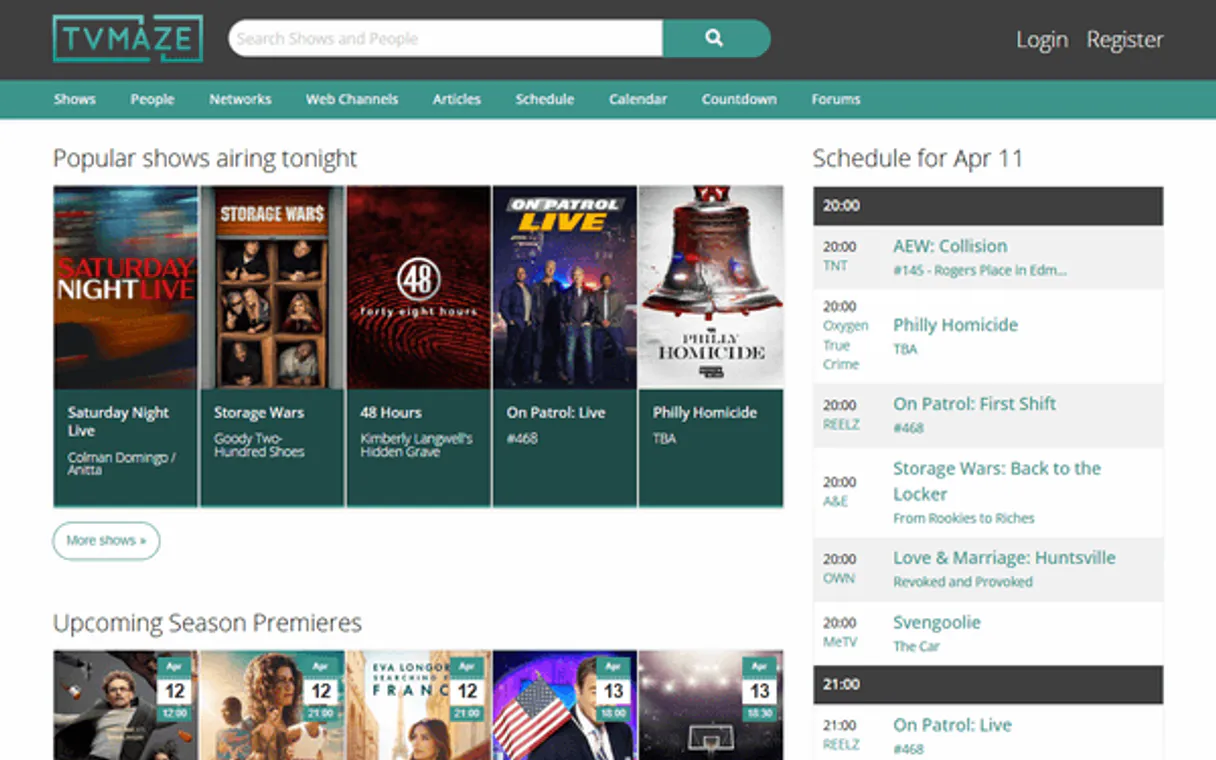
Independent Platform Disclaimer: Vinkius is an independent platform and is not affiliated with, endorsed by, sponsored by, verified by, or otherwise authorized by TVMaze. All third-party trademarks, logos, and brand names are the property of their respective owners. Their use on this website is strictly for informational purposes to identify service compatibility and interoperability.
VINKIUS INFRASTRUCTURE
Cloud Hosted
Managed infra
V8 Isolated
Sandboxed per request
Zero-Trust Proxy
No stored credentials
DLP Enforced
Policy on every call
GDPR Compliant
EU data residency
Token Compression
~60% cost reduction
Works with Claude, ChatGPT, Cursor, and more
The Model Context Protocol standardizes how applications expose capabilities to LLMs. Instead of operating in isolation, your AI gains direct access to external platforms, live data, and real-world actions through secure, standardized connections.
This server provides 15 capabilities that interface natively with Claude, ChatGPT, Cursor, and any MCP client. No middleware. No custom integration required.
Available Capabilities
Compiling show metadata used to be a nightmare of tabs and manual lookups.
Before this server, if you needed details on a single TV show, you'd open IMDb for ratings, Wikipedia for the summary, TheTVDB for season breaks, and Google for the local airing schedule. You'd copy-paste IDs, check five different websites, and end up with an incomplete spreadsheet.
Now, ask your agent to get all metadata on 'The Good Place'. It uses `get_show` for core stats, then runs `get_show_seasons`, followed by `get_show_cast`. You get a clean, structured data dump in seconds. That's it.
TVMaze MCP Server: Get the cast and episode list instantly.
Getting a full cast rundown meant checking separate pages for main stars, supporting actors, and crew members. Finding every episode required manually navigating season dropdowns and clicking through dates—a total time sink.
With this server, you ask for the cast of 'Friends.' The agent runs `get_show_cast` and delivers a complete list in one go. It's simple data retrieval at scale.
Common Questions About TVMaze MCP
Do I need an API key? +
No! TVMaze's API is completely free and requires no authentication. Just subscribe and start searching. Rate limit is 20 requests per 10 seconds per IP.
Can I search for shows by actor name? +
Yes! Use search_people with the actor's name to find them, then use get_person_cast_credits to see all shows they've appeared in. This is useful for discovering an actor's complete TV filmography.
Can I check what's on TV tonight? +
Yes! Use get_schedule with a country code (e.g. 'US', 'GB', 'BR') to see today's TV schedule. Each entry includes the show name, episode, airtime and network. You can also specify a different date with the date parameter (YYYY-MM-DD).
Can I get episode summaries? +
Yes! Use get_show_episodes with a show ID to get all episodes with their season/episode numbers, air dates, names and summaries. Each episode includes the runtime and image URL as well.
When should I use `single_search` versus `search_shows`? +
Use single_search when you know the exact name and want guaranteed comprehensive details for one show. For general searches, run search_shows; it uses fuzzy matching and returns multiple results ranked by relevance.
What data do I get using the `get_show` tool? +
The get_show call gives deep metadata: genres, network, rating, status (running/ended), premiere date range, and external identifiers like IMDb and TheTVDB. It's more comprehensive than just getting a title.
If I use `get_full_schedule`, how large is the response? +
Be prepared for a massive payload; this tool returns all known future episodes across every show and network. You can filter by country code, but keep in mind that the total data size will be multi-megabyte.
What specific info does `get_person` retrieve? +
It pulls key biographical details like name, birthday, birthplace, gender, and a photo. Crucially, it also returns multiple external IDs for the person across IMDb, Wikipedia, and TVRage.
Use it with your favorite AI tools
Connect this server to Cursor, Claude, VS Code, and more.
More in this category

Pinterest Ads
Manage advertising and pins via Pinterest Ads — list campaigns, track analytics, and audit audiences directly from any AI agent.

Binance (Crypto Market)
Track cryptocurrency markets via Binance — get real-time prices, monitor 24h trends, analyze market movers, and audit trading volumes directly from any AI agent.

Matrix Operations Engine
Perform exact linear algebra — multiply, transpose, invert, and compute determinants of massive matrices local. Zero LLM math hallucinations.
You might also like

Arize AI
Monitor ML model performance, detect data drift, and troubleshoot prediction quality with real-time observability dashboards.

Podia
Manage your Podia store — list customers, track sales, and oversee products and subscriptions directly from any AI agent.

Crisp
Chat with website visitors in real time, manage support conversations, and build a knowledge base that reduces ticket volume.