
Yida MCP. Manage forms and approvals via conversation.
 Gemini
 Works with every AI agent you already use
…and any MCP-compatible client









Just plug in your AI agents and start using Vinkius.
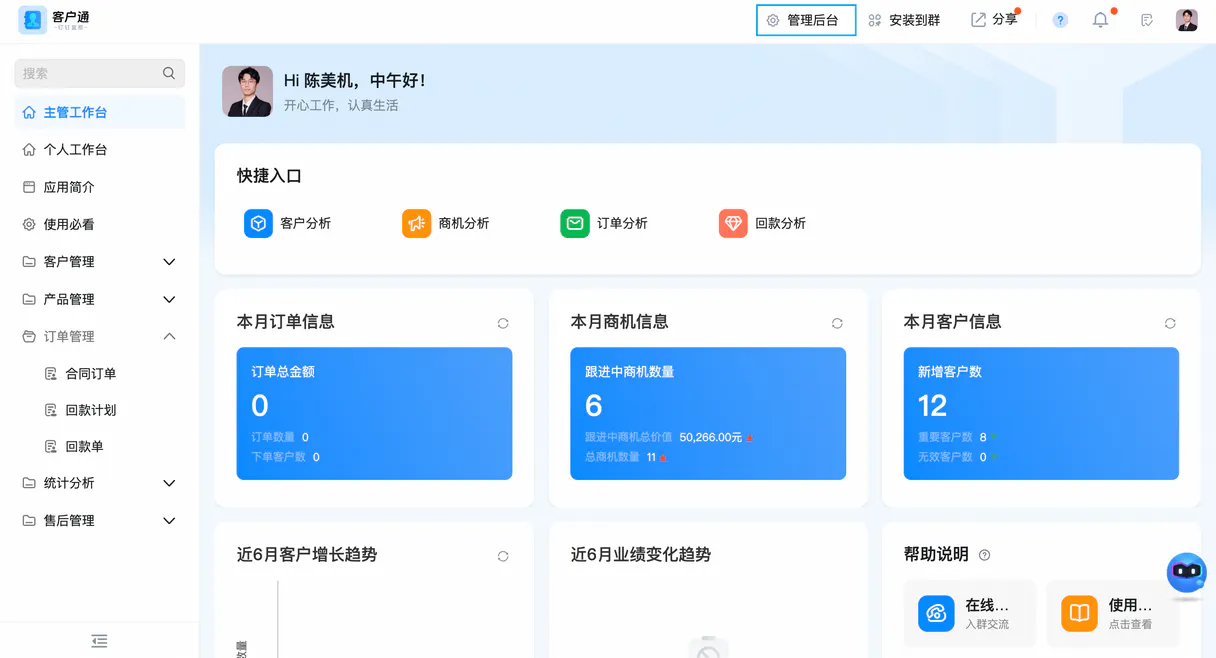
Yida connects your AI client directly to a low-code enterprise platform. It lets your agent manage complex business processes—from creating new records to tracking approvals—without you ever seeing the original web UI.
List forms, get field schemas, update data, and check workflow status through natural language commands.
What your AI agents can do
Create record
Submits a brand-new form instance, triggering necessary workflows or approvals.
Delete record
Permanently removes an existing form record from the system.
Get form schema
Retrieves a detailed map of all fields and data types for a specific form.
The agent calls list_forms to retrieve names of every form available in your Yida application.
Using get_form_schema, the agent retrieves a detailed map of all fields and their data types for any given form.
The agent runs create_record to submit a completely new instance of data into an existing form, starting a workflow if applicable.
The agent uses update_record to change one or more fields on an already submitted form instance.
Calling get_instance_timeline shows the step-by-step journey, including who approved it and when, for a specific workflow ID.
The agent executes get_record_details to pull all field values for an entire record instance at once.
Ask AI about this MCP
Supported MCP Clients
Gemini Waiting for input…
Yida MCP Server: 10 Tools for Form & Workflow Ops
Use these tools to list forms, retrieve schemas, submit records, and monitor every step of an enterprise workflow using natural conversation.
019d84a0create record
Submits a brand-new form instance, triggering necessary workflows or approvals.
019d84a0delete record
Permanently removes an existing form record from the system.
019d84a0get form schema
Retrieves a detailed map of all fields and data types for a specific form.
019d84a0get instance timeline
Provides the step-by-step history and current status of any running workflow instance.
019d84a0get record details
Pulls all field values for an existing record, giving you a full snapshot of its data.
019d84a0list data ids
Returns a list of unique identifiers for form instances that exist in the system.
019d84a0list forms
Retrieves the names and IDs of all available forms within your Yida application.
019d84a0list users
Returns a list of users who have access to the Yida application.
019d84a0list workflows
Retrieves the names and IDs of all defined approval workflows in your system.
019d84a0update record
Modifies specific fields on a record that already exists, updating the data in place.
Choose How to Get Started
Build a custom MCP for your own tools, or connect a ready-made integration from our catalog.
Build Your Own
Turn any API into an MCP. Import a spec, define Agent Skills, or deploy with MCPFusion.
- Import from OpenAPI, Swagger, or YAML specs
- Create Agent Skills with progressive disclosure
- Deploy to edge with MCPFusion framework
- Built in DLP, auth, and compliance on every call
- Real time usage dashboard and cost metering
- Publish to catalog or keep private
Make Your AI Do More
Start with Yida, then connect any of our 4,700+ other servers whenever your AI needs more. One click, no limits.
- Use this MCP plus 4,700+ others, all in one place
- Add new capabilities to your AI anytime you want
- Every connection is secured and compliant automatically
- Track usage and costs across all your servers
- Works with Claude, ChatGPT, Cursor, and more
- New servers added to the catalog every week
What you can do with this MCP connector
When you hook your AI client up with Yida using MCP, you bypass the usual clunky web interface entirely. Your agent talks straight to the underlying data model, letting you manage complex business processes—like tracking approvals or handling record updates—using nothing but natural language commands.
Your agent first checks what's even available. It calls list_forms to pull up a roster of every form in your Yida application. For process management, it also uses list_workflows and list_users to see all defined approval workflows and who has access to the system.
Need to know what data those forms hold? Your agent runs get_form_schema, which pulls up the whole blueprint for any given form instance. This map shows every field, its exact name, and what kind of data it expects—whether it's text, a date, or some other type.
To see all the existing records in play, your agent runs list_data_ids, giving you a list of unique identifiers for form instances. If you need a full picture of an already submitted record, running get_record_details pulls up every field value in that instance at once, giving you a complete data snapshot.
Want to start something from scratch? Your agent uses create_record to submit a brand-new form instance. This action triggers necessary workflows or approvals right away. If the record gets changed later, your agent runs update_record, which modifies specific fields on an existing submission without having to rebuild it.
For historical tracking and audit trails, you can call get_instance_timeline. This shows the step-by-step journey of any running workflow instance—who approved it, when they did it, and what its current status is. If a record's data needs to vanish permanently, your agent uses delete_record to remove that form record from the system.
Basically, everything you need to manage structured enterprise data—listing forms with list_forms, checking schemas with get_form_schema, creating records with create_record, updating fields with update_record, pulling history with get_instance_timeline, and getting all the raw details with get_record_details—it's all available through your agent. You keep your data accurate and those workflows moving by talking directly to Yida’s backend.
How Yida MCP Works
- 1 Subscribe the Yida MCP Server on Vinkius and input your DingTalk App Key, Secret, and Code.
- 2 Connect your preferred AI client (Claude, Cursor, etc.) to the server.
- 3 Instruct your agent to perform a task, like 'List all employee forms,' which triggers the necessary tool calls automatically.
The bottom line is: you give instructions in natural language, and your agent executes the required form data operations against Yida's backend without you touching a browser window.
Who Is Yida MCP For?
This tool is for people who manage core business processes using structured forms and need visibility into complex internal workflows. It’s perfect for the ops engineer tired of clicking through multiple dashboards just to check if an approval request stalled, or the department manager who needs instant access to form schemas without consulting IT.
Uses the agent to run daily data checks—listing forms with list_forms and then running get_record_details on specific instances.
Checks system health by retrieving form schemas (get_form_schema) or monitoring workflow status via get_instance_timeline without needing technical access to the DingTalk console.
Needs to kick off a process quickly. They ask the agent to create a new record using create_record, and then track it until completion.
What Changes When You Connect
- Stop hunting for form names. Use
list_formsto instantly see every available form in your Yida app, letting you start a task without remembering the exact name. - Don't guess what data is needed. Call
get_form_schemafirst. This tool shows the precise field IDs and types before you try to usecreate_record, preventing submission errors. - Need to check if an expense report is stuck? Instead of clicking through approval dashboards, call
get_instance_timeline. You get the exact status—who has it and when they signed off. - No more copy/pasting data. Use
get_record_detailsto pull all necessary fields from a record ID in one API call, feeding clean data directly into your agent's next step. - If someone changes the form structure, you don't break anything. Your agent can use
list_workflowsandget_form_schematogether to adapt to structural changes on the fly.
Real-World Use Cases
Starting a new audit request
An auditor needs to submit data for an inventory check. They ask their agent, 'Start a new Inventory Audit.' The agent first uses list_forms to find the ID, then calls get_form_schema to validate required fields, and finally executes create_record with all the necessary values.
Checking why a request is delayed
A department head has an approval ID. Instead of emailing people or checking the web UI, they ask their agent to check the timeline. The agent runs get_instance_timeline and tells them exactly which person holds it up, solving the problem in seconds.
Fixing old data errors
A record was submitted last month with an incorrect department code. Instead of finding the original form instance and manually fixing it, they ask the agent to 'Update the department for ID XYZ.' The agent runs update_record directly.
Finding all necessary forms
A new user needs to know what data is tracked. They simply prompt the agent to list everything, and it responds by running list_forms, giving them a complete catalog of available business processes.
The Tradeoffs
Manual UI Navigation
A manager needs to check three different form types. They open the main DingTalk app, click 'Forms,' then search for Form A, copy the ID; repeat this process for Forms B and C.
→
Just ask your agent: 'List all forms.' The agent runs list_forms immediately and gives you a clean list of every form name, saving 5 minutes of clicking.
Assuming data structure
A developer writes code to create a record but guesses the field ID. The submission fails with an error message that requires consulting documentation or a senior engineer.
→
Before you write any code, ask the agent: 'What is the schema for the Purchase Request form?' It runs get_form_schema and gives you the exact structure needed.
Editing data without tracking
A user finds a record ID and manually changes something in the UI. They lose the audit trail, and nobody knows who changed it or why.
→
To ensure a change is properly recorded, use update_record through your agent. The resulting workflow automatically updates the timeline using tools like get_instance_timeline, preserving the full history.
When It Fits, When It Doesn't
Use this server if your core business function involves structured data, multi-stage approvals, and complex forms (like HR onboarding, procurement requests, or inventory tracking). You need to know what data exists, what fields are available, and where a process is stuck. Don't use it if you just need basic messaging—a standard chat API will do. If your only goal is simple data storage without any formal approval path attached, there might be simpler database connectors available. But if the data must flow through defined business rules (workflows), Yida provides the necessary control layer via get_instance_timeline and create_record.
Independent Platform Disclaimer: Vinkius is an independent platform and is not affiliated with, endorsed by, sponsored by, verified by, or otherwise authorized by Yida. All third-party trademarks, logos, and brand names are the property of their respective owners. Their use on this website is strictly for informational purposes to identify service compatibility and interoperability.
VINKIUS INFRASTRUCTURE
Cloud Hosted
Managed infra
V8 Isolated
Sandboxed per request
Zero-Trust Proxy
No stored credentials
DLP Enforced
Policy on every call
GDPR Compliant
EU data residency
Token Compression
~60% cost reduction
Works with Claude, ChatGPT, Cursor, and more
The Model Context Protocol standardizes how applications expose capabilities to LLMs. Instead of operating in isolation, your AI gains direct access to external platforms, live data, and real-world actions through secure, standardized connections.
This server provides 10 capabilities that interface natively with Claude, ChatGPT, Cursor, and any MCP client. No middleware. No custom integration required.
Available Capabilities
The Pain of Manual Form Data Retrieval
Right now, getting a full picture of an employee's data—say, their onboarding paperwork—is tedious. You have to navigate the DingTalk interface: open the form list, find the correct record ID, click into it, and then manually copy all the necessary fields (start date, manager sign-off, department code) into your spreadsheet or chat.
With this MCP server, you just ask your agent for the details. The agent runs `get_record_details`, pulling every field value from the source directly. You get a clean, structured output instantly, without ever opening the original form.
Yida MCP Server: Track Workflow Status in Seconds
Before this, checking if a critical purchase request was approved meant logging into the workflow section, searching by ID, and reading through status updates—a process that takes minutes of clicking across multiple tabs to confirm who signed off last. This is slow, and you risk misinterpreting the steps.
Now, just ask your agent about the approval timeline for a specific request. The agent runs `get_instance_timeline` and gives you the precise status: 'Pending Finance Director.' No clicks required. It's that fast.
Common Questions About Yida MCP
How do I list all forms in Yida using the `list_forms` tool? +
You tell your agent to run list_forms. The agent returns a clean list of every form available, giving you their names and IDs so you know what processes exist without clicking anything.
Can I update data on an old record with the `update_record` tool? +
Yes. If you have the specific ID, your agent uses update_record. You provide which field and what value to use, making sure the change is tracked correctly in the system.
What does `get_form_schema` tell me? +
get_form_schema gives you the blueprint of a form. It tells you exactly which fields exist and what data type they expect (like text, date, or number), so your agent knows how to build the record correctly.
Is `create_record` safe if I don't know the field IDs? +
It is safer to run get_form_schema first. This ensures you have the correct field names and data types, which your agent then uses when calling create_record to prevent submission errors.
What happens when I use the `delete_record` tool? +
It permanently removes a form record. This action is irreversible, so always confirm you have backed up necessary data before running it. The agent sends a direct deletion command to Yida.
How do I track the full approval journey using `get_instance_timeline`? +
This tool provides an audit trail for any workflow instance. You get timestamps, which user handled it, and what the status changed to (e.g., 'Pending Finance' or 'Approved'). It’s great for compliance checks.
If I only have a data instance ID, how do I retrieve all field values with `get_record_details`? +
You pass the specific record ID to this tool. Your agent then fetches and presents every associated piece of structured data—it’s like pulling up the full raw form submission.
What information does the `list_users` tool provide about Yida users? +
It returns a list of all accounts configured in your Yida application. This is useful for understanding who has access rights or needs to be added to a specific workflow.
How do I find my DingTalk App Key and Secret? +
Log in to the DingTalk Developer Backend, create or select an 'Internal Enterprise Application', and you will find the App Key and App Secret under the 'Credentials' section.
Where can I find the Yida 'App Code'? +
Open your Yida application, go to [Settings] → [Deployment and O&M], and you will find the 'App Code' (Application Code) there. It is required for all Yida API calls.
Can I see the approval history of a record? +
Yes. Use the get_instance_timeline tool with the form instance ID. It will return the full approval history, including who approved it and at what time.
Use it with your favorite AI tools
Connect this server to Cursor, Claude, VS Code, and more.
More in this category
PreciseFP
Collect client financial data digitally with compliant intake forms designed for wealth management and financial planning firms.
Box
Store, share, and collaborate on files securely with enterprise-grade cloud content management and governance controls.

DOL (Department of Labor)
Access US Department of Labor data including OSHA inspections, MSHA safety records, and wage compliance directly from your AI agent.
You might also like

ChargeOver
Manage recurring billing and invoicing via ChargeOver — track customers, monitor subscriptions, and analyze transactions directly from any AI agent.

Image Router
Route image generation requests to the best AI model automatically based on prompt type, style, and quality requirements.

Kling AI (Generative Video & Image)
Generate cinematic videos and images via Kling AI — use text-to-video, image-to-video, and AI virtual try-on.