
HaloPSA MCP. Control your service desk and PSA from chat.
 Gemini
 Works with every AI agent you already use
…and any MCP-compatible client









Just plug in your AI agents and start using Vinkius.
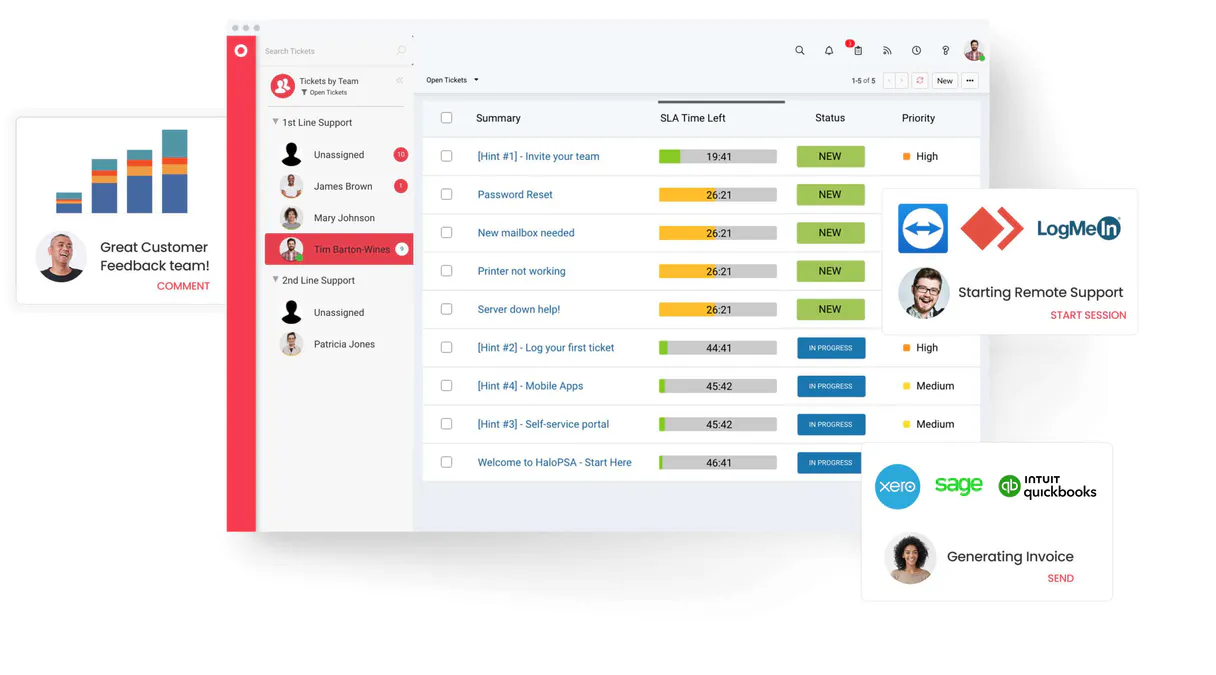
HaloPSA. Automate your service desk and PSA workflows directly from your AI agent. Use HaloPSA to manage tickets, check client records, track assets, and run reports—all without leaving your chat window.
Connect your AI client to instantly list tickets, update statuses, or retrieve contract details.
What your AI agents can do
Create ticket
Creates a new support request ticket within HaloPSA.
Get ticket
Retrieves all detailed information for a specific ticket ID.
List assets
Generates a list of all hardware and software assets tracked in HaloPSA.
You tell your agent to create a ticket, and it submits the request to HaloPSA for you.
You ask for a ticket ID, and the agent pulls up all the associated data, history, and notes.
You request an asset list, and the agent retrieves every managed item defined in HaloPSA.
You ask for a list of clients, and the agent provides a complete, up-to-date list of accounts.
You request contract or invoice lists, and the agent pulls the status and details for your financial records.
You tell the agent to add a note or change a ticket's status, and it executes the change immediately.
Ask AI about this MCP
Supported MCP Clients
Gemini Waiting for input…
HaloPSA MCP Server: 11 Tools for Service Desk Management
These tools allow your agent to read, write, and manage core service desk data, including tickets, clients, assets, and financial records.
019d75adcreate ticket
Creates a new support request ticket within HaloPSA.
019d75adget ticket
Retrieves all detailed information for a specific ticket ID.
019d75adlist assets
Generates a list of all hardware and software assets tracked in HaloPSA.
019d75adlist clients
Provides a list of all customer accounts defined in HaloPSA.
019d75adlist contracts
Retrieves a list of all active customer contracts.
019d75adlist invoices
Generates a list of all financial invoices within HaloPSA.
019d75adlist sites
Lists all physical locations or sites configured in the service desk.
019d75adlist teams
Provides a list of all configured support teams within HaloPSA.
019d75adlist tickets
Lists a summary of all support tickets in HaloPSA.
019d75adlist users
Provides a list of all user accounts configured in the HaloPSA instance.
019d75adperform ticket action
Executes specific changes on a ticket, like updating its status or adding a note.
Choose How to Get Started
Build a custom MCP for your own tools, or connect a ready-made integration from our catalog.
Build Your Own
Turn any API into an MCP. Import a spec, define Agent Skills, or deploy with MCPFusion.
- Import from OpenAPI, Swagger, or YAML specs
- Create Agent Skills with progressive disclosure
- Deploy to edge with MCPFusion framework
- Built in DLP, auth, and compliance on every call
- Real time usage dashboard and cost metering
- Publish to catalog or keep private
Make Your AI Do More
Start with HaloPSA, then connect any of our 4,700+ other servers whenever your AI needs more. One click, no limits.
- Use this MCP plus 4,700+ others, all in one place
- Add new capabilities to your AI anytime you want
- Every connection is secured and compliant automatically
- Track usage and costs across all your servers
- Works with Claude, ChatGPT, Cursor, and more
- New servers added to the catalog every week
What you can do with this MCP connector
HaloPSA MCP Server lets your AI agent handle your service desk and PSA stuff directly from chat. You don't gotta jump through the whole portal just to manage tickets, check client records, or track assets. You just talk to your agent, and it gets the job done.
How HaloPSA MCP Works
- 1 Subscribe to the server and provide your HaloPSA credentials (Client ID, Secret, URLs).
- 2 Direct your AI agent to perform a task (e.g., 'List all open tickets for Acme Corp').
- 3 The agent calls the correct tool, retrieves the data, and presents the result in a conversational format.
The bottom line is: you talk to your agent, and it uses the HaloPSA tools to get the answer or make the change.
Who Is HaloPSA MCP For?
Service Desk Agents who waste time switching between the portal and ticket notes. Operations Managers who need a quick overview of asset compliance or team assignments. IT Directors who need real-time visibility into support volume and contract status without opening a dashboard.
Retrieves specific ticket details and adds internal notes during a customer call. Needs to check the status of assets linked to the ticket without logging into the main portal.
Automates checking asset lists and team assignments across multiple sites. Uses the agent to verify resource availability across the organization.
Maintains a real-time overview of support volume, contract expiration dates, and active users. Uses the agent to check high-level metrics and status reports.
What Changes When You Connect
- Manage ticket status updates and notes directly. Use
perform_ticket_actionto change a ticket's status or add an internal note without opening the ticket view. - Stop jumping between data sources. The server lets you use
list_assetsandlist_clientsin one conversation to verify a client's hardware compliance. - Get quick financial checks. Use
list_invoicesandlist_contractsto pull up billing status and contract end dates instantly, cross-referencing client data. - Maintain a clean data picture. Use
list_usersandlist_teamsto verify who has access and which groups are responsible for support, all from the chat. - Automate reporting. Instead of running reports, use
list_ticketsandget_ticketto get real-time summaries and detailed status reports on demand. - Consolidate operations. The server lets you use
list_sitesalongsidelist_teamsto allocate resources by location, simplifying resource planning.
Real-World Use Cases
Client Onboarding: Verifying Assets
A new client signs up. Instead of manually checking the portal, the agent runs list_clients to confirm the account exists, then runs list_assets to verify the required hardware is already installed. The agent confirms the status and creates a ticket using create_ticket to kick off the setup process.
Troubleshooting: Checking User Access
A user calls in about a permission issue. The agent first runs list_users to check the user's existence and then checks the team assignments using list_teams to see if they belong to the correct support group. It can then use get_ticket to pull up the current ticket details for the agent to review.
Contract Renewal: Checking Status
The Operations Manager needs to know which clients are up for renewal. The agent calls list_contracts to find expiration dates, then uses list_invoices to check if the last invoice was paid. This gives a full financial and service status in one flow.
Support Escalation: Updating Ticket Status
A complex issue needs to be paused waiting for a vendor. The agent uses get_ticket to pull up the ticket ID, then uses perform_ticket_action to add an internal note and change the status to 'On Hold'. This updates the record immediately.
The Tradeoffs
Over-relying on list tools
Running list_tickets and then having to run list_users separately to check who owns the tickets, leading to multiple, disconnected calls and forcing the user to piece together the full picture manually.
→
Ask the agent to combine the data. For instance, 'Show me all open tickets assigned to users in the 'Tier 2 Support' team.' This single prompt utilizes the underlying logic to cross-reference list_tickets and list_teams data.
Using the wrong action tool
Trying to change a client's address by calling get_ticket. This is incorrect because get_ticket only reads data; it cannot write or modify records.
→
Use perform_ticket_action for status changes and notes. If you need to manage user data, use list_users to verify the correct user ID first.
Missing the necessary context
Calling list_assets without specifying a client or site. The agent will return thousands of assets, overwhelming the user and requiring dozens of follow-up filters.
→
Always narrow the scope. Ask: 'What assets are linked to Client X at Site Y?' This forces the agent to use context from list_clients and list_sites before calling list_assets.
When It Fits, When It Doesn't
Use this if you need to manage an entire workflow (e.g., 'Onboard Client X' or 'Check Renewal Status'). The goal is state change or data aggregation. Don't use it if you just need a static list of names, like simply getting a list of all users. For that, just use list_users. This server shines when you need to chain calls—like checking list_contracts then using list_invoices to validate payment status. If your process is always 'fetch data -> read data,' then stick to the list tools. If your process is 'fetch data -> update data,' use the action tools.
Independent Platform Disclaimer: Vinkius is an independent platform and is not affiliated with, endorsed by, sponsored by, verified by, or otherwise authorized by HaloPSA. All third-party trademarks, logos, and brand names are the property of their respective owners. Their use on this website is strictly for informational purposes to identify service compatibility and interoperability.
VINKIUS INFRASTRUCTURE
Cloud Hosted
Managed infra
V8 Isolated
Sandboxed per request
Zero-Trust Proxy
No stored credentials
DLP Enforced
Policy on every call
GDPR Compliant
EU data residency
Token Compression
~60% cost reduction
Works with Claude, ChatGPT, Cursor, and more
The Model Context Protocol standardizes how applications expose capabilities to LLMs. Instead of operating in isolation, your AI gains direct access to external platforms, live data, and real-world actions through secure, standardized connections.
This server provides 11 capabilities that interface natively with Claude, ChatGPT, Cursor, and any MCP client. No middleware. No custom integration required.
Available Capabilities
Manually checking service desk status is a nightmare.
Right now, figuring out the status of a client involves a cascade of clicks. You go to the client tab, check their assets, then jump to the tickets tab for open issues, and finally click over to the contracts section to see if they're paid up. It's a dozen tabs, five different screens, and half your time is spent just copying IDs to paste somewhere else.
With the HaloPSA MCP Server, you just tell your agent what you need. You ask, 'What's the status of Client X?' and it pulls the answer together from `list_clients`, `list_assets`, and `list_tickets` instantly. You get a single, unified answer, not a dozen dashboards.
HaloPSA MCP Server: Manage tickets, clients & assets
Forget manually creating a ticket and then having to go back later to update its status. You can use the agent to create the initial ticket with `create_ticket` and then, later, use `perform_ticket_action` to add notes or change the status—all within the same chat session.
The process shifts from discrete, multi-step API calls to a single, continuous conversation. You're not running scripts; you're having a conversation with your service desk. That's the difference.
Common Questions About HaloPSA MCP
How do I use the `list_tickets` tool with HaloPSA MCP Server? +
The list_tickets tool provides a summary of all support tickets. You can follow up by using get_ticket with a specific ID to pull up the full details and history for any ticket listed.
Can I check client assets using the `list_assets` tool? +
Yes. The list_assets tool retrieves every hardware and software asset defined in your HaloPSA instance, letting you verify client compliance or inventory status instantly.
What is the purpose of the `perform_ticket_action` tool? +
This tool lets you modify records. You use it to add internal notes or change a ticket's status. It's the write function for ticket management.
Does `list_clients` include contract info? +
No. list_clients only lists the client accounts. For contract details, you must use the dedicated list_contracts tool.
How do I create a ticket using the `create_ticket` tool? +
You initiate the process by asking the agent to create a ticket. The agent will prompt you for necessary details like the client ID, subject, and description before executing the tool.
How do I list all customer contracts using the `list_contracts` tool? +
The list_contracts tool pulls a list of all customer agreements from HaloPSA. You get details like start dates, end dates, and associated client IDs for quick review.
Which tool should I use to get detailed information about a specific ticket? Is it `get_ticket`? +
Yes, use get_ticket to retrieve comprehensive details for a single ticket ID. It shows the full ticket history, current status, and assigned user information.
What tools do I use to manage users and organizational structure? Is it `list_users` or `list_teams`? +
You use list_users to get a roster of all users in your HaloPSA instance. list_teams lists the defined operational teams and sites for resource allocation.
How do I set up my HaloPSA API credentials? +
Log in as an Administrator, go to Configuration > Integrations > Halo API. In 'View Applications', create a new app with the 'Agent' login type and grant the necessary permissions. You will receive your Client ID and Client Secret there.
What are the Resource and Auth URLs? +
The Resource URL is typically https://your-tenant.halopsa.com/api and the Auth URL is https://your-tenant.halopsa.com/auth. Replace 'your-tenant' with your actual HaloPSA instance name.
Can I perform actions on tickets, like changing status? +
Yes! Use the perform_ticket_action tool by providing the ticket ID and the specific action ID configured in your Halo instance. You can also add an optional note.
Is the integration secure? +
Yes, it uses industry-standard OAuth2 Client Credentials flow. Your credentials are encrypted and stored securely within the Vinkius Cloud infrastructure.
Use it with your favorite AI tools
Connect this server to Cursor, Claude, VS Code, and more.
More in this category

Salesforce Service Cloud
Manage support cases, search the knowledge base, track case metrics, and resolve customer issues through natural conversation.
Dixa
Equip your AI agent to manage customer conversations, track agents, and monitor support queues via the Dixa API.
Hiver
Turn Gmail into a helpdesk with shared labels, email assignment, and SLA tracking that works inside the inbox your team already uses.
You might also like

ANEEL Dados Abertos
Access the Brazilian National Electric Energy Agency (ANEEL) Open Data Portal to query electricity sector datasets, resources, and records.

MRPLN
Plan manufacturing resources with production scheduling, material requirements, and capacity planning for growing factories.

HighLevel
Automate CRM and marketing via HighLevel — manage contacts, opportunities, and calendars directly from any AI agent.