
HetrixTools MCP. Audit uptime and IP reputation instantly.
 Gemini
 Works with every AI agent you already use
…and any MCP-compatible client









Just plug in your AI agents and start using Vinkius.
HetrixTools MCP Server monitors your infrastructure uptime and checks IP/domain blacklists. Connect it to your AI client to automate system checks, track service availability, and manage IP reputation without leaving the chat.
Use it to list monitors, check real-time blacklists, and manage alerts for any website or IP address.
What your AI agents can do
Add uptime monitor
Creates a new uptime monitor for a specified target, like a website or API endpoint.
Check domain blacklist
Performs an on-demand check to determine if a given domain is listed on a blacklisting service.
Check ip blacklist
Checks an IPv4 address against global blacklists to assess its current reputation.
Performs instant, on-demand checks to see if a domain or IPv4 address is listed on global blacklists.
Creates, lists, and checks the real-time uptime status for specified websites and services.
Toggles maintenance modes for monitors, pausing alerts during updates, or deletes monitors you no longer need.
Retrieves detailed, paginated reports showing past uptime history and service availability.
Gets current API and resource consumption statistics to keep you aware of your plan limits.
Lists and manages the contact lists that receive notifications when a service goes down.
Ask AI about this MCP
Supported MCP Clients
Gemini Waiting for input…
HetrixTools MCP Server: 11 Tools for Infrastructure Health
These tools let your agent check server availability, monitor blacklists, and manage monitoring schedules without needing to open the web portal.
019d75b0add uptime monitor
Creates a new uptime monitor for a specified target, like a website or API endpoint.
019d75b0check domain blacklist
Performs an on-demand check to determine if a given domain is listed on a blacklisting service.
019d75b0check ip blacklist
Checks an IPv4 address against global blacklists to assess its current reputation.
019d75b0delete uptime monitor
Removes an existing uptime monitor from the system.
019d75b0get account usage
Retrieves your current API and resource usage statistics for the account.
019d75b0list blacklist monitors
Shows all the IP and domain addresses you currently monitor for blacklisting.
019d75b0list bulk reports
Lists all the bulk reports that have been generated by the service.
019d75b0list contact lists
Retrieves a list of all configured contacts that receive failure alerts.
019d75b0list uptime monitors
Shows the current list and status of all active uptime checks.
019d75b0list uptime reports
Gets detailed, historical reports detailing the availability of a specific monitor.
019d75b0set maintenance mode
Changes the operational mode of an uptime monitor (Normal, Maintenance with/without alerts).
Choose How to Get Started
Build a custom MCP for your own tools, or connect a ready-made integration from our catalog.
Build Your Own
Turn any API into an MCP. Import a spec, define Agent Skills, or deploy with MCPFusion.
- Import from OpenAPI, Swagger, or YAML specs
- Create Agent Skills with progressive disclosure
- Deploy to edge with MCPFusion framework
- Built in DLP, auth, and compliance on every call
- Real time usage dashboard and cost metering
- Publish to catalog or keep private
Make Your AI Do More
Start with HetrixTools, then connect any of our 4,700+ other servers whenever your AI needs more. One click, no limits.
- Use this MCP plus 4,700+ others, all in one place
- Add new capabilities to your AI anytime you want
- Every connection is secured and compliant automatically
- Track usage and costs across all your servers
- Works with Claude, ChatGPT, Cursor, and more
- New servers added to the catalog every week
What you can do with this MCP connector
HetrixTools MCP Server lets your AI agent act like a dedicated System Administrator for your infrastructure. You'll check site uptime and manage IP blacklists right through your chat. You can list all active uptime checks and get detailed, historical reports showing service availability using list_uptime_monitors and list_uptime_reports. You can also create a new uptime monitor for a specific target, like a website or API endpoint, with add_uptime_monitor, and delete old ones with delete_uptime_monitor.
You can run instant, on-demand checks to see if a domain or IPv4 address is listed on global blacklists by calling check_domain_blacklist or check_ip_blacklist. To see all the IP and domain addresses you're tracking for blacklisting, run list_blacklist_monitors. You can change the operational mode of an uptime monitor using set_maintenance_mode, which lets you pause alerts when you're making changes.
You can also manage your alerts by retrieving a list of all configured contacts that get failure notifications with list_contact_lists. You'll always know where you stand with get_account_usage, which gives you your current API and resource consumption stats. Need to see what bulk reports the service generated? Use list_bulk_reports. You can also list all the contact lists using list_contact_lists.
How HetrixTools MCP Works
- 1 Subscribe to the server and input your HetrixTools API Token.
- 2 Your AI client authenticates and gains access to the monitoring tools.
- 3 You issue a command (e.g., 'Check 1.2.3.4 blacklist status') and the agent executes the necessary tool call.
The bottom line is that your AI client handles the API calls and data processing, letting you run complex infrastructure audits using simple chat commands.
Who Is HetrixTools MCP For?
This is for the DevOps Engineer who needs to check server health and IP reputation without leaving their terminal. It’s for the System Administrator who needs to audit domain blacklists and the Website Owner who needs instant reports on service interruptions. It centralizes monitoring into chat.
Runs list_uptime_monitors to check overall server health and uses set_maintenance_mode to pause alerts during deployments.
Runs check_domain_blacklist and check_ip_blacklist to audit the reputation of IPs and domains before a campaign launch.
Uses list_contact_lists and list_uptime_monitors to manage who gets alerts and what services are being watched.
What Changes When You Connect
- See instant blacklisting status for any IP or domain using
check_ip_blacklistorcheck_domain_blacklist. You don't wait for a dashboard refresh; you get the status directly in the chat. - Track service health with
list_uptime_monitors. You see the current status of every critical endpoint in one command, avoiding manual dashboard navigation. - Control false alerts by using
set_maintenance_mode. You can put a monitor into maintenance mode without needing to log into the web portal and toggle switches. - Keep an eye on costs with
get_account_usage. You see your API and resource limits immediately, preventing unexpected overages. - Review historical performance with
list_uptime_reports. You get detailed, paginated reports on past failures, which is better than looking at a single status number. - Manage alert recipients with
list_contact_lists. You ensure that if a service fails, the right person gets the notification, and you manage that list right here.
Real-World Use Cases
Investigating a recent outage
A website owner gets an alert about downtime. Instead of logging into the monitoring dashboard, they ask their agent to run list_uptime_reports for the affected service. The agent pulls the detailed report, showing exactly when the failure started and providing the error log context.
Auditing a new campaign's target IP
A security analyst needs to ensure their campaign target IP is clean. They prompt the agent to run check_ip_blacklist against the IP. The agent scans 90+ blacklists and reports the status (e.g., CLEAN) instantly, confirming readiness before deployment.
Pausing monitoring during maintenance
A DevOps engineer needs to update a database endpoint. They run set_maintenance_mode on the specific monitor ID. The agent confirms the change, stopping all false alerts during the update window without requiring UI interaction.
Scaling up monitoring coverage
A system administrator needs to track 10 new services. They first use list_uptime_monitors to check the current count, then use add_uptime_monitor to add the new targets, streamlining the entire setup process via chat.
The Tradeoffs
Manually checking status dashboards
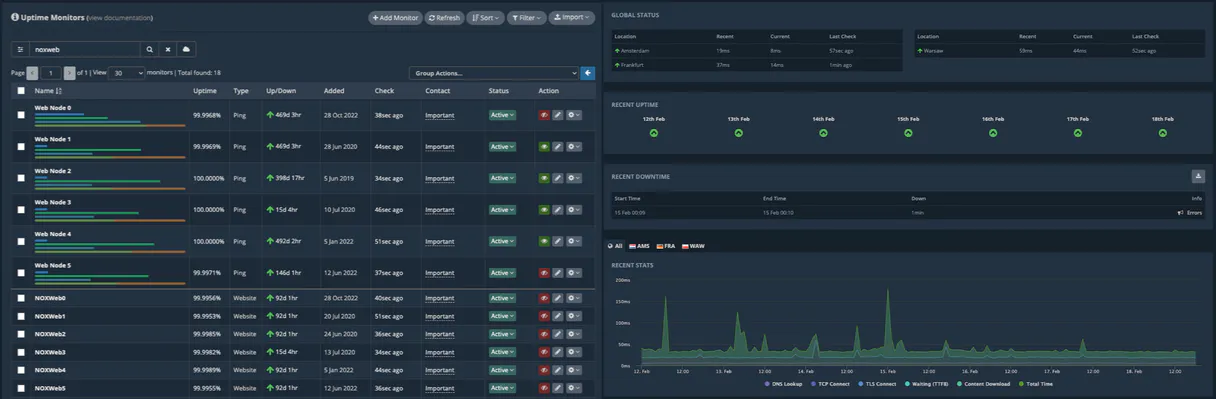
Opening the HetrixTools website and clicking through multiple tabs—Uptime, Blacklists, Reports—just to find one status or check one report. This is slow and tedious.
→
Use the agent. Ask it to list_uptime_monitors for a quick overview, or run check_domain_blacklist for a single domain status. Keep all checks in the chat.
Forgetting to update alerts
A team member updates a service and forgets to tell the monitoring system, leading to the system sending false alerts to the entire team for a few hours.
→
Use set_maintenance_mode immediately. You can toggle the mode and tell the agent to confirm the change, avoiding alert noise while you work.
Running large, unpaginated reports
Trying to pull a year's worth of historical uptime data from a web UI, which often times out or only shows the last 30 days, leaving you with incomplete data.
→
Use list_uptime_reports. It handles large data sets and gives you paginated results, ensuring you get the full history without hitting limits.
When It Fits, When It Doesn't
Use this server if your primary job is auditing system health and external reputation. You need to check if a website is up, if an IP is clean, or what the history of failures looks like. If you spend time manually switching between monitoring dashboards or running command-line tools for availability checks, this is for you. Don't use it if you need complex data analysis (e.g., correlating uptime with CPU usage) or if you are primarily managing user accounts. For basic user management, you'd just use a simple messaging tool. For deep metric analysis, look for a dedicated time-series database connection. This server keeps the scope narrow: availability and reputation checks.
Independent Platform Disclaimer: Vinkius is an independent platform and is not affiliated with, endorsed by, sponsored by, verified by, or otherwise authorized by HetrixTools. All third-party trademarks, logos, and brand names are the property of their respective owners. Their use on this website is strictly for informational purposes to identify service compatibility and interoperability.
VINKIUS INFRASTRUCTURE
Cloud Hosted
Managed infra
V8 Isolated
Sandboxed per request
Zero-Trust Proxy
No stored credentials
DLP Enforced
Policy on every call
GDPR Compliant
EU data residency
Token Compression
~60% cost reduction
Works with Claude, ChatGPT, Cursor, and more
The Model Context Protocol standardizes how applications expose capabilities to LLMs. Instead of operating in isolation, your AI gains direct access to external platforms, live data, and real-world actions through secure, standardized connections.
This server provides 11 capabilities that interface natively with Claude, ChatGPT, Cursor, and any MCP client. No middleware. No custom integration required.
Available Capabilities
Checking service status shouldn't require logging into three different dashboards.
Today, checking if a website is up requires a painful ritual: you open the monitoring dashboard, navigate to the specific service, check the status widget, then if it's down, you have to jump to the reports tab to see when it went down. If you need to check a blacklist, you open a second tab, log in again, and run a separate check. It's a lot of clicking, and you lose time switching contexts.
With HetrixTools MCP, you just ask your agent. You tell it, 'What's the status of the API endpoint?' and it runs the checks. You get the status, the history, and the blacklist report—all in the chat. No dashboard hopping required.
HetrixTools MCP Server: Check server health and blacklists in chat.
Before this server, if you needed to pause monitoring for a scheduled update, you had to find the right monitor ID, navigate to the settings, and manually toggle the maintenance switch. This was easy to forget, leading to false alerts the second you were done.
Now, you just tell your agent to `set_maintenance_mode` for the ID. It updates the status immediately and confirms it. The process is dead simple and keeps your workflow right where you are.
Common Questions About HetrixTools MCP
How do I check if an IP address is blacklisted using the HetrixTools MCP Server? +
Run check_ip_blacklist and provide the IPv4 address. The server scans global blacklists and reports the IP's current clean status against all tracked lists.
What is the difference between `list_uptime_monitors` and `list_uptime_reports`? +
list_uptime_monitors shows the current status and status list of all active checks. list_uptime_reports pulls detailed, historical data for one specific monitor, showing its full history.
Can I stop alerts when I'm working on a service? (HetrixTools MCP Server) +
Yes, use set_maintenance_mode. You can put any monitor ID into maintenance mode (Mode 3) to ensure no false alerts fire during updates.
What if I need to monitor a domain name, not an IP? +
Use check_domain_blacklist. This tool specifically checks if a domain name is listed on blacklists, useful for email delivery issues.
How do I see what services I'm already monitoring? +
Run list_uptime_monitors. This shows the names and current status of all the uptime monitors you've set up in your account.
How do I manage my monitoring account usage with `get_account_usage`? +
Use get_account_usage to retrieve current API and resource statistics. This tool shows exactly how much of your plan's quota you've used, helping you stay within your limits.
What is the purpose of `set_maintenance_mode` in the HetrixTools MCP Server? +
set_maintenance_mode allows you to temporarily pause monitoring alerts. You can set a specific monitor into maintenance mode (Mode 3) so your updates don't trigger false alerts.
What tools can I use to check the health of multiple services at once? +
You can check multiple services by listing monitors with list_uptime_monitors and then running targeted checks. You also manage the scope of checks using list_contact_lists.
How do I find my HetrixTools API Token? +
Log in to your HetrixTools account, navigate to Account Settings, and click on the API tab. You will be able to generate and copy your unique API Token from there.
Can I perform on-demand blacklist checks? +
Yes! Use the check_ip_blacklist or check_domain_blacklist tools. These trigger real-time scans across 90+ blacklists. Note that these requests can take a few minutes to complete.
What are the maintenance modes for monitors? +
The integration supports three modes: 1 (Normal), 2 (Maintenance with notifications enabled), and 3 (Maintenance without notifications). Use set_maintenance_mode to toggle these.
Is the integration secure for monitoring data? +
Absolutely. The integration uses industry-standard Bearer tokens (v3) or secure URL tokens over HTTPS. Your credentials are encrypted and stored securely within the Vinkius Cloud infrastructure.
Use it with your favorite AI tools
Connect this server to Cursor, Claude, VS Code, and more.
More in this category

Portainer
Manage Docker containers and environments via Portainer — list, create, and start containers directly from your AI agent.

Neon
Manage serverless PostgreSQL databases via Neon — provision projects, branches, endpoints and roles from any AI agent.
Baota Panel / 宝塔面板 API
Leading server management panel in China — manage websites, databases, and system resources via AI.
You might also like

Amplience
Connect your Amplience CMS to your AI agent — query hubs, pull content, edit schemas, and deploy live items easily via chat.

LiftedWork
Connect job seekers with employment opportunities through a platform that matches skills to openings and tracks applications.

Nabis
Cannabis wholesale and distribution — manage orders, inventory, and retailers via Nabis.