
Clockify MCP. Audit team hours and log time from your chat.
 Gemini
 Works with every AI agent you already use
…and any MCP-compatible client









Just plug in your AI agents and start using Vinkius.
Clockify MCP Server lets you manage all your time tracking and project data through natural conversation. Connect your Clockify account to your AI client and instantly list workspaces, projects, and user time entries.
Start and stop timers, or check team hours—all without opening the web dashboard.
What your AI agents can do
Add new time entry
Adds a new time entry to a workspace for a specific duration.
Get my clockify profile
Retrieves core information about the user who authenticated the agent.
List clockify workspaces
Lists all Clockify workspaces the connected user has access to.
Adds a new time entry to a specified workspace, logging hours for a specific task.
Retrieves specific time entries for any user, showing total hours and project context.
Lists all available workspaces, projects, and clients associated with your account.
Starts or stops a running timer directly in the chat, logging time for the current session.
Lists all users and team members within a specified workspace.
Ask AI about this MCP
Supported MCP Clients
Gemini Waiting for input…
Clockify MCP Server: 8 Tools for Time Tracking & Reporting
These eight tools let your AI agent manage every aspect of your time tracking—from creating new entries to listing entire team rosters—all from your chat interface.
019d7573add new time entry
Adds a new time entry to a workspace for a specific duration.
019d7573get my clockify profile
Retrieves core information about the user who authenticated the agent.
019d7573list clockify workspaces
Lists all Clockify workspaces the connected user has access to.
019d7573list user time entries
Retrieves a list of recorded time entries for a specified user within a workspace.
019d7573list workspace clients
Lists all client accounts configured within a specific workspace.
019d7573list workspace projects
Lists all projects defined within a specific workspace.
019d7573list workspace users
Lists all user accounts and team members associated with a workspace.
019d7573stop current timer
Stops a running timer for a user and logs the elapsed time to the workspace.
Choose How to Get Started
Build a custom MCP for your own tools, or connect a ready-made integration from our catalog.
Build Your Own
Turn any API into an MCP. Import a spec, define Agent Skills, or deploy with MCPFusion.
- Import from OpenAPI, Swagger, or YAML specs
- Create Agent Skills with progressive disclosure
- Deploy to edge with MCPFusion framework
- Built in DLP, auth, and compliance on every call
- Real time usage dashboard and cost metering
- Publish to catalog or keep private
Make Your AI Do More
Start with Clockify, then connect any of our 4,700+ other servers whenever your AI needs more. One click, no limits.
- Use this MCP plus 4,700+ others, all in one place
- Add new capabilities to your AI anytime you want
- Every connection is secured and compliant automatically
- Track usage and costs across all your servers
- Works with Claude, ChatGPT, Cursor, and more
- New servers added to the catalog every week
What you can do with this MCP connector
You'll manage all your time tracking and project data just by talking to your AI client. Just hook up your Clockify account, and you're all set to list workspaces, projects, and even check team hours—no need to open the web dashboard. You can use your agent to start or stop timers, or you can pull up detailed records of who worked on what.
Generating Time Logs: Use add_new_time_entry to log hours for a specific task in a workspace. You can also stop_current_timer to log the elapsed time when you're done.
Auditing User Data: Need to see what a specific user logged? list_user_time_entries pulls up recorded time entries for any user within a workspace. You can also list_workspace_clients to see all client accounts set up in a workspace. To get a full picture of your team, list_workspace_projects shows all defined projects in a workspace, and list_workspace_users lists every user and team member associated with a workspace.
Mapping Team Structure: You can list_clockify_workspaces to see every workspace you have access to. Your agent also knows your basic info; get_my_clockify_profile grabs core details about the user who authenticated the agent.
Controlling Timers: You can start or stop a running timer right in the chat, logging time for the current session.
Managing Users: You can list_workspace_users to get a list of all users and team members in a workspace.
How Clockify MCP Works
- 1 First, subscribe to the Clockify server and provide your Clockify API Key (find this in Settings > My Profile).
- 2 Next, prompt your AI client with a task, like 'Show me John Doe's time entries for last week.'
- 3 Your agent calls the relevant tool (e.g.,
list_user_time_entries), and the result is returned to you in plain text.
The bottom line is you control your time data and team visibility using natural language, without touching the Clockify web UI.
Who Is Clockify MCP For?
Project Managers and Operations leads need this. It cuts out the time wasted clicking through multiple dashboards just to get a status update or log a quick hour. Freelancers use it to verify billable time on the fly. If you spend time manually compiling reports from different tabs, this is for you.
Checks team hours and project progress by asking the agent to retrieve specific time entry metadata.
Needs a quick roster of all users or projects in a workspace without navigating the full administrative dashboard.
Logs time or checks billable hours immediately while chatting with a client, bypassing the need to open the dedicated time tracker.
What Changes When You Connect
- Stop losing time context. You can instantly stop and log a timer using
stop_current_timer, capturing the exact duration without manually hitting 'Stop' in the web UI. - Get a full picture of who's working. Use
list_user_time_entriesto pull time logs for any team member. This lets you audit team hours across different projects in a single chat command. - See the entire project scope. Running
list_workspace_projectslets you pull a list of every project ID and name in a workspace, so you never forget where the time belongs. - Quickly check team availability. The
list_workspace_userstool gives you a roster of every user and team member in the workspace, ideal for assignment checks. - Handle data gaps immediately. If you need to log time right now, use
add_new_time_entryto manually record hours, even if the timer wasn't running. - Know your boundaries. Running
list_workspace_clientsshows all client accounts attached to a workspace, helping you ensure time is logged against the correct billing entity.
Real-World Use Cases
Need to verify billable hours for a client.
The freelancer needs to know exactly how many hours they logged against the 'Beta Launch' project for Client X. They ask the agent to use list_user_time_entries. The agent runs the tool, filters the results, and reports back the total hours, allowing the freelancer to send an accurate invoice immediately.
Project Manager needs a team status check.
A PM needs to know if the whole engineering team is available for a deployment. Instead of opening the dashboard and checking 15 user profiles, they ask the agent to use list_workspace_users and then check the total project allocations via list_user_time_entries. The agent consolidates the roster and the current load, providing a single 'green light' status.
Quickly logging time after a meeting.
You just finished a meeting and need to log 2 hours to the 'Q3 Strategy' project. Instead of switching tabs and opening the clock, you tell your agent, 'Log 2 hours to Q3 Strategy.' The agent uses add_new_time_entry and logs the time instantly, keeping your focus on the conversation.
Stopping a timer mid-conversation.
You are researching an API feature and start a timer. When the research is done, you tell the agent, 'Stop the timer.' The agent executes stop_current_timer, logs the exact elapsed time (e.g., 1 hour, 45 minutes), and confirms the entry, all without you needing to look at the timer widget.
The Tradeoffs
Manual Dashboard Hunting
Opening the Clockify website, navigating to the 'Reports' tab, then filtering by user, then filtering by project, and finally exporting the CSV. This takes 5-10 minutes of clicking and copy-pasting.
→
Ask your agent to run list_user_time_entries for the user and the specific project. The agent pulls the raw data and formats it directly into a report for you, bypassing the entire UI navigation.
Forgetting Time Context
Working on a project, leaving the clock open, and forgetting to stop it or log the time. When you finally remember, you have to manually calculate the lost hours and guess the project association.
→
Use stop_current_timer when the work is done. It automatically logs the elapsed time and associates it with the current project, ensuring accurate tracking every time.
Confusing Users and Workspaces
Attempting to list all projects without specifying which workspace you're in, leading to ambiguous results and requiring multiple manual checks to narrow down the scope.
→
First, use list_clockify_workspaces to confirm the correct workspace ID. Then, use list_workspace_projects to get the list of projects within that confirmed scope.
When It Fits, When It Doesn't
Use this if your workflow relies on retrieving, listing, or manipulating time data without opening the Clockify dashboard. For example, if you need to audit a user's time, use list_user_time_entries. If you need to know what projects exist in a workspace, run list_workspace_projects. If you just need to log time quickly, use add_new_time_entry. Don't use this if you need to change your API key or manage account settings; use Clockify's native settings pages for that. This server is for data operations, not account maintenance.
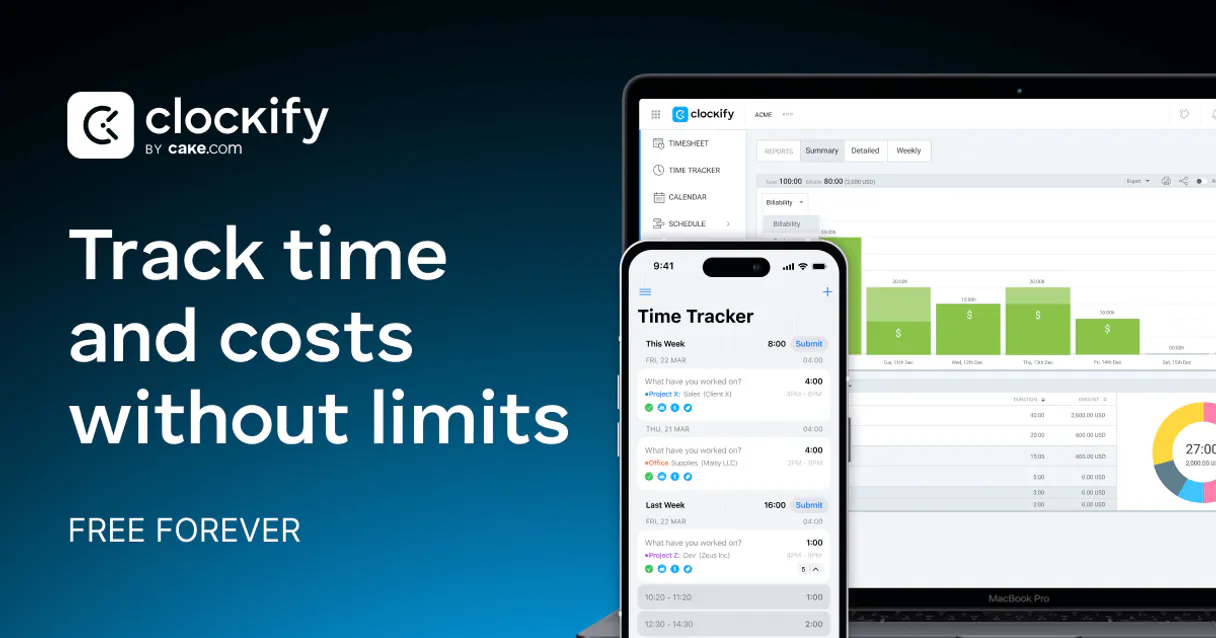
Independent Platform Disclaimer: Vinkius is an independent platform and is not affiliated with, endorsed by, sponsored by, verified by, or otherwise authorized by Clockify. All third-party trademarks, logos, and brand names are the property of their respective owners. Their use on this website is strictly for informational purposes to identify service compatibility and interoperability.
VINKIUS INFRASTRUCTURE
Cloud Hosted
Managed infra
V8 Isolated
Sandboxed per request
Zero-Trust Proxy
No stored credentials
DLP Enforced
Policy on every call
GDPR Compliant
EU data residency
Token Compression
~60% cost reduction
Works with Claude, ChatGPT, Cursor, and more
The Model Context Protocol standardizes how applications expose capabilities to LLMs. Instead of operating in isolation, your AI gains direct access to external platforms, live data, and real-world actions through secure, standardized connections.
This server provides 8 capabilities that interface natively with Claude, ChatGPT, Cursor, and any MCP client. No middleware. No custom integration required.
Available Capabilities
Checking team time logs shouldn't require 15 clicks across different tabs.
Right now, figuring out total team effort is a multi-step pain. You open the dashboard, select the team, navigate to 'Time Entries,' filter by date range, and then you have to manually check each project column to compile the total. If you have 10 people and 5 projects, you spend minutes clicking, scrolling, and cross-referencing data that should be immediate.
With the Clockify MCP Server, you just ask your agent: 'What was the total time logged by the team last week?' The agent runs `list_user_time_entries` and provides the consolidated data structure immediately. You get the answer, not a link to the dashboard.
Clockify MCP Server: Log time or audit data instantly.
The biggest time sink is switching context. To log a quick entry, you have to open the web app, select the correct project, start the timer, and then remember to stop it. If you forget one step, the data is wrong, and you waste time correcting it later.
Now, you just tell your agent what to do. Say 'Log 3 hours to Project Alpha.' The agent uses `add_new_time_entry`, logs the time, and confirms it. The process is one simple command, eliminating the entire manual logging workflow.
Common Questions About Clockify MCP
How do I use the add_new_time_entry tool with Clockify MCP Server? +
You prompt your agent with a direct command, specifying the hours, project, and description. The agent handles the required parameters and executes the add_new_time_entry function, logging the time immediately.
Does list_user_time_entries show all my team's time? +
Yes, you specify the user's name and the desired time frame. The agent runs list_user_time_entries and returns a clean list of records, including the project and duration for every entry.
How do I manage my timer with Clockify MCP Server? +
Just ask the agent to 'Start a timer for Project X.' The agent handles the state change and runs the tool. When you're done, ask it to 'Stop the timer' to use stop_current_timer.
Can I list all projects in a workspace using Clockify MCP Server? +
Yes. Run list_workspace_projects and the agent returns a complete list of all project names and IDs within the specified workspace.
How do I list all workspaces using the list_clockify_workspaces tool? +
The list_clockify_workspaces tool retrieves every workspace you have access to. You get a list of all workspace names and IDs, letting you know exactly where your team's projects are housed.
What information can I get about the authenticated user using get_my_clockify_profile? +
This tool provides key details about your Clockify profile. You'll get your name, email, and basic account info, which is useful for confirming who logged the time.
Can I list all team members using list_workspace_users? +
Yes, list_workspace_users returns a full roster of every user in the selected workspace. It includes their names and user IDs, helping you understand team allocation.
How do I list all projects using list_workspace_projects? +
list_workspace_projects retrieves every project configured within a specific workspace. You get the project name and ID, letting you know what billing categories are available.
Can I stop a running timer through the agent? +
Yes! Use the stop_current_timer tool. Provide your workspace and user ID, and the agent will instruct Clockify to stop the active timer immediately.
How do I see the projects for a specific workspace? +
Use the list_workspace_projects tool with the workspace ID. Your agent will fetch all projects, allowing you to see which ones are billable and their associated clients.
Where do I find my Clockify API Key? +
Log in to Clockify, go to Settings, and select My Profile. Scroll to the bottom to find and generate your API Key.
Use it with your favorite AI tools
Connect this server to Cursor, Claude, VS Code, and more.
More in this category

Rocketlane
Deliver customer onboarding projects on time with collaborative workspaces, task tracking, and time-to-value analytics.

Lokalise
Automate translation and localization workflows via Lokalise — manage projects, keys, and translations directly from any AI agent.

Greenhouse
Hire the right people with structured interviewing, customizable pipelines, and data-driven recruiting that scales with your team.
You might also like
Carta
Equip your AI agent with direct access to Carta — query cap tables, review equity grants, and monitor 409A valuations without opening the equity management dashboard.

NetBird
Automate Zero Trust networking via NetBird — manage accounts, users, and access controls directly from any AI agent.
Northflank (Developer Cloud & Orchestration)
Manage cloud infrastructure via Northflank — deploy microservices, trigger CI builds, and audit background jobs.