
Bring Public Transit
to Google ADK
Create your Vinkius account to connect WMATA to Google ADK and start using all 12 AI tools in minutes. Fully managed, enterprise secure, and ready to use without writing a single line of code. No hosting, no server setup — just connect and start using.
 GDPR Free for Subscribers
Compatible with every major AI agent and IDE
 Gemini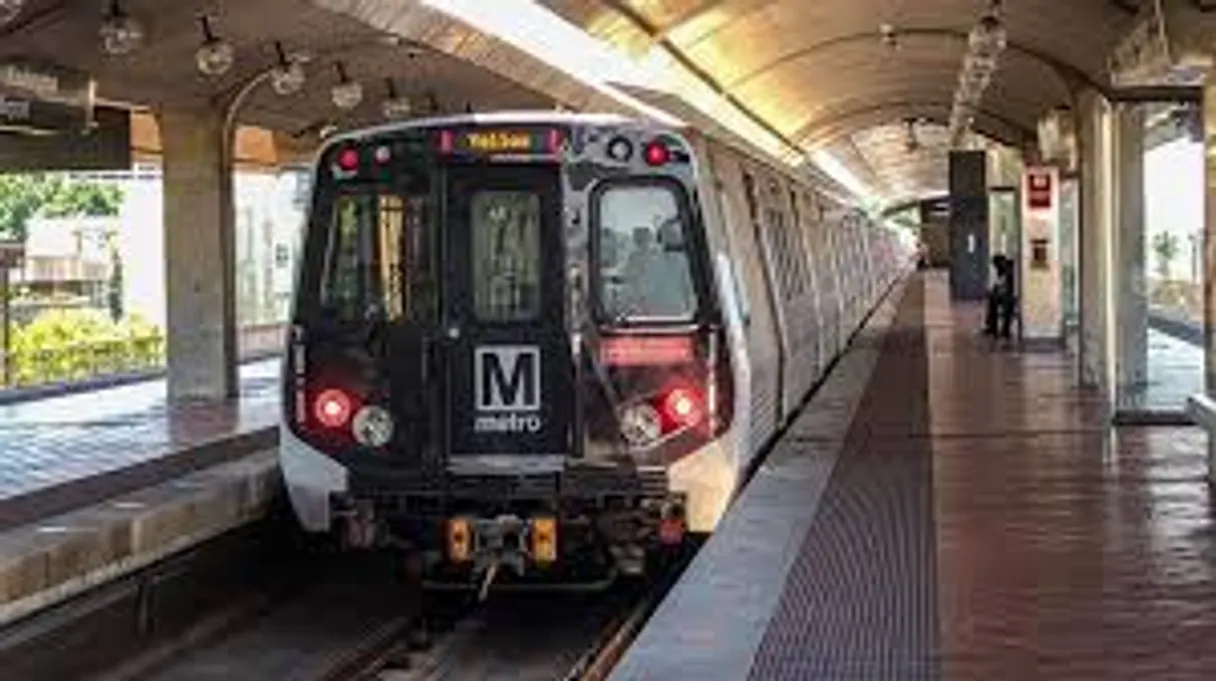
What is the WMATA MCP Server?
Connect your WMATA API Washington DC public transit data platform to any AI agent and take full control of real-time Metrorail and Metrobus tracking, incident monitoring, and station information through natural conversation.
What you can do
- Next Rail Predictions — Get real-time next train predictions system-wide or at specific Metrorail stations
- Station Discovery — List all Metrorail stations with codes, addresses, coordinates, and line affiliations
- Station Predictions — Get detailed next train arrivals at any specific Metrorail station
- Metrobus Tracking — Track real-time GPS positions of all Metrobus vehicles or filter by route
- Bus Route Details — Get complete route information including stop sequences for any Metrobus route
- Rail Incidents — Monitor active service disruptions affecting Metrorail lines and stations
- Bus Incidents — Check current incidents and detours affecting Metrobus service
- Elevator Outages — Track elevator and escalator outages for accessibility planning
- Station Entrances — Get street-level entrance information for any Metrorail station
- Parking Lots — Find station parking availability, fees, and amenities for park-and-ride planning
- Bus Routes — Browse all Metrobus routes operating across DC, Maryland, and Virginia
- Bus Predictions — Get next bus arrival predictions at stations and stops
How it works
- Subscribe to this server
- Enter your WMATA API key (free from the Developer Portal)
- Start tracking DC Metro transit from Claude, Cursor, or any MCP-compatible client
No more navigating the Metro website or manually checking train times. Your AI acts as a dedicated DC transit analyst and trip planning assistant.
Who is this for?
- DC Commuters — track trains and buses, check incidents, and plan park-and-ride trips
- Tourists — navigate the Metrorail system with station discovery and entrance guidance
- Accessibility Planners — verify elevator status and accessible entrances before traveling
- Transit Apps — integrate real-time WMATA data into mobility and journey planning applications
Built-in capabilities (12)
Returns incident descriptions, affected route IDs, detour information, bus stop closures, incident types (accident, road closure, construction, mechanical), start timestamps, and alternative service recommendations. Essential for bus service disruption awareness, alternative route planning, and passenger communication. AI agents should use this when users ask "are there any bus delays", "is route 30N running normally", or need to check Metrobus service reliability. Get current incidents affecting Metrobus service
Returns bus vehicle IDs, route IDs, latitude/longitude coordinates, trip IDs, destination names, deviation from schedule in seconds, and direction. Can query all buses system-wide or filter by specific route ID. Essential for real-time bus tracking, passenger wait time estimation, and bus arrival prediction. AI agents should reference this when users ask "where is the X2 bus", "show all buses on route 30N", or need to track Metrobus vehicles in real-time. Route IDs are typically 2-5 character identifiers (e.g., "30N", "X2", "L2"). Use getBusRoutes first to find route IDs if unknown. Get real-time positions of Metrobus vehicles, optionally filtered by route
Returns all stops served by the route in order, trip headsigns, and route path information. Essential for route planning, understanding bus service coverage, stop discovery, and passenger journey preparation. AI agents should use this when users ask "what stops does the 30N bus serve", "show me the route details for X2", or need complete route structure including stop sequences for trip planning. Get detailed information about a specific Metrobus route
Returns route IDs, route names, descriptions, and route types. Covers all WMATA-operated bus routes including limited-stop, local, and express services across DC, Maryland, and Virginia. Essential for route discovery, service area analysis, transit network understanding, and identifying route IDs for use in bus position and route detail queries. AI agents should reference this when users ask "list all bus routes", "what bus routes serve DC", or need to identify route IDs for subsequent Metrobus queries. List all Metrobus routes in the WMATA system
Returns bus route IDs, destination names, predicted arrival times in minutes, trip IDs, and vehicle IDs. Supports filtering by station code for station-specific predictions or system-wide queries. Essential for bus trip planning, real-time bus arrival awareness, and connection coordination between Metrorail and Metrobus. AI agents should use this when users ask "when is the next bus at Union Station", "show bus predictions for Foggy Bottom", or need real-time bus arrival predictions at a specific station or stop. Get next bus arrival predictions for Metrobus Circuit routes
Returns affected station codes and names, elevator/escalator identifiers, outage descriptions, estimated repair times, outage start timestamps, and accessibility impact information. Essential for accessibility planning, wheelchair route verification, senior and disability passenger support, and station accessibility awareness. AI agents should use this when users ask "are there any elevator outages at Gallery Place", "is the elevator working at Union Station", or need to verify station accessibility before planning journeys for passengers with mobility needs. Get current elevator and escalator outages at Metrorail stations
Returns train destination names, lines (Red, Orange, Silver, Blue, Yellow, Green), predicted arrival times in minutes, car counts, group numbers, and train direction. Can query all trains system-wide or filter by specific station code. Essential for commuter trip planning, real-time arrival awareness, and station crowd management. AI agents should use this when users ask "when is the next train", "show upcoming trains at Gallery Place", or need real-time Metrorail arrival predictions. Station codes are 3-letter identifiers (e.g., "A01" for Metro Center, "B36" for Gallery Place). Use getRailStations first to find station codes if unknown. Get next train predictions across the entire Metrorail system or at a specific station
Can query all parking lots system-wide or filter by specific station code. Essential for park-and-ride trip planning, commuter parking availability, station selection for driving passengers, and transportation mode choice analysis. AI agents should use this when users ask "which stations have parking", "how many spaces are at Shady Grove", or need to plan park-and-ride journeys from suburban areas into DC. Get Metrorail station parking lot information
Returns incident descriptions, affected station codes, line impacts, incident types (delay, power problem, medical, police activity, track maintenance), severity indicators, start timestamps, and estimated resolution times. Essential for service disruption awareness, alternative route planning, passenger communication, and understanding system reliability. AI agents should reference this when users ask "are there any delays on the Red Line", "is Metro running normally", or need to check service reliability before planning Metrorail journeys. Get current incidents affecting Metrorail service
Can filter by line code (RD=Red, OR=Orange, SV=Silver, BL=Blue, YL=Yellow, GR=Green) to show only stations on that line. Essential for station discovery, route planning, understanding line structure, and mapping the Metrorail network. AI agents should reference this when users ask "list all stations on the Red Line", "what is the station code for Foggy Bottom", or need to understand station sequences and line geography. Station codes are required for subsequent queries like next trains, predictions, entrances, and parking. List all Metrorail stations, optionally filtered by line
Returns entrance names, street addresses, latitude/longitude coordinates, entrance descriptions, and whether the entrance has escalator or elevator access. Essential for station navigation, first-time visitor guidance, street-level wayfinding, accessible entrance identification, and trip end planning. AI agents should reference this when users ask "where are the entrances to Metro Center", "find the closest entrance to Gallery Place", or need street-level navigation guidance for reaching a Metrorail station. Get entrance information for a specific Metrorail station
Returns trains with destination names, line colors, predicted arrival times, car counts, and train direction. More targeted than system-wide next rail queries. Essential for passenger waiting at a specific station, connection planning, and real-time arrival boards. AI agents should use this when users ask "when is the next train at Silver Spring", "show trains coming to Shady Grove", or need station-specific arrival predictions. Requires station code from getRailStations results. Get next train predictions at a specific Metrorail station
Why Google ADK?
Google ADK natively supports WMATA as an MCP tool provider. declare Vinkius Edge URL and the framework handles discovery, validation, and execution automatically. Combine 12 tools with Gemini's long-context reasoning for complex multi-tool workflows, with production-ready session management and evaluation built in.
- —
Google ADK natively supports MCP tool servers. declare a tool provider and the framework handles discovery, validation, and execution
- —
Built on Gemini models, ADK provides long-context reasoning ideal for complex multi-tool workflows with WMATA
- —
Production-ready features like session management, evaluation, and deployment come built-in. not bolted on
- —
Seamless integration with Google Cloud services means you can combine WMATA tools with BigQuery, Vertex AI, and Cloud Functions
WMATA in Google ADK
Why run WMATA with Vinkius?
The WMATA connection runs on our fully managed, secure cloud infrastructure. We handle the hosting, maintenance, and security so you don't have to deal with servers or code. All 12 tools are ready to work instantly without any complex setup.
You stay in complete control of your data. Your AI only accesses the information you approve, keeping your sensitive passwords and private details completely safe. Plus, with automatic optimizations, your AI works faster and more efficiently.
* Every connection is hosted and maintained by Vinkius. We handle the security, updates, and infrastructure so you don't have to write code or manage servers. See our infrastructure
Over 4,000 integrations ready for AI agents
Explore a vast library of pre-built integrations, optimized and ready to deploy.
Connect securely in under 30 seconds
Generate tokens to authenticate and link external services in a single step.
Complete visibility into every agent action
Audit live requests, latency, success rates, and active security compliance policies.
Optimize spending and track token ROI
Analyze real-time token consumption and cost metrics detailed by connection.




Explore our live AI Agents Analytics dashboard to see it all working
This dashboard is included when you connect WMATA using Vinkius. You will never be left in the dark about what your AI agents are doing with your tools.
WMATA and 4,000+ other AI tools. No hosting, no code, ready to use.
Professionals who connect WMATA to Google ADK through Vinkius don't need to write code, manage servers, or worry about security. Everything is pre-configured, secure, and runs automatically in the background.
Raw MCP | Vinkius | |
|---|---|---|
| Ready-to-use MCPs | Find and configure each manually | 4,000+ MCPs ready to use |
| Connection Setup | Manual coding & server setup | 1-click instant connection |
| Server Hosting | You host it yourself (needs 24/7 uptime) | 100% hosted & managed by Vinkius |
| Security & Privacy | Stored in plaintext config files | Bank-grade encrypted vault |
| Activity Visibility | Blind execution (no logs or tracking) | Live dashboard with real-time logs |
| Cost Control | Runaway AI token spend risk | Automatic budget limits |
| Revoking Access | Must delete files or code to stop | 1-click disconnect button |
How Vinkius secures
WMATA for Google ADK
Every request between Google ADK and WMATA is protected by our secure gateway. We automatically keep your sensitive data private, prevent unauthorized access, and let you disconnect instantly at any time.
Frequently asked questions
Can my AI check when the next Metrorail train is arriving at my station?
Yes! Use the get_station_prediction tool with the station code (e.g., "A01" for Metro Center, "B36" for Gallery Place). Your AI will return all upcoming trains with destination names, line colors (Red, Orange, Silver, Blue, Yellow, Green), predicted arrival times in minutes, and car counts. If you do not know the station code, first use get_rail_stations to find it by name. For a system-wide view of all upcoming trains, use get_next_rail without a station code.
How do I check if there are any delays or incidents affecting my Metrorail line?
Use the get_rail_incidents tool to check all active service disruptions across the Metrorail system. This returns incident descriptions, affected stations and lines, incident types (delays, power problems, medical emergencies, track maintenance), and start times. You can also check get_elevator_incidents for elevator and escalator outages that may affect accessibility at your station. For Metrobus service issues, use get_bus_incidents.
Can I track Metrobus vehicles in real-time to see when my bus will arrive?
Yes! Use get_bus_positions to see real-time GPS locations of all Metrobus vehicles, or filter by route ID (e.g., "30N", "X2") to track buses on a specific route. Returns vehicle IDs, route IDs, latitude/longitude, destinations, and schedule deviation in seconds. For detailed route information including stop sequences, use get_bus_route_details with the route ID. Use get_bus_routes first to find route IDs if unknown.
How does Google ADK connect to MCP servers?
Import the MCP toolset class and pass the server URL. ADK discovers and registers all tools automatically, making them available to your agent's tool-use loop.
Can ADK agents use multiple MCP servers?
Yes. Declare multiple MCP tool providers in your agent configuration. ADK merges all tool schemas and the agent can call tools from any server in a single turn.
Which Gemini models work best with MCP tools?
Gemini 2.0 Flash and Pro models both support function calling required for MCP tools. Flash is recommended for latency-sensitive use cases, Pro for complex reasoning.
McpToolset not found
Update: pip install --upgrade google-adk
Explore More MCP Servers
View all →
Coder (Remote Dev)
84 toolsManage Coder remote development environments, monitor deployment stats, and interact with AI Bridge sessions directly from your AI agent.
Lattice
9 toolsRetrieve HR employees, goals, feedback, and reviews directly from Lattice.

Document Paginator Engine
1 toolsMathematically slice massive text blocks into token-safe chunks without ever truncating critical sentences.

AMcards
7 toolsSend personalized greeting cards and handwritten notes to clients and prospects that feel genuinely personal at scale.