
Bring Ocr
to LlamaIndex
Create your Vinkius account to connect Parseur to LlamaIndex and start using all 10 AI tools in minutes. Fully managed, enterprise secure, and ready to use without writing a single line of code. No hosting, no server setup — just connect and start using.
 GDPR Free for Subscribers
Compatible with every major AI agent and IDE
 Gemini
What is the Parseur MCP Server?
Bring Parseur Document Extraction arrays directly into your AI workflows. By explicitly mapping into powerful OCR and templating engines, your agent can push unstructured PDFs or bulk emails into remote routing limits, parsing exact text fields securely. Extract fields, examine documents, list defined parse-templates, and retry pipelines without manual intervention.
What you can do
- Mailboxes & Templates — Examine specifically bound mailboxes tracking which explicit templates dictate data extraction limits mapped natively
- Document Navigation — Extract properties showing precisely which unstructured strings were identified inside uploaded payloads checking
status: parsedcorrectly - Payload Uploading — Instruct the node limits mapping
upload_documentgenerating raw payloads routing straight into the engine for OCR logic - Job Management — Discover disconnected states mitigating failed validations by pushing
retry_documentinstantly forcing physical pipeline resets
How it works
- Subscribe to this server
- Enter your Parseur API Key explicitly
- Start evaluating explicit AI OCR workflows reliably via Claude, Cursor, or any MCP structure
Who is this for?
- Operational Workflows — explicitly map invoicing pipelines investigating extraction errors remotely avoiding web limits
- Finance Teams — trace OCR receipts dynamically identifying missing fields from Chat architectures directly into a JSON limit natively
- Developers — route manual document loads simulating continuous AI logic mapping testing integrations on webhook bounds
Built-in capabilities (10)
The type determines the parsing engine (e.g., "pdf", "email", "attachment"). Once created, you can configure templates and forward documents to the mailbox for automatic extraction. Create a new Parseur mailbox for document parsing
Pass the template name and a JSON config string defining field mappings. Parseur will use this template to extract structured data from matching documents. Create a new extraction template for a Parseur mailbox
Fields depend on the template configuration (e.g., invoice_number, total_amount, line_items). Only works for documents with status "processed". Retrieve the fully extracted JSON data from a parsed document
Does not include the parsed data itself — use get_document_data for that. Get metadata of a single parsed document
Use this to verify mailbox setup before sending documents. Get detailed configuration of a specific Parseur mailbox
Each entry includes document ID, status (processed, failed, pending), and metadata like sender and received date. List all parsed documents inside a Parseur mailbox
Each mailbox represents a parsing pipeline for a specific document type (invoices, receipts, emails). Use the returned mailbox IDs for subsequent operations like listing documents or uploading files. List all Parseur parsing mailboxes
Templates define the extraction rules (field names, locations, regex patterns) used to pull structured data from incoming documents. List available extraction templates for a Parseur mailbox
Useful after fixing template rules or when the original parse failed due to a transient error. The document will be matched against the latest template rules. Retry parsing a failed or errored Parseur document
eml) to the specified mailbox for automatic parsing. The document enters the processing queue and will be parsed according to the mailbox template. Returns the new document ID for tracking. Upload a document URL to a Parseur mailbox for parsing
Why LlamaIndex?
LlamaIndex agents combine Parseur tool responses with indexed documents for comprehensive, grounded answers. Connect 10 tools through Vinkius and query live data alongside vector stores and SQL databases in a single turn. ideal for hybrid search, data enrichment, and analytical workflows.
- —
Data-first architecture: LlamaIndex agents combine Parseur tool responses with indexed documents for comprehensive, grounded answers
- —
Query pipeline framework lets you chain Parseur tool calls with transformations, filters, and re-rankers in a typed pipeline
- —
Multi-source reasoning: agents can query Parseur, a vector store, and a SQL database in a single turn and synthesize results
- —
Observability integrations show exactly what Parseur tools were called, what data was returned, and how it influenced the final answer
Parseur in LlamaIndex
Why run Parseur with Vinkius?
The Parseur connection runs on our fully managed, secure cloud infrastructure. We handle the hosting, maintenance, and security so you don't have to deal with servers or code. All 10 tools are ready to work instantly without any complex setup.
You stay in complete control of your data. Your AI only accesses the information you approve, keeping your sensitive passwords and private details completely safe. Plus, with automatic optimizations, your AI works faster and more efficiently.
* Every connection is hosted and maintained by Vinkius. We handle the security, updates, and infrastructure so you don't have to write code or manage servers. See our infrastructure
Over 4,000 integrations ready for AI agents
Explore a vast library of pre-built integrations, optimized and ready to deploy.
Connect securely in under 30 seconds
Generate tokens to authenticate and link external services in a single step.
Complete visibility into every agent action
Audit live requests, latency, success rates, and active security compliance policies.
Optimize spending and track token ROI
Analyze real-time token consumption and cost metrics detailed by connection.




Explore our live AI Agents Analytics dashboard to see it all working
This dashboard is included when you connect Parseur using Vinkius. You will never be left in the dark about what your AI agents are doing with your tools.
Parseur and 4,000+ other AI tools. No hosting, no code, ready to use.
Professionals who connect Parseur to LlamaIndex through Vinkius don't need to write code, manage servers, or worry about security. Everything is pre-configured, secure, and runs automatically in the background.
Raw MCP | Vinkius | |
|---|---|---|
| Ready-to-use MCPs | Find and configure each manually | 4,000+ MCPs ready to use |
| Connection Setup | Manual coding & server setup | 1-click instant connection |
| Server Hosting | You host it yourself (needs 24/7 uptime) | 100% hosted & managed by Vinkius |
| Security & Privacy | Stored in plaintext config files | Bank-grade encrypted vault |
| Activity Visibility | Blind execution (no logs or tracking) | Live dashboard with real-time logs |
| Cost Control | Runaway AI token spend risk | Automatic budget limits |
| Revoking Access | Must delete files or code to stop | 1-click disconnect button |
How Vinkius secures
Parseur for LlamaIndex
Every request between LlamaIndex and Parseur is protected by our secure gateway. We automatically keep your sensitive data private, prevent unauthorized access, and let you disconnect instantly at any time.
Frequently asked questions
Does this tool parse the document directly or use the cloud engine?
The tool offloads the logic specifically via endpoints mapping back to the Parseur Cloud Engine. The AI acts to organize mailboxes, list templates, and fetch final states securely without computing massive local OCR networks.
Can I upload a raw file string to be parsed?
Yes. Utilizing the explicitly mapped upload_document constraint, the agent can inject raw string boundaries identifying formatting, passing files straightforward into the target mailbox ID natively.
Will I see missing required fields if extraction fails?
Absolutely. Querying get_document_details lists specific status bounds. If a template expects InvoiceTotal and misses it, the document flags a processing boundary issue precisely traceable here.
How does LlamaIndex connect to MCP servers?
Use the MCP client adapter to create a connection. LlamaIndex discovers all tools and wraps them as query engine tools compatible with any LlamaIndex agent.
Can I combine MCP tools with vector stores?
Yes. LlamaIndex agents can query Parseur tools and vector store indexes in the same turn, combining real-time and embedded data for grounded responses.
Does LlamaIndex support async MCP calls?
Yes. LlamaIndex's async agent framework supports concurrent MCP tool calls for high-throughput data processing pipelines.
BasicMCPClient not found
Install: pip install llama-index-tools-mcp
Explore More MCP Servers
View all →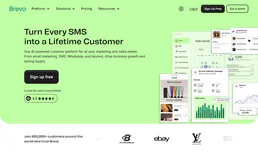
Brevo
11 toolsEngage customers across email, SMS, and chat with marketing campaigns and transactional messaging that scale with you.

Gatling
10 toolsManage load testing via Gatling Enterprise — list and start simulations, monitor test runs and request stats, and handle generator pools directly from any AI agent.

Drupal
10 toolsManage headless content via Drupal — list nodes, handle taxonomy terms, manage files, and audit users directly from any AI agent.

Loyverse
4 toolsFree POS and inventory management system.