
Integrate Health Gorilla with Claude, Cursor, Chatbots & AI Agents MCP Server
 GDPR Free for Subscribers
Compatible with every major AI agent and IDE
 Gemini
Cancel lab order on Health Gorilla
Orders in "received" or "pending" status can typically be cancelled. Orders already in "collected" or "testing" status cannot be cancelled and require lab notification. A cancellation reason is recommended for audit purposes. Use this when an order was submitted in error, the patient refused testing, or clinical circumstances have changed. Cancel a pending laboratory order
Create patient record on Health Gorilla
Required fields: first name, last name, date of birth, and gender. Optional: address, phone, email, MRN (Medical Record Number), and insurance information. Use this to register a new patient before submitting lab orders. Returns the patient ID for use in subsequent order submissions. Create a new patient record in the Health Gorilla system
Get lab results on Health Gorilla
Returns structured data suitable for EHR integration or clinical review. Results include timestamp of completion, pathologist sign-off (if applicable), and any critical value notifications. Use this to review patient results, identify abnormal values, or populate EHR records. Retrieve detailed laboratory results for a specific completed order
Get order status on Health Gorilla
Status values include: "received", "in_progress", "collected", "testing", "completed", "cancelled". Returns order details, specimen collection status, lab processing information, and estimated completion time. Use this to track order progress, update patients on result timelines, or verify completion status. Check the current status of a submitted laboratory order
Get patient demographics on Health Gorilla
Returns name, DOB, gender, contact information, MRN, and registration date. Use this to verify patient identity before order submission or to review patient registration details. Get demographic information for a registered patient
Get provider details on Health Gorilla
Use this to verify provider credentials, obtain contact information for referrals, or confirm network participation before ordering tests. Get detailed information about a specific healthcare provider
List orders on Health Gorilla
Optional filters: status (e.g., "pending", "completed", "cancelled") and patient_id. Each order includes order ID, patient name, test names, status, order date, and performing lab. Use this to review recent orders, track pending work, or audit ordering patterns. List laboratory orders with optional filtering by status or patient
List patient results on Health Gorilla
Includes test names, values, dates, and order references. Useful for trend analysis and longitudinal patient monitoring (e.g., tracking HbA1c over time, monitoring lipid panels). Use this for chronic disease management, preventive care follow-up, or comprehensive patient history review. List all laboratory results for a specific patient across all orders
Match patient on Health Gorilla
Returns match score and potential matches. Use this before creating new orders to avoid duplicate patient records and ensure results are attributed to the correct patient. Critical for data integrity in healthcare systems. Match a patient against existing records in the Health Gorilla network
Search lab tests on Health Gorilla
Returns test names, LOINC codes, categories (chemistry, hematology, microbiology, etc.), turnaround times, and performing laboratory information. Use this to find the correct test codes (LOINC/CPT) before submitting orders, explore available diagnostic options, or verify test availability. Optional query parameter accepts free-text search. Optional category parameter filters by test type. Search the Health Gorilla lab test catalog by name, LOINC code, or category
Search providers on Health Gorilla
Results include provider name, specialty, NPI number, location, and contact information. Use this to find ordering providers, verify network participation, or locate specialists in a specific area. Optional filters: specialty (e.g., "Internal Medicine", "Cardiology") and location. Search for healthcare providers in the Health Gorilla network
Submit lab order on Health Gorilla
The order includes patient demographics, ordering provider information, requested tests (LOINC/CPT codes), clinical indication/diagnosis (ICD-10 codes), and specimen collection details. Returns an order ID for tracking status and retrieving results. Use this to place lab orders electronically without manual paperwork. Supported test types include chemistry panels, CBC, metabolic panels, infectious disease testing, genetic testing, and radiology orders. The order is routed to the appropriate performing laboratory (Quest, LabCorp, etc.). Submit a new laboratory or radiology order through the Health Gorilla diagnostic network
Security & Code Integrity Audit
Every tool in the Health Gorilla MCP Server is continuously audited by the Vinkius Security Engine. We guarantee zero-trust payload isolation, strict data boundaries, and deterministic execution for enterprise-grade AI agents.
How Vinkius protects your data
Can I set different limits for each virtual assistant on my team?
Absolutely. You have full control in our command center. You can create an AI agent that only "reads" data so the support team can answer questions, and another superpowered agent that can "edit" and "create" information exclusively for your operations team. Each AI gets exactly the level of access you allow.
Is there a risk of the AI "going crazy" and deleting important company data?
No. With Vinkius, the AI operates on "rails". It can only make the exact moves you authorized in the tool's settings. It cannot invent routes, access other networks in your company, or decide to delete random files. If the action isn't in the approved catalog, the attempt is blocked instantly.
How does the AI access my passwords and credentials?
It simply doesn't. On Vinkius, your passwords, API keys, and login details are kept in a secure vault. The AI (like ChatGPT or Claude) merely "asks" Vinkius to perform the task. Vinkius opens the door, does the work, and hands the result back to the AI. Your credentials are never seen, read, or learned by the artificial intelligence.
What if the AI ends up reading customer data or confidential information?
We have a built-in digital "bodyguard" called DLP (Data Loss Prevention). If a tool fetches data and the response contains social security numbers, credit cards, or personal customer info, Vinkius magically blocks and erases that information before it is delivered to the AI. The AI works only with what is strictly necessary, and your sensitive data never leaks.
Health Gorilla. Runs on everything.
From IDE to framework. Every connection governed by Vinkius.
Anthropic's native desktop app for Claude with built-in MCP support.
AI-first code editor with integrated LLM-powered coding assistance.
GitHub Copilot in VS Code with Agent mode and MCP support.
Purpose-built IDE for agentic AI coding workflows.
Autonomous AI coding agent that runs inside VS Code.
Anthropic's agentic CLI for terminal-first development.
Python SDK for building production-grade OpenAI agent workflows.
Google's framework for building production AI agents.
Type-safe agent development for Python with first-class MCP support.
TypeScript toolkit for building AI-powered web applications.
TypeScript-native agent framework for modern web stacks.
Python framework for orchestrating collaborative AI agent crews.
Leading Python framework for composable LLM applications.
Data-aware AI agent framework for structured and unstructured sources.
Microsoft's framework for multi-agent collaborative conversations.
Explore More MCP Servers
View all →
CocktailFyi
12 toolsExplore cocktails, ingredients, and bartending techniques — get recipes and guides via AI.

Fireworks AI
6 toolsEmpower LLM applications via Fireworks AI — perform ultra-fast chat completions, generate embeddings and images, and transcribe audio directly from any AI agent.
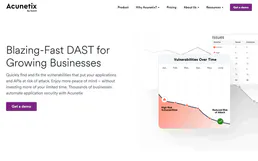
Acunetix 360
3 toolsAutomated web vulnerability scanning — manage scans, track issues, and audit security via AI.
Mem0
4 toolsGive your AI agent persistent memory — store, search, and recall facts, preferences, and context across sessions using the leading agent memory platform.