
Integrate Linkwarden with Claude, Cursor, Chatbots & AI Agents MCP Server
 GDPR Free for Subscribers
Compatible with every major AI agent and IDE
 Gemini
Archive link on Linkwarden
Archive a link (triggers an update of the link's archive files)
Auth forgot password on Linkwarden
Send password reset email
Auth reset password on Linkwarden
Reset password with token
Auth verify email on Linkwarden
Verify email address
Bulk update links on Linkwarden
Bulk update links (tags/collections)
Create collection on Linkwarden
Create a new collection
Create highlight on Linkwarden
Create or update a highlight
Create link on Linkwarden
Create a new link
Delete collection on Linkwarden
Delete a collection
Delete highlight on Linkwarden
Delete a highlight
Get archive on Linkwarden
Retrieve an archive file by link ID
Get avatar on Linkwarden
Retrieve user avatar
Get collection on Linkwarden
Get collection by ID
Get config on Linkwarden
Retrieve public runtime configuration
Get dashboard v1 on Linkwarden
Get dashboard data (v1)
Get dashboard v2 on Linkwarden
Get dashboard data (v2)
Get link on Linkwarden
Get a link by ID
Get link highlights on Linkwarden
Get highlights for a link
Get logins on Linkwarden
Get login configuration
Get migration on Linkwarden
Retrieve migration data (user info, collections, links for export)
Get preserved token on Linkwarden
Create short-lived preserved format URL token
Get public collection links on Linkwarden
Retrieve links from a specific collection (public)
Get public collection tags on Linkwarden
Get tags for a collection (public)
Import migration on Linkwarden
Import data for migration
List collections on Linkwarden
Get all collections
List rss on Linkwarden
List RSS subscriptions
Stream preserved view on Linkwarden
Stream archived format
Update collection on Linkwarden
Update a collection
Update dashboard v2 on Linkwarden
Update dashboard layout (v2)
Update link on Linkwarden
Update a link
Upload archive for link on Linkwarden
Upload or replace a client-side archive file for a specific link
Upload standalone archive on Linkwarden
Upload an archive file, create a new link, and store it in the default collection
Security & Code Integrity Audit
Every tool in the Linkwarden MCP Server is continuously audited by the Vinkius Security Engine. We guarantee zero-trust payload isolation, strict data boundaries, and deterministic execution for enterprise-grade AI agents.
How Vinkius protects your data
Can I set different limits for each virtual assistant on my team?
Absolutely. You have full control in our command center. You can create an AI agent that only "reads" data so the support team can answer questions, and another superpowered agent that can "edit" and "create" information exclusively for your operations team. Each AI gets exactly the level of access you allow.
How can I see a list of all my bookmark folders?
You can use the list_collections tool. It will retrieve all your existing collections, allowing the AI to show you how your bookmarks are organized.
What happens if the underlying API rate limits my agent?
Our edge infrastructure automatically handles backoffs, queueing, and throttling. If an AI agent sends too many erratic requests, Vinkius manages the rate limits gracefully, ensuring your backend doesn't crash.
Does the AI train on my tools or API data?
No. Vinkius enforces a strict Zero-Retention policy. Your data simply passes through our secure servers to complete the requested action and is instantly forgotten. Nothing you do here is ever stored, logged, or used to train any artificial intelligence.
Triggering Linkwarden via Natural Language
The Linkwarden MCP server handles authentication and payload formatting, allowing your LLM to perform deterministic actions.
Execute bookmark manager Commands with AI
The Linkwarden server exposes documented endpoints for bookmark manager. This allows ChatGPT and Cursor to interact with productivity APIs seamlessly.
web archiving & AI Execution
Integrate web archiving features into your LLM framework using Linkwarden. The MCP server ensures precise command execution across your productivity stack.
Linkwarden. Runs on everything.
From IDE to framework. Every connection governed by Vinkius.
Anthropic's native desktop app for Claude with built-in MCP support.
AI-first code editor with integrated LLM-powered coding assistance.
GitHub Copilot in VS Code with Agent mode and MCP support.
Purpose-built IDE for agentic AI coding workflows.
Autonomous AI coding agent that runs inside VS Code.
Anthropic's agentic CLI for terminal-first development.
Python SDK for building production-grade OpenAI agent workflows.
Google's framework for building production AI agents.
Type-safe agent development for Python with first-class MCP support.
TypeScript toolkit for building AI-powered web applications.
TypeScript-native agent framework for modern web stacks.
Python framework for orchestrating collaborative AI agent crews.
Leading Python framework for composable LLM applications.
Data-aware AI agent framework for structured and unstructured sources.
Microsoft's framework for multi-agent collaborative conversations.
Explore More MCP Servers
View all →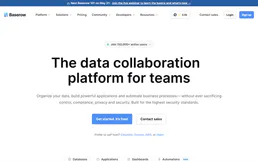
Baserow
9 toolsBuild no-code databases, create custom views, and collaborate on structured data with an open-source Airtable alternative.

Rapid7 InsightVM
10 toolsEquip your AI to interact directly with Rapid7 InsightVM, extracting vulnerability assessments, scanning network assets, and launching immediate scans.

Checkr
8 toolsAutomate background checks via Checkr — screen candidates, monitor reports, and manage compliance directly from any AI agent.

Import.io (Web Data Extraction)
10 toolsExtract structured data from any website via Import.io — run extractors, manage bulk crawls, and monitor API usage.