
Bring Visual Testing
to Vercel AI SDK
Create your Vinkius account to connect Applitools to Vercel AI SDK and start using all 10 AI tools in minutes. Fully managed, enterprise secure, and ready to use without writing a single line of code. No hosting, no server setup — just connect and start using.
 GDPR Free for Subscribers
Compatible with every major AI agent and IDE
 Gemini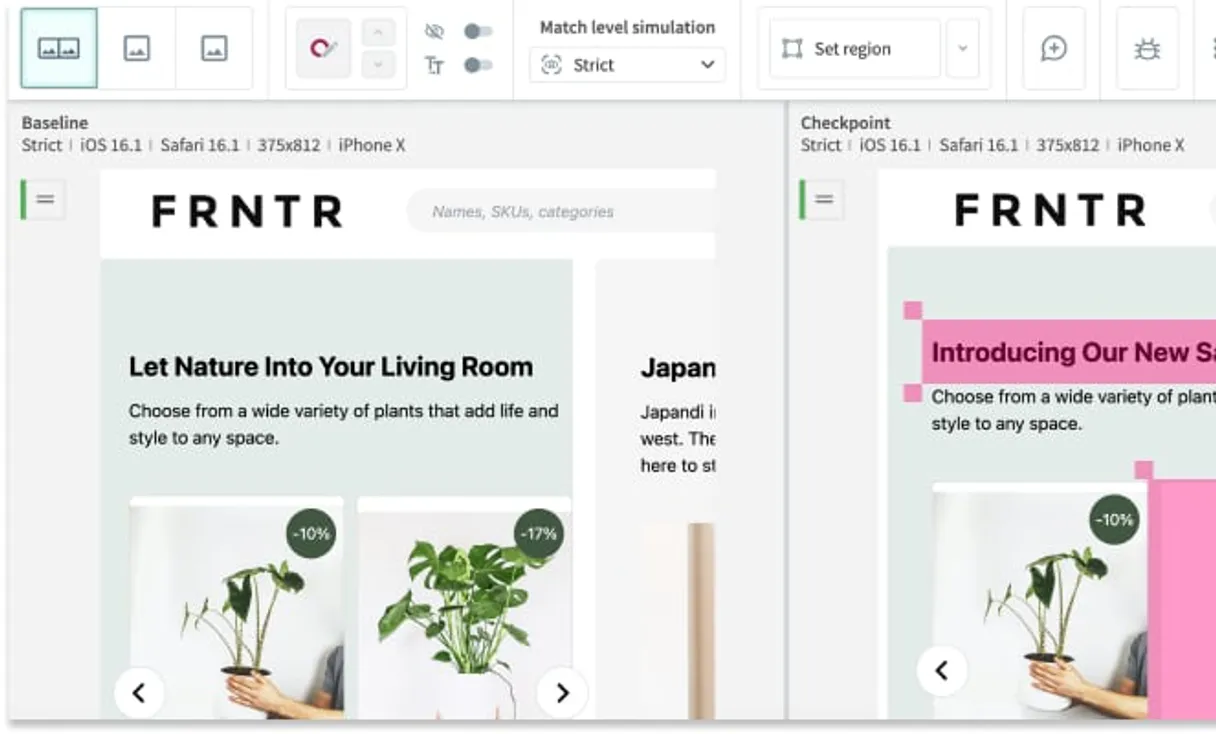
What is the Applitools MCP Server?
Connect your Applitools Eyes testing suite to your AI agent and manage your entire visual regression pipeline without opening the dashboard. Allow your agent to spot UI changes, validate baselines, and assess testing health dynamically.
What you can do
- Batch Observability — Query active test batches to view aggregated statuses (Passed, Failed, Unresolved) and completion rates
- Session & Results analysis — Drill down into specific test sessions to examine failed step images, match levels, and browser differences
- Baseline Management — List your "golden" graphical baselines bound to applications or specific Git branches
- Actionable Maintenance — Authorize the agent to delete outdated baselines or discard legacy batches to keep your workspace clean
- Key Validation — Ensure connectivity against your visual AI engine before pipeline triggers
How it works
- Subscribe to this server
- Insert your Applitools API Key
- Review visual bugs and validate frontend changes directly from Claude, Cursor, or any MCP-compatible surface
Who is this for?
- QA Automation Engineers — ask your agent to summarize unresolved test batches and pinpoint exact OS/browser failure combinations
- Frontend Developers — verify branch-specific visual baselines during PRs without context switching
- Engineering Managers — pull high-level batch stats to ensure release criteria are visually met
- Designers — request a quick breakdown of structural UI changes caught by Applitools Visual AI before deployment
Built-in capabilities (10)
Use when a baseline is outdated or a page has been redesigned. Delete an Applitools test baseline
Does NOT affect baselines. Use with caution — this is irreversible. Delete an Applitools test batch
Use batch ID from list_batches. Get full details of an Applitools batch
Returns passed/failed/unresolved/new counts without full test data. Get summary statistics for an Applitools batch
Provide batch ID and session ID. Get details of a test session within an Applitools batch
Returns baseline IDs, names, and env configs. Filter by app name. List visual baselines for an app on Applitools
Batches group related test sessions. Returns batch IDs, names, statuses (Passed/Unresolved/Failed), and test counts. Each batch has a unique ID used to query its results. List all test batches on Applitools Eyes
Use to inspect branch-specific visual states. List baselines for a specific branch on Applitools
List all test results in an Applitools batch
Use to verify connectivity before running tests. Validate the Applitools API key
Why Vercel AI SDK?
The Vercel AI SDK gives every Applitools tool full TypeScript type inference, IDE autocomplete, and compile-time error checking. Connect 10 tools through Vinkius and stream results progressively to React, Svelte, or Vue components. works on Edge Functions, Cloudflare Workers, and any Node.js runtime.
- —
TypeScript-first: every MCP tool gets full type inference, IDE autocomplete, and compile-time error checking out of the box
- —
Framework-agnostic core works with Next.js, Nuxt, SvelteKit, or any Node.js runtime. same Applitools integration everywhere
- —
Built-in streaming UI primitives let you display Applitools tool results progressively in React, Svelte, or Vue components
- —
Edge-compatible: the AI SDK runs on Vercel Edge Functions, Cloudflare Workers, and other edge runtimes for minimal latency
Applitools in Vercel AI SDK
Why run Applitools with Vinkius?
The Applitools connection runs on our fully managed, secure cloud infrastructure. We handle the hosting, maintenance, and security so you don't have to deal with servers or code. All 10 tools are ready to work instantly without any complex setup.
You stay in complete control of your data. Your AI only accesses the information you approve, keeping your sensitive passwords and private details completely safe. Plus, with automatic optimizations, your AI works faster and more efficiently.
* Every connection is hosted and maintained by Vinkius. We handle the security, updates, and infrastructure so you don't have to write code or manage servers. See our infrastructure
Over 4,000 integrations ready for AI agents
Explore a vast library of pre-built integrations, optimized and ready to deploy.
Connect securely in under 30 seconds
Generate tokens to authenticate and link external services in a single step.
Complete visibility into every agent action
Audit live requests, latency, success rates, and active security compliance policies.
Optimize spending and track token ROI
Analyze real-time token consumption and cost metrics detailed by connection.




Explore our live AI Agents Analytics dashboard to see it all working
This dashboard is included when you connect Applitools using Vinkius. You will never be left in the dark about what your AI agents are doing with your tools.
Applitools and 4,000+ other AI tools. No hosting, no code, ready to use.
Professionals who connect Applitools to Vercel AI SDK through Vinkius don't need to write code, manage servers, or worry about security. Everything is pre-configured, secure, and runs automatically in the background.
Raw MCP | Vinkius | |
|---|---|---|
| Ready-to-use MCPs | Find and configure each manually | 4,000+ MCPs ready to use |
| Connection Setup | Manual coding & server setup | 1-click instant connection |
| Server Hosting | You host it yourself (needs 24/7 uptime) | 100% hosted & managed by Vinkius |
| Security & Privacy | Stored in plaintext config files | Bank-grade encrypted vault |
| Activity Visibility | Blind execution (no logs or tracking) | Live dashboard with real-time logs |
| Cost Control | Runaway AI token spend risk | Automatic budget limits |
| Revoking Access | Must delete files or code to stop | 1-click disconnect button |
How Vinkius secures
Applitools for Vercel AI SDK
Every request between Vercel AI SDK and Applitools is protected by our secure gateway. We automatically keep your sensitive data private, prevent unauthorized access, and let you disconnect instantly at any time.
Frequently asked questions
Can my AI agent resolve a test failure on its own?
No. The MCP server is designed for pulling state data—it retrieves batches, session diff links, and match levels so you can review them locally. Approving a new baseline or resolving a mismatch still requires human intervention within the Applitools Eyes dashboard to maintain absolute testing safety.
Can I use the agent to delete old UI snapshots?
Yes. If your UI has undergone major structural changes and old baselines are causing false positives, you can authorize the agent to execute the delete_baseline tool. Provide the exact baseline ID to instantly discard the legacy screenshot from your workspace.
How fast can I summarize test errors after my CI/CD action triggers?
Almost instantly. Rather than scrolling through dozens of Applitools logs, ask your agent to 'Get batch stats for ID 123'. It will immediately return the aggregation of Passed, Failed, and Unresolved runs, saving you countless minutes of digging.
How does the Vercel AI SDK connect to MCP servers?
Import createMCPClient from @ai-sdk/mcp and pass the server URL. The SDK discovers all tools and provides typed TypeScript interfaces for each one.
Can I use MCP tools in Edge Functions?
Yes. The AI SDK is fully edge-compatible. MCP connections work on Vercel Edge Functions, Cloudflare Workers, and similar runtimes.
Does it support streaming tool results?
Yes. The SDK provides streaming primitives like useChat and streamText that handle tool calls and display results progressively in the UI.
createMCPClient is not a function
Install: npm install @ai-sdk/mcp
Explore More MCP Servers
View all →
EngageBay All-in-One CRM
10 toolsEquip your AI agent to manage contacts, track sales deals, and monitor CRM tasks via the EngageBay API.
Harry Potter API
6 toolsExplore the wizarding world — search characters, students, staff, houses and spells from the Harry Potter universe.

Enrich CRM
5 toolsEnhance your CRM records with verified company data, technographic signals, and contact enrichment that keeps your database fresh.

Bounsel
9 toolsManage your contract lifecycle via Bounsel — list documents, automate templates, and request signatures directly from any AI agent.