
Bring Custom Apps
to OpenAI Agents SDK
Create your Vinkius account to connect Fusioo to OpenAI Agents SDK and start using all 12 AI tools in minutes. Fully managed, enterprise secure, and ready to use without writing a single line of code. No hosting, no server setup — just connect and start using.
 GDPR Free for Subscribers
Compatible with every major AI agent and IDE
 Gemini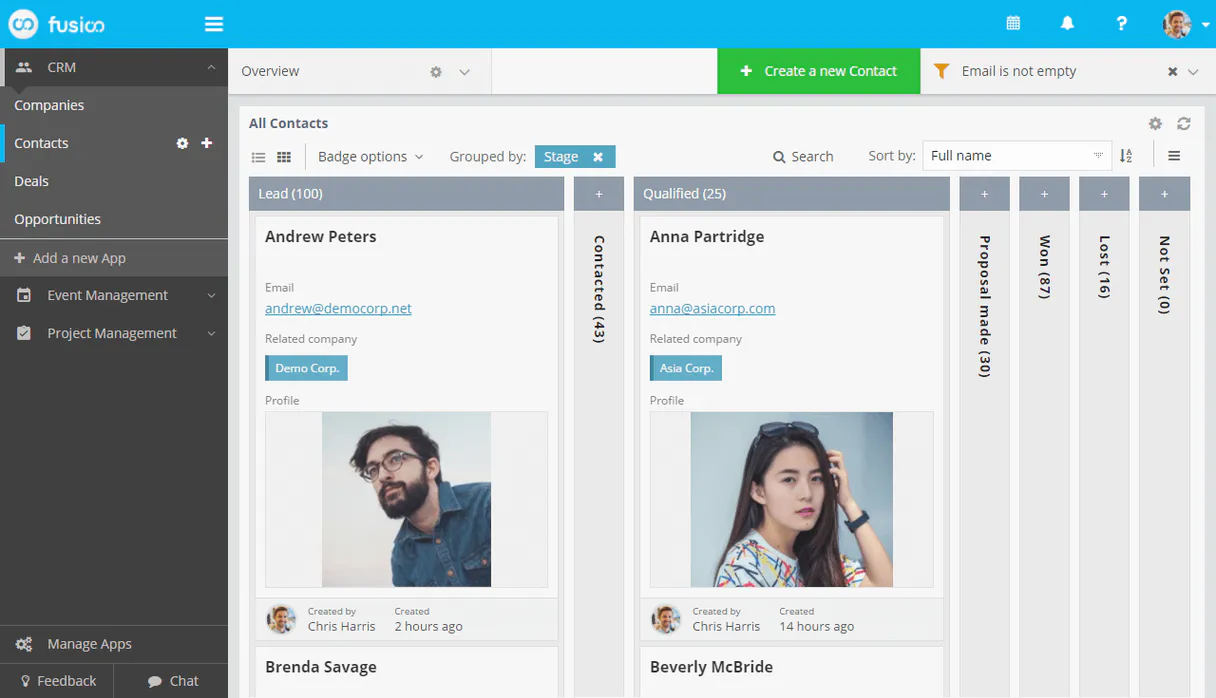
What is the Fusioo MCP Server?
Connect your Fusioo workspace to any AI agent to automate your project management and database workflows through the Model Context Protocol (MCP). Fusioo is a highly customizable workspace platform that allows you to build your own apps to manage everything from CRM to project tracking. This MCP server enables you to retrieve app schemas, manage individual records, and monitor workspace activity directly through natural conversation.
Key Features
- Custom App Oversight — List all apps in your workspace and fetch detailed schemas including field definitions and unique IDs.
- Record Management — Access and retrieve data from any of your custom apps, or create and update records programmatically.
- Data Quantification — Get real-time record counts for specific apps to track project volume or lead growth.
- Teammate Collaboration — List workspace users and teammates to maintain full context of who is involved in each app.
- Dashboard Insights — Access configured widgets and saved reports to get high-level snapshots of your data.
- User Identity — Fetch profile information for the authenticated API identity to verify access levels.
- Real-time Synchronization — Keep your custom database records accessible to your AI assistant without leaving your primary workspace.
How it works
- Subscribe to this server through the Vinkius Marketplace
- Enter your Fusioo Client ID and Client Secret (found in Integrations > Custom Integrations)
- Start managing your custom apps from Claude, Cursor, or any MCP client
Who is this for?
- Project Managers — quickly check project statuses or record counts without manual dashboard navigation.
- CRM Admins — get a real-time overview of leads and customer profiles via simple AI commands.
- Operations Teams — automate the creation of new records and verify field schemas seamlessly.
Built-in capabilities (12)
Add a new record
Get total record count
Get app metadata
Get current user
Get record metadata
List records in app
List all Fusioo apps
List widgets
List available reports
List teammates
Modify a record
Check connection
Why OpenAI Agents SDK?
The OpenAI Agents SDK auto-discovers all 12 tools from Fusioo through native MCP integration. Build agents with built-in guardrails, tracing, and handoff patterns. chain multiple agents where one queries Fusioo, another analyzes results, and a third generates reports, all orchestrated through Vinkius.
- —
Native MCP integration via
MCPServerSse, pass the URL and the SDK auto-discovers all tools with full type safety - —
Built-in guardrails, tracing, and handoff patterns let you build production-grade agents without reinventing safety infrastructure
- —
Lightweight and composable: chain multiple agents and MCP servers in a single pipeline with minimal boilerplate
- —
First-party OpenAI support ensures optimal compatibility with GPT models for tool calling and structured output
Fusioo in OpenAI Agents SDK
Why run Fusioo with Vinkius?
The Fusioo connection runs on our fully managed, secure cloud infrastructure. We handle the hosting, maintenance, and security so you don't have to deal with servers or code. All 12 tools are ready to work instantly without any complex setup.
You stay in complete control of your data. Your AI only accesses the information you approve, keeping your sensitive passwords and private details completely safe. Plus, with automatic optimizations, your AI works faster and more efficiently.
* Every connection is hosted and maintained by Vinkius. We handle the security, updates, and infrastructure so you don't have to write code or manage servers. See our infrastructure
Over 4,000 integrations ready for AI agents
Explore a vast library of pre-built integrations, optimized and ready to deploy.
Connect securely in under 30 seconds
Generate tokens to authenticate and link external services in a single step.
Complete visibility into every agent action
Audit live requests, latency, success rates, and active security compliance policies.
Optimize spending and track token ROI
Analyze real-time token consumption and cost metrics detailed by connection.




Explore our live AI Agents Analytics dashboard to see it all working
This dashboard is included when you connect Fusioo using Vinkius. You will never be left in the dark about what your AI agents are doing with your tools.
Fusioo and 4,000+ other AI tools. No hosting, no code, ready to use.
Professionals who connect Fusioo to OpenAI Agents SDK through Vinkius don't need to write code, manage servers, or worry about security. Everything is pre-configured, secure, and runs automatically in the background.
Raw MCP | Vinkius | |
|---|---|---|
| Ready-to-use MCPs | Find and configure each manually | 4,000+ MCPs ready to use |
| Connection Setup | Manual coding & server setup | 1-click instant connection |
| Server Hosting | You host it yourself (needs 24/7 uptime) | 100% hosted & managed by Vinkius |
| Security & Privacy | Stored in plaintext config files | Bank-grade encrypted vault |
| Activity Visibility | Blind execution (no logs or tracking) | Live dashboard with real-time logs |
| Cost Control | Runaway AI token spend risk | Automatic budget limits |
| Revoking Access | Must delete files or code to stop | 1-click disconnect button |
How Vinkius secures
Fusioo for OpenAI Agents SDK
Every request between OpenAI Agents SDK and Fusioo is protected by our secure gateway. We automatically keep your sensitive data private, prevent unauthorized access, and let you disconnect instantly at any time.
Frequently asked questions
How do I get a Client ID and Secret for Fusioo?
Log in to your Fusioo workspace, navigate to Integrations > Custom Integrations, and create a new integration to retrieve your Client ID and Client Secret.
Where do I find my App ID or Record ID?
Open any record in your Fusioo app, click the options menu (three dots), and select 'Developer Information' to see the IDs for the App, Record, and Fields.
Can I filter records through the agent?
The 'list_app_records' tool retrieves the most recent records. For advanced filtering, ensure you have the correct App ID or use the 'get_record_details' if you have the specific ID.
What is the difference between an App and a Record?
In Fusioo, an App is a collection or database table (e.g., 'Projects'), while a Record is a specific entry in that collection (e.g., 'Website Launch').
How does the OpenAI Agents SDK connect to MCP?
Use MCPServerSse(url=...) to create a server connection. The SDK auto-discovers all tools and makes them available to your agent with full type information.
Can I use multiple MCP servers in one agent?
Yes. Pass a list of MCPServerSse instances to the agent constructor. The agent can use tools from all connected servers within a single run.
Does the SDK support streaming responses?
Yes. The SDK supports SSE and Streamable HTTP transports, both of which work natively with Vinkius.
MCPServerStreamableHttp not found
Ensure you have the latest version: pip install --upgrade openai-agents
Agent not calling tools
Make sure your prompt explicitly references the task the tools can help with.
Explore More MCP Servers
View all →
Bloomberg Law
13 toolsAccess 200M+ court dockets, case law, and legal news via Bloomberg Law Enterprise Dockets API for comprehensive legal research.

Azure AI Search
6 toolsExecute RAG queries against Azure AI Search natively — search vectors, full-text documents, and audit cloud indexes directly from your AI agent.

SonarCloud
9 toolsMerge your SaaS DevOps workflow with SonarCloud to review AI code and prevent production vulnerabilities.

commercetools
10 toolscommercetools is a flexible, cloud-native e-commerce platform that provides a headless API for composable commerce. This MCP server allows you to manage products, orders, and customer data programmatically.