
CERN Open Data MCP Server for VS Code CopilotGive VS Code Copilot instant access to 16 tools to Check Cern Opendata Status, Get Glossary, Get Portal Statistics, and more
 GDPR Free for Subscribers
GitHub Copilot in VS Code is the most widely adopted AI coding assistant, embedded directly into the world's most popular code editor. With MCP support in Agent mode, Copilot can access external data and APIs to generate context-aware code grounded in real-time information.
Ask AI about this MCP Server for VS Code Copilot
The CERN Open Data MCP Server for VS Code Copilot is a standout in the The Unthinkable category — giving your AI agent 16 tools to work with, ready to go from day one.
Vinkius delivers Streamable HTTP and SSE to any MCP client
 Gemini
{
"mcpServers": {
"cern-open-data": {
"url": "https://edge.vinkius.com/[YOUR_TOKEN_HERE]/mcp"
}
}
}Vinkius Desktop App
The modern way to manage MCP Servers — no config files, no terminal commands. Install CERN Open Data and 4,000+ MCP Servers from a single visual interface.




* Every MCP server runs on Vinkius-managed infrastructure inside AWS - a purpose-built runtime with per-request V8 isolates, Ed25519 signed audit chains, and sub-40ms cold starts optimized for native MCP execution. See our infrastructure
About CERN Open Data MCP Server
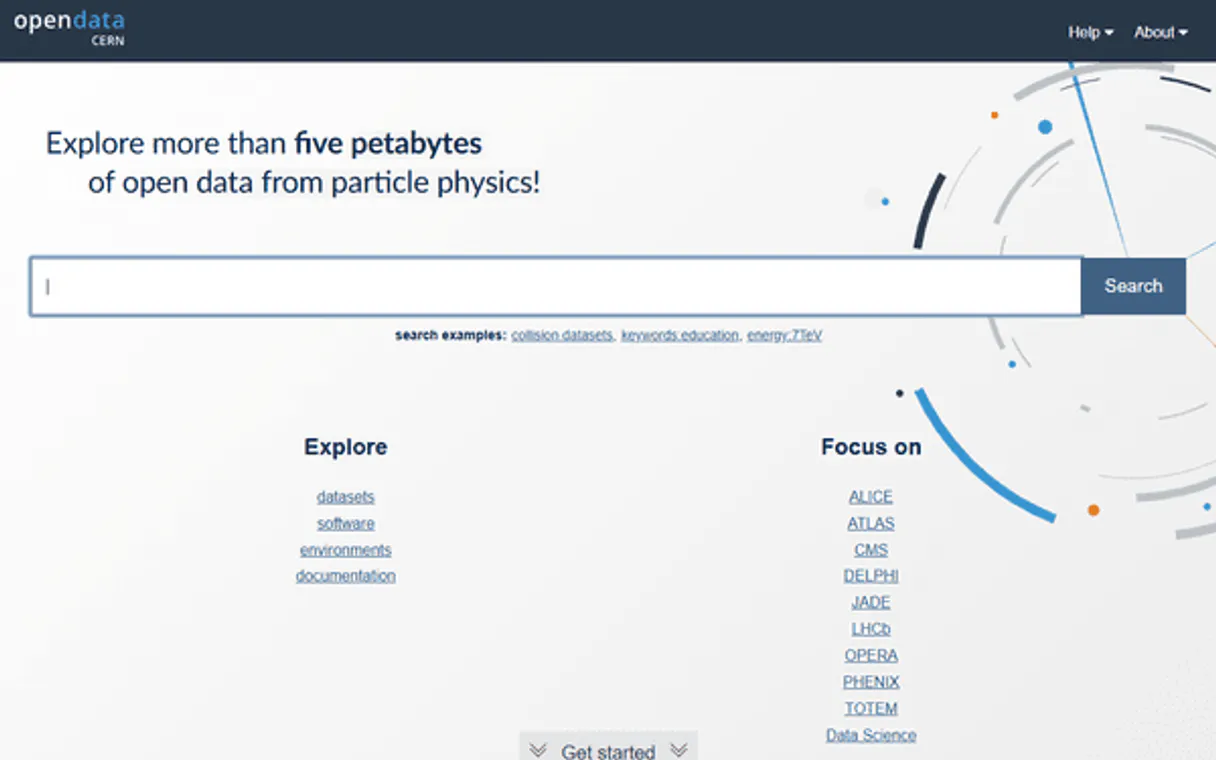
Connect to the CERN Open Data Portal and access the world's largest repository of open particle physics data — over 66,000 datasets from the Large Hadron Collider and LEP experiments.
GitHub Copilot Agent mode brings CERN Open Data data directly into your VS Code workflow. With a project-scoped config, the entire team shares access to 16 tools. Copilot queries live data, generates typed code, and writes tests from actual API responses, all without leaving the editor.
What you can do
- Dataset Discovery — Search across 66,000+ records with powerful filters for experiment (CMS, ATLAS, ALICE, LHCb, DELPHI, OPERA), collision type (pp, e+e−, Pb-Pb), collision energy (7–13.6 TeV), and physics category
- Physics Categories — Browse datasets by research topic including Higgs boson, Exotica (Dark Matter, Gravitons, Extra Dimensions, Leptoquarks), B physics, heavy-ion collisions, and more
- Record Intelligence — Retrieve complete metadata for any record: abstracts, authors with ORCID, DOI, event counts, file listings with ROOT/EOS URIs, and processing configurations
- Portal Analytics — Get comprehensive statistics across all facets: experiments, collision types, energies, file formats, years, and event count distributions
- Physics Glossary — Search 1,000+ glossary entries for definitions of particle physics terms, detector components, and analysis techniques
- Software & Documentation — Find analysis frameworks, reconstruction software, guides, and supplementary materials needed to reproduce published results
The CERN Open Data MCP Server exposes 16 tools through the Vinkius. Connect it to VS Code Copilot in under two minutes — credentials fully managed, no infrastructure to provision, no vendor lock-in. Your configuration, your data, your control.
All 16 CERN Open Data tools available for VS Code Copilot
When VS Code Copilot connects to CERN Open Data through Vinkius, your AI agent gets direct access to every tool listed below — spanning particle-physics, open-data, research-datasets, and more. Every call runs in a secure, isolated environment with full audit visibility. Beyond a simple connection, you get real-time monitoring of agent activity, enterprise governance, and optimized token usage.
Check cern opendata status on CERN Open Data
Use this to verify the integration is working correctly before performing data queries. The API uses the InvenioRDM REST framework. Verify CERN Open Data API connectivity and portal status
Get glossary on CERN Open Data
Returns term names, definitions, and associated experiments. Covers fundamental particles, detector components, analysis techniques, and physics phenomena. Use this to explain technical physics terms like "luminosity", "transverse momentum", "pseudorapidity", "b-tagging", or "muon spectrometer". Invaluable for science communication and educational contexts. Search the CERN particle physics glossary for term definitions
Get portal statistics on CERN Open Data
), record types (Dataset, Documentation, Software, Glossary, Supplementaries), data-taking years, keywords, availability status, and event count distributions. This is the single most informative endpoint for understanding the scope and composition of available CERN data. Get comprehensive CERN Open Data portal statistics and facets
Get record on CERN Open Data
Returns the full title, abstract, experiment, authors with ORCID identifiers, collision parameters, publication dates, DOI, file distribution summary (number of files, events, size), usage instructions, and a direct link. Use this after finding a record via search to obtain complete details. Example: recid "1" returns the CMS BTau primary dataset. Get detailed metadata for a specific CERN Open Data record
Get record by doi on CERN Open Data
Returns the resolved record ID, title, experiment, type, and direct link if found. Useful when you have a DOI from a publication or reference and need to find the corresponding open dataset. DOIs follow the format "10.7483/OPENDATA.CMS.XXX". Returns a "not found" result if the DOI does not match any record. Resolve a DOI to a CERN Open Data record
List categories on CERN Open Data
Returns category names and dataset counts. Categories span the full range of particle physics research: Higgs boson searches, exotic particles (Dark Matter, Extra Dimensions, Gravitons), B physics, heavy-ion collisions, and more. Subcategories within Exotica and Higgs Physics provide finer granularity. List all physics categories and subcategories with dataset counts
List experiments on CERN Open Data
Currently includes CMS (the largest contributor with ~52,000 datasets), DELPHI (LEP era), ATLAS, ALICE, LHCb, OPERA (neutrino physics), TOTEM, JADE, and PHENIX. Use this as a starting point to understand what data is available before drilling into specific experiments. List all available CERN experiments and their dataset counts
List record files on CERN Open Data
Returns filename, size in bytes, checksum, ROOT/EOS URI for direct data access, and file format. Useful for understanding what data is available in a dataset before downloading. Large datasets may contain hundreds of ROOT files. Example: record 1 contains AOD format files from CMS BTau data. List all data files in a CERN Open Data record
Search by category on CERN Open Data
Major categories include: Exotica (~13,000 datasets, including Dark Matter, Extra Dimensions, Gravitons, Heavy Fermions, Leptoquarks), Higgs Physics (~10,400, Standard Model and Beyond Standard Model), Higgs (~10,700), Beyond 2 Generations (~1,600), 2 Fermion (~1,200), B physics and Quarkonia (~500), 4 Fermion (~380), Heavy-Ion Physics (~220). Some categories have subcategories — use the subcategory parameter for more precise filtering. Search datasets filtered by physics category
Search by collision energy on CERN Open Data
Available energies include: 13TeV (~50,500 datasets, LHC Run 2), 181-210 GeV (~11,700, LEP2), 7TeV (~1,100, LHC Run 1), 8TeV (~900, LHC Run 1), 5.02TeV (~310, heavy-ion), 2.76TeV (~120, heavy-ion), 130-140 GeV (~120, LEP), 13.6TeV (LHC Run 3). The vast majority of data comes from 13 TeV proton-proton collisions at the LHC. Search datasets filtered by collision energy
Search by collision type on CERN Open Data
Available collision types: pp (proton-proton, ~52,000 datasets), e+e- (electron-positron, ~12,700), Pb-Pb (lead-lead, ~140), pPb (proton-lead, ~140). Proton-proton collisions from the LHC dominate the dataset. Electron-positron data comes primarily from the LEP era (DELPHI). Use this to focus on a specific collision topology. Search datasets filtered by particle collision type
Search by experiment on CERN Open Data
Available experiments include CMS (~52,000 datasets), DELPHI (~12,700), ATLAS (~160), ALICE (~150), LHCb (~108), OPERA (~900), and TOTEM. Combine with a text query for targeted searches within an experiment. This is the fastest way to scope results to a single collaboration. Search datasets filtered by a specific LHC experiment
Search datasets on CERN Open Data
Supports full-text queries combined with filters for experiment, collision type, collision energy, physics category, file type, and year. Returns paginated results with metadata including record ID, title, abstract, event counts, file sizes, and direct links. Use this as the primary discovery tool for finding specific physics data. Example queries: "Higgs boson", "dark matter", "top quark pair production". Search CERN Open Data datasets with full-text query and filters
Search documentation on CERN Open Data
Returns document titles, abstracts, subtypes (Guide, Policy, About, Activities, Authors, Report, Help, Stripping), and direct links. Use this to find instructions on how to use specific datasets, understand detector configurations, or learn about data processing workflows. Search CERN guides, policies, and documentation
Search software on CERN Open Data
Returns software title, description, associated experiment, and subtypes (Analysis, Framework, Tool, Validation, Workflow). Use this to find reconstruction software, analysis frameworks like CMSSW, or specific analysis code associated with published physics results. Search CERN analysis software, frameworks, and tools
Search supplementaries on CERN Open Data
These ~5,900 records provide the technical context needed to reproduce physics analyses. Filter by subtype to find specific configuration types. Essential for researchers reproducing or extending published analyses. Search CERN supplementary materials and configurations
Connect CERN Open Data to VS Code Copilot via MCP
Follow these steps to wire CERN Open Data into VS Code Copilot. The entire setup takes under two minutes — your credentials stay safe behind Vinkius.
Create MCP config
.vscode/mcp.json file in your project rootAdd the server config
Enable Agent mode
Start using CERN Open Data
Why Use VS Code Copilot with the CERN Open Data MCP Server
GitHub Copilot for Visual Studio Code provides unique advantages when paired with CERN Open Data through the Model Context Protocol.
VS Code is used by over 70% of developers. adding MCP tools to Copilot means your team can leverage external data without leaving their primary editor
Project-scoped MCP configs (`.vscode/mcp.json`) let you commit server configurations to your repository, ensuring the entire team shares the same tool access
Copilot's Agent mode integrates MCP tools seamlessly with file editing, terminal commands, and workspace search in a single agentic loop
GitHub's enterprise compliance and audit features extend to MCP tool usage, providing visibility into how AI interacts with external services
CERN Open Data + VS Code Copilot Use Cases
Practical scenarios where VS Code Copilot combined with the CERN Open Data MCP Server delivers measurable value.
Live API integration: Copilot can query an MCP server, inspect the response schema, and generate typed API client code in the same step
DevSecOps workflows: security teams can give developers access to domain intelligence tools directly in their editor for real-time vulnerability assessment during code review
Data pipeline development: Copilot fetches sample data via MCP and generates transformation scripts, validators, and test fixtures from actual API responses
Documentation generation: Copilot queries available tools and auto-generates README sections, API reference docs, and usage examples
Example Prompts for CERN Open Data in VS Code Copilot
Ready-to-use prompts you can give your VS Code Copilot agent to start working with CERN Open Data immediately.
"Show me the available experiments and how many datasets each one has on CERN Open Data."
"Search for Dark Matter datasets from the CMS experiment at 13 TeV."
"What does 'luminosity' mean in particle physics? Check the CERN glossary."
Troubleshooting CERN Open Data MCP Server with VS Code Copilot
Common issues when connecting CERN Open Data to VS Code Copilot through Vinkius, and how to resolve them.
MCP tools not available
CERN Open Data + VS Code Copilot FAQ
Common questions about integrating CERN Open Data MCP Server with VS Code Copilot.
Which VS Code version supports MCP?
How do I switch to Agent mode?
Can I restrict which MCP tools Copilot can access?
Does MCP work in VS Code Remote or Codespaces?
.vscode/mcp.json work in Remote SSH, WSL, and GitHub Codespaces environments. The MCP connection is established from the remote host, so ensure the server URL is accessible from that environment.Explore More MCP Servers
View all →
Commodities
12 toolsAccess real-time futures prices for 30+ commodities — gold, silver, oil, gas, wheat, coffee, copper, and more via Commodities-API.

CleverTap
8 toolsManage customer engagement and analytics via CleverTap — track campaigns, monitor user segments, and audit event data directly from any AI agent.
DHL
6 toolsAI logistics: track global shipments, audit delayed packages, and quote DHL worldwide rates.
Checkly
8 toolsManage application monitoring and E2E testing via Checkly — track API uptime, trigger checks, and monitor performance directly from any AI agent.