
Integrate Salesforce Analytics & SOQL with Claude, Cursor, Chatbots & AI Agents MCP Server
 GDPR Free for Subscribers
Compatible with every major AI agent and IDE
 Gemini
Sf get dashboard on Salesforce Analytics & SOQL
Each component includes its type, header, data values, and the source report. Dashboards provide pre-built visual summaries. Get the dashboard ID from sf_list_dashboards. Use when the user asks "show me the sales dashboard" or wants a visual summary of specific metrics. Get all component data from a specific Salesforce dashboard — charts, metrics, and tables with their underlying data
Sf list dashboards on Salesforce Analytics & SOQL
Returns dashboard title, folder, last referenced date, and dashboard ID. Dashboards contain visual components (charts, tables, metrics) built from reports. Use to find dashboard IDs before fetching their component data with sf_get_dashboard. List available Salesforce dashboards with title, folder, and last referenced date to discover visualization assets
Sf list reports on Salesforce Analytics & SOQL
Returns report name, folder path, report format (Tabular/Summary/Matrix), last run date, and report ID. Use when the user asks about available reports, wants to find a specific one, or needs report IDs before running them with sf_run_report. List available Salesforce reports with name, folder, format, and last run date to discover reporting assets
Sf record count on Salesforce Analytics & SOQL
Returns the total number of records. Use for quick data volume checks: "how many leads do we have?", "total number of accounts", or capacity planning. Accepts any standard or custom object API name. Get the total record count for any Salesforce object — Account, Contact, Lead, Opportunity, Case, or any custom object
Sf run report on Salesforce Analytics & SOQL
Get the report ID from sf_list_reports first. This is the read-only equivalent of clicking "Run Report" in the Salesforce UI. Returns up to 2000 rows. Use when the user asks for specific report data or wants to extract insights from a saved report. Execute a specific Salesforce report by ID and return its full data — all rows, columns, and groupings
Sf run soql on Salesforce Analytics & SOQL
This is the most powerful and flexible tool — you can query any standard or custom object, apply filters, use aggregate functions, and join related objects. Example: SELECT Id, Name, Amount, StageName FROM Opportunity WHERE StageName = 'Closed Won' AND Amount > 10000 LIMIT 10. Use when no other tool covers the specific data need, or when the user requests a custom query. Execute a raw SOQL query against your Salesforce org to retrieve any data from standard or custom objects
Security & Code Integrity Audit
Every tool in the Salesforce Analytics & SOQL MCP Server is continuously audited by the Vinkius Security Engine. We guarantee zero-trust payload isolation, strict data boundaries, and deterministic execution for enterprise-grade AI agents.
How Vinkius protects your data
Is there a risk of the AI "going crazy" and deleting important company data?
No. With Vinkius, the AI operates on "rails". It can only make the exact moves you authorized in the tool's settings. It cannot invent routes, access other networks in your company, or decide to delete random files. If the action isn't in the approved catalog, the attempt is blocked instantly.
Is this safe to use?
All queries are read-only and respect your Salesforce permissions. The SOQL tool only reads data — it cannot modify records.
What happens if the underlying API rate limits my agent?
Our edge infrastructure automatically handles backoffs, queueing, and throttling. If an AI agent sends too many erratic requests, Vinkius manages the rate limits gracefully, ensuring your backend doesn't crash.
What if the AI ends up reading customer data or confidential information?
We have a built-in digital "bodyguard" called DLP (Data Loss Prevention). If a tool fetches data and the response contains social security numbers, credit cards, or personal customer info, Vinkius magically blocks and erases that information before it is delivered to the AI. The AI works only with what is strictly necessary, and your sensitive data never leaks.
How Chatbots Interact with Salesforce Analytics & SOQL
The Salesforce Analytics & SOQL integration provides structured, LLM-friendly schemas for reliable tool execution within your agentic workflows.
Autonomous soql query Strategies
The Salesforce Analytics & SOQL integration allows Cursor and ChatGPT to securely fetch soql query data. It handles the API requests required for industry titans operations.
Streamlining crm reporting
The Salesforce Analytics & SOQL server exposes documented endpoints for crm reporting. This allows ChatGPT and Cursor to interact with industry titans APIs seamlessly.
Salesforce Analytics & SOQL. Runs on everything.
From IDE to framework. Every connection governed by Vinkius.
Anthropic's native desktop app for Claude with built-in MCP support.
AI-first code editor with integrated LLM-powered coding assistance.
GitHub Copilot in VS Code with Agent mode and MCP support.
Purpose-built IDE for agentic AI coding workflows.
Autonomous AI coding agent that runs inside VS Code.
Anthropic's agentic CLI for terminal-first development.
Python SDK for building production-grade OpenAI agent workflows.
Google's framework for building production AI agents.
Type-safe agent development for Python with first-class MCP support.
TypeScript toolkit for building AI-powered web applications.
TypeScript-native agent framework for modern web stacks.
Python framework for orchestrating collaborative AI agent crews.
Leading Python framework for composable LLM applications.
Data-aware AI agent framework for structured and unstructured sources.
Microsoft's framework for multi-agent collaborative conversations.
Explore More MCP Servers
View all →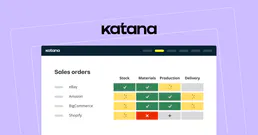
Katana
11 toolsAutomate manufacturing ERP workflows, sales orders, and inventory via Katana Cloud Manufacturing.
RCSB PDB
2 toolsExplore 220K+ 3D molecular structures — search proteins, DNA, and RNA by name, experimental method, resolution, and bound ligands from the Protein Data Bank.
Open Food Facts
2 toolsScan barcodes and search packaged food products for complete nutritional data, Nutri-Score grades, allergens, and ingredient analysis.
Zenvia Conversion
10 toolsManage your Zenvia Conversion (Sirena) leads and messages directly through AI.