
Integrate Watershed Climate with Claude, Cursor, Chatbots & AI Agents MCP Server
 GDPR Free for Subscribers
Compatible with every major AI agent and IDE
 Gemini
Create upload on Watershed Climate
An upload is required before you can add data records to Watershed. After creating an upload, you add data records to it, validate the data, and then submit it for processing. The upload acts as a batch grouping mechanism for related activity data. You can optionally provide a name and description to identify the upload purpose. Create a new data upload container in Watershed
Delete upload data record on Watershed Climate
Use this to remove incorrect or unwanted data before validating and submitting the upload. This action cannot be undone. The record_id is obtained from list_upload_data_records. Delete a specific data record from an upload
Get inventory on Watershed Climate
Use the inventory_id from list_inventories to inspect detailed carbon footprint results and understand your organization's emissions composition. Get detailed information about a specific GHG inventory
Get report on Watershed Climate
Use the report_id from list_reports to access the full report details including generated files, disclosure frameworks covered, and emissions data summarized. Reports are typically generated after inventories are complete and validated. Get detailed information about a specific report
Get task status on Watershed Climate
When you submit an upload for processing, a task is created and returns a task_id. Use this tool to check if the processing is complete, still in progress, or failed. Task status is useful for monitoring large data submissions that may take time to process. Check status of a processing task (e.g., upload submission)
Get upload on Watershed Climate
Use the upload_id from list_uploads to inspect details before adding data or submitting for validation. Get details of a specific data upload
List inventories on Watershed Climate
An inventory represents your organization's carbon footprint measurement for a specific year, containing Scope 1 (direct), Scope 2 (energy), and Scope 3 (value chain) emissions data. Each inventory has a year, status, and total emissions calculated from submitted activity data. List all GHG inventories in your Watershed organization
List measurements on Watershed Climate
Measurements represent the actual carbon footprint values derived from your uploaded activity data. You can filter by inventory_id to see measurements for a specific year's inventory, or by year to see measurements across all inventories for that year. Each measurement includes the activity type, emission factor used, and calculated CO2e value. List emissions measurements with optional filters
List reduction targets on Watershed Climate
Reduction targets define your organization's goals for decreasing emissions over time, often aligned with Science Based Targets initiative (SBTi) or net-zero commitments. Each target includes baseline year, target year, reduction percentage, and progress tracking. List all emissions reduction targets configured in your organization
List reports on Watershed Climate
Reports are formatted outputs of your climate data for disclosure, analysis, or internal review. Reports can include CDP disclosures, TCFD reports, or custom carbon footprint summaries. Each report has metadata about its type, generation date, and scope. List all available reports in your Watershed organization
List upload data records on Watershed Climate
Each record contains the activity data that will be processed into emissions measurements. Use this to review the data before validating and submitting the upload. List all data records in a specific upload
List uploads on Watershed Climate
Uploads are containers for activity data that will be validated and processed into emissions measurements. Each upload can contain multiple data records representing activities like electricity usage, flights, or shipping. Use this to see all existing uploads and their IDs before adding data or submitting for processing. List all data uploads in your Watershed organization
Submit upload on Watershed Climate
This triggers Watershed's calculation engine to convert activity data into emissions measurements using appropriate emission factors. The upload must be validated successfully before submission. The response includes a task_id that can be used to track processing status via get_task_status. Processing may take some time depending on data volume. Submit a validated upload for emissions processing
Update upload data record on Watershed Climate
Use this to correct errors or modify activity data before validation and submission. The record_id is obtained from list_upload_data_records. The body should contain the complete updated record object with all required fields. Update a specific data record in an upload
Upload data records on Watershed Climate
Each record represents an activity that generates emissions (e.g., electricity consumption, business travel, shipping). Records should follow Watershed's data format with fields like: activity_type, quantity, unit, start_date, end_date, location, etc. You can upload a single record or multiple records in a batch by providing an array of objects. Example record: { "activity_type": "electricity", "quantity": 1500, "unit": "kWh", "start_date": "2024-01-01", "end_date": "2024-01-31" } Upload activity data records to an existing upload container
Validate upload on Watershed Climate
Validation ensures data quality and prevents rejection during the submission phase. The response includes validation results with any errors or warnings that need to be addressed. Always validate before submitting to ensure successful processing. Validate data in an upload before submission
Security & Code Integrity Audit
Every tool in the Watershed Climate MCP Server is continuously audited by the Vinkius Security Engine. We guarantee zero-trust payload isolation, strict data boundaries, and deterministic execution for enterprise-grade AI agents.
How Vinkius protects your data
Is there a risk of the AI "going crazy" and deleting important company data?
No. With Vinkius, the AI operates on "rails". It can only make the exact moves you authorized in the tool's settings. It cannot invent routes, access other networks in your company, or decide to delete random files. If the action isn't in the approved catalog, the attempt is blocked instantly.
Can I check my organization's total carbon footprint for a specific year?
Yes! Use list_inventories to find your organization's GHG inventories by year. Then use get_inventory with the specific inventory_id to see the complete emissions breakdown by Scope 1 (direct), Scope 2 (energy), and Scope 3 (value chain). You can also use list_measurements with the year filter to see individual measurement details across all inventories.
How does the AI access my passwords and credentials?
It simply doesn't. On Vinkius, your passwords, API keys, and login details are kept in a secure vault. The AI (like ChatGPT or Claude) merely "asks" Vinkius to perform the task. Vinkius opens the door, does the work, and hands the result back to the AI. Your credentials are never seen, read, or learned by the artificial intelligence.
What if the AI ends up reading customer data or confidential information?
We have a built-in digital "bodyguard" called DLP (Data Loss Prevention). If a tool fetches data and the response contains social security numbers, credit cards, or personal customer info, Vinkius magically blocks and erases that information before it is delivered to the AI. The AI works only with what is strictly necessary, and your sensitive data never leaks.
Triggering Watershed Climate via Natural Language
Connect your AI agents and chatbots (Claude, ChatGPT, Cursor) with the Watershed Climate MCP server to manage operations across the following domains.
carbon accounting & AI Execution
Add carbon accounting functionality to your custom chatbots. The Watershed Climate MCP handles the payload formatting required for ChatGPT and Claude to interface with the unthinkable endpoints.
Scaling emissions tracking via MCP
Use the Watershed Climate MCP to manage emissions tracking requests. Models like Claude Code utilize this connection to perform reliable the unthinkable updates.
Watershed Climate. Runs on everything.
From IDE to framework. Every connection governed by Vinkius.
Anthropic's native desktop app for Claude with built-in MCP support.
AI-first code editor with integrated LLM-powered coding assistance.
GitHub Copilot in VS Code with Agent mode and MCP support.
Purpose-built IDE for agentic AI coding workflows.
Autonomous AI coding agent that runs inside VS Code.
Anthropic's agentic CLI for terminal-first development.
Python SDK for building production-grade OpenAI agent workflows.
Google's framework for building production AI agents.
Type-safe agent development for Python with first-class MCP support.
TypeScript toolkit for building AI-powered web applications.
TypeScript-native agent framework for modern web stacks.
Python framework for orchestrating collaborative AI agent crews.
Leading Python framework for composable LLM applications.
Data-aware AI agent framework for structured and unstructured sources.
Microsoft's framework for multi-agent collaborative conversations.
Explore More MCP Servers
View all →
Daftra
12 toolsRun your Arabic-first business with invoicing, inventory, CRM, and accounting designed for the Middle East and North Africa.

Alphamoon
12 toolsExtract data from documents using AI-powered OCR and intelligent document processing for contracts, invoices, and forms.
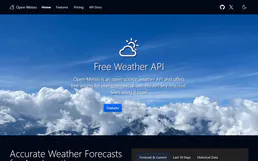
Open-Meteo Climate & Ensemble
3 toolsProject the future of our planet: IPCC climate simulations to 2100, multi-model ensemble forecasts, and long-term temperature trends — the data backbone for ESG and climate policy AI.

Pinterest Ads
10 toolsManage advertising and pins via Pinterest Ads — list campaigns, track analytics, and audit audiences directly from any AI agent.