
Bring Intelligent Document Processing
to Google ADK
Create your Vinkius account to connect DocSumo to Google ADK and start using all 10 AI tools in minutes. Fully managed, enterprise secure, and ready to use without writing a single line of code. No hosting, no server setup — just connect and start using.
 GDPR Free for Subscribers
Compatible with every major AI agent and IDE
 Gemini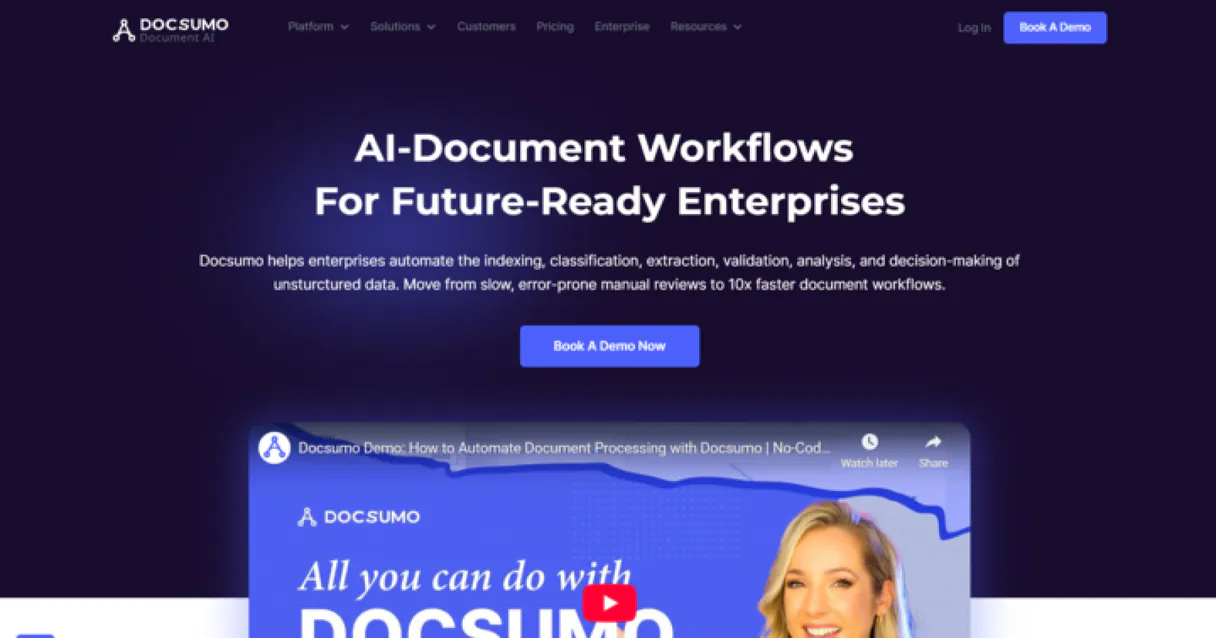
What is the DocSumo MCP Server?
Integrate DocSumo, the advanced Intelligent Document Processing (IDP) platform, directly into your AI workflow. Automate the extraction of complex data from invoices, bank statements, and ID cards, monitor your processing pipelines, and retrieve structured results using natural language.
What you can do
- Pipeline Oversight — List and retrieve detailed settings and processing statuses for all your document types and IDP workflows.
- Data Intelligence — Access the structured data extracted by DocSumo's AI engine, including table layouts and verified fields.
- Confidence Monitoring — Identify documents that require manual review due to low extraction confidence scores.
- Extraction Auditing — Retrieve a chronological feed of recent extraction results across all your processed document categories.
How it works
- Connect the DocSumo integration to your AI assistant.
- Authorize using your DocSumo API Key (found in your platform settings).
- Orchestrate your document data extraction and verification through intuitive conversation.
Who is this for?
- Finance Teams — Quickly retrieve extracted data from invoices and receipts for bookkeeping via chat.
- Compliance Officers — Audit processed ID cards and bank statements for verification status instantly.
- Operations Leads — Monitor document processing health and success rates across the organizational pipeline.
Built-in capabilities (10)
Retrieve metadata and usage limits for your DocSumo account
Get the structured data extracted from a specific document
List all document types (e.g., invoices, bank statements) configured in DocSumo
Identify documents that require manual review due to low extraction confidence
Identify documents that failed the extraction process (mock logic)
Identify the most recently processed documents across all types
List all documents processed by DocSumo, optionally filtered by document type
Identify documents that have been successfully processed and verified
Retrieve a high-level summary of document processing activity and success rates
Search for processed documents using a filename keyword
Why Google ADK?
Google ADK natively supports DocSumo as an MCP tool provider. declare Vinkius Edge URL and the framework handles discovery, validation, and execution automatically. Combine 10 tools with Gemini's long-context reasoning for complex multi-tool workflows, with production-ready session management and evaluation built in.
- —
Google ADK natively supports MCP tool servers. declare a tool provider and the framework handles discovery, validation, and execution
- —
Built on Gemini models, ADK provides long-context reasoning ideal for complex multi-tool workflows with DocSumo
- —
Production-ready features like session management, evaluation, and deployment come built-in. not bolted on
- —
Seamless integration with Google Cloud services means you can combine DocSumo tools with BigQuery, Vertex AI, and Cloud Functions
DocSumo in Google ADK
Why run DocSumo with Vinkius?
The DocSumo connection runs on our fully managed, secure cloud infrastructure. We handle the hosting, maintenance, and security so you don't have to deal with servers or code. All 10 tools are ready to work instantly without any complex setup.
You stay in complete control of your data. Your AI only accesses the information you approve, keeping your sensitive passwords and private details completely safe. Plus, with automatic optimizations, your AI works faster and more efficiently.
* Every connection is hosted and maintained by Vinkius. We handle the security, updates, and infrastructure so you don't have to write code or manage servers. See our infrastructure
Over 4,000 integrations ready for AI agents
Explore a vast library of pre-built integrations, optimized and ready to deploy.
Connect securely in under 30 seconds
Generate tokens to authenticate and link external services in a single step.
Complete visibility into every agent action
Audit live requests, latency, success rates, and active security compliance policies.
Optimize spending and track token ROI
Analyze real-time token consumption and cost metrics detailed by connection.




Explore our live AI Agents Analytics dashboard to see it all working
This dashboard is included when you connect DocSumo using Vinkius. You will never be left in the dark about what your AI agents are doing with your tools.
DocSumo and 4,000+ other AI tools. No hosting, no code, ready to use.
Professionals who connect DocSumo to Google ADK through Vinkius don't need to write code, manage servers, or worry about security. Everything is pre-configured, secure, and runs automatically in the background.
Raw MCP | Vinkius | |
|---|---|---|
| Ready-to-use MCPs | Find and configure each manually | 4,000+ MCPs ready to use |
| Connection Setup | Manual coding & server setup | 1-click instant connection |
| Server Hosting | You host it yourself (needs 24/7 uptime) | 100% hosted & managed by Vinkius |
| Security & Privacy | Stored in plaintext config files | Bank-grade encrypted vault |
| Activity Visibility | Blind execution (no logs or tracking) | Live dashboard with real-time logs |
| Cost Control | Runaway AI token spend risk | Automatic budget limits |
| Revoking Access | Must delete files or code to stop | 1-click disconnect button |
How Vinkius secures
DocSumo for Google ADK
Every request between Google ADK and DocSumo is protected by our secure gateway. We automatically keep your sensitive data private, prevent unauthorized access, and let you disconnect instantly at any time.
Frequently asked questions
How do I get a DocSumo API Key?
Log in to your DocSumo account, navigate to the API section in your settings, and you can retrieve your unique API Key from there. API access is typically enabled for most plans.
What happens if extraction confidence is low?
DocSumo flags documents with low confidence for manual review. You can use the list_documents_awaiting_review tool to identify these documents directly via the agent.
Does the integration support custom document types?
Yes, as long as you have configured the document types in your DocSumo account, the agent can list them and retrieve extracted data for any of them.
How does Google ADK connect to MCP servers?
Import the MCP toolset class and pass the server URL. ADK discovers and registers all tools automatically, making them available to your agent's tool-use loop.
Can ADK agents use multiple MCP servers?
Yes. Declare multiple MCP tool providers in your agent configuration. ADK merges all tool schemas and the agent can call tools from any server in a single turn.
Which Gemini models work best with MCP tools?
Gemini 2.0 Flash and Pro models both support function calling required for MCP tools. Flash is recommended for latency-sensitive use cases, Pro for complex reasoning.
McpToolset not found
Update: pip install --upgrade google-adk
Explore More MCP Servers
View all →
Shumei Anti-Fraud
4 toolsBring Shumei's top-tier Anti-Fraud and Risk Control to your AI. Analyze text, images, and devices for malicious activity instantly.
Chatwoot
8 toolsManage customer engagement via Chatwoot — track conversations, reply to messages, and manage contacts directly from any AI agent.

Orb
10 toolsAutomate usage-based billing via Orb — ingest events, manage subscriptions, and track invoices directly from any AI agent.
Bitso Exchange
12 toolsTrade dynamically on Mexico's biggest Crypto Exchange. Access live balances, order books, and command trades programmatically.