

Drone CI MCP Server with 39 Tools for Claude, Cursor, and AI Agents
 GDPR Free for Subscribers
Automate your CI/CD workflows with Drone CI—manage repositories, monitor builds, and handle secrets directly from your AI agent. Vinkius routes your AI agents directly to Drone CI through a governed connection. 39 tools ready to use with Claude, ChatGPT, Cursor, or any AI agent — no hosting, no setup, connect in 30 seconds.
Ask AI about this server
Compatible with every major AI agent and IDE
 Gemini
* Every MCP server runs on Vinkius-managed infrastructure inside AWS - a purpose-built runtime with per-request V8 isolates, Ed25519 signed audit chains, and sub-40ms cold starts optimized for native MCP execution. See our infrastructure
What is the Drone CI MCP Server?
The Drone CI MCP Server routes AI agents like Claude, ChatGPT, and Cursor directly to Drone CI via 39 tools. Automate your CI/CD workflows with Drone CI—manage repositories, monitor builds, and handle secrets directly from your AI agent. Powered by Vinkius — your credentials stay on your side of the connection, every request is auditable. Connect in under 2 minutes.
Built-in capabilities (39)
Tools for your AI Agents to operate Drone CI
Ask your AI agent "List all my active repositories in Drone." and get the answer without opening a single dashboard. With 39 tools connected to real Drone CI data, your agents reason over live information, cross-reference it with other MCP servers, and deliver insights you would spend hours assembling manually.
Works with Claude, ChatGPT, Cursor, and any MCP-compatible client. Powered by Vinkius — your credentials never touch the AI model, every request is auditable. Connect in under two minutes.
Why teams choose Vinkius
One subscription gives you the infrastructure to connect your AI agents to thousands of MCP servers — and deploy your own to the Vinkius Edge. Your credentials stay yours. Your data flows directly between your agent and the API. DLP blocks sensitive information from ever reaching the model, kill switch for instant shutdown, and up to 60% token savings. Enterprise-grade routing and governance, zero maintenance.
Build your own MCP Server with our secure development framework →The Drone CI App Connector works with every AI agent you already use
…and any MCP-compatible client









Use all 39 Drone CI tools with your AI agents right now
Vinkius routes your AI agents to Drone CI through a governed proxy. Beyond a simple connection, you get full visibility into every action your agents perform, with enterprise-grade security and up to 60% savings on AI costs.
Approve build on Drone CI
Approve a blocked build
Chown repo on Drone CI
Change repository ownership to current user
Create build on Drone CI
Create a custom build for a branch
Create cron job on Drone CI
Create a new cron job
Create secret on Drone CI
Create a new repository secret
Create template on Drone CI
Create a new template
Create user on Drone CI
Create a new user account (Admin)
Decline build on Drone CI
Decline a blocked build
Delete cron job on Drone CI
Delete a cron job
Delete secret on Drone CI
Delete a repository secret
Delete template on Drone CI
Delete a template
Delete user on Drone CI
Delete a user account (Admin)
Disable repo on Drone CI
Disable or delete a repository
Enable repo on Drone CI
Enable/register a repository in Drone
Get build on Drone CI
Get specific build info including stages and steps
Get build logs on Drone CI
Get logs for a specific step in a build stage
Get cron job on Drone CI
Get cron job details
Get current user on Drone CI
Get current authenticated user info
Get current user repos on Drone CI
Get current user repositories
Get repo on Drone CI
Get repository info
Get secret on Drone CI
Get repository secret details
Get template on Drone CI
Get template details
Get user on Drone CI
Get user info by login (Admin)
List builds on Drone CI
List recent builds for a repository
List cron jobs on Drone CI
List cron jobs for a repository
List secrets on Drone CI
List repository secrets
List templates on Drone CI
List organization templates
List users on Drone CI
Requires administrative privileges. List all registered users (Admin)
Promote build on Drone CI
Promote a build to a target environment
Repair repo on Drone CI
Repair repository webhooks
Restart build on Drone CI
Restart a specific build
Stop build on Drone CI
Stop a running build (Admin)
Sync user repos on Drone CI
Synchronize user repositories
Trigger cron job on Drone CI
Manually trigger an existing cron task
Update cron job on Drone CI
Update a cron job
Update repo on Drone CI
Update repository configuration
Update secret on Drone CI
Update a repository secret
Update template on Drone CI
Update a template
Update user on Drone CI
Update a user account (Admin)
What the Drone CI MCP Server unlocks
Connect your Drone CI server to any AI agent to streamline your DevOps lifecycle through natural language.
What you can do
- Build Management — List, get details, restart, or stop builds across your repositories using
list_builds,get_build, andrestart_build. - Repository Control — Enable, update, or repair repository settings and sync them with your source control provider via
enable_repoandsync_user_repos. - Secret & Config Management — Manage environment secrets, cron jobs, and templates without leaving your chat interface using
list_secretsandcreate_cron_job. - User Administration — (Admin only) Create, update, or delete users and manage organizational access with
list_usersandcreate_user. - Log Inspection — Fetch build logs to debug pipeline failures instantly using
get_build_logs.
How it works
1. Subscribe to this server
2. Provide your Drone Server URL and Personal Access Token
3. Start orchestrating your pipelines from Claude, Cursor, or any MCP client
Who is this for?
- DevOps Engineers — Monitor pipeline health and trigger builds via voice or text.
- Software Developers — Check build logs and status directly from the IDE.
- SREs — Manage secrets and cron jobs across multiple projects efficiently.
Frequently asked questions about the Drone CI MCP Server
Can I view the logs of a specific build to debug an error?
Yes, use the get_build_logs tool by providing the owner, repo name, and build number. Your agent will retrieve the full output from the pipeline steps.
How do I trigger a new build for a repository?
You can use the create_build tool to trigger a new build or restart_build to re-run an existing build number for a specific repository.
Is it possible to manage environment secrets through this agent?
Absolutely. You can use list_secrets, create_secret, and update_secret to manage your repository's sensitive data securely from the conversation.
More in this category

Laravel Forge
9 toolsManage Laravel Forge servers, orchestrate site deployments, and query databases directly from your AI agent.

Cloudflare Stream
26 toolsManage video infrastructure via Cloudflare Stream—list videos, manage live inputs, and handle uploads directly from any AI agent.

Railway
10 toolsEquip your AI with direct access to your Railway infrastructure — manage projects, deployments, services, and environment variables.

QuickNode
18 toolsManage blockchain infrastructure via QuickNode — create data streams, configure webhooks, and interact with RPC nodes directly from your AI agent.
You might also like
Little Green Light
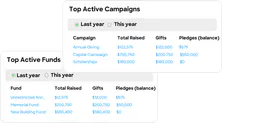
9 toolsManage donor constituents, gifts, and appeals via the Little Green Light REST API.

Resemble AI
16 toolsGenerate high-quality AI voices, manage projects, and transform speech with Resemble AI's powerful voice cloning and synthesis tools.

BLS Prices — Consumer Price Index (CPI) & Inflation
2 toolsAccess the official source of US inflation data. Retrieve the Consumer Price Index (CPI-U), Producer Price Index (PPI), and precise historic metrics on the cost of living using the BLS v2 API.

Todoist
7 toolsManage tasks, organize projects, and streamline your personal or team workflows natively with your AI agent.
We built the connector to Drone CI. Now put your agents to work. Fully governed.
Vinkius is the AI Gateway with managed hosting. Stop building connectors. Every connection runs inside eight layers of security.
Hosted, sandboxed, and live on AWS. You don't provision anything. You don't maintain anything. You connect.
Every tool call, every token, every response. Logged and auditable. Data flows direct from Drone CI to your agent. Nothing is stored on our side. Ever.
Eight governance layers on every request. Sensitive data redacted before it reaches the model. Kill switch if anything goes sideways. Always on.