
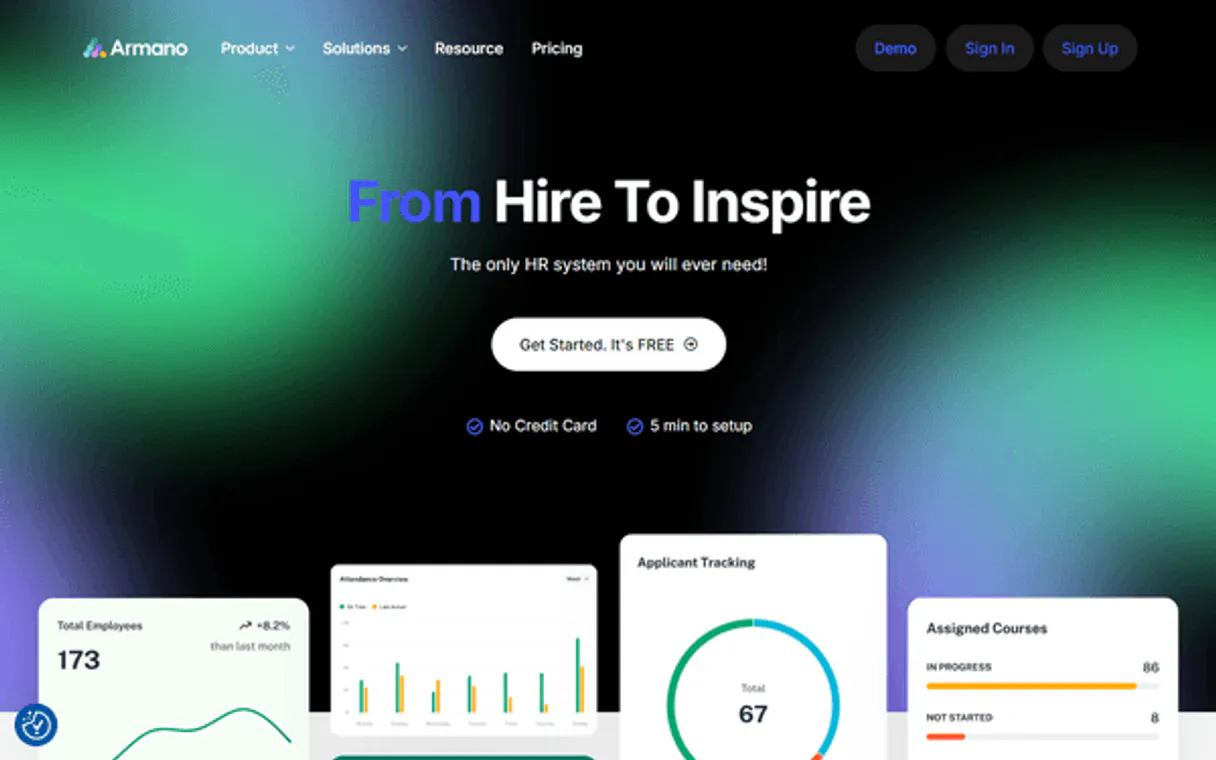
Armano MCP Server with 10 Tools for Claude, Cursor, and AI Agents
 GDPR Free for Subscribers
Connect your business systems through intelligent iPaaS integration that syncs data across apps without custom development. Vinkius routes your AI agents directly to Armano through a governed connection. 10 tools ready to use with Claude, ChatGPT, Cursor, or any AI agent — no hosting, no setup, connect in 30 seconds.
Ask AI about this server
Compatible with every major AI agent and IDE
 Gemini
* Every MCP server runs on Vinkius-managed infrastructure inside AWS - a purpose-built runtime with per-request V8 isolates, Ed25519 signed audit chains, and sub-40ms cold starts optimized for native MCP execution. See our infrastructure
What is the Armano MCP Server?
The Armano MCP Server routes AI agents like Claude, ChatGPT, and Cursor directly to Armano via 10 tools. Connect your business systems through intelligent iPaaS integration that syncs data across apps without custom development. Powered by Vinkius — your credentials stay on your side of the connection, every request is auditable. Connect in under 2 minutes.
Built-in capabilities (10)
Tools for your AI Agents to operate Armano
Ask your AI agent "List all active employees in my Armano account." and get the answer without opening a single dashboard. With 10 tools connected to real Armano data, your agents reason over live information, cross-reference it with other MCP servers, and deliver insights you would spend hours assembling manually.
Works with Claude, ChatGPT, Cursor, and any MCP-compatible client. Powered by Vinkius — your credentials never touch the AI model, every request is auditable. Connect in under two minutes.
Why teams choose Vinkius
One subscription gives you the infrastructure to connect your AI agents to thousands of MCP servers — and deploy your own to the Vinkius Edge. Your credentials stay yours. Your data flows directly between your agent and the API. DLP blocks sensitive information from ever reaching the model, kill switch for instant shutdown, and up to 60% token savings. Enterprise-grade routing and governance, zero maintenance.
Build your own MCP Server with our secure development framework →The Armano App Connector works with every AI agent you already use
…and any MCP-compatible client









Use all 10 Armano tools with your AI agents right now
Vinkius routes your AI agents to Armano through a governed proxy. Beyond a simple connection, you get full visibility into every action your agents perform, with enterprise-grade security and up to 60% savings on AI costs.
Check armano status on Armano
Verify Armano API connectivity
Create time entry on Armano
Create a time entry
Get employee on Armano
Get employee details
Get project on Armano
Get project details
Get time entry on Armano
Get time entry details
List departments on Armano
List all departments
List employees on Armano
List all employees
List leaves on Armano
List all leave requests
List projects on Armano
List all projects
List time entries on Armano
Optionally filter by date range (YYYY-MM-DD format). List time entries
What the Armano MCP Server unlocks
Connect your Armano account to any AI agent and take full control of your human resources and automated workforce orchestration through natural conversation.
What you can do
- Workforce Portfolio Orchestration — List and manage your entire database of employees programmatically, retrieving detailed profiles and department affiliations
- Time & Attendance Intelligence — Programmatically retrieve time tracking records and monitor clock-in/out metadata to maintain a perfectly coordinated audit trail
- Absence & Leave Architecture — Access your complete directory of time-off requests and statuses to oversee your organizational resource allocation
- Document Monitoring — Access real-time status updates for employee records and retrieve hosted assets directly through your agent
- Operational Monitoring — Verify account-level API connectivity and monitor HR process volume directly through your agent for perfectly coordinated service scaling
How it works
1. Subscribe to this server
2. Retrieve your API Key from your Armano dashboard (App Integrations section)
3. Start orchestrating your workforce from Claude, Cursor, or any MCP client
No more manual checking of individual employee cards or missing leave requests. Your AI acts as your dedicated HR coordinator and workforce architect.
Who is this for?
- HR Managers — instantly retrieve employee summaries and monitor team attendance using natural language commands
- Department Leads — verify individual absence requests and track team availability without leaving your workspace
- Developers — integrate high-speed Armano HR data into custom internal tools through simple AI queries
Frequently asked questions about the Armano MCP Server
How do I find my Armano API Key?
Log in to your account, navigate to Settings > App Integrations, and copy your unique API Token from the credentials section.
Can I retrieve time entries via AI?
Yes! The list_time_entries tool allows your agent to retrieve clock-in/out records for any specific period.
How do I list my active employees?
Use the list_employees tool to retrieve your complete directory along with the unique identifiers for all registered staff members.
More in this category
Nozbe
12 toolsTask management and team productivity.

Telegram Bot
13 toolsControl Telegram bots programmatically — send messages, photos, documents, and manage chats via AI.

MemeGen API
5 toolsGenerate meme images — audit templates and fonts via AI.

Emoji Name Resolver
1 toolsConvert emoji shortcodes to Unicode and back (:rocket: ↔ 🚀). Essential for Slack, Discord, and GitHub cross-platform compatibility.
You might also like

Honeybadger (Error Tracking)
10 toolsMonitor app exceptions and uptime via Honeybadger — list projects, resolve faults, and track deployments.

Airship
10 toolsMobile engagement orchestration — manage push notifications, segments, and channels via AI.
AP Elections API
4 toolsAccess real-time election results — audit races, candidates, and votes via AI.
Clubspeed
8 toolsManage entertainment venues and bookings via Clubspeed — track customers, monitor reservations, and manage race heats directly from any AI agent.
We built the connector to Armano. Now put your agents to work. Fully governed.
Vinkius is the AI Gateway with managed hosting. Stop building connectors. Every connection runs inside eight layers of security.
Hosted, sandboxed, and live on AWS. You don't provision anything. You don't maintain anything. You connect.
Every tool call, every token, every response. Logged and auditable. Data flows direct from Armano to your agent. Nothing is stored on our side. Ever.
Eight governance layers on every request. Sensitive data redacted before it reaches the model. Kill switch if anything goes sideways. Always on.