
Bring Grain Monitoring
to Mastra AI
Create your Vinkius account to connect AgroLog to Mastra AI and start using all 11 AI tools in minutes. Fully managed, enterprise secure, and ready to use without writing a single line of code. No hosting, no server setup — just connect and start using.
 GDPR Free for Subscribers
Compatible with every major AI agent and IDE
 Gemini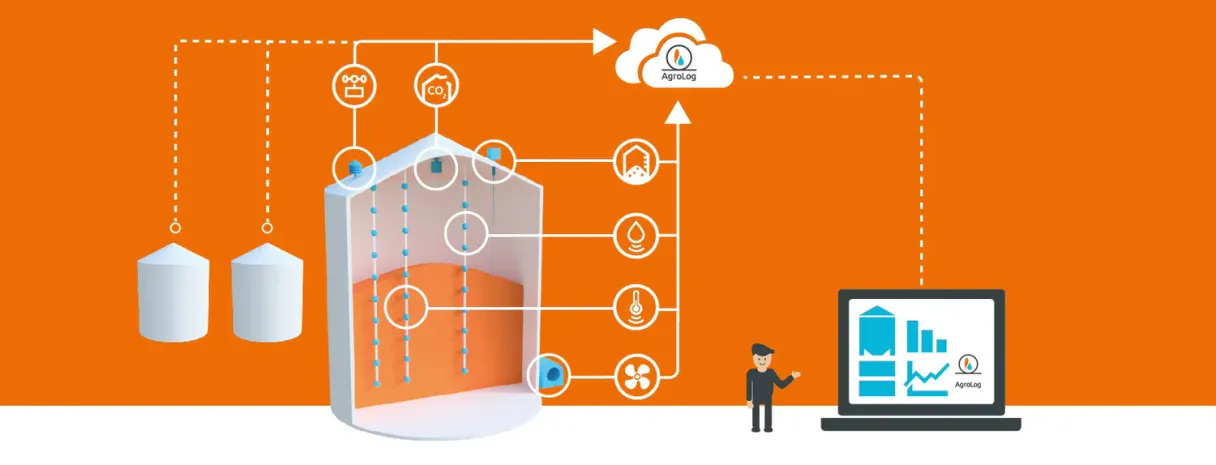
What is the AgroLog MCP Server?
Connect your AgroLog Grain Monitoring API to any AI agent and take full control of real-time temperature monitoring, moisture tracking, CO2 spoilage detection, crop level inventory, and automated aeration control through natural conversation.
What you can do
- Temperature Monitoring — Get real-time grain temperature readings from sensors in silos and bins
- Moisture Tracking — Monitor grain moisture content for safe storage and drying decisions
- CO2 Detection — Detect elevated CO2 levels as early warning signs of spoilage and mold growth
- Crop Level Inventory — Track grain volume and silo fill levels for inventory management
- Weather Station Data — Access outdoor temperature, humidity, wind speed, and rainfall data
- Device Management — List all monitoring devices and view their configuration attributes
- Relay Control — Remotely control fans, aeration systems, and dryers connected to AgroLog devices
- Alarm Monitoring — Track active alarms and alerts for proactive grain management
- Historical Telemetry — Retrieve time-series sensor data for trend analysis and reporting
- Multi-Customer Management — Manage devices across multiple farms or customer organizations
How it works
- Subscribe to this server
- Enter your AgroLog credentials (username, password, and base URL)
- Start monitoring grain conditions from Claude, Cursor, or any MCP-compatible client
No more manual silo inspections or complex monitoring software. Your AI acts as a dedicated grain storage analyst and facility management assistant.
Who is this for?
- Grain Farmers — monitor stored grain conditions, manage aeration, and prevent spoilage remotely
- Grain Elevator Operators — track temperature, moisture, and inventory across multiple bins and silos
- Facility Managers — oversee grain storage facilities with real-time sensor data and automated controls
- Agricultural Consultants — provide data-driven storage management recommendations to clients
Built-in capabilities (11)
Alarms are triggered by threshold breaches (high temperature, high moisture, elevated CO2, equipment failure) and indicate conditions requiring immediate attention. Returns alarm severity (critical, warning, info), alarm type, affected device, timestamp, and acknowledgment status. Essential for proactive grain management, quality issue detection, and operational response. AI agents should use this when users ask "show me all active alarms", "what alerts have been triggered", or need alarm data for operational monitoring. Optional device_id filters alarms for a specific device. Get active and historical alarms/alerts from the AgroLog monitoring system
Elevated CO2 levels indicate biological activity (mold growth, insect respiration, or grain respiration) and are early warning signs of spoilage before temperature changes become apparent. Returns timestamped CO2 value in ppm. Essential for early spoilage detection, grain quality monitoring, and proactive storage management. AI agents should use this when users ask "what is the CO2 level in silo 2", "check headspace gas readings for device X", or need early warning indicators of grain spoilage. Get CO2/headspace gas readings from a specific monitoring device
Crop level sensors measure the grain volume or height in silos and bins, enabling inventory management and capacity planning. Returns timestamped crop level value (percentage or distance). Essential for grain inventory tracking, bin capacity management, and logistics planning. AI agents should reference this when users ask "how full is silo 4", "check crop level for device X", or need inventory data for storage management and logistics planning. Get grain crop level (volume/quantity) readings from a specific monitoring device
Returns device IDs, names, types, and status for the specified customer. Essential for multi-farm management, service provider operations, and organizational device administration. AI agents should use this when users ask "show me all devices for customer X", "list sensors for this farm organization", or need customer-scoped device inventory in multi-tenant deployments. List all monitoring devices for a specific customer/organization in multi-tenant setups
Essential for understanding device setup, sensor positioning within silos, and device management. AI agents should reference this when users ask "show me the configuration for this sensor", "what is the calibration data for device X", or need device metadata for system administration. Get configuration attributes and metadata for a specific monitoring device
Supports custom key selection (temperature, moisture, co2, humidity, etc.) and configurable data point limits for historical analysis. Essential for trend analysis, condition monitoring over time, and creating data visualizations. AI agents should reference this when users ask "show me temperature history for device X over the last 48 hours", "get moisture trend for this sensor", or need historical telemetry data for grain management analysis. Get time-series telemetry data from a specific monitoring device with customizable keys and limits
Returns device IDs, names, types (temperature sensor, moisture sensor, weather station, crop level monitor, headspace/CO2 sensor), labels, and current status. Essential for device inventory, system overview, and selecting specific sensors for telemetry queries. AI agents should use this when users ask "show me all sensors in my grain silo", "list monitoring devices", or need to identify available devices before querying temperature, moisture, or other telemetry data. List all AgroLog monitoring devices (temperature, moisture, weather sensors) in your system
Moisture content is the most critical factor for safe grain storage — high moisture leads to mold, spoilage, and heating. Returns timestamped moisture value as percentage. Essential for grain quality assessment, drying decisions, and storage safety monitoring. AI agents should reference this when users ask "what is the moisture level in bin 5", "check grain moisture for device X", or need moisture data for storage management and drying planning. Get current grain moisture readings from a specific monitoring device
Temperature is critical for detecting spoilage, mold growth, and insect activity in stored grain. Returns timestamped temperature value in Celsius. Essential for grain quality monitoring, spoilage prevention, and ventilation scheduling. AI agents should use this when users ask "what is the temperature in silo 3", "check grain temperature for device X", or need current temperature data for storage management decisions. Device IDs can be found using get_devices. Get current grain temperature readings from a specific monitoring device
Essential for drying decisions (outdoor air conditions for natural air drying), harvest planning (rain forecasts, wind conditions), and understanding environmental impact on stored grain. Returns the latest 10 readings with timestamps. AI agents should use this when users ask "what are the current weather conditions at my facility", "show me wind speed and rainfall data", or need weather context for grain management decisions. Get weather station data (temperature, humidity, wind, rainfall) from a specific device
Accepts device ID, relay name, and desired state (true=on, false=off). Essential for remote grain management, automated ventilation scheduling, and responding to temperature/moisture alerts. AI agents should use this when users ask "turn on the fan for silo 3", "activate aeration for bin 2", or need to remotely control ventilation equipment based on sensor readings. WARNING: Always verify current conditions before changing relay states. Control relay outputs (fans, aeration, dryers) connected to an AgroLog device
Why Mastra AI?
Mastra's agent abstraction provides a clean separation between LLM logic and AgroLog tool infrastructure. Connect 11 tools through Vinkius and use Mastra's built-in workflow engine to chain tool calls with conditional logic, retries, and parallel execution. deployable to any Node.js host in one command.
- —
Mastra's agent abstraction provides a clean separation between LLM logic and tool infrastructure. add AgroLog without touching business code
- —
Built-in workflow engine chains MCP tool calls with conditional logic, retries, and parallel execution for complex automation
- —
TypeScript-native: full type inference for every AgroLog tool response with IDE autocomplete and compile-time checks
- —
One-command deployment to any Node.js host. Vercel, Railway, Fly.io, or your own infrastructure
AgroLog in Mastra AI
Why run AgroLog with Vinkius?
The AgroLog connection runs on our fully managed, secure cloud infrastructure. We handle the hosting, maintenance, and security so you don't have to deal with servers or code. All 11 tools are ready to work instantly without any complex setup.
You stay in complete control of your data. Your AI only accesses the information you approve, keeping your sensitive passwords and private details completely safe. Plus, with automatic optimizations, your AI works faster and more efficiently.
* Every connection is hosted and maintained by Vinkius. We handle the security, updates, and infrastructure so you don't have to write code or manage servers. See our infrastructure
Over 4,000 integrations ready for AI agents
Explore a vast library of pre-built integrations, optimized and ready to deploy.
Connect securely in under 30 seconds
Generate tokens to authenticate and link external services in a single step.
Complete visibility into every agent action
Audit live requests, latency, success rates, and active security compliance policies.
Optimize spending and track token ROI
Analyze real-time token consumption and cost metrics detailed by connection.




Explore our live AI Agents Analytics dashboard to see it all working
This dashboard is included when you connect AgroLog using Vinkius. You will never be left in the dark about what your AI agents are doing with your tools.
AgroLog and 4,000+ other AI tools. No hosting, no code, ready to use.
Professionals who connect AgroLog to Mastra AI through Vinkius don't need to write code, manage servers, or worry about security. Everything is pre-configured, secure, and runs automatically in the background.
Raw MCP | Vinkius | |
|---|---|---|
| Ready-to-use MCPs | Find and configure each manually | 4,000+ MCPs ready to use |
| Connection Setup | Manual coding & server setup | 1-click instant connection |
| Server Hosting | You host it yourself (needs 24/7 uptime) | 100% hosted & managed by Vinkius |
| Security & Privacy | Stored in plaintext config files | Bank-grade encrypted vault |
| Activity Visibility | Blind execution (no logs or tracking) | Live dashboard with real-time logs |
| Cost Control | Runaway AI token spend risk | Automatic budget limits |
| Revoking Access | Must delete files or code to stop | 1-click disconnect button |
How Vinkius secures
AgroLog for Mastra AI
Every request between Mastra AI and AgroLog is protected by our secure gateway. We automatically keep your sensitive data private, prevent unauthorized access, and let you disconnect instantly at any time.
Frequently asked questions
Can my AI check the current temperature and moisture in my grain silo?
Yes! First use get_devices to find the device ID for your silo sensors. Then use get_temperature and get_moisture with that device ID to get current readings. Temperature above 25°C or moisture above 15% may indicate spoilage risk. For historical trends, use get_device_telemetry with keys=temperature,moisture to see how conditions have changed over time.
How do I detect early signs of grain spoilage using CO2 levels?
Use the get_co2 tool to check CO2 readings from headspace sensors in your bins. Elevated CO2 levels (above 1500 ppm) indicate biological activity from mold, insects, or grain respiration — often appearing days before temperature changes. Combine with get_alarms to check for any active spoilage alerts. If CO2 is rising, consider turning on aeration using set_relay_state to ventilate the bin and reduce spoilage risk.
Can I remotely control my aeration fans based on sensor readings?
Yes! Use the set_relay_state tool with your device ID, relay name (e.g., "fan", "aeration"), and desired state (true for ON, false for OFF). Before activating, check current conditions with get_temperature and get_moisture, and verify weather conditions with get_weather to ensure outdoor conditions are suitable for aeration. For example, avoid running aeration during high humidity or rain.
How does Mastra AI connect to MCP servers?
Create an MCPClient with the server URL and pass it to your agent. Mastra discovers all tools and makes them available with full TypeScript types.
Can Mastra agents use tools from multiple servers?
Yes. Pass multiple MCP clients to the agent constructor. Mastra merges all tool schemas and the agent can call any tool from any server.
Does Mastra support workflow orchestration?
Yes. Mastra has a built-in workflow engine that lets you chain MCP tool calls with branching logic, error handling, and parallel execution.
createMCPClient not exported
Install: npm install @mastra/mcp
Explore More MCP Servers
View all →
ClickTime
8 toolsManage time tracking and resource planning via ClickTime — track entries, monitor projects, and audit client hours directly from any AI agent.

Attio
14 toolsBuild powerful CRM workflows with flexible data models, relationship tracking, and deal management tailored to your process.

ContentStack (Management)
10 toolsGrant your AI agent read-write capabilities using ContentStack CMA. Update, publish, and manage contents, schemas, and environments from chat.

FullStory
11 toolsManage digital experience intelligence, track users, and retrieve session data via AI agents with FullStory.