
Integrate Planet Labs with Claude, Cursor, Chatbots & AI Agents MCP Server
 GDPR Free for Subscribers
Compatible with every major AI agent and IDE
 Gemini
Create saved search on Planet Labs
Accepts the same filter parameters as quick_search including geometry, date range, cloud cover, and item types. Returns a search ID that can be used with get_search_results to execute the search on demand. Essential for automated monitoring, change detection workflows, and recurring imagery retrieval. AI agents should use this when users ask "set up a search for new imagery over my field every week", "create a saved search for cloud-free images", or need to establish recurring imagery monitoring for a specific area. Create a saved search for continuous imagery monitoring
Create subscription on Planet Labs
Accepts geometry, date range, cloud cover filters, item types, and delivery destination (cloud storage or webhook). Returns the created subscription with ID and status. Essential for setting up automated monitoring, establishing continuous data feeds for change detection, and ensuring regular imagery delivery for operational workflows. AI agents should use this when users ask "set up daily imagery delivery for my farm", "create a subscription for cloud-free images over this area", or need to establish automated imagery delivery for monitoring applications. Create a new subscription for continuous automated imagery delivery
Get cloud coverage on Planet Labs
Returns clear percentage, cloud percentage, and status information. Essential for quality assessment before downloading imagery, filtering cloudy images from analysis workflows, and ensuring usable imagery for visual interpretation. AI agents should use this when users ask "how cloudy is this image", "what percentage of this scene is clear", or need to assess imagery quality before committing to download. Estimate cloud coverage and clear area percentage for a specific imagery item
Get item assets on Planet Labs
Each asset includes download URLs, file sizes, and permissions. Essential for selecting the appropriate data product for analysis, downloading imagery for GIS processing, and understanding available data products. AI agents should use this when users ask "what assets are available for this image", "get download URLs for analytic imagery", or need to select specific asset types (visual for display, analytic for analysis) for download. List all available asset types (visual, analytic, UDM) for a specific imagery item
Get item details on Planet Labs
Essential for evaluating image quality before download, understanding acquisition conditions, and preparing orders for specific imagery. AI agents should reference this when users ask "show me details for this image", "what is the cloud cover and acquisition time for item X", or need to evaluate imagery quality before downloading. Get detailed metadata for a specific satellite imagery item
Get search results on Planet Labs
Supports pagination (page, page_size) and sorting (acquired asc/desc, published asc/desc). Returns imagery items with acquisition dates, cloud cover, geometry, and available asset types. Essential for retrieving results from pre-configured monitoring searches and executing recurring imagery queries. AI agents should use this when users ask "run my Weekly Farm Monitoring search", "get results from saved search X", or need to execute a saved search and retrieve the latest imagery results. Execute a saved search and retrieve imagery results
Get search statistics on Planet Labs
Essential for understanding imagery availability patterns, planning data collection schedules, and assessing temporal coverage for change detection analysis. AI agents should use this when users ask "how many images are available per month for my area", "show me imagery availability statistics", or need to understand temporal patterns of satellite coverage before setting up monitoring. Get statistical histograms of available imagery for an area and time period
List asset types on Planet Labs
Returns asset type IDs, display names, and descriptions. Essential for selecting the appropriate data product for specific use cases (visual for visualization, analytic for NDVI calculation, UDM for quality filtering). AI agents should reference this when users ask "what asset types can I download", "difference between analytic and visual assets", or need to understand available data products for analysis. List all available asset types (visual, analytic, UDM, etc.) and their properties
List item types on Planet Labs
Returns item type IDs, display names, and supported asset types for each. Essential for understanding available imagery sources, selecting appropriate resolution and coverage for analysis, and planning data acquisition strategies. AI agents should use this when users ask "what satellite imagery types are available", "compare PSScene vs SkySat resolution", or need to understand the full catalog of Planet imagery options. List all available satellite imagery item types and their supported assets
List saved searches on Planet Labs
Returns search names, IDs, filter criteria, item types, and creation dates. Essential for managing monitoring workflows, reviewing existing search configurations, and selecting searches for execution. AI agents should reference this when users ask "show me all my saved searches", "list my monitoring configurations", or need to review existing saved searches before executing them. List all saved searches in your Planet account
List subscriptions on Planet Labs
Returns subscription names, IDs, filter criteria, delivery destinations, and status. Essential for monitoring automated imagery delivery, reviewing subscription configurations, and managing continuous data feeds. AI agents should reference this when users ask "show me all my subscriptions", "list automated imagery deliveries", or need to review existing subscription configurations. List all active imagery subscriptions for continuous cloud delivery
Quick search on Planet Labs
Supports item types including PSScene (PlanetScope, 3-5m resolution, daily global coverage), SkySat (sub-meter resolution, high-detail), RapidEye (5m resolution, historical archive), Landsat 8/9 (30m resolution, USGS), and Sentinel-2 (10m resolution, ESA). Returns imagery items with acquisition dates, cloud cover percentages, sun elevation, instrument mode, geometry, and available asset types. Essential for satellite imagery discovery, change detection analysis, disaster monitoring, and agricultural assessment. AI agents should use this when users ask "find cloud-free imagery over this area from last month", "search for PSScene images of my farm", or need to discover available satellite imagery for a specific location and time period. Geometry must be provided as GeoJSON (Point, Polygon, or MultiPolygon). Date filtering uses the acquired property in ISO 8601 format. Cloud cover and sun elevation are filtered using the filter object with range operators. Search for satellite imagery from Planet Labs with geometry, date, and cloud cover filters
Security & Code Integrity Audit
Every tool in the Planet Labs MCP Server is continuously audited by the Vinkius Security Engine. We guarantee zero-trust payload isolation, strict data boundaries, and deterministic execution for enterprise-grade AI agents.
How Vinkius protects your data
Is there a risk of the AI "going crazy" and deleting important company data?
No. With Vinkius, the AI operates on "rails". It can only make the exact moves you authorized in the tool's settings. It cannot invent routes, access other networks in your company, or decide to delete random files. If the action isn't in the approved catalog, the attempt is blocked instantly.
How do I set up automated daily imagery delivery for my area of interest?
Use the create_subscription tool with your area geometry, item types (e.g., PSScene), and cloud cover filter. You can specify delivery to AWS S3, Google Cloud Storage, Azure Blob, or webhook endpoints. The subscription will continuously deliver new imagery matching your criteria as it becomes available. To manage existing subscriptions, use list_subscriptions to review and monitor active deliveries.
What happens if the underlying API rate limits my agent?
Our edge infrastructure automatically handles backoffs, queueing, and throttling. If an AI agent sends too many erratic requests, Vinkius manages the rate limits gracefully, ensuring your backend doesn't crash.
Does the AI train on my tools or API data?
No. Vinkius enforces a strict Zero-Retention policy. Your data simply passes through our secure servers to complete the requested action and is instantly forgotten. Nothing you do here is ever stored, logged, or used to train any artificial intelligence.
Triggering Planet Labs via Natural Language
Connect your AI agents and chatbots (Claude, ChatGPT, Cursor) with the Planet Labs MCP server to manage operations across the following domains.
Intelligent satellite imagery Management
The Planet Labs server supports direct MCP connections for satellite imagery. This provides Claude with the required permissions to execute the unthinkable functions.
Seamless geospatial data Integration
Use Planet Labs to manage geospatial data via conversational interfaces. The integration centralizes access control for the unthinkable operations performed by ChatGPT.
Planet Labs. Runs on everything.
From IDE to framework. Every connection governed by Vinkius.
Anthropic's native desktop app for Claude with built-in MCP support.
AI-first code editor with integrated LLM-powered coding assistance.
GitHub Copilot in VS Code with Agent mode and MCP support.
Purpose-built IDE for agentic AI coding workflows.
Autonomous AI coding agent that runs inside VS Code.
Anthropic's agentic CLI for terminal-first development.
Python SDK for building production-grade OpenAI agent workflows.
Google's framework for building production AI agents.
Type-safe agent development for Python with first-class MCP support.
TypeScript toolkit for building AI-powered web applications.
TypeScript-native agent framework for modern web stacks.
Python framework for orchestrating collaborative AI agent crews.
Leading Python framework for composable LLM applications.
Data-aware AI agent framework for structured and unstructured sources.
Microsoft's framework for multi-agent collaborative conversations.
Explore More MCP Servers
View all →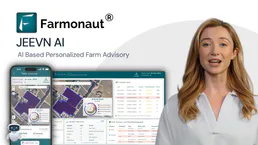
Farmonaut
12 toolsAccess satellite agriculture data via Farmonaut — monitor crop health with NDVI, weather, soil moisture, crop advisory, and deforestation alerts from any AI agent.

BrightMove
10 toolsManage your hiring pipeline via BrightMove — track jobs, applicants, and references directly from any AI agent.

Aracaju
5 toolsAccess Aracaju's transparency data—revenues, expenses, bids, contracts, and payroll—directly from your AI agent.

Deterministic Codec Engine
4 toolsEmpower your AI to perfectly serialize and deserialize data. Effortlessly switch between URL Encoding, HTML Entities, Unicode Escapes, and DNS Punycode with a native V8 engine.